Do you think IIT Guwahati certified course can help you in your career?
Introduction
Collections in Java is a group of objects represented as a single unit. They are an integral part of any programming language, and Java is no exception. The Java Collection Framework provides a well-designed set of interfaces and classes that allows developers to work with collections of objects consistently and efficiently.
What is a Collection in Java?
A collection in Java is a framework that provides an architecture to store, manipulate, and retrieve groups of objects. It is a part of the Java Collections Framework and is present in the java.util package. The collection framework in Java offers a set of interfaces and classes to handle data efficiently, such as List, Set, Queue, and Map.
In simple terms, a collection represents a single unit of objects, or a group of elements, stored together. Unlike arrays, collections can grow or shrink in size dynamically and offer more advanced features like sorting, searching, and thread-safety (in some implementations).
The Java Collections Framework is a unified architecture for representing and manipulating collections.
The root interface of the collection framework in Java is java.util.Collection.
Common classes like ArrayList, HashSet, LinkedList, and HashMap implement various parts of this framework.
It supports algorithms like sorting, shuffling, reversing, etc., through the Collections utility class.
What is a framework in Java?
A framework in Java refers to a pre-defined set of classes and interfaces that provide a structured and reusable solution for developing applications. It provides a foundation for developers to build upon, offering ready-made functionalities and structures that help simplify the development process and promote code reuse. Frameworks in Java often follow specific design patterns and conventions, offering standardized ways to solve common programming problems.
Hierarchy of Collection Framework
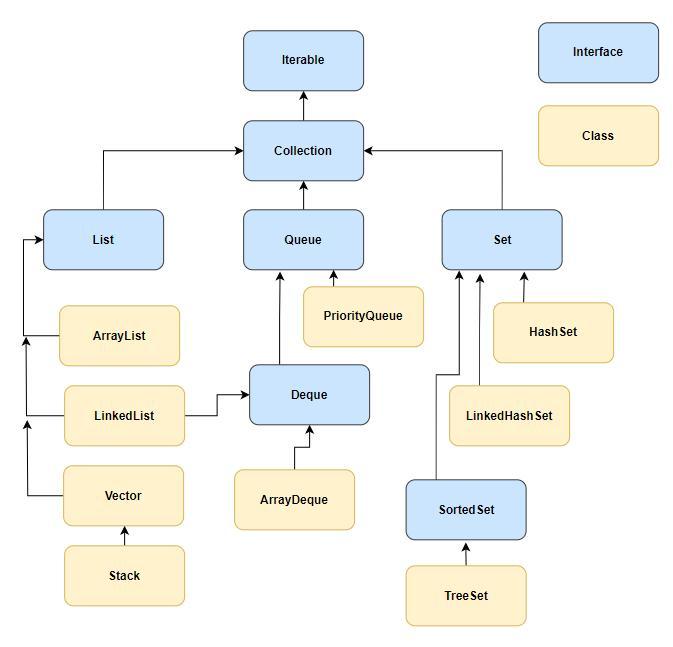
The Java Collection Hierarchy defines the relationships between interfaces and classes in the Collections framework. It provides efficient storage, manipulation, and processing of data structures in Java.
The hierarchy consists of four core interfaces: Collection, List, Set, and Map. Additionally, there are specialized interfaces for sorting: SortedSet and SortedMap.
All the interfaces and classes related to the collection framework reside in the java.util package. The diagram below illustrates the Java collection hierarchy.
Inheritance is established using the "extends" keyword for classes and interfaces, while the "implements" keyword is used for inheritance between a class and an interface.
Advantages of the Java Collection Framework
Unified Architecture: All collections (like List, Set, and Map) follow a standard interface, making them easier to learn and use consistently.
Reusability: The framework provides reusable classes and interfaces, reducing the need to write custom data structures from scratch.
Interoperability: Different collection classes can work together since they implement common interfaces from the collection framework in Java.
Performance Optimization: Java Collections are highly optimized for performance, and developers can choose appropriate implementations (e.g., ArrayList for fast access, LinkedList for fast insertions/removals).
Built-in Algorithms: The Collections utility class provides ready-to-use algorithms like sorting, searching, shuffling, and reversing.
Dynamic Sizing: Unlike arrays, collections in Java can grow or shrink in size automatically based on the data.
Thread Safety Options: The framework includes both synchronized (like Vector) and non-synchronized classes, allowing developers to choose based on the application's concurrency needs.
Ease of Maintenance: Using standard and tested components from the Java Collections framework reduces bugs and makes code easier to maintain.
Extensibility: Developers can extend the framework by creating their own collection classes using existing interfaces.
Methods of the Collection interface
Method
Description
boolean add(E element)
The element you provide is added to the collection. If the collection has been updated, it returns true.
boolean remove(Object o)
the first instance of the provided element is removed from the collection. If the element was located and eliminated, it returns true.
boolean contains(Object o)
determines whether the requested element is present in the collection. It returns true if the element is found.
int size()
returns the collection's total number of elements.
boolean isEmpty()
evaluates whether the collection is empty. returns true if there are no elements in the collection.
void clear()
Deletes each and every element from the collection.
boolean containsAll(Collection<?> c)
determines whether every element of the supplied collection is present in the collection. If all of the components are located, it returns true.
boolean addAll(Collection<? extends E> c)
adds all of the specified collection's items to the collection. True is returned if the collection has been altered.
boolean removeAll(Collection<?> c)
All objects that are also part of the specified collection are removed from the collection. If the collection has been updated, it returns true.
boolean retainAll(Collection<?> c)
Removes every element from the collection that is not also present in the given collection. True is returned if the collection has been altered.
Object[] toArray()
returns a list of all the collection's elements in an array.
Iterator<E> iterator()
returns an iterator that iterates across the collection's elements.
Iterator interface
Iterator interface in Java provides methods to iterate over elements in a collection. It allows sequential access to elements and supports operations like hasNext() to check if there are more elements, and next() to retrieve the next element.
Here's a table listing some methods of the Iterator interface along with their descriptions:
Method
Description
boolean hasNext()
Returns true if there are more elements to iterate over.
E next()
Returns the next element in the iteration.
void remove()
Removes the last element returned by the iterator from the underlying collection.
default void forEachRemaining(Consumer<? super E> action)
Performs the given action for each remaining element until all elements have been processed or the action throws an exception.
The Iterator interface provides a way to traverse and manipulate elements in a collection sequentially. It is commonly used in conjunction with the enhanced for-loop syntax to iterate over elements in a collection.
Iterable Interface
A group of elements that can be consecutively iterated is represented by the Iterable interface in Java. It offers the iterator() method, which returns an Iterator object and enables the for-each loop traversal of the elements.
For example:
List<String> names = new ArrayList<>();
names.add("Josh");
names.add("Musk");
names.add("Alok");

for (String name : names) {
    System.out.println(name);
}
Collection Interface
The Java Collections Framework's root interface is the Collection interface. It symbolises a collection of things referred to as elements. It offers all-purpose tools for modifying and searching collections.
An ordered collection of elements is represented by the List interface, which extends the Collection interface. Both duplicate elements and the insertion order are preserved.
An implementation of the List interface called ArrayList stores its elements in a resizable array. It offers quick random access and effective insertion and deletion at the conclusion.
Another implementation of the List interface, LinkedList, stores entries in a doubly-linked list. At both ends, it offers effective insertion and deletion, but random access is slower.
A last-in, first-out (LIFO) stack of items is represented by the subclass of Vector called Stack. It offers particular stack operations, such as pop() and push().
In Java, a collection that retains elements in a particular sequence for processing is represented by the queue interface. The First-In-First-Out (FIFO) principle is used, in which items are inserted at the end and subtracted from the beginning.
For example:
Queue<String> queue = new LinkedList<>();
queue.add("Apple");
queue.add("Banana");
queue.add("Orange");


System.out.println(queue.poll()); // Output: Apple
System.out.println(queue.size()); // Output: 2
System.out.println(queue.peek()); // Output: Banana
PriorityQueue
PriorityQueue uses a custom comparator or the components' natural ordering to determine how they are arranged. Higher priority elements are the first to be dequeued.
An element can be added to or removed from a linear collection at both ends thanks to the Java Deque interface (Double Ended Queue). AddFirst(), AddLast(), RemoveFirst(), and RemoveLast() are among the operations that are supported.
For example:
Deque<String> deque = new ArrayDeque<>();
deque.addFirst("Apple");
deque.addLast("Banana");
deque.addLast("Orange");


System.out.println(deque.removeLast()); // Output: Orange
System.out.println(deque.size()); // Output: 2
System.out.println(deque.getFirst()); // Output: Apple
ArrayDeque
The Deque interface is implemented by ArrayDeque, which stores elements in a resizable array. It is not thread-safe but offers effective insertion and removal at both ends.
Java's Set interface represents a collection with distinct elements. It does not preserve any particular sequence and does not permit duplicate elements.
For example:
Set<String> set = new HashSet<>();
set.add("Apple");
set.add("Banana");
set.add("Orange");
set.add("Banana"); // Duplicate, not added


System.out.println(set.size()); // Output: 3
System.out.println(set.contains("Apple")); // Output: true
set.remove("Orange");
System.out.println(set); // Output: [Apple, Banana]
HashSet
An implementation of the Set interface called HashSet stores components in a hash table. It does not guarantee the order of the elements but does provide constant-time performance for basic operations.
For example:
HashSet<Integer> set = new HashSet<>();
set.add(10);
set.add(20);
set.add(30);
set.add(20); // Duplicate, not added


System.out.println(set.size()); // Output: 3
System.out.println(set.contains(10)); // Output: true
set.remove(30);
System.out.println(set); // Output: [10, 20]
LinkedHashSet
The LinkedHashSet implementation of the Set interface preserves the order in which elements are inserted. It offers effective iteration and predictable order by combining a linked list and hash table.
Java's SortedSet interface provides a sorted collection of elements and extends the Set interface. According to a customized comparator or by default, it keeps the elements in ascending order.
For example:
SortedSet<Integer> set = new TreeSet<>();
set.add(30);
set.add(10);
set.add(20);


System.out.println(set.first()); // Output: 10
System.out.println(set.size()); // Output: 3
System.out.println(set.last()); // Output: 30
TreeSet
The SortedSet interface is implemented by TreeSet, which stores elements in a tree structure. For retrieving elements in sorted order, it offers effective operations.
For example:
TreeSet<String> set = new TreeSet<>();
set.add("Apple");
set.add("Banana");
set.add("Orange");

System.out.println(set.first()); // Output: Apple
System.out.println(set.size()); // Output: 3
System.out.println(set.last()); // Output: Orange
Classes Implementing Set Interface
A class can offer a collection of distinct elements, with duplicates disallowed, by implementing the Set interface. It gives the class a means of complying with a predefined set of procedures for modifying the collection's elements, such as adding and removing items, determining whether or not items are present, and iterating over them.
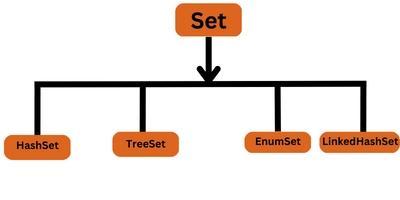
The classes that implement the Set interface in Java are:-
1. HashSet: This class uses a hash table for storage, which provides fast lookups, and insertion times. It does not guarantee any specific order of the elements.
2. TreeSet: This class uses a Red-Black tree for storage, which provides efficient ordering of the elements. The elements in a TreeSet are ordered according to their natural order or by a specified Comparator.
3. LinkedHashSet: This class uses a hash table with a linked list running through it. The order of the elements is the order in which they were inserted into the set.
4. EnumSet: This class is a specialized Set for use with enumerated types.
Interface Extending Set
An interface in java is a blueprint for a class. It does not provide an implementation for the methods it defines, which a class must implement. It is used to achieve abstraction in java.
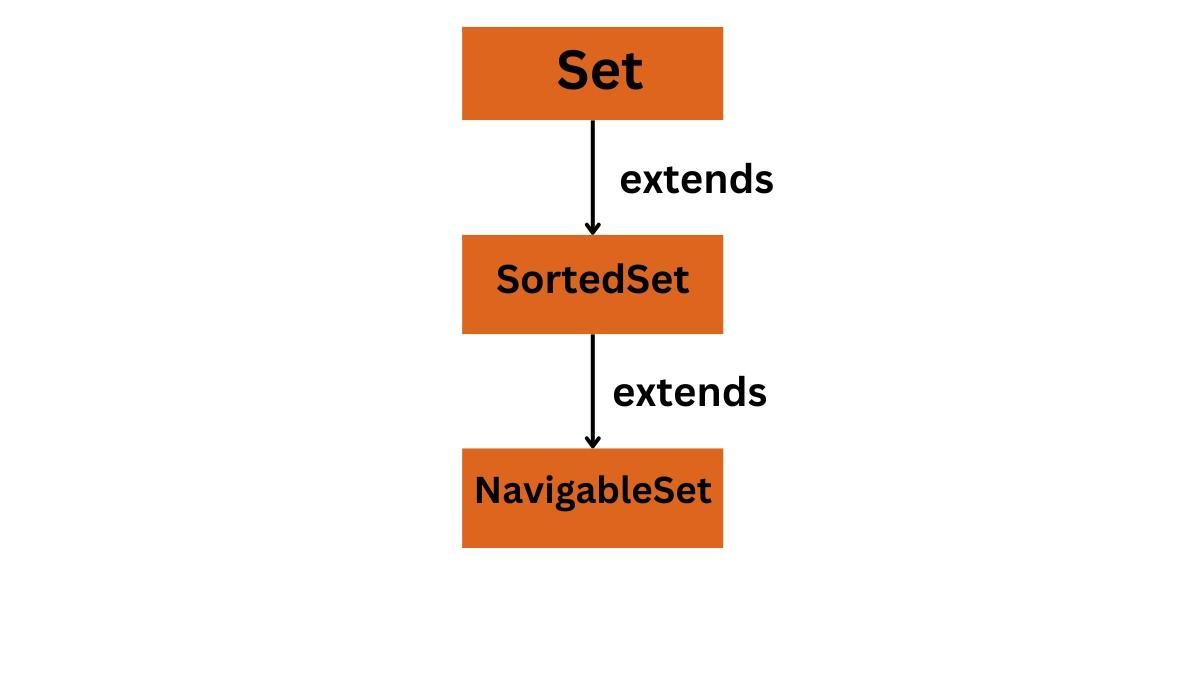
A few interfaces in the Java standard library extend the Java.util.Set interface are:-
1. SortedSet:- The SortedSet interface extends the Set interface to provide an ordered set. This means that the elements in a SortedSet are ordered in a specific way, typically based on their natural ordering or according to a specified Comparator.
The SortedSet interface provides methods for retrieving the first and last elements in the set and subsets based on a range of elements.
Here is an example of how to use Java.util.TreeSet class, which is a SortedSet implementation:
2. NavigableSet:- It is another interface in Java that extends SortedSet, and provides navigation methods like a lower(), floor(), ceiling(), and higher(). It also provides additional methods like pollFirst() and pollLast().
You can use the NavigableSet interface or TreeSet class to sort and navigate.
The Set interface in Java defines several methods for working with sets, which include:
1. add(e):
It adds an element to the set. Here, e is the element to be inserted.
Syntax:
boolean add(e);
2. addAll(Collection c):
It adds all the elements in a collection to the set.
Syntax:
boolean addAll(Collection<? extends E> c);
3. clear():
It removes all elements from the set.
Syntax:
void clear();
4. contains(Object o):
It always returns true if the set contains the specific element.
Syntax:
boolean contains(Object o);
5. containsAll(Collection c):
It returns true if the set contains all the elements in the specified collection.
Syntax:
boolean containsAll(Collection<?> c);
6. isEmpty():
It returns true if the set is null.
Syntax:
boolean isEmpty();
7. iterator():
It returns an iterator over the elements in the set.
Syntax:
Iterator<E> iterator();
8. remove(Object o):
It removes an element from the set.
Syntax:
boolean remove(Object o);
9. removeAll(Collection c):
It removes all the elements in a collection from the set.
Syntax:
boolean removeAll(Collection<?> c);
10. retainAll(Collection c):
It removes all elements from the set that are not contained in the specified collection.
Syntax:
boolean retainAll(Collection<?> c);
11. size():
It returns the number of elements in the set.
Syntax:
int size();
Implementing Various Set Operations in Java
Set Collection in Java defines standard operations methods, such as union, intersection, and difference.
1. Union:
The elements that are present in either of the two sets are returned by this operation.
For Example:-
Let us suppose 2 sets, A : [1,2,3,4], and B : [2,3,4,5].
So, the Union of A and B is [1,2,3,4,5].
Implementation of Union using HashSet is:
import java.util.*;
class Main {
    public static void main(String[] args) {
        Set < Integer > set1 = new HashSet < Integer > (Arrays.asList(1, 2, 3));
        Set < Integer > set2 = new HashSet < Integer > (Arrays.asList(2, 3, 4));
        set1.addAll(set2);
        System.out.println(set1);
    }
}
Output:
[1, 2, 3, 4]
2. Intersection:
The elements that are present in both sets are returned by this operation.
For Example:-
Let us suppose 2 sets, A : [1,2,3,4], and B : [2,3,4,5].
So, the Intersection of A and B is [2,3].
Implementation of Intersection using HashSet is:
import java.util.*;
class Main {
    public static void main(String[] args) {
        Set < Integer > set1 = new HashSet < Integer > (Arrays.asList(1, 2, 3));
        Set < Integer > set2 = new HashSet < Integer > (Arrays.asList(2, 3, 4));
        Set < Integer > intersection = new HashSet < Integer > (set1);
        intersection.retainAll(set2);
        System.out.println(intersection);
    }
}
Output:
[2, 3]
3. Difference:
This operation removes all the values in one set that are present in the other set.
For Example:-
Let us suppose 2 sets, A : [1,2,3], and B : [2,3,4].
So, the Difference between A and B is [1].
Implementation of Difference using HashSet is:
import java.util.*;
class Main {
    public static void main(String[] args) {
        Set < Integer > set1 = new HashSet < Integer > (Arrays.asList(1, 2, 3));
        Set < Integer > set2 = new HashSet < Integer > (Arrays.asList(2, 3, 4));
        Set < Integer > difference = new HashSet < Integer > (set1);
        difference.removeAll(set2);
        System.out.println(difference);
    }
}
Output:
[1]
Performing Various Operations on SortedSet
A SortedSet in Java is a collection that maintains its elements in sorted order. It provides operations to add, remove, and retrieve elements based on their ordering. Here's a concise example:
In this example, we create a SortedSet using the TreeSet implementation. We can add elements, retrieve the first and last elements, check if an element exists, remove an element, get a subset of elements within a range, and clear all elements from the sorted set.
A Set in Java is a collection that stores unique elements, meaning it does not allow duplicate values and follows no specific order.
What are collections and its types?
Collections in Java are containers for groups of objects. Types include List, Set, Queue, and Map, each with specific use cases.
What is CopyOnWriteArraySet in Set Interface?
It is a class that is a modified version of the HashSet Interface that is thread-safe. It employs a copy-on-write technique that performs better when the set is essentially immutable. Each mutation operation creates a unique copy of the underlying array.
Which Java collection framework class should you use if you don't need duplicates?
Use a Set Collection in Java if you don't need duplicates. The Set interface defines a group of distinct elements and extends the Collection interface. HashSet, TreeSet, and LinkedHashSet are just a few classes that implement the Set interface.
What is the main difference between a list and a set?
Set is an unsorted collection that does not permit duplicate elements and only permits one null element. The list, which is an ordered collection, does not permit duplicates. The list can contain null elements as well.
Conclusion
We have discussed the Collections in Java. The Set is a collection of unique elements. It does not allow duplicate elements, and elements are unordered.
We hope this blog has helped you enhance your knowledge of set collection in Java. Do not stop learning! We recommend you read some of our Java articles:







 7+ registered

