Do you think IIT Guwahati certified course can help you in your career?
Introduction
A polyline is identical to a polygon with the exception that it is not closed at the end. In JavaFx, a polyline is represented by the Polygon class. This class is part of the javafx.scene.shape package. The main distinction between Polyline and the Polygon class is that Polygons form closed areas, but Polylines can form both closed and open areas. This blog describes JavaFX polylines in detail, including its constructors, methods, and different programs for drawing polylines.
Without further ado, let's start by learning the constructors of the JavaFX Polyline Class.
Constructors
The class's constructors are:
Polyline(): It Creates a blank instance of Polyline
Polyline(double... points): It generates a fresh polyline object using the specified points.
Let's discuss the JavaFX Polyline methods and their functions.
Methods
The commonly used methods of JavaFX Polyline are:
getPoints() : This method obtains the polyline segment points.
toString(): This method returns an object's Polyline representation as a string.
Let's examine how to create open and closed polylines using a program.
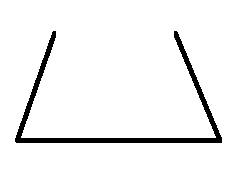
Program to create an open polyline
The following code snippet describes creating an open polyline.
Code:
//importing Packages
import javafx.application.Application;
import javafx.scene.Group;
import javafx.stage.Stage;
import javafx.scene.Scene;
import javafx.scene.shape.Polyline

public class Draw_Polyline extends Application {
   public void start(Stage stage) {

      Polyline polyline = new Polyline();  //Creating a polyline

      //Adding coordinates
      polyline.getPoints().addAll(new Double[]{
         100.0, 250.0,
         200.0, 100.0,
         400.0, 100.0,
         500.0, 250.0,
      });

      Group group = new Group(polyline); //Creating Group

      Scene scene = new Scene(group, 600, 400);  //Creating scene
      stage.setScene(scene);

      stage.setTitle("creating Polyline"); //Title

      stage.show();
   }
   public static void main(String args[]){
      launch(args);
   }
You can also try this code with Online Java Compiler
In the above program, the coordinates of the points on the line segments are used by the constructor to generate an open JavaFX Polyline. The Polyline will be built within a scene that is hosted within a stage. The stage's title is provided through the setTitle() method. The polyline is then added after creating a Group. The group is associated with the scene. To display the result, the show() method is used.
Program to create a closed polyline
The following code snippet describes creating a closed polyline.
Code:
//importing Packages
import javafx.application.Application;
import javafx.scene.Group;
import javafx.stage.Stage;
import javafx.scene.Scene;
import javafx.scene.shape.Polyline

public class Draw_Polyline extends Application {
   public void start(Stage stage) {

      Polyline polyline = new Polyline();  //Creating a polyline

      //Adding coordinates
      polyline.getPoints().addAll(new Double[]{
         100.0, 250.0,
         200.0, 100.0,
         400.0, 100.0,
         500.0, 250.0,
         100.0, 250.0
      });

      Group group = new Group(polyline); //Creating Group

      Scene scene = new Scene(group, 600, 400);  //Creating scene
      stage.setScene(scene);

      stage.setTitle("creating Polyline"); //Title

      stage.show();
   }
   public static void main(String args[]){
      launch(args);
   }
You can also try this code with Online Java Compiler
In the above program, the coordinates of the points on the line segments are used by the constructor to generate a closed JavaFX Polyline. The Polyline will be built within a scene that is hosted within a stage. The stage's title is provided through the setTitle() method. The polyline is then added after creating a Group. The group is associated with the scene. To display the result, the show() method is used.
Frequently Asked Questions
What are the three main components of a JavaFX application?
A JavaFX application will typically consist of three main parts: Stage, Scene, and Nodes.
Which method is used to set the title of the stage?
The setTitle() is used to set the title of the stage.
Which library is used for using JavaFX applications in Web browsers?
The Deployment Toolkit library is suggested for usage when launching a JavaFX application from a web page or embedding one there.
Conclusion
In this article, we have extensively discussed the details of the JavaFX Polyline along with its constructors, methods, and different programs for drawing polylines.











 7+ registered

