




Introduction
JavaFX includes the Reflection class. Reflection, in general, can be defined as a change in direction.JavaFX allows us to generate the reflection effect on any image. The Reflection class is used to display a reflected image below the original image of the input value.

The class javafx.scene.effect.Reflection in JavaFX represents the Reflection effect. To generate an appropriate impact, we simply need to instantiate this class.
Constructors
The class contains two constructors.
-
public Reflection(): Creates a new Reflection instance.
- public Reflection(double topOffset, double fraction, double topOpacity, double bottomOpacity): Creates an instance of Reflection with the specified parameters.
Properties
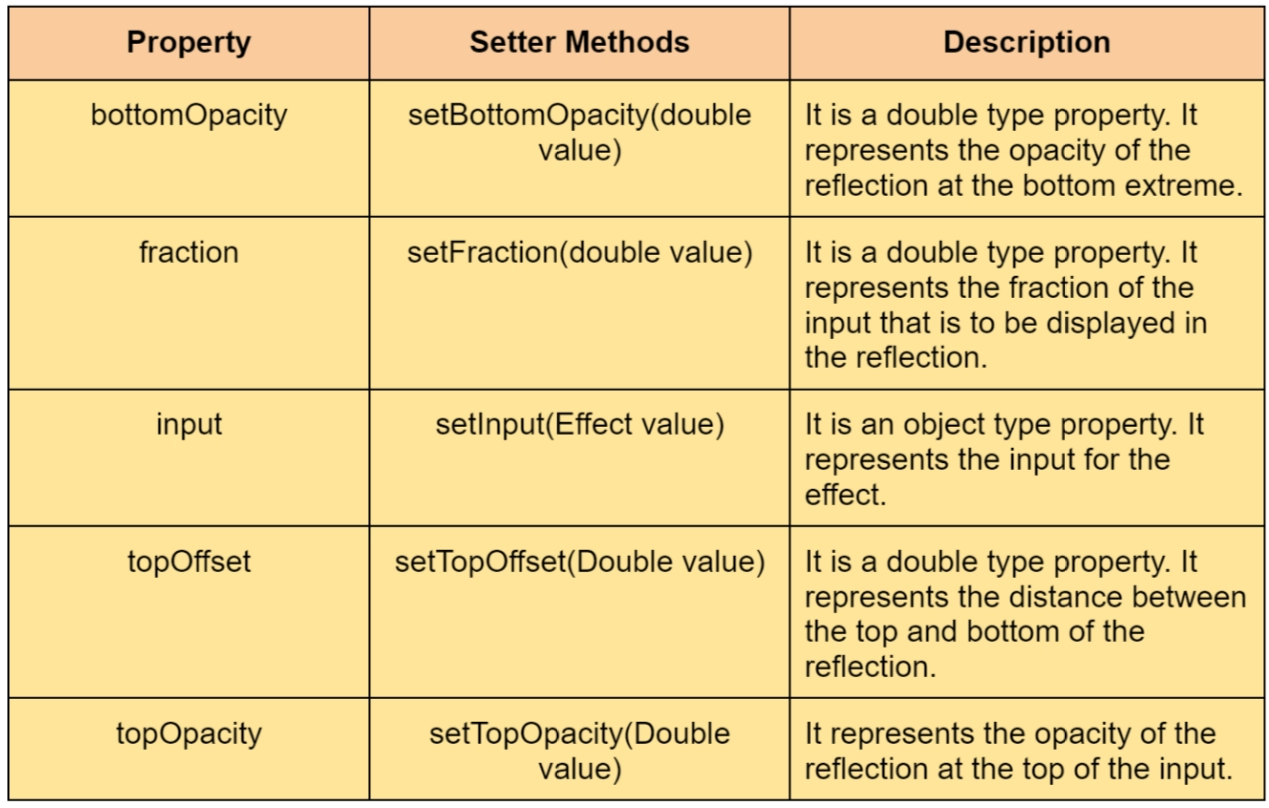
The table below describes the Reflection class properties as well as the setter methods.
Usage
This program serves as an example of the Reflection Effect in JavaFX. In this case, we're writing the words "Welcome to Coding Ninjas" in Black and adding a reflection effect to it.
Save this code in a file named ReflectionEffect.java.
Implementation
import javafx.application.Application;
import javafx.scene.Scene;
import javafx.scene.Group;
import javafx.scene.effect.Reflection;
import javafx.stage.Stage;
import javafx.scene.paint.Color;
import javafx.scene.text.Font;
import javafx.scene.text.Text;
import javafx.scene.text.FontWeight;

public class ReflectionEffectExample extends Application {
   @Override
   public void start(Stage stage) {
      //Create a Text object
      Text text = new Text();

      //Setting font and position of text
      text.setFont(Font.font(null,FontWeight.BLACK,FontPosture.REGULAR,20));
      text.setX(90);
      text.setY(90);

      //Set the text to be embedded.
      text.setText("Welcome to Coding Ninjas");

      //Setting the color of the text
      text.setFill(Color.Black);

      //Instantiate the reflection class
      Reflection reflection = new Reflection();

      //setting the bottom & top opacity of the reflection
      reflection.setBottomOpacity(0.2);
      reflection.setTopOpacity(0.2);

      //setting the top offset of the reflection
      reflection.setTopOffset(10);

      //Setting the fraction of the reflection
      reflection.setFraction(12);

      //Applying reflection effect to the text
      text.setEffect(reflection);

      //Creating a Group & scene object
      Group root = new Group(text);
      Scene scene = new Scene(root, 400, 300);

      //Setting title to the Stage
      stage.setTitle("Reflection effect example");

      //Adding scene to the stage
      stage.setScene(scene);

      //Displaying the contents of the stage
      stage.show();
   }
   public static void main(String args[]){
      launch(args);
   }
}
Execution
To execute the above program. You can follow the given steps:
-
Open the terminal in the same folder where you have saved your source code.
-
Enter the below code and hit enter.
javac --module-path path/to/your/javaFx/modules --add-modules javafx.fxml,javafx.controls filename.java
-
After you hit enter a new file will automatically be generated namely filename.class
-
Now, enter the below command and hit enter to execute the above program.
java --module-path path/to/your/javaFx/modules --add-modules javafx.fxml,javafx.controls filename.java
-
You have successfully executed the JavaFX program.
Output


 7+ registered

