Table of contents
1.
Introduction
2.
f:param Tag
3.
Attributes
4.
Sample Program
5.
Frequently Asked Questions
5.1.
What is JSF?
5.2.
What is a UI?
5.3.
What is a tag?
5.4.
What are the parameters?
5.5.
What is the prerequisite to running the JSF program?
6.
Conclusion
Last Updated: Mar 27, 2024

JSF f:param Tag

Author Manish Kumar
0 upvote
Career growth poll
Do you think IIT Guwahati certified course can help you in your career?

Introduction

A component without any additions is equivalent to an empty plate with nothing. You need to serve contents into it to make it function properly. f: param provides this functionality to tunnel in required parameters and data elements. This blog will teach you how to use the f: param tag. Have a good time, Ninja!!

f:param Tag

Formally speaking, the f: param tag helps to pass parameters to UI components or pass request parameters. Its behaviour depends on the type of component to which it is attached.

Example 1: Passing parameter to UI/UX component

<h:outputFormat value = "Coding {0}!.">     
  <f:param value = "Ninjas" /> 
</h:outputFormat>

Example 2: Passing request parameters

<h:commandButton id="submit" 
  value="Display Text" action="#{userData.showResult}">
  <f:param name="username" value="Ninja coder" />
</h:commandButton>

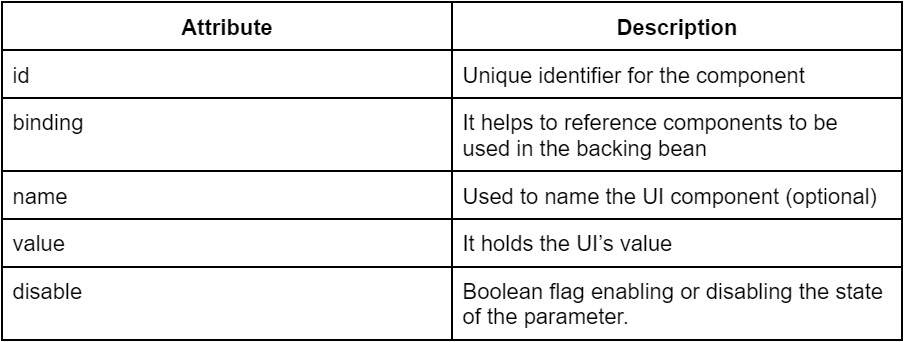
Attributes

Sample Program


User-managed bean code

package com.coding.ninjas;

import java.util.Map;

import javax.faces.bean.ManagedBean;
import javax.faces.bean.SessionScoped;
import javax.faces.context.FacesContext;

@ManagedBean(name="ninja")
@SessionScoped

//public bean class
public class UserBean{

public String name;
public String country;

public String outcome(){

FacesContext fc = FacesContext.getCurrentInstance();
this.country = getCountryParam(fc);

return "result";
}


public String getCountryParam(FacesContext fc){

Map<String,String> params = fc.getExternalContext().getRequestParameterMap();
return params.get("country");

}

}

default.xhtml

<?xml version="1.0" encoding="UTF-8"?>
<!DOCTYPE html PUBLIC "-//W3C//DTD XHTML 1.0 Transitional//EN" 
"http://www.w3.org/TR/xhtml1/DTD/xhtml1-transitional.dtd">
<html xmlns="http://www.w3.org/1999/xhtml"   
      xmlns:h="http://java.sun.com/jsf/html"
      xmlns:f="http://java.sun.com/jsf/core"
      >
    
    <h:body>
     
    <h1>JSF 2 param example</h1>

      <h:form id="form">

Enter your name :
<h:inputText size="10" value="#{ninja.name}" />

<br /><br />

<h:commandButton id="submitButton" 
value="Submit - IN" action="#{ninja.outcome}">

<f:param name="country" value="India" />

</h:commandButton>

      </h:form>

    </h:body>
</html>

result. XHTML

<?xml version="1.0" encoding="UTF-8"?>
<!DOCTYPE html PUBLIC "-//W3C//DTD XHTML 1.0 Transitional//EN" 
"http://www.w3.org/TR/xhtml1/DTD/xhtml1-transitional.dtd">
<html xmlns="http://www.w3.org/1999/xhtml"   
      xmlns:h="http://java.sun.com/jsf/html"
      xmlns:f="http://java.sun.com/jsf/core"
      >
    
    <h:body>
     
    <h1>JSF 2 param example</h1>

    <h2>
    <h:outputFormat value="Hello,{0}. You are from {1}.">
 <f:param value="#{ninja.name}" />
 <f:param value="#{ninja.country}" />
    </h:outputFormat>
    </h2>

    </h:body>
    
</html>

Output: 

Enter your name here ('Ninja'), and click on the submit button.


Display the formatted message, "name" from user input, and "country" from the button parameter.


Frequently Asked Questions

What is JSF?

JSF is a UI development framework similar to React. It is based on components as its building blocks. It connects parts to data sources, directly improving security and efficiency.

What is a UI?

It is the space of user and machine interaction. It forms an integral part of user experience (UX), consisting of visual and functional design. UI aims to make it easier for users to interact with the product.

What is a tag?

A tag is a syntactical way of implementing program logic. These tags are like keywords which define how to display elements on the web browser. For example <html>, <img> etc.

What are the parameters?

Parameters are the input elements that support the proper functioning of a component. Parameters can be of various types depending on the requirement.

What is the prerequisite to running the JSF program?

Java Runtime Environment, JDK, Maven and Apache tomcat facilitate the running of JSF applications.

Conclusion

Finally, you have made it to the end of this article. Congratulations!! You learnt about the f: param tag in JSF in this blog. You went through the tag, its attributes and a sample program.

source: thecoderpedia.com

After reading about the f: param tag, are you not feeling excited to read more articles on the topic of JSF? Don't worry; Coding Ninjas has you covered. To learn, see the JSF.

Please refer to our guided paths on Coding Ninjas Studio to learn more about DSA, Competitive Programming, JavaScript, System Design, etc. And also, enrol in our courses and refer to the mock test and problems available. Have a look at the interview experiences and interview bundle for placement preparations.

Please do upvote our blogs if you find them helpful and informative!

Happy learning!

Live masterclass