




Introduction
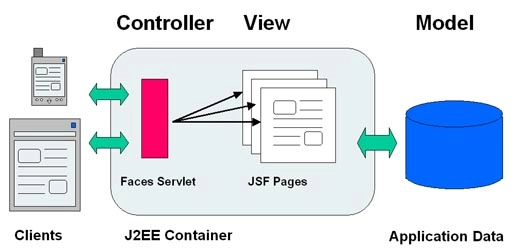
In this blog, we will learn about the JSF h:message. JSF (Java Server Faces) is a Java-based web application framework designed to build web-based user interfaces more accessible. The Java Community Process codified a definition for JavaServer Faces, a standardised display technology. The MVC design pattern separates model and display, allowing developers to concentrate on their primary competencies and communicate more effectively.
The JSF h:message tag displays a message for a particular JSF UI Component. It is used to show a single message for a certain component. By supplying the id of that component into the for property, you may show your message. This article describes the message function in JSF, beginning with the most straightforward statements and progressing to the most significant modules.
h:message HTML Tag
<h:inputText  id = "username"  size = "12" label = "UserName" required = "true">
   <f:validateLength for = "username" minimum = "4" maximum = "12" />
</h:inputText>
<h:message for = "username" style = "color:red" />
It is used to show a single message for a certain component. By supplying the id of that component into the for property, you may show your message.
Rendered Output
- if the supplied username is more than 12 characters.
<span style = "color:red">UserName: Validation Error:
 Length is greater than allowable maximum of '12'</span>
- if the given username has fewer than four characters.
<span style = "color:red">UserName: Validation Error:
Length is less than allowable minimum of '4'</span>-
if a username is not provided.
<span style = "color:red">UserName: Validation Error:
    Value is required</span>
Tag Attributes
The message Tag properties are listed in the tables below:
| S.No. | Attributes |
Description |
title |
A title that is used for accessibility. Browsers often generate tooltips for the value of the title. | |
| 2. | style |
It is used for getting Inline Style Information. |
| 3. | for |
It is a required tag that is used to assign the id of the component for which the message is composed. |
| 4. | binding |
It obtains a reference to a component that can be utilised in a backing bean. |
| 5. | id |
It is used as a Component’s Identifier. |
| 6. | rendered |
It is a boolean tag attribute, where false reduces rendering. |
| 7. | styleClass |
It is used as the class name for Cascading style sheet(CSS). |
| 8. | errorClass |
It adds a CSS style class to any message with the severity class "ERROR". |
| 9. | errorStyle |
It styles any message with the severity class "ERROR." |
| 10. | fatalClass |
It adds a CSS style class to any message with the severity class "FATAL." |
| 11. | fatalStyle |
It styles any message with the severity class "FATAL." |
| 12. | infoClass |
It adds a CSS style class to any message with the severity class "INFO." |
| 13. | InfoStyle |
It styles any message with the severity class "INFO." |
| 14. | tooltip |
It displays the message's detail as a tooltip. |
| 15. | warnClass |
It adds a CSS style class to any message with the severity class "WARN." |
| 16. | warnStyle |
It styles any message with the severity class "WARN." |
| 17. | showDetail |
It is a boolean attribute that specifies whether or not message details are displayed. The defaults for h:message are false and true, respectively. |
| 18. | showSummary |
It is a boolean that specifies whether or not message summaries are displayed. The default values are true for h:messages and false for h:message. |
| 19. | layout |
Message layout specification: table or list, applied exclusively to h:messages. |




 7+ registered

