




Introduction
Attributes and iteration in JSP are very useful in dynamically viewing servlets. We will first look at how to set up custom attributes in JSP, then will move on with examples for better understanding. Iterators will be coupled with custom attributes in JSP for another illustration.
Custom attributes in JSP
We can define as many custom attributes in JSP as per our need. We will follow these points to create an attribute.
First, we will define the property in the tag handler class with the attribute name, then define its setter method.
Then, we will define the attribute element inside the TLD(Tag Library Descriptor) file's tag element.
The syntax to define the tag handler is as below:
<m:square number=”2”></m:square>
Let us see one example illustration of a JSP custom tag.
index.jsp file
<%@ taglib uri="tags.tld" prefix="m" %>
Square of 4 is: <m:Square num="4"></m:Square>
SquareNumber.java
package taghandler;
import javax.servlet.jsp.JspException;
import javax.servlet.jsp.JspWriter;
import javax.servlet.jsp.tagext.TagSupport;
 public class Squarenum extends TagSupport{
private int num;

public void setnum(int num) {
   this.num = num;
}
 public int doStartTag() throws JspException {
   JspWriter out=pageContext.getOut();
   try{
       out.print(num*num);
   }catch(Exception e){e.printStackTrace();}

   return SKIP_BODY;
}
} 
tags.tld
<?xml version="1.0" encoding="ISO-8859-1" ?>
<!DOCTYPE taglib
       PUBLIC "-//Sun Microsystems, Inc.//DTD JSP Tag Library 1.2//EN"
       "http://java.sun.com/j2ee/dtd/web-jsptaglibrary_1_2.dtd">
 <taglib>
 <tlib-version>1.0</tlib-version>
 <jsp-version>1.2</jsp-version>
  <description>A simple tab library for the examples</description>
  <tag>
   <name>Square</name>
   <tag-class>taghandler.Squarenum</tag-class>
   <attribute>
   <name>num</name>
   <required>true</required>
   </attribute>
 </tag>
</taglib>
Output:
 |
You can also read about the JSP Architecture and Lifecycle.
Iterators with a custom tag
Iterating the content of a tag can be done using the doAfterBody() method of the iterationTag interface. With the tagSupport class's help, iteration can be implemented using the EVAL_BODY_AGAIN constant in the doAfterBody() function.
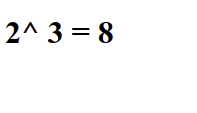
Let us have a look at one example illustration implementing iterators with a custom tag.
<%@ taglib uri="tags.tld" prefix="m" %>
 2 ^ 3 = <m:power num="2" power="3">
body
</m:power>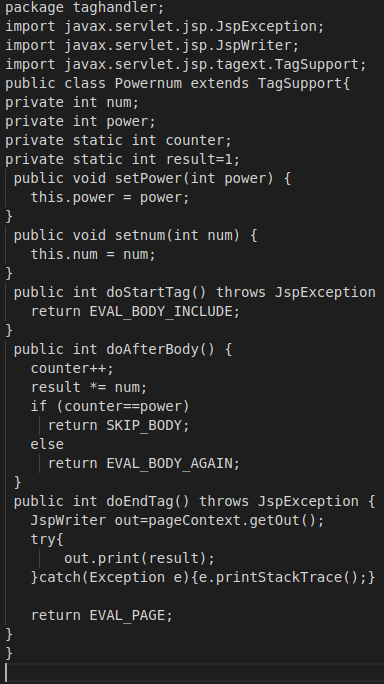
tags.tlb
<taglib>
   <tlib-version>1.0</tlib-version>
   <uri>http://tomcat.apache.org/example-taglib</uri>

   <tag>
     <name>power</name>
     <tag-class>taghandler.Powernum</tag-class>

     <attribute>
     <name>num</name>
     <required>true</required>
     </attribute>

     <attribute>
     <name>power</name>
     <required>true</required>
     </attribute>

   </tag>
 </taglib>
Output
|
|


 7+ registered

