First Impression of Parameterized Test
Parameterized tests are similar to regular tests, except they have the @ParameterizedTest annotation added to them:
Program
// create src/main/java/Numbers
public class Numbers {
   public static boolean isOdd(int number) {
       return number % 2 != 0;
   }
}

You can also try this code with Online Java Compiler
Test Program
// create src/test/NumbersTest
import org.JUnit.jupiter.params.ParameterizedTest;
import org.JUnit.jupiter.params.provider.ValueSource;

import static org.JUnit.jupiter.api.Assertions.*;

class NumbersTest {
   @ParameterizedTest
   @ValueSource(ints = {1, 3, 5, -3, 15, Integer.MAX_VALUE})
   void isOddTest(int number){
       assertTrue(Numbers.isOdd(number));
   }
}
You can also try this code with Online Java Compiler
Output

Argument Sources
A parameterized test, as we all know, runs the same test numerous times with various parameters.
And, perhaps, we'll be able to accomplish more than numbers, so let's get started.
Simple Values
We may supply an array of literal values to the test function using the @ValueSource annotation.
Program
// create src/main/java/Strings
public class Strings {
   public static boolean isBlank(String input) {
       return input == null || input.trim().isEmpty();
   }
}
You can also try this code with Online Java Compiler
Test Program
// create src/test/StringsTest
class StringsTest {
   @ParameterizedTest
   @ValueSource(strings = {"", "  "})
   void isBlankStrings(String input) {
       assertTrue(Strings.isBlank(input));
   }
}
You can also try this code with Online Java Compiler
Output

Before we continue, it's important to remember that we didn't use null as an argument. Another restriction is that null cannot be sent through a @ValueSource, even for String and Class.
Null and Empty Values
NullSource Annotation
Test Program
// create src/test/java/StringsTest
class StringsTest {
   @ParameterizedTest
   @NullSource
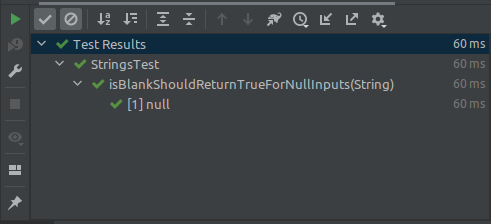
   void isBlankShouldReturnTrueForNullInputs(String input) {
       assertTrue(Strings.isBlank(input));
   }
}
You can also try this code with Online Java Compiler
Output
EmptySource Annotation
Test Program
// create src/test/java/StringsTest
class StringsTest {
   @ParameterizedTest
   @EmptySource
   void isBlank_ShouldReturnTrueForEmptyStrings(String input) {
       assertTrue(Strings.isBlank(input));
   }
}
You can also try this code with Online Java Compiler
Output

NullAndEmpty Score Annotation
Test Program
// create src/test/java/StringsTest
class StringsTest {
   @ParameterizedTest
   @NullAndEmptySource
   void isBlankShouldReturnTrueForNullAndEmptyStrings(String input) {
       assertTrue(Strings.isBlank(input));
   }
}
You can also try this code with Online Java Compiler
Output

NullEmptyAndValue Source Annotation
Test Program
// create src/test/java/StringsTest
class StringsTest {
   @ParameterizedTest
   @NullAndEmptySource
   @ValueSource(strings = {"  ", "\t", "\n"})
   void isBlankShouldReturnTrueForAllTypesOfBlankStrings(String input) {
       assertTrue(Strings.isBlank(input));
   }
}
You can also try this code with Online Java Compiler
Output

Enum
EnumSource Annotation
Program
// create src/main/java/Month
public enum Month {
   JANUARY, FEBRUARY, MARCH, APRIL, MAY, JUNE, JULY, AUGUST, SEPTEMBER, OCTOBER, NOVEMBER, DECEMBER;


   public int getValue() {
       return this.ordinal() + 1;
   }
}
You can also try this code with Online Java Compiler
Test Program
// create src/test/java/EnumsTest
public class EnumsTest {
   @ParameterizedTest
   @EnumSource(Month.class) // passing all 12 months
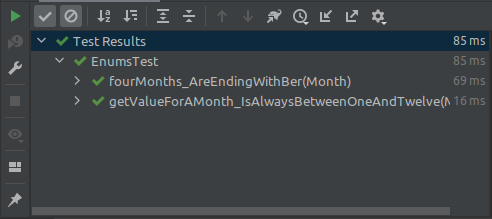
   void getValueForAMonth_IsAlwaysBetweenOneAndTwelve(Month month) {
       int monthNumber = month.getValue();
       assertTrue(monthNumber >= 1 && monthNumber <= 12);
   }


   @ParameterizedTest
   @EnumSource(value = Month.class, names = ".+BER", mode = EnumSource.Mode.MATCH_ANY)
   void fourMonths_AreEndingWithBer(Month month) {
       EnumSet<Month> months =
               EnumSet.of(Month.SEPTEMBER, Month.OCTOBER, Month.NOVEMBER, Month.DECEMBER);
       assertTrue(months.contains(month));
   }
}
You can also try this code with Online Java Compiler
Output
CSV Literal
Assume we want to verify that the String's toUpperCase() function returns the expected uppercase result. @ValueSource will not suffice.
For such circumstances, we must construct a parameterized test.
- To the test method, pass an input value and an anticipated value.
- Calculate the final result using the input values.
- Compare and contrast the actual and predicted values.
As a result, we require argument sources that can pass numerous arguments. One of these sources is the @CSVSource:
CSVSource
@ParameterizedTest
@CsvSource({"test,TEST", "tEst,TEST", "Java,JAVA"})
void toUpperCase_ShouldGenerateTheExpectedUppercaseValue(String input, String expected) {
   String actualValue = input.toUpperCase();
   assertEquals(expected, actualValue);
}
You can also try this code with Online Java Compiler
CSV Files
CSVFileSource Annotation
@ParameterizedTest
@CsvFileSource(resources = "/data.csv", numLinesToSkip = 1)
void toUpperCase_ShouldGenerateTheExpectedUppercaseValueCSVFile(
       String input, String expected) {
   String actualValue = input.toUpperCase();
   assertEquals(expected, actualValue);
}
You can also try this code with Online Java Compiler
When reading CSV files, the numLinesToSkip property specifies the number of lines to skip.
@CsvFileSource does not skip any lines by default, however this functionality is sometimes beneficial for bypassing the header lines, like we did above.
The delimiter, like the plain @CsvSource, may be customised using the delimiter property.
We also have the following capabilities in addition to the column separator:
- The lineSeparator parameter can be used to change the line separator; the default value is newline.
- The encoding property can be used to change the file encoding; UTF-8 is the default.
Methods
MethodSource Annotation
@ParameterizedTest
@MethodSource("provideStringsForIsBlank")
void isBlank_ShouldReturnTrueForNullOrBlankStrings(String input, boolean expected) {
   assertEquals(expected, Strings.isBlank(input));
}
You can also try this code with Online Java Compiler
Custom Argument Provider
ArgumentsProvider Annotations
Another sophisticated technique for passing test parameters is to create a custom implementation of the ArgumentsProvider interface:
class BlankStringsArgumentsProvider implements ArgumentsProvider {
   @Override
   public Stream<? extends Arguments> provideArguments(ExtensionContext context) {
       return Stream.of(
               Arguments.of((String) null),
               Arguments.of(""),
               Arguments.of("   ")
       );
   }
}
You can also try this code with Online Java Compiler
Then we can use the @ArgumentsSource annotation to use this custom provider in our test.
@ParameterizedTest
@ArgumentsSource(BlankStringsArgumentsProvider.class)
void isBlank_ShouldReturnTrueForNullOrBlankStringsArgProvider(String input) {
   assertTrue(Strings.isBlank(input));
}
You can also try this code with Online Java Compiler
Argument Conversion
Implicit Conversion
@ParameterizedTest
@CsvSource({"APRIL", "JUNE", "SEPTEMBER", "NOVEMBER"}) // Passing strings
void someMonths_Are30DaysLongCsv(Month month) {
   final boolean isALeapYear = false;
   assertEquals(30, month.length(isALeapYear));
}
You can also try this code with Online Java Compiler
Explicit Conversion
class SlashyDateConverter implements ArgumentConverter {


   @Override
   public Object convert(Object source, ParameterContext context)
           throws ArgumentConversionException {
       if (!(source instanceof String)) {
           throw new IllegalArgumentException(
                   "The argument should be a string: " + source);
       }
       try {
           String[] parts = ((String) source).split("/");
           int year = Integer.parseInt(parts[0]);
           int month = Integer.parseInt(parts[1]);
           int day = Integer.parseInt(parts[2]);


           return LocalDate.of(year, month, day);
       } catch (Exception e) {
           throw new IllegalArgumentException("Failed to convert", e);
       }
   }
}


@ParameterizedTest
@CsvSource({"2020/12/25,2020", "2022/02/11,2022"})
void getYearAsExpected(
       @ConvertWith(SlashyDateConverter.class) LocalDate date, int expected) {
   assertEquals(expected, date.getYear());
}
You can also try this code with Online Java Compiler
Argument Accessor
Each argument to a parameterized test corresponds to a single method parameter by default.As a result, supplying a few arguments via an argument source causes the test method signature to become excessively lengthy and complicated.
Encapsulating all provided arguments in an instance of ArgumentsAccessor and retrieving arguments by index and type is one solution to this problem.
Program
// create src/main/java/Person
public class Person {
   String firstName;
   String middleName;
   String lastName;


   // constructor
   public Person(String firstName, String middleName, String lastName) {
       this.firstName = firstName;
       this.middleName = middleName;
       this.lastName = lastName;
   }

   public String fullName() {
       if (middleName == null || middleName.trim().isEmpty()) {
           return String.format("%s %s", firstName, lastName);
       }
       return String.format("%s %s %s", firstName, middleName, lastName);
   }
}
You can also try this code with Online Java Compiler
Test Program
// create src/test/java/PersonTest
class PersonTest {
   @ParameterizedTest
   @CsvSource({"Isaac,,Newton,Isaac Newton", "Charles,Robert,Darwin,Charles Robert Darwin"})
   void fullName_ShouldGenerateTheExpectedFullName(ArgumentsAccessor argumentsAccessor) {
       String firstName = argumentsAccessor.getString(0);
       String middleName = (String) argumentsAccessor.get(1);
       String lastName = argumentsAccessor.get(2, String.class);
       String expectedFullName = argumentsAccessor.getString(3);


       Person person = new Person(firstName, middleName, lastName);
       assertEquals(expectedFullName, person.fullName());
   }
}
You can also try this code with Online Java Compiler
Output

Argument Aggregator
The test code may become less understandable or reusable if the ArgumentsAccessor abstraction is used directly. We can construct a bespoke and reusable aggregator to handle these difficulties.
To do this, we use the ArgumentsAggregator interface:
class PersonAggregator implements ArgumentsAggregator {


   @Override
   public Object aggregateArguments(ArgumentsAccessor accessor, ParameterContext context)
           throws ArgumentsAggregationException {
       return new Person(
               accessor.getString(1), accessor.getString(2), accessor.getString(3));
   }
}
You can also try this code with Online Java Compiler
Aggregate With Annotation
@ParameterizedTest
@CsvSource({"Isaac Newton,Isaac,,Newton", "Charles Robert Darwin,Charles,Robert,Darwin"})
void fullName_ShouldGenerateTheExpectedFullName(
       String expectedFullName,
       @AggregateWith(PersonAggregator.class) Person person) {


   assertEquals(expectedFullName, person.fullName());
}
You can also try this code with Online Java Compiler
FAQs
-
What is parameterization in performance testing?
The capacity of the tester to adjust numerous parameters in a load test on a just-in-time basis is referred to as parameterization. A test where each virtual user signs in to the tested application with a separate UserID and Password is the simplest example.
-
What are parameterized queries?
A parameterized query is one in which the parameter values are given at execution time and placeholders are used for parameters. The primary rationale for using parameterized queries is to prevent SQL injection attacks.
-
Why is parameterization necessary in performance testing?
The approach of parameterization allows us to run a test plan several times with different sets of data. This aids in the development of a load test script that closely resembles real-world scenarios in which various users interact with different test data.
-
Can we rerun failed test cases in JUnit?
TestRule is a class in the JUnit test framework that allows you to retry failed tests. This class will restart failed tests without disrupting your test flow. Let's look at an example of a JUnit Rule in action. It gives us a great tool for writing any test that we wish to run several times.
Key Takeaways
We looked at the nuts and bolts of parameterized tests in JUnit 5 in this post. Parameterized tests vary from regular tests in two ways: they're marked with the @ParameterizedTest annotation, and they need a source for their specified parameters. By now, we should be aware that JUnit has features for converting parameters to custom target types and customising test names.
Check out JUnit Interview Questions here.
I'm sure you'll enjoy this article, and also be interested in JUnit Nested Test.As a result, never give up on your quest for knowledge.
Happy Learning!





 1+ registered

