

Table of contents
1.
Introduction
2.
Getting Started
3.
Start Page​
3.1.
Disabling Start Page Content
4.
Search for help in Katalon Studio
5.
Tutorials
6.
Reporting Issues
7.
Error Log​ and Encrypted Text​
8.
Updating Katalon Studio
9.
Frequently Asked Questions
9.1.
What framework is employed by Katalon?
9.2.
Which programming language does Katalon use?
9.3.
Is Katalon generally used?
10.
Conclusion
Last Updated: Mar 27, 2024
Easy

Katalon Help in Katalon Studio

Career growth poll
Do you think IIT Guwahati certified course can help you in your career?

Introduction

After developing an app, the next part of the software development lifecycle is testing. We have a lot of platforms to do the development, but how do we test these apps? Well, a widely known platform for software testing is “Katalon”. Katalon Studio allows automated tests for various UI elements, including iFrames, pop-ups, and wait time.

katalon help in katalon studio

This article will discuss how to get started with Katalon and get Katalon help in Katalon studio. We will start our discussion with a general introduction about the platform and how to get started with it. Afterwards, we will see the start page, the help section, and how to access tutorials. At last, we will discuss how to report issues, look at log files and check for errors and updates. 

So without any further ado, let’s get started!

Getting Started

You probably saw this page when you first installed Katalon Studio in your system. But do you know, you can always return to this page to have a look at onboarding instructions?

getting started

These instructions in Katalon Studio are provided for:

⭐ API 

⭐ WebUI

⭐ BDD (Behaviour Driven Development)

To get these instructions, you must first start a project. Then, depending on the project type you select, Katalon Studio will show you how to:

👉 Make a test, then run it.

👉 Using a test suite, plan your tests.

Tooltip boxes that are displayed during each tour will walk you through each step. 

Katalon Studio also supports BDD. It helps the developer make an app which is designed around the user's behaviour. It helps the developer to know what the user expects to experience when interacting with it.

onboarding tour

Start Page

Every time you launch Katalon Studio, the Start Page appears. Your current Katalon Studio version, edition, and licence info, including the expiration date, are all visible on the Start Page. Additionally, you can access Katalon Studio’s academy, help center, doc page (Tutorials), and plugin store here.
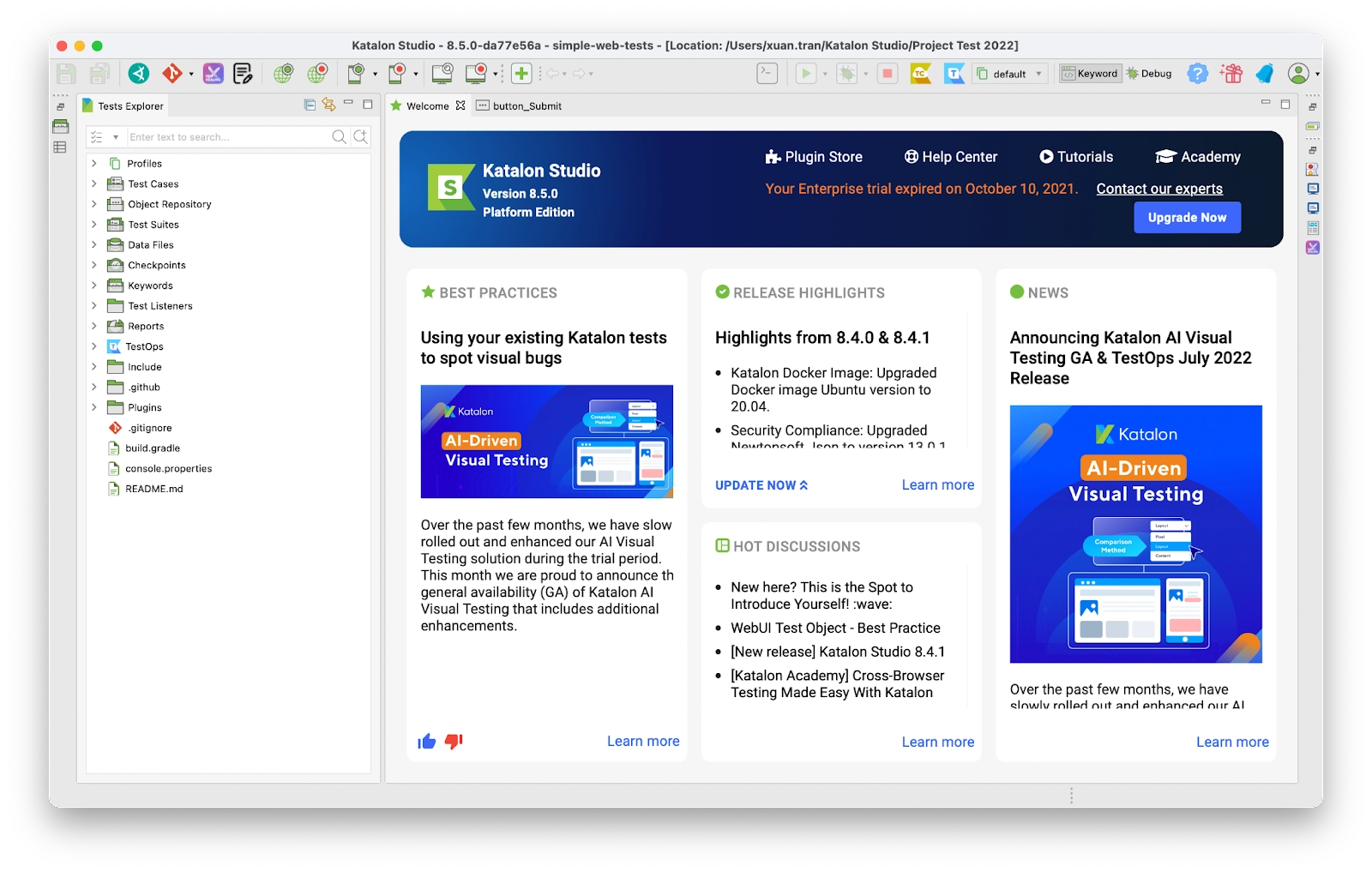
start page

You can also go to Help > Start Page to access this Start Page.

Disabling Start Page Content

On the start page, on the right-hand side, there is a section where you can find news, released highlights, hot forum discussions, and guidance on testing best practices. But it is annoying most of the time. 

Disabling this content is one of the practices that developers perform. You can also disable these contents by following these steps:

👉 Under Preferences, select Katalon.
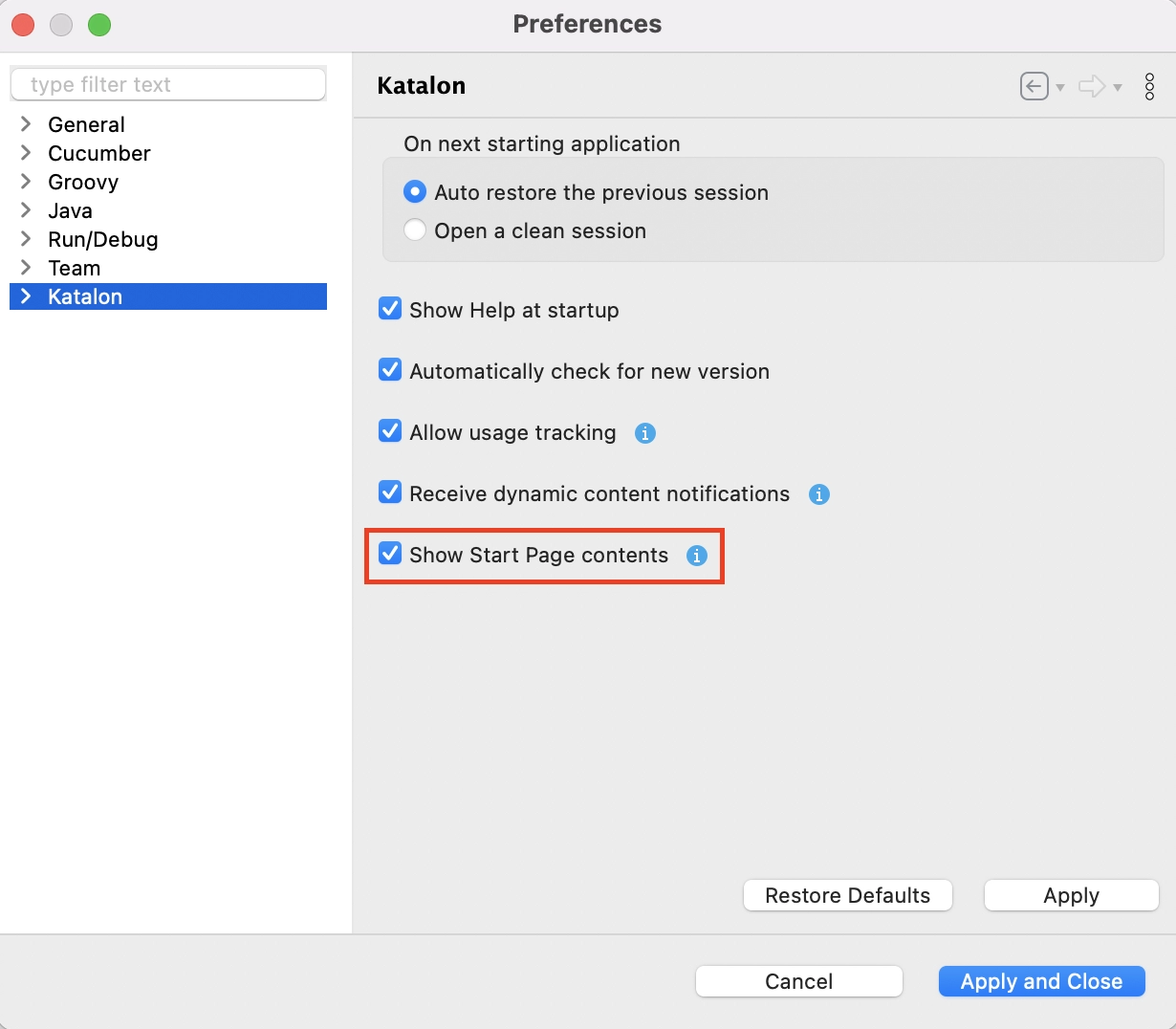
disabling start page content

👉 Uncheck the box next to "Show Start Page contents" to disable the Start Page content.

Conditions to disable start page content:
✔️ You must have the latest version of Katalon Studio (8.2.0 onwards).

✔️ You must have an active Katalon Studio Enterprise license.

Search for help in Katalon Studio

You are at your start page right now. If you get stuck on something trivial (or maybe big), you can always get “help” from Katalon studio.

You can find the help section in the main toolbar. You will see a search bar and a dropdown menu when you put your cursor over it.

searching help in katalon studio

When you type any keywords in the search bar, you’ll get two categories of search results:

🔽 Menu Items: Items that are relevant to your search in Katalon Studio. Each item will have a pop-up with location info when you hover over it.

🔽 Help Topics: A collection of user manuals chosen according to your operating system.

Tutorials

If you are having trouble using Katalon, don’t worry! Katalon provides a tutorial for using Katalon Studio. These tutorials are available for versions 7.8.0 and onwards.

To view the tutorial, you can first select Help and then Tutorial. Katalon Studio provides tutorials for Desktop, Web Services, Mobile and WebUI.

Step-by-step instructions are provided for creating, running, and viewing the report for test execution in each tutorial.

Reporting Issues

Katalon studio offers a commendable feature for reporting issues. When you select Help > Report Issues, you will get redirected to the Katalon forum. Here, you can search for your problem among all the related topics. You can also start your own discussion about your problem or any new topic. 

Error Log and Encrypted Text

After testing, the first thing we generally do is to have a look at the log files. The log file contains info about the app, operations within an operating system, usage patterns, and activities. It is the main data source for network observability.

You can have a look at the log file by clicking Help > Error Log. The log file will show all the info, including errors if present.

log files

While building something, there is a good chance we will encounter some sensitive text. Using encrypted text is quite beneficial when working with sensitive text.

Updating Katalon Studio

Keeping your Katalon studio up to date will help you in many unexpected ways. We all know the benefits of an update, so we won’t go into detail about it here. 

To check the updates, you can go to Help > Check for Updates. You won’t lose any previous configuration by updating your Katalon studio. So sit back and relax while your toolkit is getting an update. 

You can also refer to our blog, Update Katalon Studio and Change theme.

Frequently Asked Questions

What framework is employed by Katalon?

The Katalon Testing Platform, which is based on the hybrid test automation framework, gives testing experts the full range of testing options for testing software and apps.

Which programming language does Katalon use?

Groovy is a Java-based language used by Katalon Studio. It requires loading numerous libraries to parse test data, test objects, and logging.

Is Katalon generally used?

One of the well-known tools for automated testing is Katalon Studio. As more and more testing engineers choose Katalon, it merits discussion alongside Selenium, Ranorex, TestComplete, and Apache JMeter.

Conclusion

This article briefly discussed Katalon help in Katalon studio. We started our article with an introductory discussion about the platform and how to get started with it. Afterwards, we saw the start page, the help section, and how to access tutorials. At last, we discussed how to report issues,  look at log files and check for errors and updates. Thus concluding our discussion on the article Katalon help in Katalon studio.

We hope that this blog has helped you enhance your knowledge about Katalon help in Katalon studio. If you like to learn more, you can check out our articles: 

🌐 Automation Testing Tools

🌐 Configure Key Bindings in Katalon Studio

🌐 Keyboard Shortcut in Katalon Studio

🌐 Toolbars and Views in Katalon Studio

Refer to our Guided Path on Coding Ninjas Studio to upskill yourself in Data Structures and AlgorithmsCompetitive ProgrammingJavaScriptAWS and many more! If you wish to test your competency in coding, you may check out the mock test series and participate in the contests hosted on Coding Ninjas Studio! 

If you have just started your learning process and are looking for questions asked by tech giants like Amazon, Microsoft, Uber, etc. In that case, you must look at the problemsinterview experiences, and interview bundles for placement preparations.

Nevertheless, you may consider our paid courses to give your career an edge over others!

Do upvote our blogs if you find them helpful and engaging!

Happy Learning!

Live masterclass


