Do you think IIT Guwahati certified course can help you in your career?
Introduction
Hello Ninjas! Welcome to our article on PHP and web programming. Web development is a very famous domain in computer science. It involves designing, developing, maintaining, and testing web applications. You require a tool and scripting language for developing web applications. PHP is one such scripting language.
This article will discuss Laravel Composer in PHP. We will discuss the installation process for Laravel Composer.
PHP is an open-source general-purpose scripting language designed for web development. It was released in 1995 by Rasmus Lerdorf. It is an acronym for "PHP: Hypertext Preprocessor". It is easier to learn and user-friendly scripting language.
It handles dynamic content, session monitoring, databases, and creating complete websites. It supports multiple databases, including MySQL, Oracle, PostgreSQL, and Microsoft SQL Server. The ability to be used on various platforms increases the use of PHP by web developers.
Laravel is an open-source PHP framework for developing web applications. It was developed by Taylor Otwell and released in 2011. It follows the MVC(model view controller) architectural pattern. It makes the development of web applications easier and more convenient.
Laravel makes use of pre-existing parts from other frameworks to build online applications. Hence the resulting web application is more organized and practical.
A composer is a tool that integrates all the libraries and dependencies in your Laravel-developed web applications. You can install various third-party libraries effortlessly using Composer to help build applications faster.
Installation Steps
Laravel Composer is based on PHP, so our system will need PHP installed. Don’t worry, even If you don’t have PHP installed in your system. You can install it right now, just visit the below link and follow the installation process for PHP.
To check if your system has PHP installed, run the below command on the command prompt.
php -v
If PHP is installed, you will see the version displayed as shown in the below image.
Great! Now, we will install XAMPP.
Install XAMPP
PHP is a multi-platform programming language that can run on any operating system and Windows environment. XAMPP (Windows, MySQL, Apache Server, Perl, and PHP) and LAMP (Linux, MySQL, Apache Server, Perl, and PHP) are the most popular. We will use XAMPP in this article. It will be used to provide the database.
Follow the below steps to install XAMPP.
Step 1. Install the latest XAMPP version for your operating system from the official Apache Friends site. We will demonstrate the installation for Windows.
Step 2. Run the downloaded executable file. Press OK on the warning dialog.
Step 3. A setup window will appear. Click Next.
Step 4. Select only the necessary components and click Next.
Step 5. It will automatically be set to the C drive. Click Next.
Step 6. Select Language English and click Next.
Step 7. Click Next.
Step 8. The installation will start. You will be asked to provide access by the windows defender. Click Allow Access.
Step 9. Click Finish.
Step 10. The XAMPP control panel will appear. Click start for Apache, and it will set up a connection.
Next, we will install the Composer for PHP.
Install Composer
Composer can be downloaded easily by following the below steps.
Step 1. Search for Composer and visit the official site for Composer. Move to downloads and click on Composer.Setup.exe. The download will start automatically.
Step 2. After downloading, run the executable file. Use the default setting and click Next.
Step 3. It will provide a command line in the XAMPP folder for PHP. Click Next.
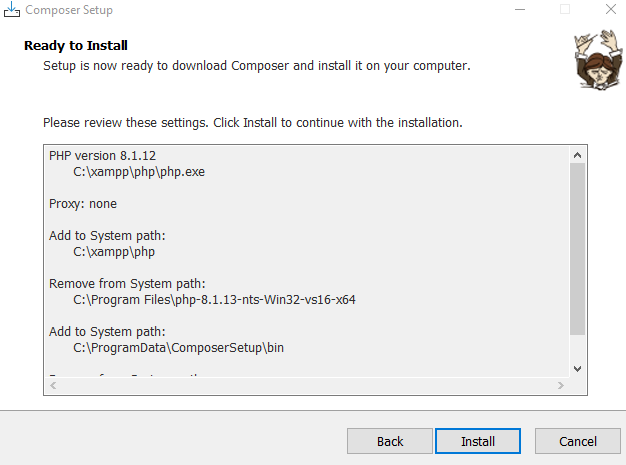
Step 4. Click Next if you do not want to pass a proxy. Click install.
Step 5. Click Next. Click Finish.
Voila! You have installed Composer for PHP. Now we are ready to install Laravel for our system.
Install Laravel
Now to use Laravel Composer, we are already halfway through. Let's move ahead and install Laravel. Follow the below steps.
Step 1. Open the command prompt. Change the current directory to C drive. Run command cdC:\.
Step 2. Run the command composer global require laravel/installer. The laravel installer will be installed.
Step 3. Now we will create a project in htdocs folder of XAMPP. You will find a few default files which you can delete. Change directory to htdocs folder. Run cd C:\xampp\htdocs.
Step 4. We will use composer to build our new project. So, to do that, run the following command.
We have installed Laravel Composer, and we have also created a project named NinjaApp. Now, we will use the command line and XAMPP to view our application on the local host. Note that it is necessary to first change the directory to your project’s directory.
Run the following commands
cd NinjaApp
php artisan serve
The second command will start the server, and you will get a local host address.
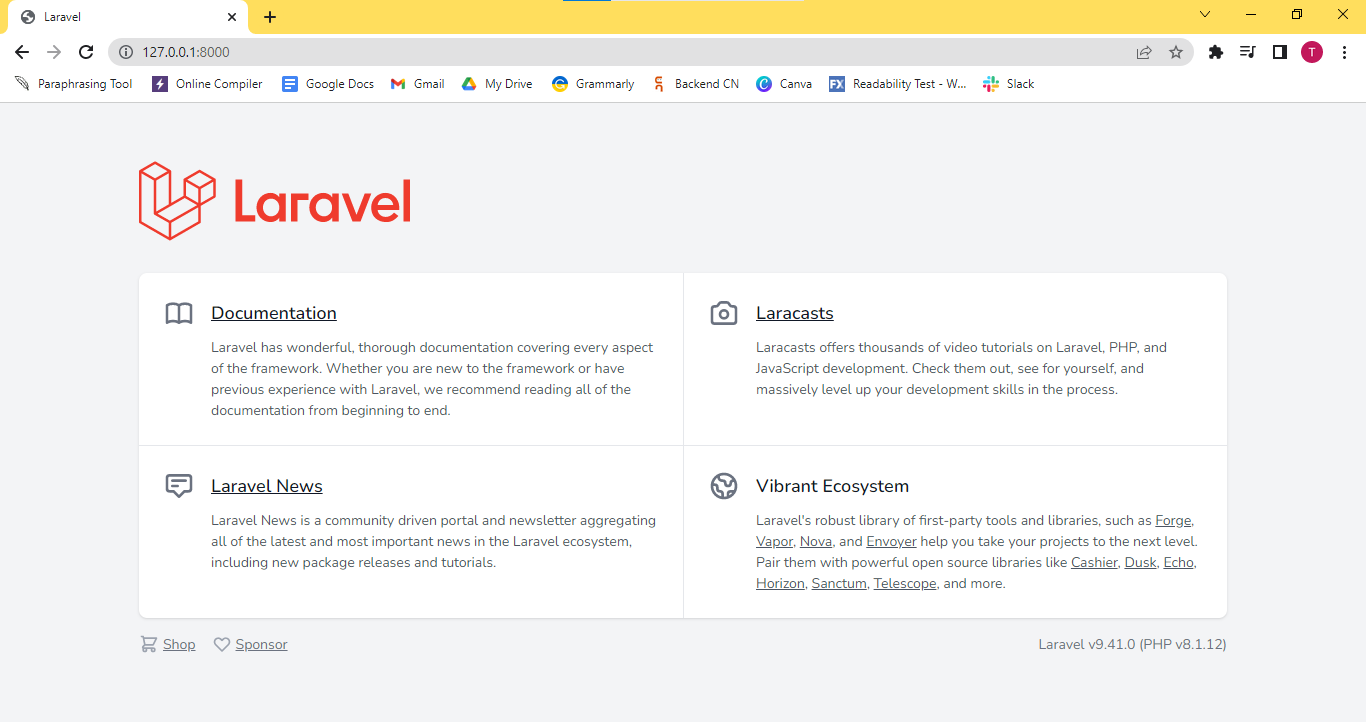
When you visit the given local host, you will find the below-shown page.
This page verifies that laravel is installed and the application is ready to be developed.
Web development is the process of designing and building web applications to serve some functions. Web applications can be static or dynamic. It is easier to develop static websites.
What are some common web development technologies?
There are three main components of web development - front end, backend, and database. Front end technologies include HTML, CSS, JavaScript, Angular, etc. Backend technologies include PHP, Java, Django, react, etc. Example of databases for web development are Oracle, MySQL, and MongoDB.
What are the uses of Laravel in PHP?
Laravel is a PHP framework for web development. It eases the process of application development by providing easy solution to common tasks like authentication, sessions, caching, and routing.
How to check whether PHP is installed in your system or not?
To check if your system has PHP installed, run php -v command on the command prompt. If the PHP is installed, then the version installed will be displayed.
Why do we use XAMPP?
XAMPP is used by Laravel Composer and PHP to help you access the database. It uses the Apache web server to help you easily access the database and make the necessary changes.
Conclusion
This article discussed Laravel Composer. We have also discussed the installation process for Laravel composer in PHP.
To learn more about PHP and Laravel Composer, visit the below articles.
I hope you have gained a better understanding of these topics now! Are you planning to ace the interviews with reputed product-based companies like Amazon, Google, Microsoft, and more?











 1+ registered

