Do you think IIT Guwahati certified course can help you in your career?
Introduction
Hello Readers!!! Welcome to this blog. Today our topic of discussion is Linux - Pipes & Filters.
We will discuss the pipe, filters, and commands related to it. Compared to other operating systems, such as macOS and Windows, commands in Linux are case-sensitive. Using its terminal, we can perform both basic and advanced tasks. First, let us start with a brief introduction to Linux of the main topic, i.e., Linux - Pipes & Filters.
Linux
Linux is a free and open operating system. It is similar to Windows, Mac, Android, and so on.
Unix, like Linux, is an operating system. It is a for-profit operating system.
It is divided into three sections: Kernel, Shell, and Programs. The majority of Unix and Linux commands are similar.
Let's start with pipes before going to the main topic, i.e., Linux - Pipes & Filters.
Linux Pipes
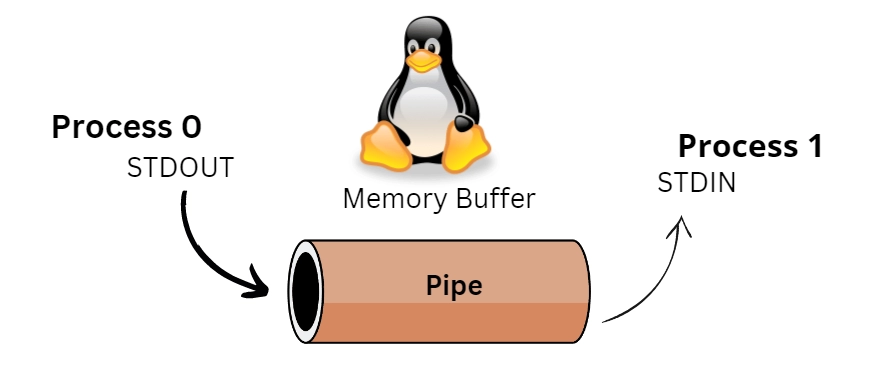
In Linux - Pipes & Filters, Pipes are defined as the two commands that can be linked together to redirect input/output to a named file. So that the output of one program becomes the input of the following program by using the pipe.
When a pipe is established between two commands, the first command's output is redirected to the second command's standard input.
You can accomplish this by inserting a vertical bar (|) between two commands to represent a pipe.
Linux Filters
Linux Filter commands accept input from stdin (standard input) and output to stdout (standard output). It converts plain-text data into meaningful data and can be used with pipes to perform more complex operations.
These filters are tiny programs that perform a specific function and can be used as building blocks.
Commands
A Linux command is a program or functionality that runs on the command line interface (CLI), a console that interacts with the system through texts and processes. It's similar to Windows Command Prompt application.
Following are some filter commands that are used to filter the files in a document.
The grep Command
It looks for lines that match a particular pattern in a file. The syntax is as follows:
Syntax
grep <option> pattern <fileName>
The term "grep" is derived from the command g/re/p, which means "globally search for a regular expression and print all lines containing it".
A regular expression is a piece of plain text (for example, a word) and special characters used for pattern matching.
These filters are tiny programs that perform a specific function and can be used as building blocks.
You can use various options along with the grep command −
Option
Use
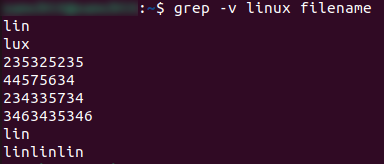
-v
With the help of this command, we print the lines that do not match.
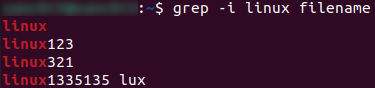
-i
Print the lines that match the upper or lower case.
-n
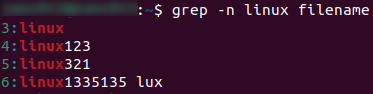
Print the matching lines along with the line number.
-c
Print the count of the matching lines.
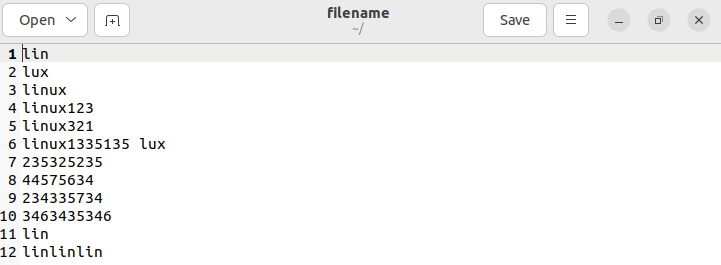
Filename -
For -v,
For -i,
For -n,
For -c,
The cat Command
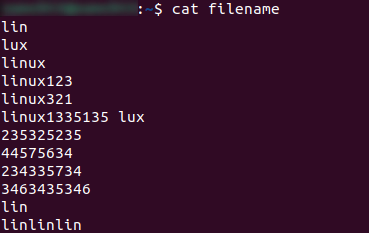
"cat" full form is "concatenate." This command displays the contents of a file without having to open it.
Syntax:
cat filename.txt
Example:
The od Command
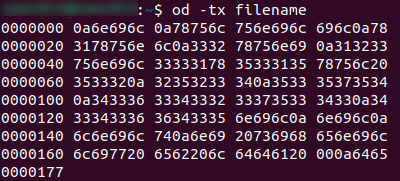
"od" full form is an octal dump, and it is used to show the contents of a file in various formats such as octal, hexadecimal, ASCII characters, decimals, and so on.
Syntax:
od -b <fileName>      (In octal format)
od -t x <fileName>    (In hexadecimal bytes format)
od -c <fileName>      (In ASCII (backslashed) character format)
Working of “od” Command:
The wc Command
"wc" full form is word count. This command counts the words, characters, and lines in a file.
Implementation:
Here 12, 13, and 103 are words, lines, and characters, respectively.
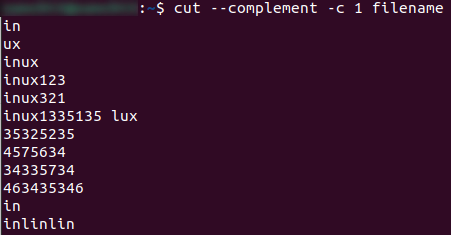
The cut Command
It is used for columns in a file to cut and write specific sections to standard output based on byte position, character, and field.
You can use various options along with the cut command −
Option
Use
-b, --bytes=LIST:
Cut a specific section by bytes.
-c, --characters=LIST:
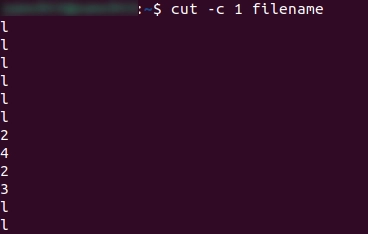
Select the specified characters.
--complement:
Complement the set of selected bytes, characters, or fields.
Implementation:
The tee Command
With one exception, the Linux tee command is very similar to the 'cat' command. It copies stdin to stdout and saves it to a file. It is used in combination with other commands via piping.
Syntax:
tee <options> <file name>
The uniq Command
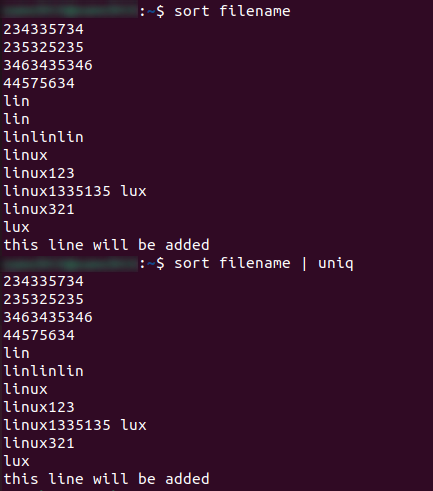
In the Uniq command, duplicate lines are removed. Uniq has the limitation of only being able to remove continuous duplicate lines (although the use of piping can overcome this). The example below shows how the piping is used.
Here first, we sort the files with the help of a sort command so that the filename, i.e., lin, can come in a continuous order of 2, after that with the help of the file, we merge both sort and uniq commands so that duplication of 2 filenames can be one.
Frequently Asked Questions
What is the purpose of Linux?
Linux is an open-source operating system (OS). An operating system is a software that directly manages the hardware and resources of a system, such as the memory, CPU, and storage.
In Linux, how do pipes work?
Commands, scripts, utilities, programs, and processes typically operate in three stages. The stages involved are taking input, processing the input, and returning the output (processed input). A pipe connects the third stage of one command to the first stage of another.
What is the function of a filter in Unix?
A filter is a program in Unix and Unix-like operating systems that receives most of its data from its standard input (the main input stream) and writes its primary results to its standard output (the main output stream).
What are the different types of pipes in Unix?
However, when working on a Unix system, you can use two types of pipes: regular, and unnamed. These two types of pipes have some advantages in common, but they are used and implemented in very different ways.
What does the sort command do?
In Linux, the “sort” command is used to print the output of a file in the order specified.
Conclusion
In this blog, we have learned about Linux - Pipes & Filters. We have covered the Linux - Pipes & Filters in a detailed manner with proper syntax.
For more such articles like Linux - Pipes & Filters, look at the following:












 6+ registered

