Do you think IIT Guwahati certified course can help you in your career?
Introduction
On many levels, the complexity of email is underappreciated. Creating and sending email, in the eyes of a Ruby developer, is conceptually identical to rendering opinions and shipping them to the web browser. Receiving automated emails is so frequent with modern websites and services that it almost feels strange not to receive one in some form or manner. As a result, understanding how to implement a mailer is critical for a developer. Fortunately, Action Mailer can assist anyone learning Ruby on Rails or working with Rails.
Action Mailer in Ruby on Rails
Action Mailer allows us to send emails directly from the application using mailer classes and views. This component is found in app/mailers and derives from ActionMailer::Base. Views related to this component may be found in the app/views. Rails employ the ActionMailer gem to deliver emails. It is one of the seven primary jewels that comprise it. A mailer functions similarly to a model and controller combined.
Setting Up Mailer in Ruby on Rails
Before putting a mailer to use, we must create or set it up. Below are the steps to set up a mailer in Ruby on Rails.
Step 1 Creating the Rails File
Create a Ruby on Rails file with the command "rails new mailer-app". This command will create the needed files to set up the Mailer in Ruby on Rails. The following will be displayed once we do that.
Step 2 Generating Welcome Mailer
Now we generate a welcome mailer in our mailer-app rails file. We do it by using the "rails g mailer welcome" command.
Step 3 Configuring Development File
Now we open the Rails file and apply the following code in the "development.rb" file located within the environment folder.
Now we generate a welcome controller in our mailer-app rails file. We do it by using the "rails g controller welcome" command.
Step 5 Configuring Routes File
Next, we locate the "routes.rb" file in the config folder. This is the file from our requests that are initiated. In simple words, it can be called the gateway between the inside and outside of the mailer app in Ruby on Rails. Then we write the following code in the file.
Rails.application.routes.draw do
  root "welcome#index"
end
You can also try this code with Online Ruby Compiler
Now we have to make a small sample page in the welcome file inside the views folder. We name it "index.html.erb" and write the code. This is for giving the localhost:3000 page to have a button for functionality. This button will come in handy when we finally check the localhost of the mailer in Ruby on Rails.
<a href="/send_mail">CLICK HERE TO SEND MAIL</a>
Step 8 Customizing Welcome Mailer
Following this, we locate the "welcome_mailer.rb" file in the mailer folder and write the following code.
class WelcomeMailer < ApplicationMailer
    def send_welcome_mail
        mail(to:"enterEmail@gmail.com",from:"enterSender@gmail.com",subject:"testingmail",message:"Hi!!!")
    end
end
You can also try this code with Online Ruby Compiler
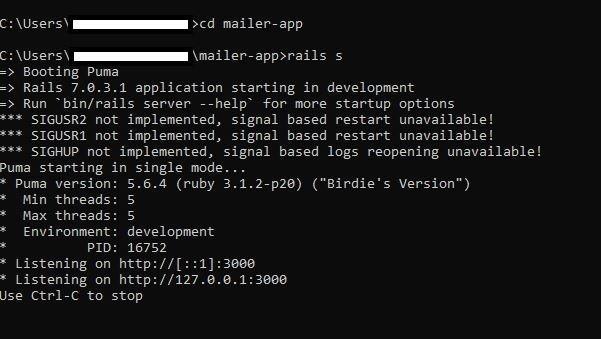
We run the "rails s" command in a different command window. This command will run the rails server for Mailer in Ruby on Rails. Running which, we will see the following.
Step 10 Checking the Localhost
As we are ready, we rerun the command prompt and run the mailers in the Ruby on Rails application. Once this is done, we check the localhost:3000 page. This ensures that the mailers in Ruby on Rails have a form. The output is similar to the following.
Step 11 Running the Mailers App
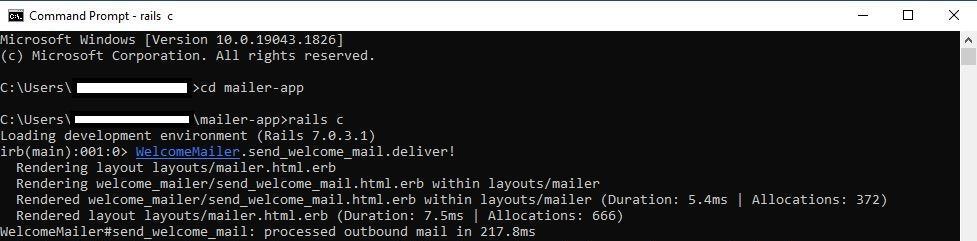
Now, as we are ready, we rerun the command prompt and run the mailers in Ruby on Rails application. We do this to see if the code is running or not. For doing this, we run the " rails c" command. The command window also gives an output response mentioning that the message has been sent.
Output:
Frequently Asked Questions
How are Mailers different to controllers?
Mailers differ from controllers because we call them directly rather than through the router.
What is the benefit of having a text and an HTML mailer version?
One difference between mailer and "regular" views is that emails often come in two formats: HTML and text. Most users will see the HTML version, but some will have HTML disabled and will only see the text version. Having two versions also allows us to avoid SPAM filters.
How to use callbacks with mailers?
Mailers allow us to use callbacks like conventional controllers, such as the after-action callback. They will run after the email is generated, not after it is delivered, allowing us to change parts of the email if necessary. We gain access to the mail instance's variables, allowing us to use the @user variable as part of the logic.
Conclusion
In the article, we read about action mailers in Ruby on Rails. We also saw each step of how to implement action mailers in Ruby on Rails with practical outputs. There are certain ways in which how Ruby differs from Ruby on rails. You can get many career opportunities after mastering ruby on rails. Refer to our courses on web development and read some articles on Ruby on rails to find out why you should consider Ruby on rails for your web projects. You can also check out some other blogs on ruby on rails to know everything you wish to know about Ruby on Rails.









 7+ registered

