Do you think IIT Guwahati certified course can help you in your career?
💫Introduction
Managing APIs in Ready API is distributing, regulating, and analyzing the APIs that connect applications and data across the company and clouds. Managing APIs in Ready API enables companies that construct APIs or use other people's APIs to monitor activities and guarantee that the needs of the developers and apps that utilize the API are satisfied.
This article explains how to structure our APIs for easier use.
💫REST APIs
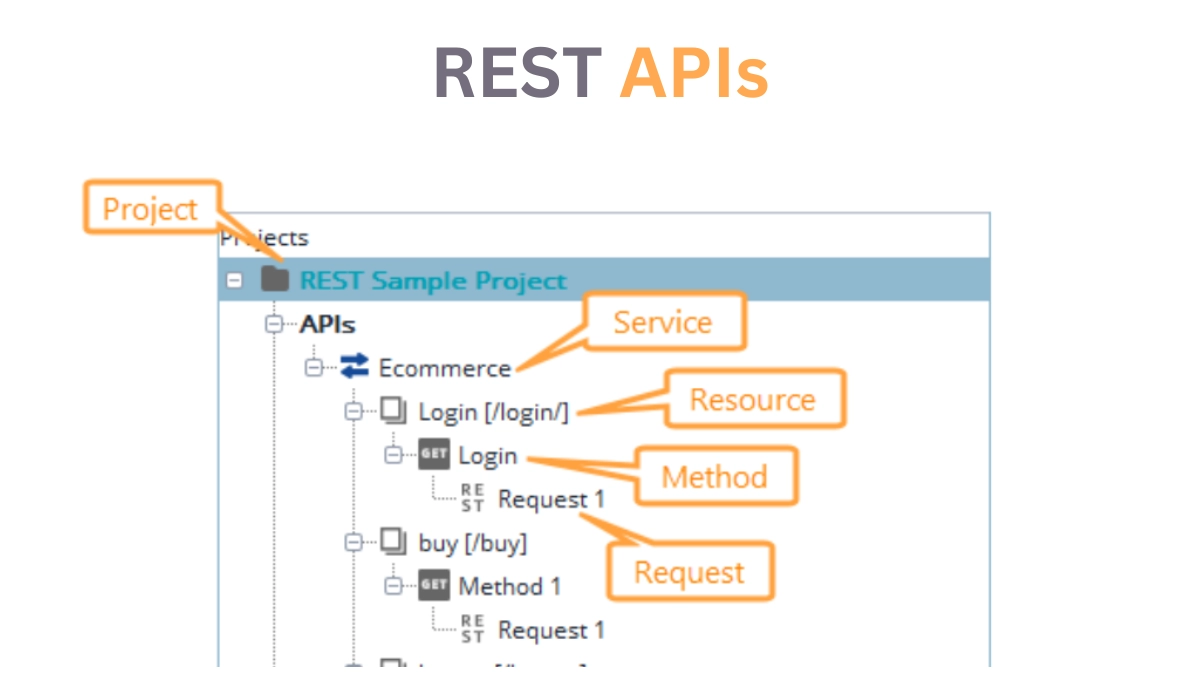
Users can interact with REST APIs in the Navigator panel to organize them for improved accessibility and readability. REST APIs are contained in the following way:
🔰REST Service
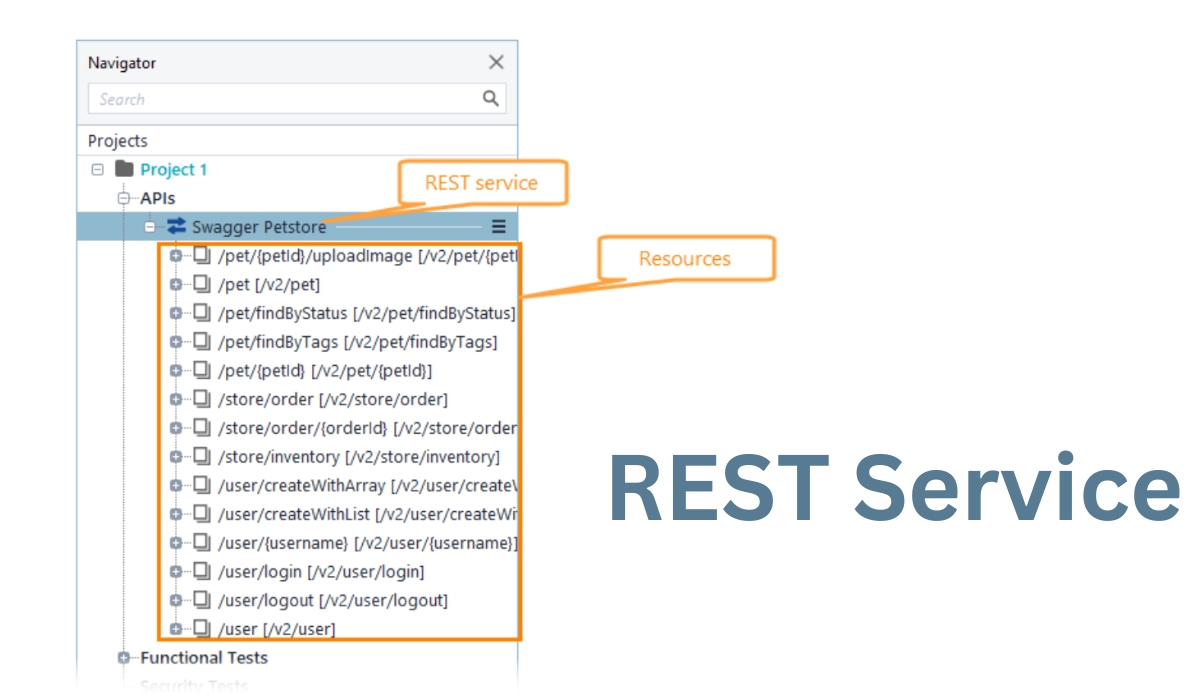
A REST service is a top-level node in the Navigator panel of REST services. Select it to view and alter the resources, endpoints, and service specifications.
🔰Endpoints
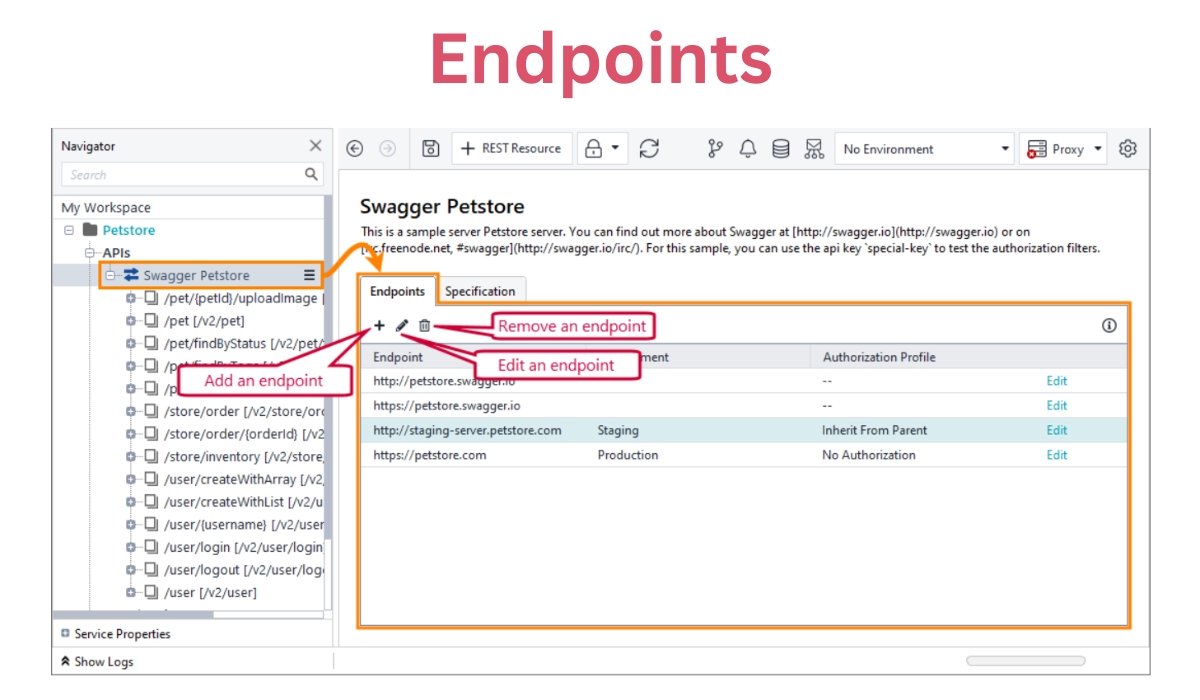
The Endpoints webpage is the central location for managing REST API endpoints.
We can set the following options:
OPTION
DESCRIPTION
Endpoint
The URL or destination of the endpoint.
Environment
An environment linked to the endpoint.
Authorization Profile
An authorization profile is used to gain access to the endpoint.
🔰Specification
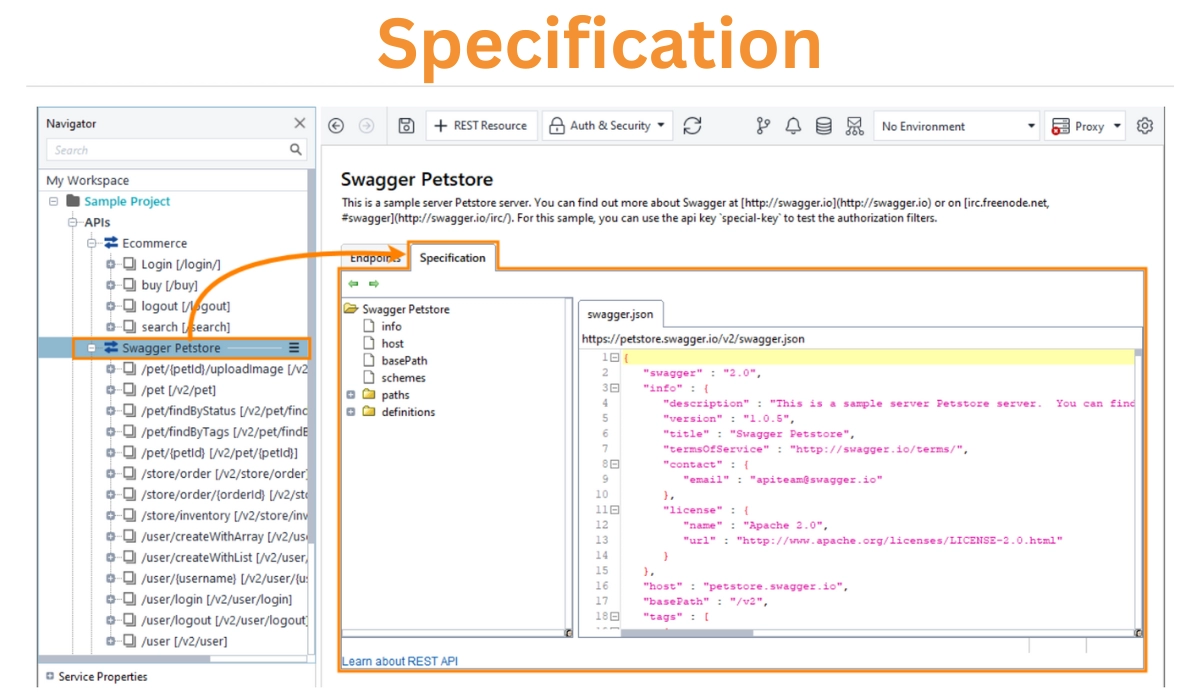
The REST Service editor's Specification page displays the OpenAPI, Swagger, or WADL definition of the service presently selected in the Navigator panel.
The content page lists the resources, methods, representations, and specifications. The specification will be updated when we add new resources and techniques to the API.
💫GraphQL APIs
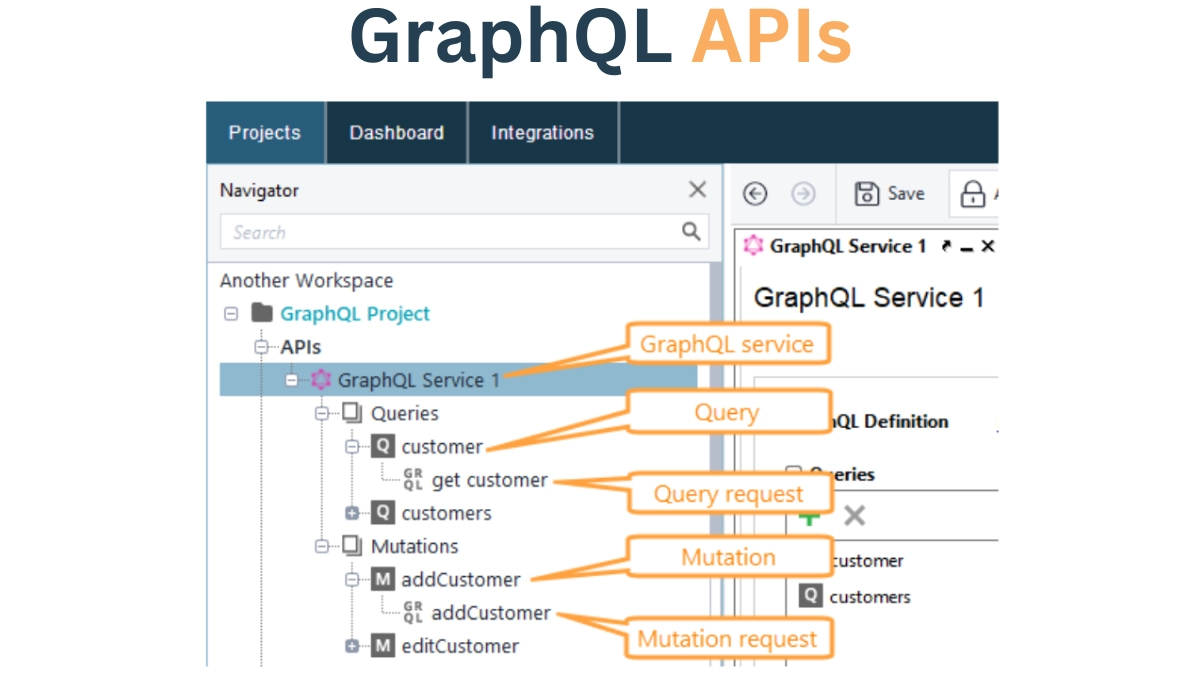
When we add a GraphQL API, Ready API displays the following components in the Navigator panel.
This section outlines Managing APIs in Ready API and how to use Ready API to handle GraphQL APIs.
🔰GraphQL service
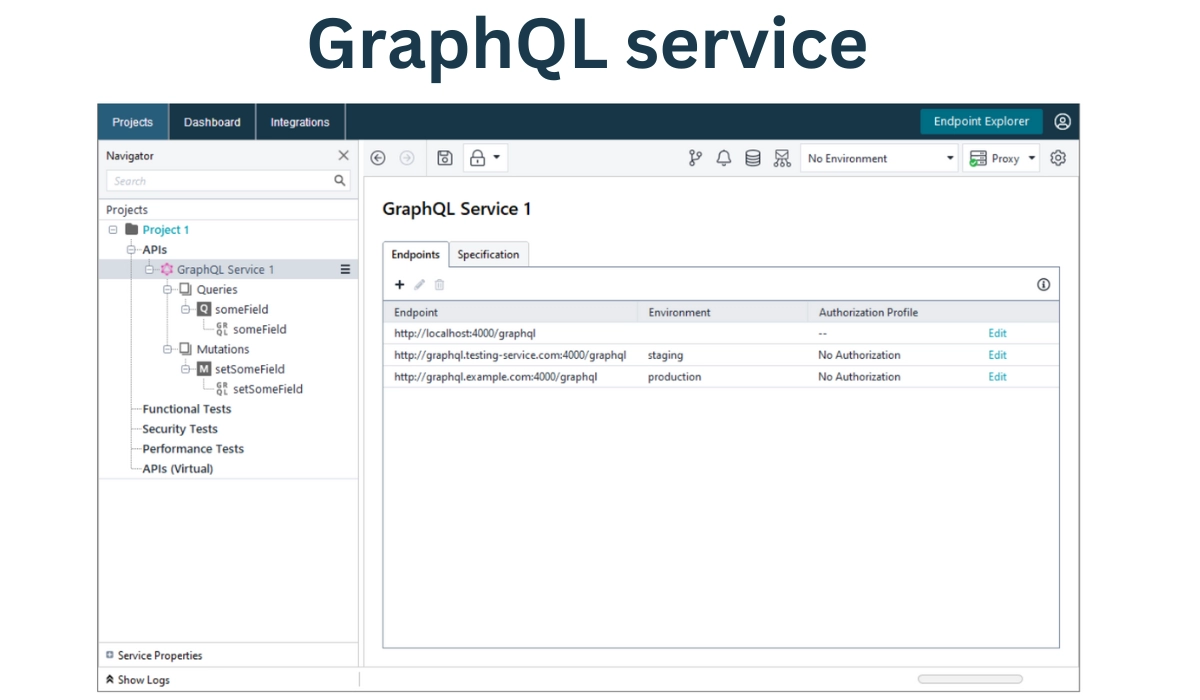
A GraphQL service is a top-level node in the Navigator panel's GraphQL services. Select it to view and alter newly introduced queries, mutations, endpoints, and the service's schema.
🔰Endpoints
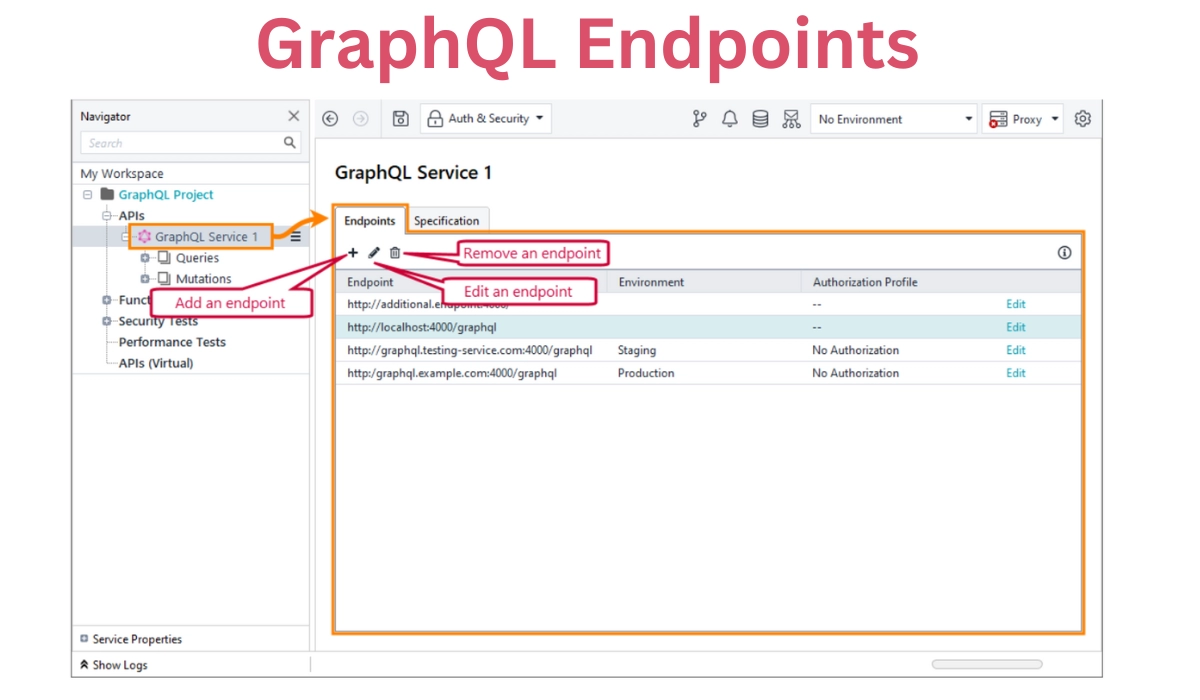
The Endpoints page is the central location for managing GraphQL API endpoints.
We can set the following options:
OPTION
DESCRIPTION
Endpoint
The URL or destination of the endpoint.
Environment
An environment linked to the endpoint.
Authorization Profile
An authorization profile is used to gain access to the endpoint.
🔰Specification
The GraphQL schema is displayed on the Specification page: declared types, queries, and mutations. This information aids in the development of queries and mutations.
💫gRPC APIs
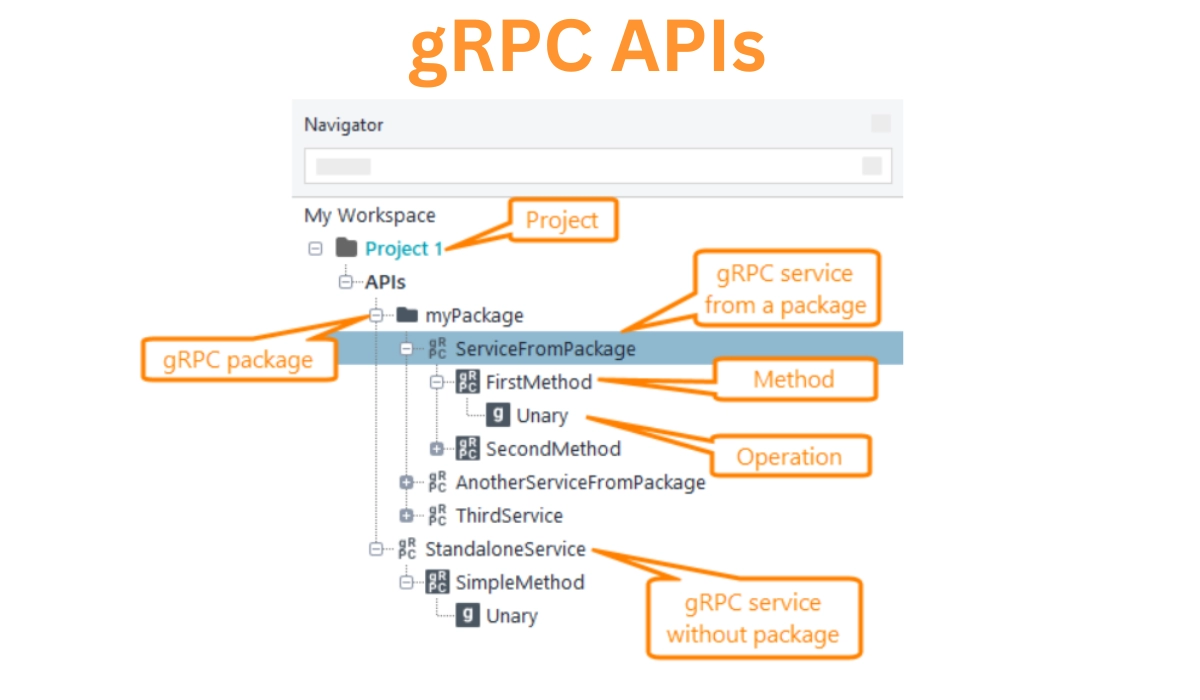
Ready API shows gRPC APIs in a tree form for easier reading. The gRPC APIs are arranged as follows.
🔰Packages
A package can be declared in a .proto file. Ready API represents a package as a folder in the APIs node. Even if we added them from separate .proto files, the package node has all of the gRPC services from that package.
🔰gRPC service
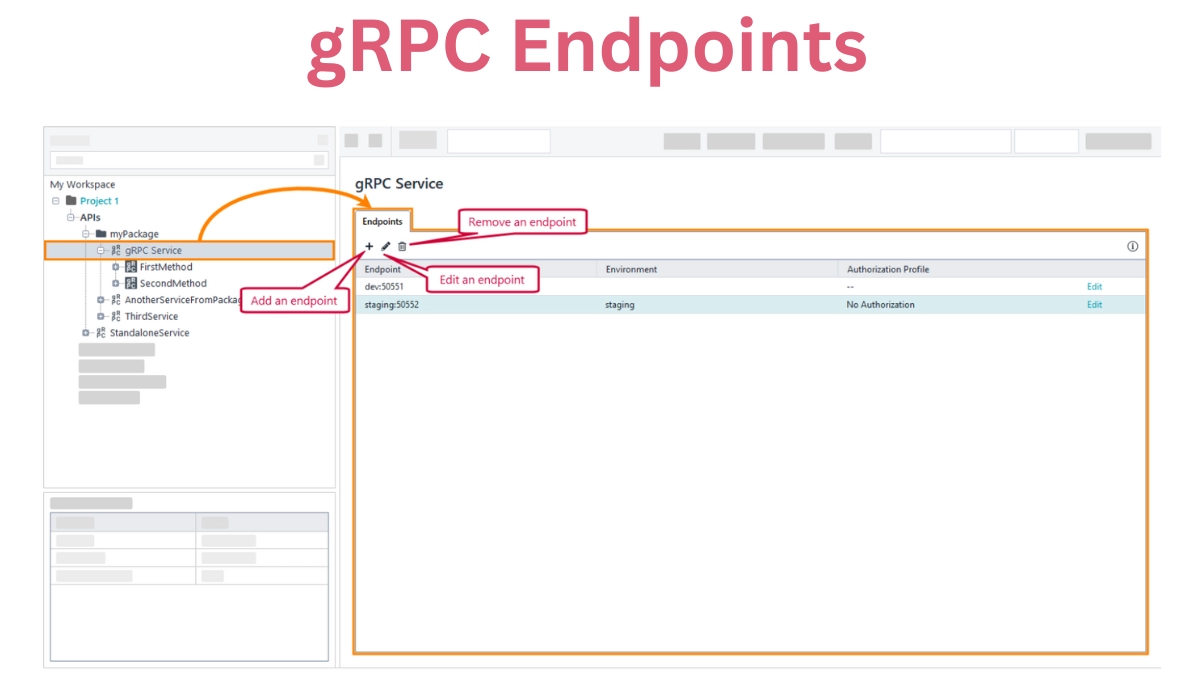
A gRPC service is a top-level node in the Navigator panel's gRPC services. Choose it to view and adjust endpoints.
🔰Endpoints
The Endpoints page is the central location for managing gRPC API endpoints.
We can set the following options:
OPTION
DESCRIPTION
Endpoint
The URL or destination of the endpoint.
Environment
An environment linked to the endpoint.
Authorization Profile
An authorization profile is used to gain access to the endpoint.
💫Kafka APIs
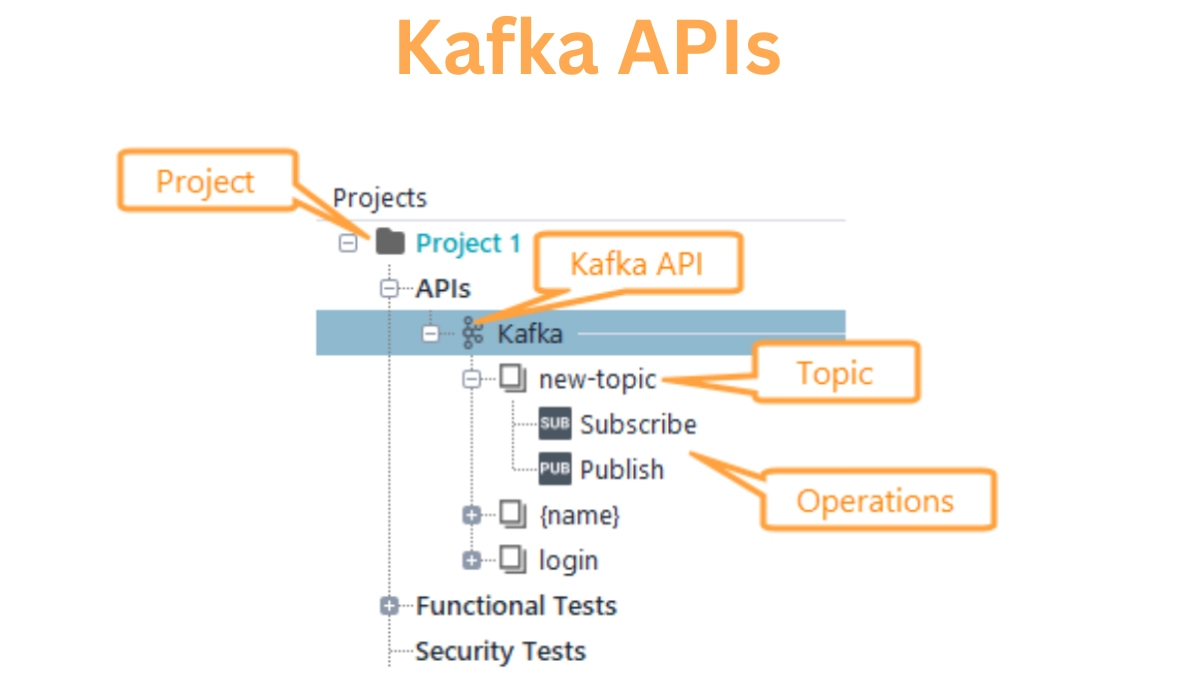
You can interact with Kafka APIs in the Navigator panel to organize them for improved accessibility and readability. The Kafka APIs are arranged as follows.
🔰Kafka service
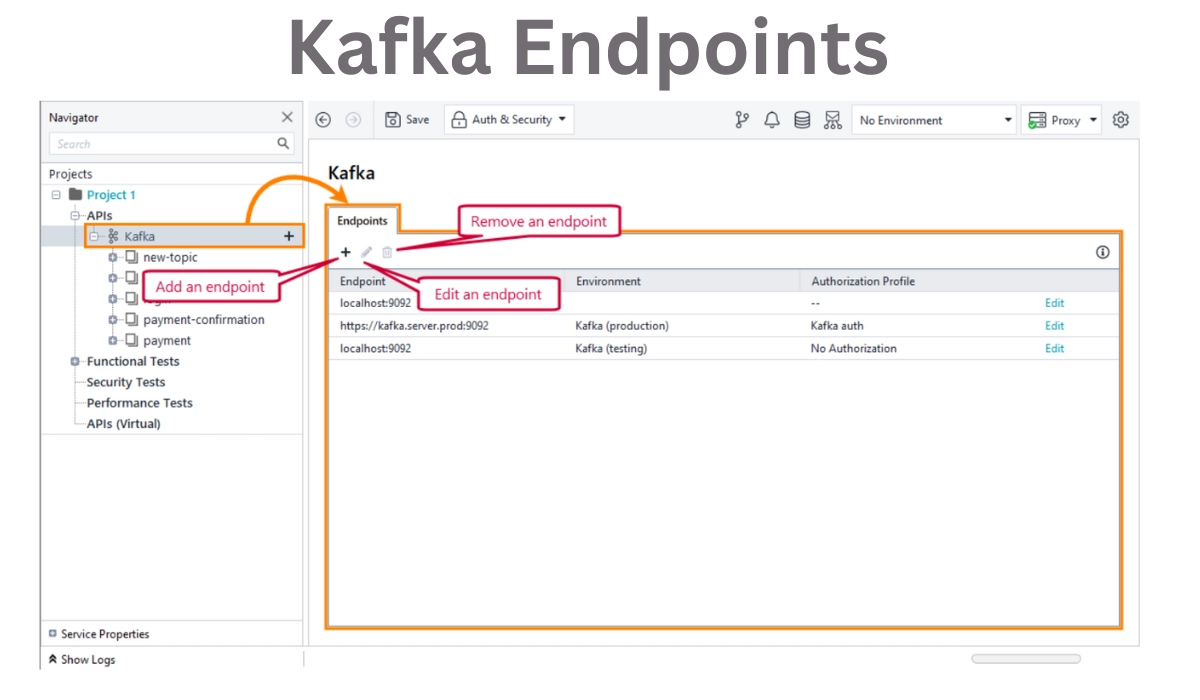
A Kafka service is a top-level node in the Navigator panel of Kafka services. Choose it to view and adjust endpoints.
🔰Channels
A channel (or topic in Kafka terminology) is a broker category to which publishers send and subscribers read data. Channels are child nodes of the Kafka API in Managing APIs in Ready API. Channels, in turn, have child nodes for publishing and subscription activities.
🔰Endpoints
The Endpoints tab is the central location for managing Kafka API endpoints.
We can set the following options:
OPTION
DESCRIPTION
Endpoint
The URL or destination of the endpoint.
Environment
An environment linked to the endpoint.
Authorization Profile
An authorization profile is used to gain access to the endpoint.
💫SOAP APIs
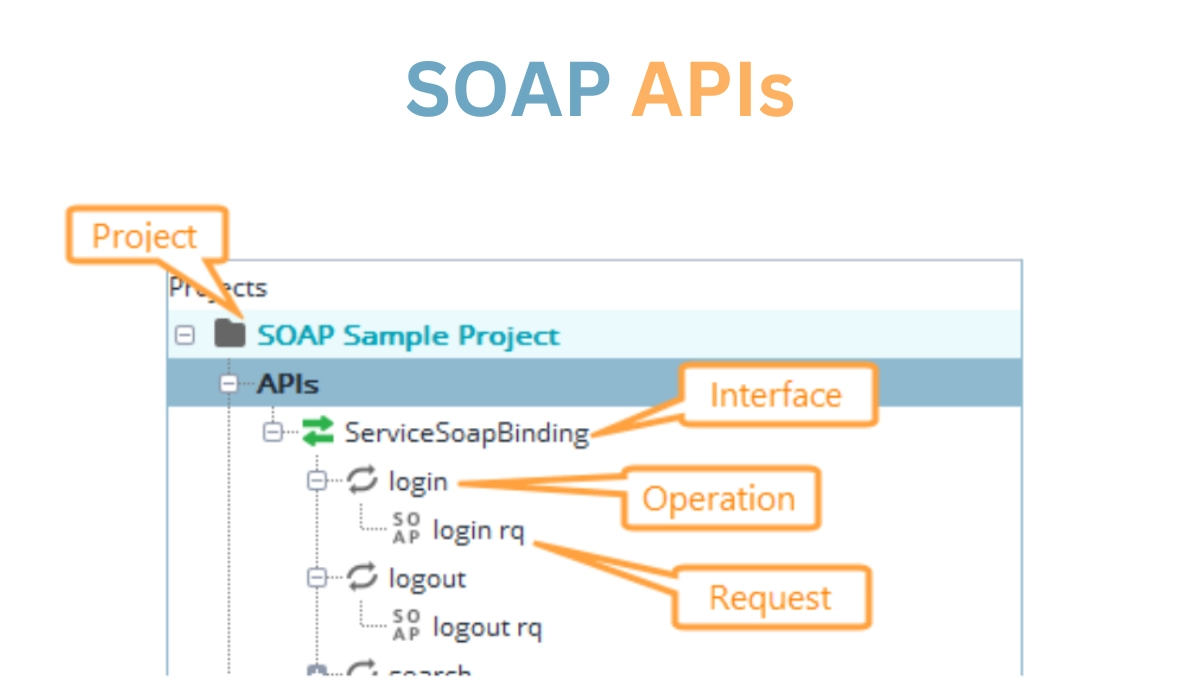
This subject explains how to organize SOAP APIs in the Navigator panel for better accessibility and readability. The following is how SOAP APIs are organized.
🔰Common tasks
This subject explains how to organize SOAP APIs in the Navigator panel for better accessibility and readability. The following is how SOAP APIs are organized:
💠Copying items
Cloning involves making an exact clone of an item in Ready API terms.
To duplicate an item:
Right-click the Navigator panel item.
Choose Clone <Item>.
Enter the new item's name here.
💠Renaming items
To rename it, do the following:
Right-click the Navigator panel item.
Choose Rename.
Make a new name for the object.
Renaming things does not affect the API definition. It just changes the item representation in Ready API.
💠Deleting items
Select an item and press SHIFT+DELETE to delete it. Then, confirm that you no longer require it.
💠Changing the item order
Most objects in the Navigator panel can be dragged to the desired position. Our tests do not affect the order of the items.
💫XML-RPC APIs
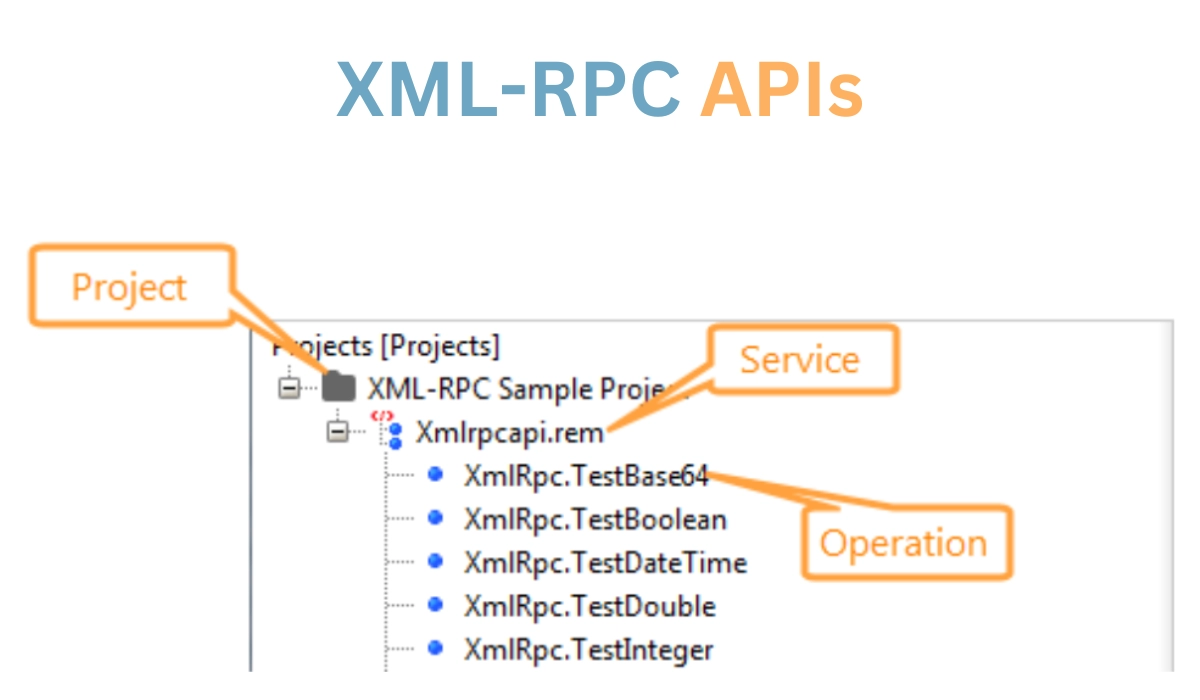
We can interact with XML-RPC APIs in the Navigator panel to organize them for improved accessibility and readability. The XML-RPC APIs are organized as follows in managing APIs in Ready APIs.
🔰Common tasks
We have the option of reorganizing our interfaces and requests. Because operations are stated in a WSDL definition, they cannot be added or removed. Furthermore, requests cannot be cloned from one process to another.
💠Renaming requests
To rename it, do the following:
Right-click the Navigator item.
Choose Rename.
Make a new name for the object.
Renaming things does not affect the API definition. It just changes the item representation in Ready API.
💠Renaming services
Renaming a service:
Choose a service.
Change the Name property's value.
💠Deleting items
Select an item and press SHIFT+DELETE to delete it. Then, confirm that you no longer require it.
💠Changing the item order
Most objects in the Navigator panel can be dragged to the desired position. Our tests do not affect the order of the items.
Frequently Asked Questions
What is the use of Ready API?
Ready API enables teams to build, organize, and run automated functional, security, and performance tests in a single centralized interface, hence speeding up API quality for Agile and DevOps software teams.
How can we increase the performance of our API?
Another technique to optimize the efficiency of your API calls is to send and receive only the data that interests us.
Is ready API and Postman the same thing?
Because Postman is built around each individual endpoint of an API, end-to-end testing is nearly impossible to manage and follow over time. Because Ready API is structured around each test case, tests can comprise several endpoints, resources, or data bits.
What exactly is a ready API tool?
Ready API is a no-code API testing platform that simplifies your testing procedures.
Conclusion
In the article “Managing APIs in Ready API,” we have started our discussion with the fundamental aspects of managing APIs in Ready API. Further, we discussed the different structures helping in Ready API. Formats included REST APIs, GraphQL APIs, gRPC APIs, Kafka APIs, SOAP APIs, and XML-RPC APIs.







 7+ registered

