Return Default Values for Optional and Stream
Optional and Stream are other key features introduced in Java 8. The Optional class is a container object that you can use to contain not-null objects, and you can use the Stream to process collections of objects. A similarity between these two classes is that they both have a particular object type representing an empty object. This empty object makes it easier for us to avoid the NullPointerException we constantly encounter.
For our example, to return default values for Optional, we are going to create a service(UnemploymentService) that injects the JobService from the previous program and has a method that calls findCurrentJobPosition() and then implements that service interface in a class(UnemploymenyServiceImp).
And in the same class(UnemploymenyServiceImp), we can also mock Stream, which will show similar behavior.
Here we will use the listJobs method that we included in our JobService interface program above. This method returns a stream that represents all the job positions of the employee.
{
..
Stream<JobPosition> listJobs(Person person);
..
}

You can also try this code with Online Java Compiler
We will use this method in a new method in our UnemploymenyServiceImp class that will query if a person is working on a job matching a given search string.
Now we have the program for our interface and class.
Program
//src/main/java/com.codingninjas.testrunner/UnemploymentService.java
package com.codingninjas.testrunner;


import java.util.Optional;


public interface UnemploymentService {


    boolean personIsEntitledToUnemploymentSupport(Person person);


    Optional<JobPosition> searchJob(Person person, String searchString);


}
You can also try this code with Online Java Compiler
Program
//src/main/java/com.codingninjas.testrunner/UnemploymentService.java
package com.codingninjas.testrunner;


import java.util.Optional;
import java.util.stream.Stream;


public class UnemploymentServiceImpl implements UnemploymentService {
    private final JobService jobService;

    public UnemploymentServiceImpl(JobService jobService) {
        this.jobService = jobService;
    }


    @Override
    public boolean personIsEntitledToUnemploymentSupport(Person person) {
        Optional<JobPosition> optional = jobService.findCurrentJobPosition(person);

        return !optional.isPresent();
    }
    @Override
    public Optional<JobPosition> searchJob(Person person, String searchString) {
        Stream<JobPosition> stream = jobService.listJobs(person);

        return stream.filter((j) -> j.getTitle().contains(searchString)).findFirst();
    }
}
You can also try this code with Online Java Compiler
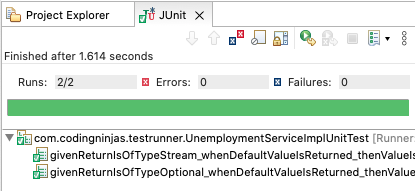
We can test both the returns with tests that check if a person has no current job position(forcing findCurrentJobPosition() to return an empty Optional). And if the person has not had any work at any jobs yet(listJobs() returns an empty Stream) using Mockito version 2.
Program
//src/test/java/com.codingninjas.testrunner/UnemploymentServiceImpUnitTest.java
package com.codingninjas.testrunner;

import org.junit.Test;
import org.junit.runner.RunWith;
import org.mockito.InjectMocks;
import org.mockito.Mock;
import org.mockito.junit.MockitoJUnitRunner;


import static org.junit.Assert.assertFalse;
import static org.junit.Assert.assertTrue;


@RunWith(MockitoJUnitRunner.class)
public class UnemploymentServiceImplUnitTest {
    @Mock
    private JobService jobService;


    @InjectMocks
    private UnemploymentServiceImpl unemploymentService;


    @Test
    public void givenReturnIsOfTypeOptional_whenDefaultValueIsReturned_thenValueIsEmpty() {
        Person person = new Person();


        assertTrue(unemploymentService.personIsEntitledToUnemploymentSupport(person));
    }

    @Test
    public void givenReturnIsOfTypeStream_whenDefaultValueIsReturned_thenValueIsEmpty() {
        Person person = new Person();


        assertFalse(unemploymentService.searchJob(person, "").isPresent());
    }
}
You can also try this code with Online Java Compiler
Output
Lambda Expressions
Lambda Expressions in Java 8 allow you to make more compact and readable statements. ArgumentMatchers and Custom Answers are two good examples of simplicity introduced by lambda expressions while using Mockito version 2.
Lambda With ArgumentMatcher
The Lambda expressions feature in Java 8 allows you to replace the inner class you would have to create before java 8 to implement ArgumentMatcher with a simple lambda expression.
Program
////src/test/java/com.codingninjas.testrunner/ArgumentMatcherWithLambdaUnitTest.java
package com.codingninjas.testrunner;


import org.junit.Test;
import org.junit.runner.RunWith;
import org.mockito.ArgumentMatchers;
import org.mockito.InjectMocks;
import org.mockito.Mock;
import org.mockito.junit.MockitoJUnitRunner;


import java.util.Optional;


import static org.junit.Assert.assertFalse;
import static org.junit.Assert.assertTrue;
import static org.mockito.Mockito.when;


@RunWith(MockitoJUnitRunner.class)
public class ArgumentMatcherWithLambdaUnitTest {


    @InjectMocks
    private UnemploymentServiceImpl unemploymentService;

    @Mock
    private JobService jobService;


    @Test
    public void whenPersonWithJob_thenIsNotEntitled() {
        Person peter = new Person("Peter");
        Person linda = new Person("Linda");

        JobPosition teacher = new JobPosition("Teacher");


        when(jobService.findCurrentJobPosition(
                ArgumentMatchers.argThat((p) -> p.getName().equals("Peter")))
             ).thenReturn(Optional.of(teacher));

        assertTrue(unemploymentService.personIsEntitledToUnemploymentSupport(linda));
        assertFalse(unemploymentService.personIsEntitledToUnemploymentSupport(peter));
    }
}
You can also try this code with Online Java Compiler
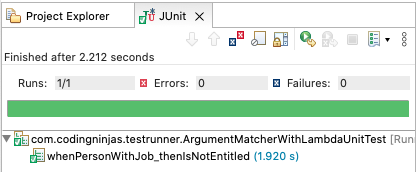
Output
Lambda With Custom Answer
Combining lambda expressions with the Custom Answer of Mockito will give you a similar result. Using lambda expression allows you to write all the mock behavior inline.
In the example below, we want to simulate calls to the listJobs() method to make it return a Stream that contains a single JobPosition if the person's name is "Peter". Otherwise, return an empty Stream. You would have to create an anonymous or inner class that implements the Answer interface without lambda expression. But here, we do not need a PersonAnswer inner class.
Program
////src/test/java/com.codingninjas.testrunner/CustomAnswerWithLambdaUnitTest.java
package com.codingninjas.testrunner;


import org.junit.Before;
import org.junit.Test;
import org.junit.runner.RunWith;
import org.mockito.InjectMocks;
import org.mockito.Mock;
import org.mockito.junit.MockitoJUnitRunner;


import java.util.stream.Stream;


import static org.junit.Assert.assertEquals;
import static org.mockito.ArgumentMatchers.any;
import static org.mockito.Mockito.when;


@RunWith(MockitoJUnitRunner.class)
public class CustomAnswerWithLambdaUnitTest {


    @InjectMocks
    private UnemploymentServiceImpl unemploymentService;


    @Mock
    private JobService jobService;


    @Test
    public void whenPersonWithJobHistory_thenSearchReturnsValue() {
        Person peter = new Person("Peter");


        assertEquals("Teacher", unemploymentService.searchJob(peter, "").get().getTitle());
    }


    @Before
    public void init() {
        when(jobService.listJobs(any(Person.class))).then((i) ->
          Stream.of(new JobPosition("Teacher"))
          .filter(p -> ((Person) i.getArgument(0)).getName().equals("Peter")));
    }
}
You can also try this code with Online Java Compiler
Output

FAQs
1. Is Mockito part of JUnit?
Ans: Mockito is not a part of the JUnit testing framework. Mockito is a mocking framework based on java, which you can use with other testing frameworks such as JUnit and TestNG. It uses Java Reflection API internally and allows you to create objects of a service.
2. How do I use Mockito annotations?
Ans: To use Mockito annotations, you need to initialize them using one of these three techniques.
- Using @RunWith(MockitoJUnitRunner.class) at the top of the unit test class.
- Using MockitoAnnotations.initMocks(this) in the @Before method of the unit test class.
- Using MockitoJUnit.rule() to create a MockitoRule class.
3. What is a Mockito spy?
Ans: A Mockito spy is similar to a partial mock. You can mock a part of the object by stubbing a few methods while using real method invocations for the other part. Calling a method on a spy invokes the actual method unless you explicitly stub the method, hence the term partial mock.
4. What is stubbing in Mockito?
Ans: Mockito provides a when and then stubbing pattern to stub a method invocation of a mock object. The mock API invocation goes into when(), a static Mockito API method and the value we want the mock to return goes into the then() API.
Key Takeaways
This article extensively discussed Java 8 features and their implementation in the Mockito mocking framework. Through elaborate examples, we have understood Mockito's Java 8 features like mocking interfaces with Mockito, returning default values for Optional and Stream, and leveraging Lambda Expressions.
We hope this blog has helped you enhance your knowledge regarding Unit Testing in Java with Mockito and JUnit. If you would like to keep learning, check out our articles on JUnit Introduction and Features, JUnit Environment Setup and Framework, and Basics of Java. Do upvote our blog to help other ninjas grow. Happy Coding!





 1+ registered

