Examples of using turtle
First, we import the turtle module; then, we can make a window if we want to; else, a default window will be created, and then we can give commands to the turtle to draw on this window; the thing is simply the way turtle moves is the way it draws.
Creating a window
import turtle
win=turtle.Screen()# creating a window to draw.
win.bgcolor("blue")
win.title("Hello Ninjas")
turtle.done()## this is important for the screen to be there.

You can also try this code with Online Python Compiler
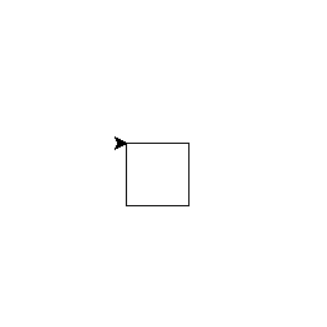
Drawing a square
# Python program to draw a square
# using Turtle Programming
import turtle
turt = turtle.Turtle()

for i in range(4):
    turt.forward(50)
    turt.right(90)

turtle.done()
You can also try this code with Online Python Compiler
Output:
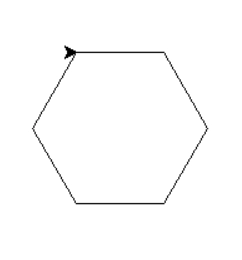
Drawing a hexagon
# generic program to draw a polygon.

import turtle
turt = turtle.Turtle()

num_sides = 6
side_length = 70
angle = 360.0 / num_sides

for i in range(num_sides):
    turt.forward(side_length)
    turt.right(angle)

turtle.done()
You can also try this code with Online Python Compiler
Output:
Drawing Sprial Square
# Python program to draw
# Spiral Square Outside In and Inside Out
# using Turtle Programming
import turtle   #Outside_In
wn = turtle.Screen()
wn.bgcolor("light green")
wn.title("Turtle")


turt= turtle.Turtle()
turt.color("blue")

def sqrfunc(size):
    for i in range(4):
        turt.fd(size)
        turt.left(90)
        size = size-5

sqrfunc(146)
sqrfunc(126)
sqrfunc(106)
sqrfunc(86)
sqrfunc(66)
sqrfunc(46)
sqrfunc(26)
You can also try this code with Online Python Compiler
Output:

Drawing a Spiral
# Python program to draw
# Spiral Helix Pattern

import turtle
window = turtle.Screen()
turtle.speed(20)
for i in range(20):
    turtle.circle(5*i)
    turtle.circle(-5*i)
    turtle.left(i)

turtle.done()
You can also try this code with Online Python Compiler
Output:

You can compile it with online python compiler.
Frequently Asked Questions
What is the turtle library in Python?
Turtle is a pre-installed Python module that allows users to utilise a virtual canvas to make drawings and shapes. The turtle is both the name of the onscreen pen that you use to draw with and the library's name.
What is turtle coding?
Turtle graphics are vector graphics that use a relative cursor (the "turtle") on a Cartesian plane in computer graphics (x and y-axis). A significant component of the Logo programming language is turtle graphics.
What can turtle in Python do?
Turtles can draw complex shapes with the help of programmes that repeat simple movements. Combining these and related commands can readily draw Intricate shapes and graphics.
Why do we use turtle?
Turtle is a pre-installed Python module that allows users to draw drawings and shapes on a virtual canvas. The turtle is the name of the onscreen pen you use to sketch with.
Conclusion
So, in a nutshell, the turtle is a graphics-oriented library which helps us draw images with the help of repeated commands and can be handy when we are trying to replicate some patterns.
Also read palindrome number in python.
Hey Ninjas! Don't stop here; check out Coding Ninjas for Python, more unique courses and guided paths. Also, try Coding Ninjas Studio for more exciting articles, interview experiences, and fantastic Data Structures and Algorithms problems.
Happy Learning!








 1+ registered

