

Table of contents
1.
Introduction
2.
Resolving the Error
2.1.
astype() Method
2.2.
int() Method
3.
FAQs
4.
Key Takeaways
Last Updated: Mar 27, 2024
Easy

'numpy.float64' Error Resolution

Career growth poll
Do you think IIT Guwahati certified course can help you in your career?

Introduction

The 'numpy.float64' object cannot be interpreted as an integer typeerror occurs when we try to pass some float value to a function that expects integer values.


For demonstration purposes we can use the range() function. We pass three parameters in the range() function: start-value, end-value and jump-value.

for i in range(2, 12, 3):
  print(i)
You can also try this code with Online Python Compiler
Run Code


The start-value and jump-value are optional parameters; by default, the start-value is 0, and the jump-value is 1.

for i in range(5):
  print(i)
You can also try this code with Online Python Compiler
Run Code


import numpy as np
arr = np.array([1.2, 2.4, 4.8, 9.6, 19.2, 38.4])
You can also try this code with Online Python Compiler
Run Code


for i in range(len(arr)):
  print(arr[i])
You can also try this code with Online Python Compiler
Run Code


The range() function expects integer values in parameter. If we try to pass float values, we’ll get the error.
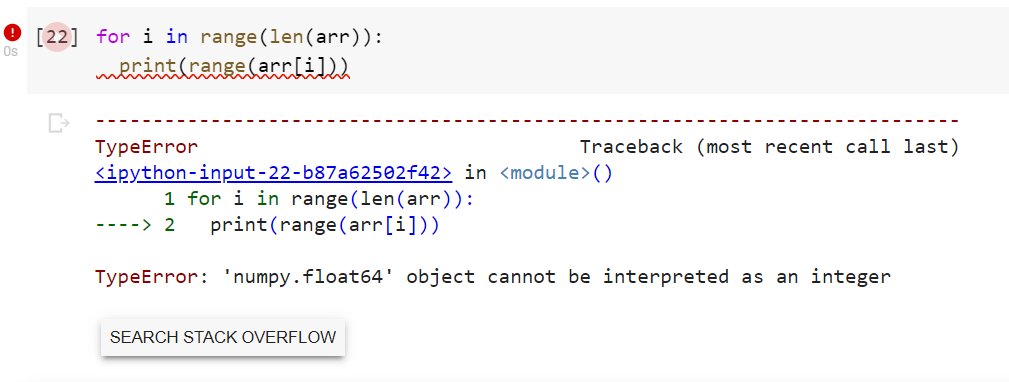
TypeError: 'numpy.float64' object cannot be interpreted as an integer


Resolving the Error

The above TypeError can be easily resolved by using either of the following two methods:

astype() Method

As the name suggests, we use astype() function to convert one data type to other.

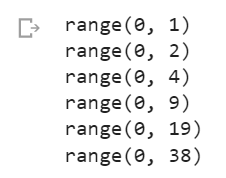
We can modify the array to convert all the float values to integer values by using astype() function.

import numpy as np
arr = np.array([1.2, 2.4, 4.8, 9.6, 19.2, 38.4])
You can also try this code with Online Python Compiler
Run Code


arr = arr.astype(int)
You can also try this code with Online Python Compiler
Run Code


for i in range(len(arr)):
  print(arr[i])
You can also try this code with Online Python Compiler
Run Code

for i in range(len(arr)):
  print(range(arr[i]))
You can also try this code with Online Python Compiler
Run Code

int() Method

By using int() function, we can explicitly typecast each float datatype to int without changing the array's contents.

import numpy as np
arr = np.array([1.2, 2.4, 4.8, 9.6, 19.2, 38.4])
You can also try this code with Online Python Compiler
Run Code


for i in range(len(arr)):
  print(range(int(arr[i])))
You can also try this code with Online Python Compiler
Run Code

FAQs

1. What is ‘numpy.float64’ error?

The 'numpy.float64' object cannot be interpreted as an integer typeerror occurs when we try to pass some float value to a function that expects integer values.


2. What are the advantages of NumPy?

NumPy supports the OOPS approach. For instance, the ndarray is a class that contains several properties and functions to make changes in the array. Numpy is much faster, and the code written using NumPy more closely resembles standard mathematical notation (making it more accessible, typically, to correctly code mathematical constructs).


3. What is the difference between a list and an array in Python?

A python list can contain different data types in a single list, whereas all the elements in an array are homogenous. Compared to a list, an array is faster and takes up less memory space.

Key Takeaways

Congratulations on making it to the end of the blog. If you want to read the basics of the PyTorch, check out this blog.


Check out this link if you are a Machine Learning enthusiast or want to brush up on your knowledge with ML blogs.


If you are preparing for the upcoming Campus Placements, don't worry. Coding Ninjas has your back. Visit this link for a carefully crafted and designed course for campus placements and interview preparation.

Live masterclass

