Do you think IIT Guwahati certified course can help you in your career?
Introduction
On Chef Habitat Builder, an origin is where we can store, share and build packages. It is a space of separate names within the chief habitat builder, and although an origin can be deleted or transferred, it cannot get renamed after its creation. The origin "core", all the basic packages controlled and paid for by the heads of the chief habitat, is an original example. By invitation, we can join the existing origins or start our own.
Creating an Origin
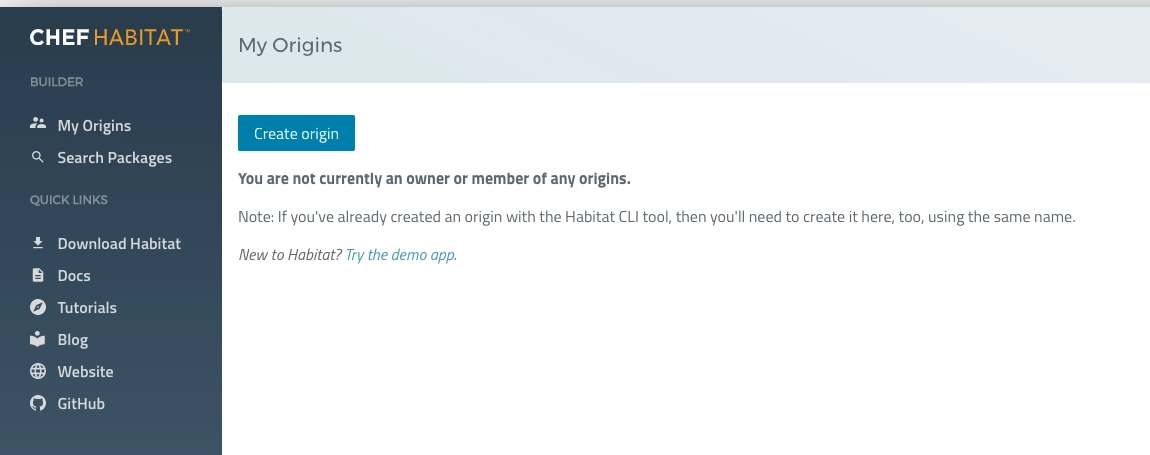
Click on the original Create button on the My Origins page to launch the Create an original form. We must visit the creator of the chief habitat and "my origins" to find it.
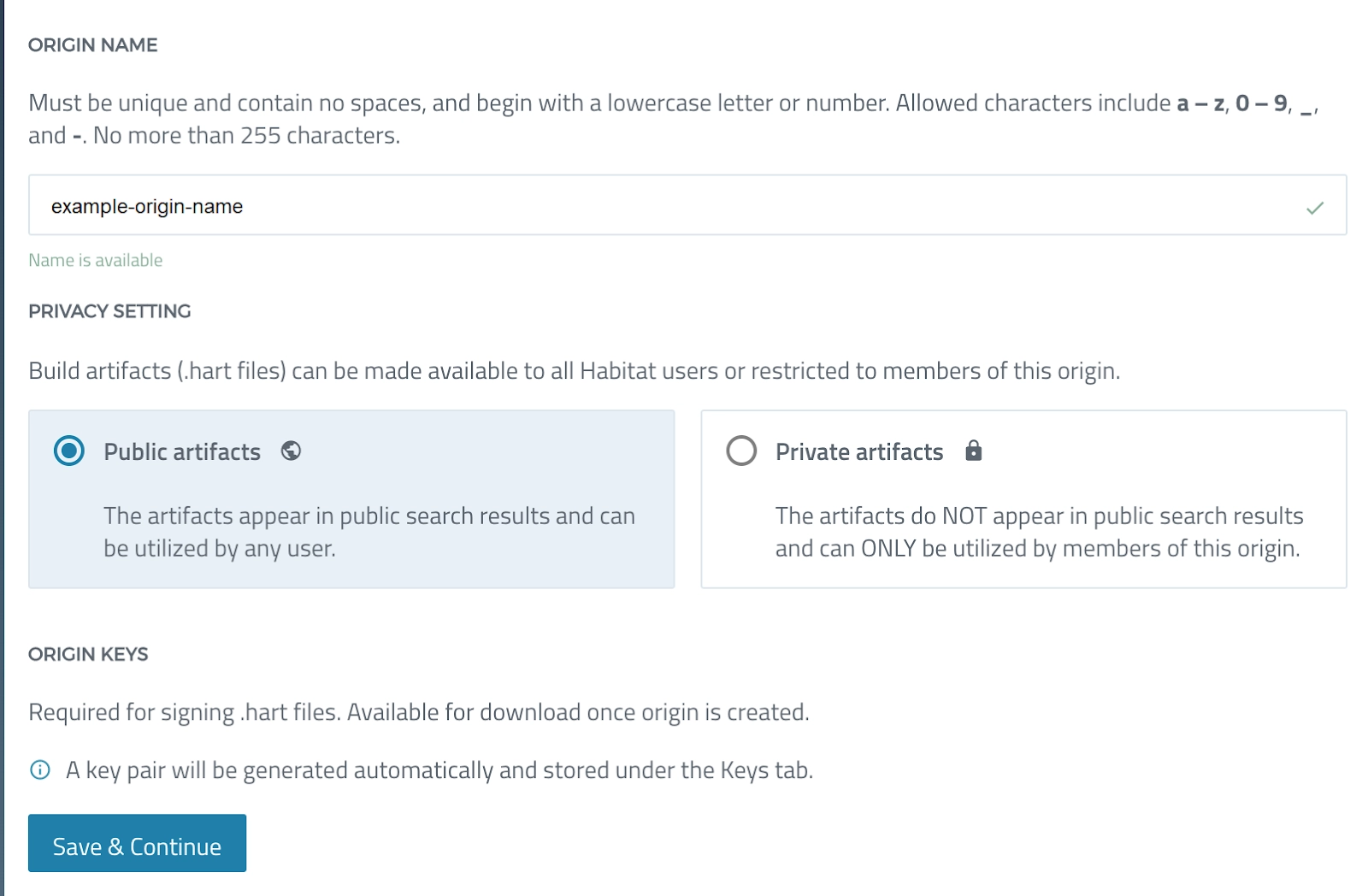
First, give our packages a different name. The chief habitat will only allow us to create an origin with a unique name. Team names, user names, and abstract notions are instances of the chief's habitat manufacturer.
Then, for new packages, define a default confidentiality option. The user can replace this parameter. This can be done when downloading individual packages using the CLI or connecting a plan file that judges a private package.
What makes private packages different from public people is:
Anyone can locate and use public packages. Private packages cannot be discovered and used by users whose origin originally.
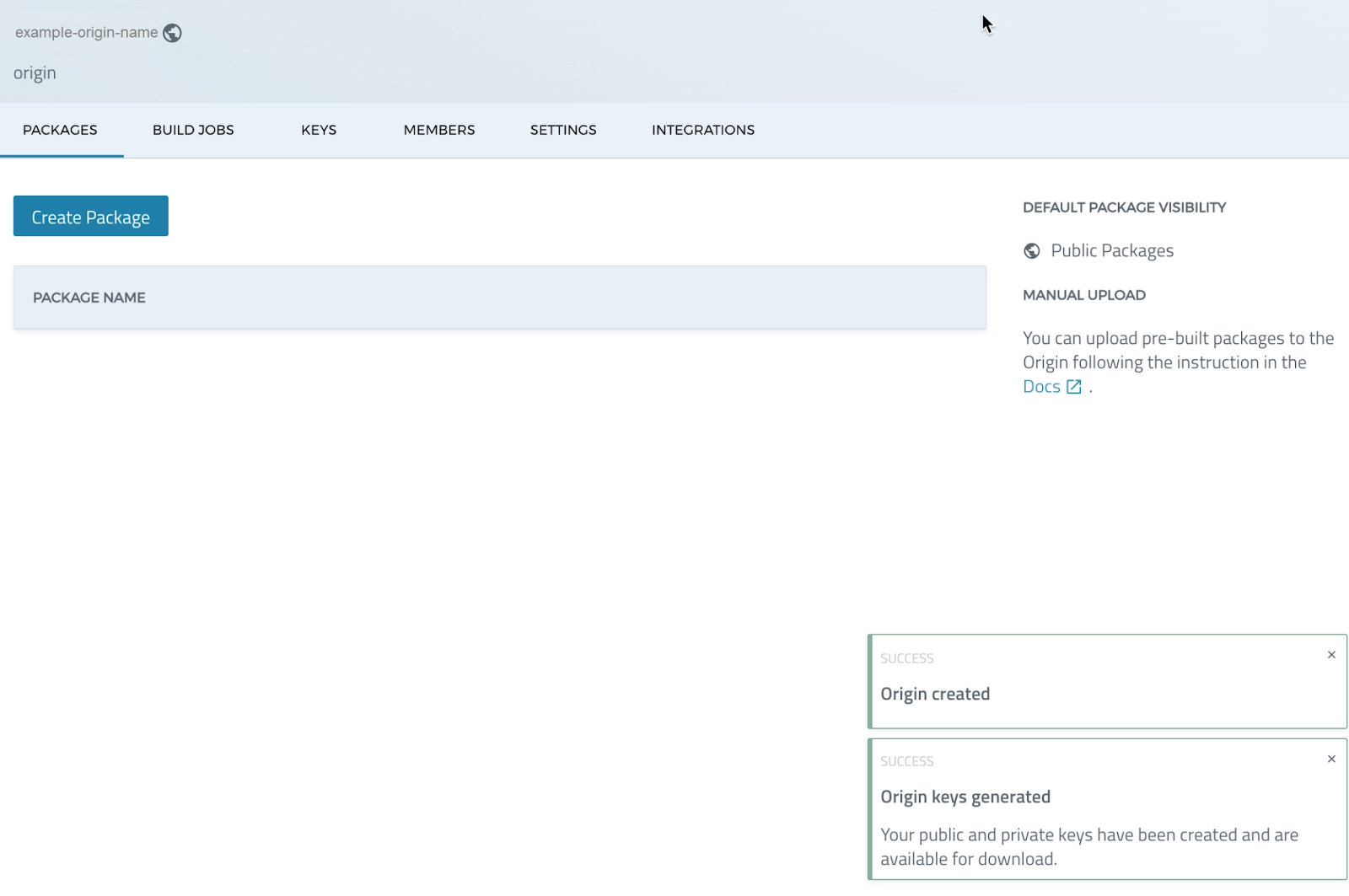
When we choose Save and continue in the creator of the Chief Habitat, a few things happen in order:
It first creates the origin. Then it creates a pair of original keys.
Third, it returns to the original page of Chef Habitat Builder.
Create Origin with Chef Habitat CLI
Use the Hab Origin commands of the command line to manage the origins. Using the Hab Origin Create command, we can create an origin from the command line.
hab origin create <origin>
This command's release differs differently from that of generating an origin on Chef Habitat Builder's website.
The CLI command originates on the Chef Habitat Builder website.
It does not produce a pair of unique keys.
Origin Keys
The Builder of the chief habitat automatically produces original keys when we build an origin. The original key has asymmetrical cryptography. It has a key of public origin. A key that we can distribute freely. A private key is also used as a "signature key". This is the one that the user should only distribute to users of the origin. In the Key Origin tab, all users of the Chief Habitat Builder who have origin can see the revisions of the keys of public origin. We can get the key to public origin by going to build> Origin> Keys. However, only users with the original "administrator" or "owner" roles can access, download or modify the original key pair.
Chef Habitat employs origin keys:
When we build an artefact in the local environment, Chef Habitat signs it with the private origin key.
Chef Habitat uses the public origin code to verify that an artefact is signed with the password of private origin when it uploads it to chef habitat Builder or Builder in companies.
Chef Habitat uses the public origin key to validate the integrity of any package before installing it into a chef habitat supervisor.
When we download an artefact to the local Chef Habitat Studio, Chef Habitat uses the public origin key to validate the artefact's integrity. This is done before moving with the installation.
Origin key names in Chef Habitat Builder follow the format below:
<origin>-<datetime>.pub (this is the public key)
<origin>-<datetime>.sig.key (this is the private key, which is also called a "signing key")
"20220016112826" is the key's creation date and time, which was "2022-09-16 11:28:26."
The public key file extension is pub.
The file extension sig.key refers to the private key, often known as a "signing key."
The Keys Tab
Chef Habitat Builder generates an origin key pair and saves both keys when we build an origin. Navigate to the origin and pick the Keys tab to view the origin keys in Chef Habitat Builder. (Creator > Origins > Keys) we can always view and download public origin keys, but we will only see private keys for origins where we are an "administrator" or "owner."
Download Origin Keys from the Keys Tab
Download the private or public origin key by clicking the download icon at the right end of the key details under the Actions header.
Upload Origin Keys from the Keys Tab
We can upload the origin keys generated by the command line for chef Habitat Builder by selecting the loading a private key or loading a public key icon and pasting the key on the display form.
Managing Origin Keys with the CLI
Chef Habitat CLI commands can be executed from our local environment or the Chef Habitat Studio.
Find the Origin Keys
Chef Habitat saves the public and private origin keys in "/.hab/cache/keys" on Linux, "C:hab\cache\keys" on Windows, and "/hab/cache/keys" within the Chef Habitat Studio environment.
Chef Habitat Builder provides an origin key pair for us when we build an origin using the site. The Chef Habitat CLI generates origin key pairs using two distinct commands for two distinct purposes:
As part of configuring the "hab" CLI, use this to produce the first origin key pair.
To generate a key pair for an origin, use the "hab origin key generate ORIGIN>" command.
Use the following hab command to produce origin keys:
"hab origin key generate ORIGIN>"
Download Origin Keys
To obtain the public origin key from the command line, type:
"hab origin key download ORIGIN>".
Upload Origin Keys
The Hab Origin Key generate command produces a key pair and stores it locally but does not upload the key to the original key to the chef habitat builder.
1) New keys can only be uploaded to an origin by "administrators" and "owners."
2) We must upload the public origin key to upload artefacts for that origin.
3) The Builder requires the private origin key to enable new artefact builds from packages with plans tied to that origin.
Upload the public origin key with the hab command: "hab origin key upload <ORIGIN>"
Upload the private origin key with the hab command: "hab origin key upload --secret <ORIGIN>"
We may experience an upload failure on macOS. To correct this error:
Make sure the "HAB_AUTH_TOKEN" environment variable is set and initialised correctly.
Add the "SSL_CERT_FILE" environment variable to the interactive shell configuration file, such as.bashrc.
Role-Based Access Control for Chef Habitat Builder
Membership in Role-Based Access Control (RBAC) is a token-based authentication procedure that operates at the origin level. RBAC increases operational security by allowing us to grant different levels of access to each user of an origin. The role of membership defines the level of access to resources within an origin. When joining or building an origin for the first time, chef Habitat Builder recognises his access token and assigns a membership role for that origin. When we join an origin, we are assigned the "read-only" status by default, and when we create an origin, we are given the "owner" position. Role access is cumulative and progressive, with each RBAC role inheriting all primary roles' privileges and adding new access privileges.
RBAC Origin Member Roles
Reading only: Reading membership is the predetermined membership role for users who join an origin. Packages, channels, membership of origin, works, keys, integrations, invitations, roles and configurations can be read only by users. "Reading only" users cannot add, alter or eliminate anything at source, including package load or inviting users to the origin.
Member: A 'member' origin member can load and develop packages in the 'unstable' channel and have only reading 'access, but they cannot promote packages to other channels.
Maintainer: The 'maintainers' can write in packages, create a membership, works, integrations, and invitations and promote 'unstable' packages to other channels in addition to the 'member' access. Maintainers can only read key and origin configurations; They cannot create, change or eliminate them. The 'maintainers' of origin can read membership roles and see and send invitations. Still, they cannot change their own or the membership of origin of anyone else. 'Maintainers' cannot read or write secrets of origin.
Administrator: The role of 'Administrator', in addition to the 'maintenance' access, has to write access to origin keys and add, update and eliminate the membership of origin. An 'administrator' can read and write secrets of origin.
Owner: The 'owner' of the origin has full access to reading and writing to the origin. Only owners can eliminate the origin or transfer the property to another member.
Manage Origin Membership
RBAC is backed by the hab CLI. For managing origin roles, it is recommended to use the CLI. The Chef Habitat Builder site does not allow us to manage origin roles.
With hab origin invitations
To invite users to our origin and to answer invites, use the hab origin invitations command. This command is available to Origin Administrators and Owners for managing invitations.
All Chef Habitat Builder users can accept, decline, and view invitations for their accounts.
Default Package Settings
The visibility of build artefacts is controlled by the Default Package Settings (.hart files). Everyone with an origin membership can access the chef origin settings, but onlychef origin administrators and owners can add, change, or delete them.
Public packages appear in search results and are accessible to all Chef Habitat Builder users.
Private artefacts are not searchable and are only accessible to users with chef origin membership.
Change the origin's default setting from Public Packages to Private Packages. Each origin requires the default configuration. Packages' default visibility settings may differ from the origin to which they belong. On the package settings page (Builder > Origin > Package > Settings), we can modify the default visibility setting for an individual package.
Origin Secrets
Everyone with origin membership can access origin secrets, but only chef origin administrators and owners can add, amend, or delete settings. Builder > Origin > Settings > Origin Secrets allows us to encrypt and save secrets as environment variables. Origin secrets are beneficial for plans that require build-time access to secured resources, such as private source-code repositories and cloud storage providers.
Only Chef Habitat Builder has access to the encrypted origin secrets. An origin encryption key is used to encrypt the origin secrets in the local environment. The origin keeps the origin secrets and makes them available to any package.
Manage Origin Secrets with Chef Habitat CLI
In Chef Habitat Builder, we may inspect and delete the list of origin secrets. However, the Chef Habitat CLI is the primary means of dealing with origin secrets.
List Secrets
We can use the following command to list all of the secrets in origin:
"hab origin secret list --origin <ORIGIN>"
Set Origin Secrets as Environment Variables
In the local environment, add the origin secrets as environment variables:
export HAB_ORIGIN=<ORIGIN>
export HAB_AUTH_TOKEN=<TOKEN>
hab origin secret list
Save Origin Secret
Give the origin secret a name and the key value to save it:
Chef Habitat is a patented automation solution that allows companies to use a standardised approach to the application's definition, packaging and delivery in all applications and environments. The continuous delivery scale requires consistent patterns independent of the tool or platform.
What is a habitat chef supervisor?
A habitat supervisor represents the service group, which allows users to make a command against any unique node and then automatically repeat the action to all nodes in the group. Administrators who implement chef habitat must learn to manage service groups.
What is the intention of the habitat supervisor?
The habitat supervisor is in charge of administering habitat packages. The supervisor launches the program contained in a habitat package, prepares the necessary settings, and ensures that its application behaves correctly at any point in its life cycle.
Conclusion
Habitat is a system that streamlines applications' development, deployment, and management. It enables the teams that must collaborate to deliver and speeds up the rate at which we can obtain a better experience. We learned about Origin in Chef Habitat in the article. We learned about Chef Origin Keys and Chef Origin Creations. We also learned about several methods such as downloading, uploading and importing Chef origin Keys. Finally, we learned about Chef origin settings and membership roles in origins.









 1+ registered

