Do you think IIT Guwahati certified course can help you in your career?
Introduction
Do you know which method converts numerical strings into floating numbers in Javascript? What are the parameters of that method? What is the return type? Method of use? Don't worry. We are here to provide you with all these details. In the present era, Javascript is one of the most widely used programming languages. parseFloat Javascript is a frequently used method in Javascript which converts the numerical input string into floating numbers. It is mainly used in Javascript for handling form data on the client and server sides.
This article will discuss the parseFloat Javascript method. We will also review its Importance, Applications, Comparison and Examples.
parseFloat() is a built-in function in Javascript that takes a string as an argument and returns a floating point number.
Syntax
The following is the syntax of parseFloat in Javascript:
parseFloat(string);
It is generally used using an extra variable to store the parsed value:
let num = parseFloat(string);
The above syntax is straightforward to use. It takes a string as Input. parseFloat method will return the floating-point Number. Remark: It cannot be used for other data types, such as arrays, objects, etc.
Parameters
parseFloat method accepts a string as an input to be parsed. If we give the method another parameter, the parameter will be ignored.
Below is the example for better illustration:
JS
JS
// declaring variable to store numeric string
let str="3.14";

// passing unnecessary parameters
let num=parseFloat(str,10);

// displaying the output
console.log(num);
You can also try this code with Online Javascript Compiler
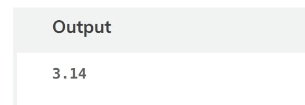
Here, "str" has a value of 3.14. "str" and another value ", 10", are passed as a second parameter. parseFloat method will ignore "10". As we can see, when the variable "num" is console logged, the output turns out to be "3.14", which was in the variable "num", and the second parameter was ignored.
Return Type
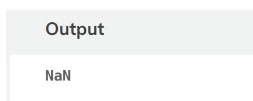
The parseFloat method changes a string into a floating-point number. The return type will be a number. It will return "NaN" if the parameter is invalid, which is not a number. Below is the example for illustration:
// declaring variable to store non-numeric string
let str="not a number";

// applying parseFloat method
let num=parseFloat(str);

// displaying the result
console.log(num);
console.log(typeof num);
You can also try this code with Online Javascript Compiler
The parseFloat method does not support the above string str. It will give the output as "NaN".
Importance
parseFloat Javascript has several importance, which are given below -
It frequently happens in JavaScript programming that we must convert a string to its matching Number. For instance, changing the text "6.89" to the integer format of 6.89. Because JavaScript is used for client-side web development, these situations do happen.
We have to deal with data forms submitted by users while doing client-side web programming. The data that comes from the form is generally in string format.
Even the information from numerical form fields, such as age, rating, etc., is in a string rather than a number format. So that more data processing can occur, it is necessary to convert such data into a number format.
Application
Since JavaScript is employed on the client side, there is a significant chance that numerical data from the form fields - such as currency amount, metric, etc.- is collected from the user in string format. Therefore, we must first transform the data into number format to get that numeric string data directly on the client side. We also provide data to the server side, where conversion is also necessary. Thus parseFloat Javascript method may be used in client-side and server-side web programming.
Here are some examples explaining the applications of the parseFloat method in Javascript:
Parsing a Numeric String to a Floating-Point Number
Let's look at a normal example of converting a simple string into a floating point number.
Code
JS
JS
// declaring a variable for storing a string value
let ninjaString = "3.14159";

// applying parseFloat method
let num = parseFloat(ninjaString);
console.log(num);
You can also try this code with Online Javascript Compiler
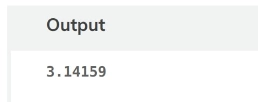
Here, the parseFloat method converts the string "3.14159" to a floating-point number, which is stored as "num". Then console.log() method provides the output of "num" that is 3.14159.
Parsing a String with Leading Whitespace to a Floating-point Number
Here is an example of a string with leading spaces in front of the number.
Code
JS
JS
// declaring a variable to store numeric string with leading whitespace
let ninjaString = "    3.14";

// applying parseFloat method
let num = parseFloat(ninjaString);
console.log(num);
You can also try this code with Online Javascript Compiler
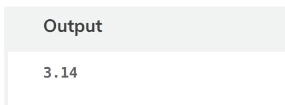
Here, the input string has non-numeric values on both sides. parseFloat method will not recognize the string since non-numeric values are before the numeric values.
Parsing a String with a Comma Separator to a Floating-Point Number
Now look at this example which contains commas in the input string.
Code
JS
JS
// declaring variable to store numeric string separated by commas
let ninjaString = "1,000.5";

// applying parseFloat method
let num = parseFloat(ninjaString.replace(',', '.'));
console.log(num);
You can also try this code with Online Javascript Compiler
Here, in the string "1,000.5", a comma is used. But the parseFloat method needs a dot as the decimal separator. Therefore we use replace() method to replace the comma with a dot, and the result is then parsed to parseFloat, giving a floating point number as the output.
Examples
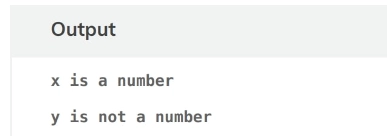
Determining whether the input string is a floating digit or character using isNaN.
Code
JS
JS
// storing numeric string in variable
var x = parseFloat("3.45"); //parsed value is stored in x

// checks if the value of x is “NaN”
if (isNaN(x))
   console.log("x is not a number" + "<br>");
else
   console.log("x is a number" + "<br>");

// parsed string is stored in y
var y = parseFloat("CodingNinja");

// checks if the value of y is “NaN”
if (isNaN(y))
    console.log("y is not a number" + "<br>");
else
    console.log("y is a number" + "<br>");
You can also try this code with Online Javascript Compiler
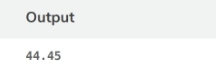
If two decimals are present in the numerical input string, the second decimal is invalid, and the parseFloat method converts the string to that position. String 44.45.32 will be parsed to 44.45.
Code
//string with 2 decimal
console.log(parseFloat( "44.45.32" ) + "</br>" );
Output
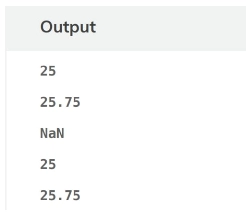
Demonstration Using Number.parseFloat(strng_value).
Code
JS
JS
// using string as simple integer
var a="25";

// using string as floating point number
var b="25.75"

// using string as string
var c="Coding Ninja";

// combining string and integer
var d="25Ninjas";

// combining string and floating-point number
var e="25.75Ninjas";

// displaying the output
console.log(Number.parseFloat(a)+"<br>");
console.log(Number.parseFloat(b)+"<br>");
console.log(Number.parseFloat(c)+"<br>");
console.log(Number.parseFloat(d)+"<br>");
console.log(Number.parseFloat(e));
You can also try this code with Online Javascript Compiler
Below is a comparison between the two most common string conversion methods. One is the parseFloat Javascript method, and the other is the parseInt Javascript method -
Parameter
parseFloat()
parseInt()
Return Value
Floating point number or “NaN”.
Integer or “NaN”.
Input Parsing
Parses input as a decimal number.
Parses input as an integer.
Handling of Non-Numeric
It returns NaN if the Input cannot be converted to a number.
It returns NaN if the Input cannot be converted to a number.
Decimal Numbers
It can handle decimal numbers as well.
It can handle only the Integral part.
Radix Parameter
Does not have a radix parameter.
Accepts an optional radix parameter to specify the base of input.
Leading and Trailing Spaces
Ignores leading and trailing spaces.
Does not ignore leading or trailing spaces.
Handling of Leading Zeroes
Ignores leading zeroes.
Determines input as an octal number if it starts with a '0'.
Frequently Asked Questions
What is parseFloat in JavaScript?
parseFloat in JavaScript converts a string into a floating-point number, parsing until it encounters a non-numeric character.
What is the purpose of the parseInt() and parseFloat() methods?
parseInt() converts a string to an integer, while parseFloat() converts a string to a floating-point number, both handling numerical values in strings.
Why do we use parseFloat?
We use parseFloat to convert a string containing a decimal number into a floating-point value, useful for mathematical operations involving decimals.
Conclusion
In this article, we discussed the parseFloat Javascript method. We went through their Applications, Importance and some Examples. We learned their comparison with their alternatives. We hope you enjoyed this article.
You can visit our other related blogs for more information on these topics.












 7+ registered

