\";."}},{"@type":"Question","name":"Can we use PHP variables inside an alert box?","acceptedAnswer":{"@type":"Answer","text":"Yes, PHP variables can be used inside an alert box by embedding them in JavaScript."}}]}
Do you think IIT Guwahati certified course can help you in your career?
Introduction
The PHP alert is a way to display messages to users, often used for notifications, warnings, or confirmations. Since PHP runs on the server, it does not have a built-in alert function like JavaScript. However, developers can use JavaScript alerts within PHP code to show messages dynamically.
In this article, we will discuss how to create different types of pop-up boxes in PHP using JavaScript, such as alert boxes, prompt boxes, and confirm boxes, with proper examples.
What do you mean by PHP Alert?
A PHP alert is a message which is displayed to users on a web page. It acts as a way for developers to inform users about something important, like an error in form submission or a successful login. Since PHP runs on the server side, it cannot directly create alerts. Instead, it uses JavaScript to display these messages dynamically on the client side. This combination of PHP & JavaScript allows developers to control when & how alerts appear based on specific conditions.
For example, imagine you have a login form. If a user enters incorrect details, PHP can check the input on the server side & then trigger a JavaScript alert to inform the user about the mistake. This ensures that the user gets instant feedback without needing to reload the page unnecessarily.
Let’s see a basic example of how PHP & JavaScript work together to create an alert:
<?php
// Check if a button is clicked
if (isset($_POST['submit'])) {
    // Set a message to display
    echo "<script>alert('Form submitted successfully!');</script>";
}
?>
<!DOCTYPE html>
<html>
<head>
    <title>PHP Alert Example</title>
</head>
<body>
    <form method="post">
        <input type="submit" name="submit" value="Submit Form">
    </form>
</body>
</html>
In this Code:
1. The PHP script checks if the "submit" button is clicked using `isset($_POST['submit'])`.
2. If the condition is true, it outputs a JavaScript alert using the `<script>` tag.
3. The HTML form contains a simple submit button. When clicked, the form sends data to the server using the POST method.
4. The alert pops up only after the form is submitted, showing the message "Form submitted successfully!"
Types of Pop-up Boxes
Pop-up boxes help in interacting with users and providing necessary information. There are three main types:
Alert Dialog Box – Displays a message with an 'OK' button.
Prompt Dialog Box – Takes input from the user.
Confirm Dialog Box – Asks the user for confirmation before proceeding.
Let's discuss each of them in detail with examples.
Alert Dialog Box
An alert box is the simplest type of dialog box. It displays a message to the user & requires them to click "OK" to proceed. This is commonly used to notify users about errors, success messages, or warnings.
Syntax
<?php
echo "<script>alert('This is an alert box');</script>";
?>
Examples of Using an Alert Dialog Box with PHP
Example 1: Simple Alert Box
<?php
echo "<script>alert('Welcome to Coding Ninjas!');</script>";
?>
You can also try this code with Online PHP Compiler
When the user clicks "Submit Form", an alert appears saying "Form Submitted Successfully!".
Prompt Dialog Box
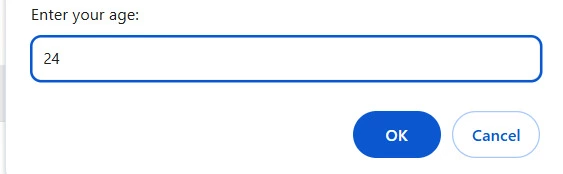
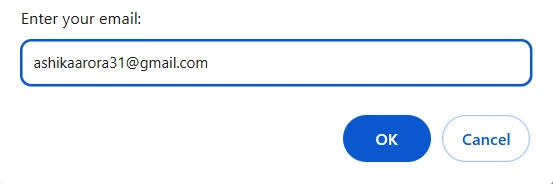
A prompt box is used to collect input from the user. It displays a message along with a text field where the user can enter data. This is useful for scenarios like updating user details or entering custom values.
Syntax
<?php
echo "<script>
    var name = prompt('Enter your name:');
    if(name) {
        alert('Hello, ' + name);
    }
</script>";
?>
You can also try this code with Online PHP Compiler
Asks for an email, then displays "Your email is: [entered email]" on the page.
Confirm Dialog Box
A confirm box is used when you need the user to make a decision. It displays a message along with two buttons: "OK" & "Cancel". Based on the user’s choice, you can execute different actions.
Syntax
<?php
echo "<script>
    var confirmAction = confirm('Are you sure you want to proceed?');
    if(confirmAction) {
        alert('You chose to proceed.');
    } else {
        alert('You canceled the action.');
    }
</script>";
?>
Examples of Using Confirm Dialog Box with PHP
Example 1: Confirm Before Deleting Data
<?php
echo "<script>
    var confirmDelete = confirm('Do you really want to delete this record?');
    if(confirmDelete) {
        document.write('Record deleted successfully.');
    } else {
        document.write('Deletion canceled.');
    }
</script>";
?>
You can also try this code with Online PHP Compiler
Output: If 'OK' is clicked, the user is redirected to 'logout.php'. If 'Cancel' is clicked, nothing happens.
Frequently Asked Questions
How can I show an alert in PHP?
PHP does not have a built-in alert function, but you can use JavaScript inside PHP to display alerts using echo "<script>alert('Message');</script>";.
Can we use PHP variables inside an alert box?
Yes, PHP variables can be used inside an alert box by embedding them in JavaScript.
Conclusion
In this article, we learned about PHP Alert and how to display messages using JavaScript, Bootstrap, and PHP itself. Alerts help improve user interaction by providing important notifications or warnings. By using different methods, developers can create dynamic and responsive alerts to enhance the user experience in PHP applications.
















 7+ registered

