Include/Exclude timestamp in .properties files
We have the option to include/exclude timestamps in .properties files. To do so, follow the following:
- Go to Project
- Go to Settings
- Go to Project Information.
- Click on the Include/Exclude timestamps in the .properties files box. This box is unchecked for new projects by default.
- Click Apply.
Execution settings
To access the default Execution Settings of a project, select Project -> Settings -> Execution from the main menu.

Source: Katalon
The following information is available in the execution settings:
-
Log executed test steps: Determine whether the records include the executed test steps.
-
Default execution: The default environment that Katalon Studio uses to perform test scripts.
-
The default wait for element timeout (in seconds): The default timeout period that Katalon Studio remains for the application that is under test to be loaded when executing the automation test.
- Post-Execution Options: These options decide the actions that Katalon Studio does after finishing the execution of the test.
Allow editing JVM parameters in Execution Settings
We have the option to edit VM arguments in the execution settings by:
- Go to Project
- Go to Settings
- Click Execution
- Click Launch Arguments
In the VM Arguments tab, we enter our arguments. VM Arguments set in the execution settings of a project update the behavior of a Java process of each execution.
A list of the most used JVM Parameters is given below:
-
Specify minimal and maximal heap sizes:
- Xms<heap size>[unit]
- Xmx<heap size>[unit]
-
XX:MaxMetaspaceSize=<metaspace size>[unit]
-
Garbage collection implementation types:
-
G1 Garbage Collector: -XX:+UseG1GC
-
Serial Garbage Collector: -XX:+UseSerialGC
-
CMS Garbage Collector: -XX:+UseParallelGC
-
Parallel Garbage Collector: -XX:+USeParNewGC
-
Garbage collection logging:
-
Specifies the log file rolling policy: -XX:+UseGCLogFileRotation
-
Denotes the max log files possible to be written for a single application life cycle: -XX:NumberOfGCLogFiles=< number of log files >
-
Specify the max size of the file: -XX:GCLogFileSize=<file size>[unit]
-
Denote the file's location: -Xloggc:/path/to/gc.log
-
Handling out of memory:
-
Dump heap into a physical file in case of OutOfMemoryError: -XX:+HeapDumpOnOutOfMemoryError
-
Denote the path where the file is to be written: -XX:HeapDumpPath=./java_pid<pid>.hprof
-
Issue emergency commands to be executed in case of out-of-memory error: -XX:OnOutOfMemoryError="< cmd args >;< cmd args >"
-
Limits the proportion of the VM's time that is spent in GC before an OutOfMemory error is thrown: -XX:+UseGCOverheadLimit
WebUI settings
Default settings for Web UI test execution can be set by:
- Go to Project
- Go to Settings
- Click Execution
- Select WebUI
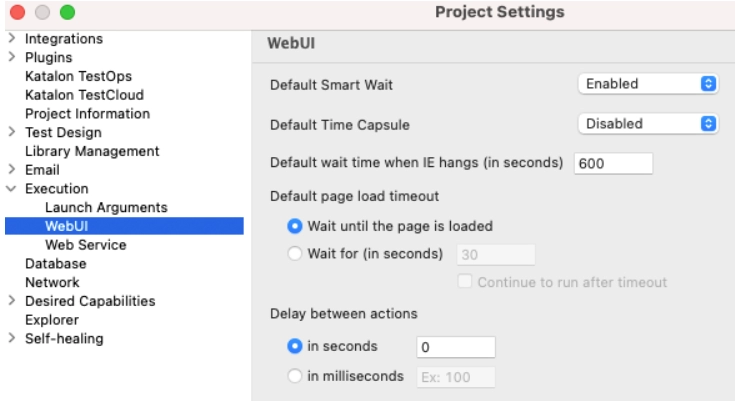
Source: Katalon
Web Service Settings
Default settings for Web Service test execution can be set by:
- Go to Project
- Go to Settings
- Select Execution
- Select Web Service.
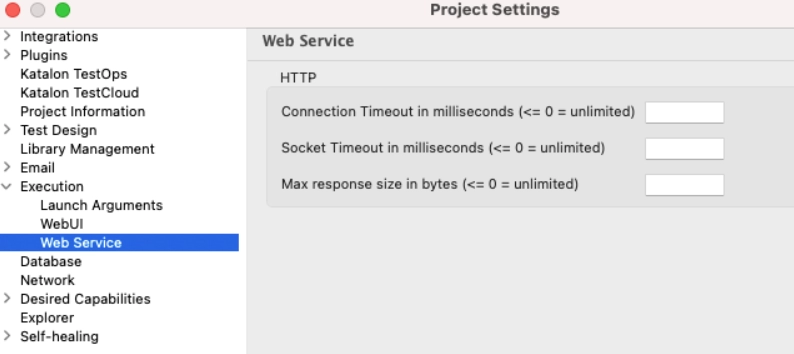
Source: Katalon
Request Timeout
To override the timeout settings of a project in a test case, use:
Map<String, Object> generalSettings = RunConfiguration.getExecutionGeneralProperties()
generalSettings.put(RunConfiguration.REQUEST_CONNECTION_TIMEOUT, 3500)
generalSettings.put(RunConfiguration.REQUEST_SOCKET_TIMEOUT, 3500)
And to change the timeout settings of a particular test request:
RequestObject request = findTestObject("Object Repository/Localhost") request.setConnectionTimeout(3500) request.setSocketTimeout(3500)


// Or to unset the timeout request.setConnectionTimeout(RequestObject.TIMEOUT_UNSET) request.setSocketTimeout(RequestObject.TIMEOUT_UNSET)


// Or to set the timeout to unlimited request.setConnectionTimeout(RequestObject.TIMEOUT_UNLIMITED) request.setSocketTimeout(RequestObject.TIMEOUT_UNLIMITED)
// Or if you want to set it to its default value (The default value is set to unlimited) request.setConnectionTimeout(RequestObject.DEFAULT_TIMEOUT) request.setSocketTimeout(RequestObject.DEFAULT_TIMEOUT)
To change the maximum response size setting of a particular test request:
RequestObject request = findTestObject("Object Repository/Basic Auth")
request.setMaxResponseSize(400)


// Or to unset response size limit. And so, the project's max response size setting will be used.
request.setMaxResponseSize(RequestObject.MAX_RESPONSE_SIZE_UNSET)


// Or to set response size limit to unlimited
request.setMaxResponseSize(RequestObject.MAX_RESPONSE_SIZE_UNLIMITED)


// Or if you want to set it to its default value (The default value is set to unlimited)
request.setMaxResponseSize(RequestObject.DEFAULT_MAX_RESPONSE_SIZE)
Frequently Asked Questions
What ‘Project types’ are available in Katalon Studio?
- Generic, Mobile, Desktop, Web
- API/Web Service
Where are the temporary files of Katalon Studio stored?
The temporary files are stored at:
Windows: C:\Users\\AppData\Local\Temp\Katalon
Mac: /temp/katalon
What are the critical features of Katalon?
The key features of Katalon include:
- Test Management
- Test Planning
- Test Execution
Conclusion
So, with this, we saw project execution settings in Katalon Studio. I hope that the blog was informative.
See Basics of C++ with Data Structure, DBMS, and Operating System by Coding Ninjas, and keep practicing on our platform Coding Ninjas Studio.
If you think you are ready for the tech giants company, check out the mock test series on code studio.
You can also refer to our Guided Path on Coding Ninjas Studio to upskill yourself in domains like Data Structures and Algorithms, Competitive Programming, Aptitude, and many more! You can also prepare for tech giants companies like Amazon, Microsoft, Uber, etc., by looking for the questions asked by them in recent interviews. If you want to prepare for placements, refer to the interview bundle. If you are nervous about your interviews, you can see interview experiences to get ideas about these companies' questions.
Nevertheless, you may consider our premium courses to give your career an edge over others!
Do upvote our blogs if you find them helpful and engaging!
Happy Learning!








 1+ registered

