Do you think IIT Guwahati certified course can help you in your career?
Introduction
VMware is a virtualisation and cloud computing industry. It was established in 1998. It is a software tool used for installing virtual OS. VMware is a market leader in multi-cloud services for all apps to support digital innovation while maintaining business governance.
This article will give insight into the puppet plug-in for VMWare. The installation and configuration of the plug-in. We will also discuss its working.
VRealize Automation
A DevOps-based infrastructure management tool called vRealize Automation is used to provision and configure IT services. It automates the delivery of container-based apps.
The Puppet Plug-in for vRealize Automation (vRA) offers tools and pre-built components to construct, provision quickly, and manage application stacks on virtual servers.
We will see how to set up the plug-in, vRO, and vRA for reference purposes. We will also discuss setting up a production implementation for usage on an already-existing PE primary server. You can change the reference implementation to suit your needs even though it was created as a demo and not for usage in production straight out of the box.
Let’s start with the installation of the Puppet Plug-in.
Installation And Configuration Details
This solution aims to quickly set up a development environment that runs vRO, vRA, and Puppet so that you can learn how these tools interact. Using Puppet Enterprise 2018.1 or newer and vRA 7.3 or newer, install and set up a reference implementation of the Puppet plug-in.
The plug-in is compatible with numerous vRO, vRA, and Puppet Enterprise versions. Although you can set up this plugin using these instructions with different Puppet Enterprise versions and vRO/vRA, we advise using this reference implementation the first time.
Prerequisites
To use the plug-in with vRa 7.3 edition, you need the following things:
⭐ The central server with PE version 2018.1 or newer.
⭐ The vRA enterprise 7.3 edition.
⭐ The vRO 7.x appliance, either internal or external.
To use the plug-in with vRa 6 to 7.3 edition, you need the following things:
⭐ The central server with PE version 2016.1 or newer.
⭐ The vRA enterprise 6.x or 7.x edition.
⭐ The vRO enterprise 6.x or 7.x edition.
⭐ For GUI integration, vRealize Automation Enterprise 7.3 or later is necessary.
Network Requirements
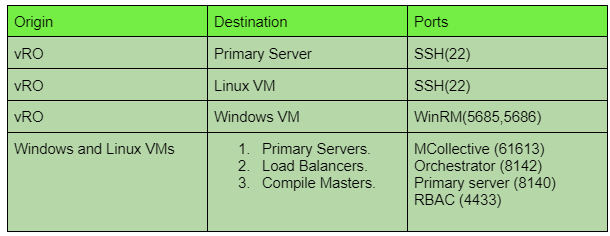
You need to have the correct port setup to use vRealize Automation. Let’s discuss these setups for deploying new Windows, Linux, and the primary server.
Removing Previous Plug-ins
Before installing a newer version of the plug-in, you must totally uninstall any older versions you may be using. Copy this script from the vRO starter content to the appliance, then run it for the best results, remove all puppet elements from the vRO GUI client first.
Install and Configure the PE
To install and configure Puppet Enterprise use the steps:
🧩 Step 1: Review the operating system and hardware requirements for Puppet Enterprise.
🧩 Step 2: Install Puppet Enterprise on a host or virtual machine. The vRO appliance or server must have network access to this server, as it will be the main one. Running the installer in text mode makes it simple to install PE.
🧩 Step 4: A proper DNS hostname and NTP configuration must be on the central server.
🧩 Step 5: Run sudo puppet agent -t to start a Puppet run on the central server.
🧩 Step 6: The starter content instals puppet strings to show role class descriptions in the vRealize Automation web GUI. Puppet strings can be installed if it isn't already by running:
🧩 Step 1: Get the .vmoapp package for the Puppet plug-in from the VMware Solution Exchange.
🧩 Step 2: Visit https://VRO-SERVER-IP-ADDRESS>:8283/vco-controlcenter to access the vRO server's control panel.
🧩 Step 3: Select the Plugins tab.
🧩 Step 4: Install the plug-in by clicking.
🧩 Step 5: Click Startup Options when the installation confirmation window appears.
🧩 Step 6: Click Restart the Startup Options page's Current Status section.
Frequently Asked Questions
What do you mean by Starter pack content?
The Puppet plug-in starter pack content is used for reference implementations of Puppet roles and profiles for Linux and Windows web server stacks. The starter pack repository offers templated auto-signing and utility scripts to set up the primary server for vRO.
Which ports are Puppet using?
Port 8140 is the default for HTTPS traffic in Puppet. The OS and firewall must permit the JVM process inside Puppet Server to accept incoming connections on this port. One can change the web server's port.
What is the purpose of Puppet Enterprise?
You may manage and automate servers' configuration with Puppet's aid. When using Puppet, specify the ideal condition for the infrastructure systems you want to manage.
Conclusion
We have discussed the Puppet Plug-in for VMWare. Further, We have discussed vRealize automation, prerequisites for installation, network requirements, and removing the old version of plugins. We have how to install and configure Puppet Enterprise and VMWare. Finally, we discussed the detailed installation of the Plug-in.
We hope this blog has helped you. We recommend you to visit our articles on different topics of Puppet Remediate, such as:







 1+ registered

