Do you think IIT Guwahati certified course can help you in your career?
Introduction
In the context of machine learning, a fundamental concept is the pandas DataFrame. It is a two-dimensional data structure organized into rows and columns, widely used for data handling and analysis. In Python, the DataFrame serves as the core data type in pandas, a prominent library for data analysis.
In this blog, we will learn all about DataFrames in the Python pandas library. So buckle up, and let’s get started.
What is DataFrame in Python?
DataFrame is a two-dimensional data structure in which data is structured in a tabular format. You can imagine them as a SQL table or a spreadsheet of data. Dataframes are useful for storing data in rows of entities and columns of features. It is one of the most intuitive ways to analyze, manipulate, and extract important information from the data.
Features of DataFrame
Some of the most beneficial features of a DataFrame are given below:
Better analysis and visualization of data.
Proper labelling of rows and columns.
Size can be changed according to our requirements.
We can perform different arithmetic operations on rows and columns.
Different types of data can be stored in different columns.
Structure of DataFrame
Let’s look at the structure of a data frame:
The above image shows the representation of a DataFrame. The rows and columns are structurally divided horizontally and vertically. Mostly the columns will be of a different type. You can imagine a DataFrame as a SQL table or a representation of spreadsheet data.
Pandas DataFrame
Pandas is a data analysis library that provides DataFrame for better analysis of data. Just like a traditional DataFrame, a pandas DataFrame is also a two-dimensional tabular data structure. It is mutable and consists of mainly three components, i.e., data, rows, and columns.
Note: We can create a DataFrame of numpy, ndarrays, lists, dict, map, series, constants, and DataFrame as well.
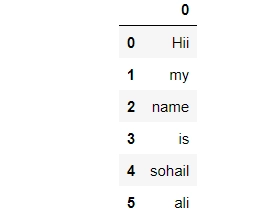
In the above example, we created a list of strings as an argument for DataFrame. Pandas will structure all the elements of the list row-wise if no list of columns is provided.
Example 2
Let's look at another example with a list of lists this time.
import pandas as pd
# Generating data
Data = [ ['Robert', 30], ['Sam', 25], ['Diana', 20], ['Mark', 33] ]
Labels = ['Name', 'Age']

# Creating the DataFrame
df = pd.DataFrame(Data, columns = Labels )

# Printing DataFrame
print(df)
You can also try this code with Online Python Compiler
In the above example, We created our dummy data using a list of lists. The number of rows in the DataFrame is equal to the list size. The list Labels is used to create columns of the DataFrame.
Example 3
We can change the type of data in the DataFrame using the dtype parameter. Let us look at it with the same example. Here, we will create a new table named score, whose type will be a float type.
import pandas as pd

# Generating data
Data = [ ['Robert', 30], ['Sam', 25], ['Diana', 20], ['Mark', 33] ]
Labels = ['Name', 'Score']

# Creating the DataFrame
df = pd.DataFrame(Data, columns = Labels, dtype=float )

# Printing DataFrame
print(df)
You can also try this code with Online Python Compiler
In the previous example, we saw that the data type of numbers is an integer by default. Here we changed its data type to a float value using the dtype parameter of the DataFrame() method.
DataFrame from List of Dict
We can create a DataFrame using a list of dictionaries in Python. Let us look at some examples of it.
Example 1
# Importing library
import pandas as pd

# Generating data
data = [{'X': 1, 'Y': 2, 'Z':3},{'X': 4, 'Y':5, 'Z': 6}]

# Creating DataFrame
df = pd.DataFrame(data)
print(df)
You can also try this code with Online Python Compiler
In the above example of Python DataFrame, We used a list to store key-value pairs of dictionaries. After using DataFrame() function with the data, it is converted into a pandas DataFrame.
Example 2
Now, let us look at what happens when we miss a value in the data.
# Importing library
import pandas as pd

# Generating data
data = [{'X': 1, 'Y': 2, 'Z':3},{'X': 4, 'Y':5}]

# Creating DataFrame
df = pd.DataFrame(data)
print(df)
You can also try this code with Online Python Compiler
In the above example of Python DataFrame, the key Z is created with one less value compared to other keys. The pandas DataFrame filled this missing value with a NaN value.
Here we have only a single missing value in the data. But what happens when we have a completely new label with no values?
import pandas as pd

# Creating data
data = [{'X': 1, 'Y': 2, 'Z':3},{'X': 4, 'Y':5, 'Z': 6}]

# Row Index
row_index = ['row1', 'row2']

# Lables
col = ['X', 'Y', 'S']

# Creating DataFrame
df = pd.DataFrame(data, index= row_index, columns = col)
print(df)
You can also try this code with Online Python Compiler
In the above example of Python DataFrame, we created three labels (X, Y, S) while creating DataFrame, but label S was not present in the original data. The Pandas filled the NaN value for missing values of this label.
Example 3
Now, let’s see how we can take some selected columns and leave the rest.
import pandas as pd

# Creating data
data = [{'X': 1, 'Y': 2, 'Z':3},{'X': 4, 'Y':5, 'Z': 6}]

# Row index
row_index = ['row1', 'row2']

# Selected columns
col = ['X', 'Z']
df = pd.DataFrame(data, index= row_index, columns = col)
print(df)
You can also try this code with Online Python Compiler
In the above example of Python DataFrame, only the selected columns X and Z are passed as columns parameter. Thus, we can remove the rest of the columns from the DataFrame and keep the selected ones.
DataFrame from Dict of Lists
Till now, we have seen how to create a DataFrame from a list of dictionaries. Now, let's look at how we can make it using Dictionaries of lists.
Example
import pandas as pd

# List of names
list1 = ['Robert', 'Sam', 'Diana', 'Mark']

# List of scores
list2 = [30, 25, 20, 33]

data = {'Name' : list1, 'Score': list2}
df = pd.DataFrame(data)
print(df)
You can also try this code with Online Python Compiler
In the above example, the column Name and Score are used as keys, in the rest of the list are used as values.
Note: Unlike the previous method, this method does not add NaN values instead of missing values. For example, let's change the size of list 2 in the previous example. The code will look like the one shown below:
In the above example, we generated a series of values for a dictionary's keys using the Series() method. Row labels are passed as a list, and we get our resultant DataFrame.
Row Operations
Let’s now see different operations that we can perform in a row.
Selection Using Label
First of all, let us see how we can access a particular row in Python DataFrame.
import pandas as pd

# Generating data
data = {'Male' : pd.Series([32, 52, 44], index=['PHYSICS', 'MATH', 'CHEMISTRY']),
   'Female' : pd.Series([23, 25, 32], index=['PHYSICS', 'MATH', 'CHEMISTRY'])}

# Creating DataFrame
df = pd.DataFrame(data)
print(df)
print()

# Selecting the row
print(df.loc['CHEMISTRY'])
You can also try this code with Online Python Compiler
In the above example, the loc() function is used to access a group of rows/columns by label(s). Here we used a single-row label and accessed the corresponding columns. In Python, there is another method using which we can access rows and columns in DataFrame called the iloc() method.
Selection Using Integer
We can also use the index of the row to access all the columns corresponding to it.
# Selection using row index
import pandas as pd

# Generating data
data = {'Male' : pd.Series([32, 52, 44], index=['A', 'B', 'C']),
   'Female' : pd.Series([23, 25, 32], index=['A', 'B', 'C'])}

df = pd.DataFrame(data)
print(df)
print()
print(df.iloc[1])
You can also try this code with Online Python Compiler
In the above example, the iloc() method accesses the row elements through the index passed to it. Note that the indexing starts with zero. In short, the loc() method accesses the rows using row labels, and the iloc() method uses the row index.
Slicing can be performed on DataFrame using the iloc[] function. Here the ‘:’ operator is used to specify the first and last position of the rows to be accessed.
# Accessing part of a DataFrame using iloc
import pandas as pd

# Generating the data
list1 = ['Aakash', 'Sarvesh', 'Smith', 'Swaraj']
list2 = [30, 25, 20, 33]
data = {'Name' : list1, 'Score': list2}

# Creating DataFrame
df = pd.DataFrame(data)
print(df)
print()

print(df.iloc[1:3])
You can also try this code with Online Python Compiler
In the above example, the iloc() method considers the first index row but neglects the last. Therefore the range of rows according to the index will be from start to end-1 index row.
Column Operations
Let us look at various operations that we can perform on columns in pandas.
Selection Using Label
import pandas as pd

# Generating data
data = {'Male' : pd.Series([32, 52, 44], index=['A', 'B', 'C']),
   'Female' : pd.Series([23, 25, 32], index=['A', 'B', 'C'])}

df = pd.DataFrame(data)
print(df)
print()

# Selecting only first column
print(df['Male'])
You can also try this code with Online Python Compiler
In the above example, the first ‘:’ operator before the comma is used to access all the rows, and the second ‘:’ operator is used to access the columns in a similar way we did for the rows.
DataFrame Methods
Some of the most used methods of pandas DataFrame are given below.
Sr. No.
Method
Description
1
index()
It returns the index (row label) of the DataFrame.
2
insert()
It inserts a column in the DataFrame.
3
nunique()
It returns the count of unique values in the DataFrame.
4
unique()
It extracts the unique values from the DataFrame.
5
isnull()
It returns a series of boolean values of rows with null values.
6
notnull()
It returns a series of boolean values of rows with non-null values.
7
value_counts()
It returns the total count of each unique value.
8
columns()
It returns the column labels of the DataFrame.
9
add()
It returns element-wise addition of DataFrames.
10
sub()
It returns element-wise subtraction of DataFrames.
11
div()
It returns element-wise floating division of DataFrames.
12
mul()
It returns element-wise multiplication of DataFrames.
13
dropna()
It removes the specified row/columns from the DataFrame.
14
fillna()
It replaces NaN values with user-specified values.
15
copy()
It creates another independent copy of a pandas object.
Frequently Asked Questions
What are Pandas in Python?
Pandas is a Python data analysis library that provides a DataFrame for better analysis and manipulation of data.
How can we read a .csv file in pandas?
The pandas read_csv() method is used to read CSV files in pandas.
What are the two data structures present in pandas?
The DataFrame and Series are the two most widely used data structures in pandas.
What is the difference between numpy and pandas?
Numpy and pandas both are libraries in Python. Numpy is used to work with numerical data, while pandas are used to work with tabular data.
How can we install pandas?
In order to install pandas, you need to write the ‘pip install pandas’ command on your Python console.
Conclusion
This article discusses Python DataFrames in detail. We hope this blog has helped you enhance your knowledge of DataFrame and the different methods involved in the pandas library. If you want to learn more, then check out our articles.







 5+ registered

