Do you think IIT Guwahati certified course can help you in your career?
Introduction
Recursion is an important concept and a popular programming technique where a function calls itself to solve a problem by breaking it down into smaller sub-problems. Many examples from everyday life can be used to illustrate the idea of recursion, like how a tree branch splits into smaller branches and how a maze can be cleared by continuously examining ever-tinier sections of it.
In this article, we will discuss about recursion in javascript. We will understand its components, and learn why it is necessary to have base conditions in recursion. Later we will see the examples and look at how it differs from the loop.
Recursion in Javascript is a programming technique in which a method calls itself again and again. It's an approach often used when a problem can be divided into similar subproblems. The method that performs this self-call is known as a recursive method and when a function calls itself again and again is known as recursion.
Recursion can solve many mathematical problems like calculating the factorial of a number, binary search, etc.; some of the famous problems, like the Tower of Hanoi, are also solved using recursion. Recursion cannot be applied to every problem; it is useful for problems that can be defined in terms of similar subtasks.
Syntax for Recursion in JavaScript
function RecursiveFunction(Parameters )
{
 if(base condition)
return 1 ;
else
//recursive function call(modified Parameters)
}
Javascript Recursion Function
Every time you write a recursive function in Javascript, you need to ensure that you provide all the below three components in the function. Missing any of them, will not give the desired results. Below we have discussed the three parts that every recursive function must have:
Function definition
Base condition
Recursive call command
1. Function definition
In JavaScript, you declare a recursive function similar to a normal function. Below is the pseudocode for the recursive function.
Function RecursiveFunction() //Function declaration will have arguments
{
//recursive code
}
2. Base Condition
A base condition is a condition that is used in recursion to terminate the function calling itself. Any recursive function must have a base case, and the solution to that base case must be provided. A base case is a condition where the function returns a value instead of recursive calling itself. We can’t write a recursive function without a base case. Otherwise, it will create an infinite loop and result in a stack overflow error.
This is the most important component as this is the last or the smallest component to be solved in the recursive call.
function RecursiveFunction(int n )
{
 if(n==0 || n == 1)
return 1 ;
else
//recursive function call
}
In the above code, when n reaches 0 the code will terminate and will get back to the main method. So the if condition is the base condition in the above code.
3. Recursive Call Command
In recursion, the function calls itself, and the function which calls itself is known as a recursive function. A recursive case is a condition in the function that calls itself with a modified version of the input. It is the other part of the function along with the base case, as it allows the function to break down a complex problem into smaller and more manageable sub-problems. Below is the code for the recursive call command.
function RecursiveFunction(n )
{
 if(n==0 || n == 1)
return 1 ;
else

return n * RecursiveFunction(n-1); //recursive call command

}
In the above code, the return statement is the recursive command that triggers a new recursive call.
Using if...else statement to Avoid infinite recursion
If else statement is needed to be used in the recursive function to avoid infinite recursion. This ensures once the base condition is met, the function must be stopped and should not fall into the infinite loop as it will crash the program.
function recursive_function(n) {
  // Base case: stop when n is 0
    if (n <= 0) { //base condition
        return;
    }

    console.log(n);
    recursive_function(n - 1); //recursive function
}
recursive_function(5);
Once the n value reads the if condition and the n value reaches 0 or less than 0 the function will stop and get returned.
How do you define a recursive function?
A recursive function is a function that calls itself again and again but with a modified parameter value. It consists of a base condition to stop recursion and a recursive case with a modified input value. The base condition is the stopping point of the function. Once the base condition is true or satisfied function stops calling itself and stops.
Example
function countdown(n) {
   if (n <= 0) {
       console.log("Done!"); // Base case
   } else {
       console.log(n);
       countdown(n - 1); // Recursive call
   }
}
countdown(5);
You can also try this code with Online Javascript Compiler
Base condition is the crucial and most important aspect of recursion. The base condition defines the point at which the function should stop calling itself again and again. In the absence of a base condition, there will be no termination which will lead to an infinite loop. This infinite loop will automatically lead the function to exceed the memory stack which will result in a stack overflow error. This call stack has a maximum limit and also it keeps a record of the functions that keep running inside it.
For every recursive function, it is important to define the base condition and it must be reached so as to stop the function calling itself.
Below is an example of when the base condition is not defined and the function runs recursively which leads to a stack overflow error.
Case1: When a base condition is not defined
function recursive_function(n){
n=n*1;
console.log(n);
return recursive_function(n-1);
}
recursive_function(10);
In the above code where the base condition is not present, will lead to stack overflow, and ultimately the code will ran out of error.
Case2: When an incorrect base condition is defined
In the above code where the base condition is defined but is incorrect. The code will never fall in the if condition which will lead to an infinite recursive function call and will result in error.
Case3: When a base condition is correctly defined
JavaScript
JavaScript
function recursive_function(n) { // Base case: stop when n is 0 if (n <= 0) { return; }
The output here is because we have correctly defined the base condition with the correct logic. So it is very important in the recursion function to implement and define the base condition correctly.
Memory Management in Recursion in Javascript
For every recursive function, a new memory allocation is created in the stack with the function's current state. It is important to note that every call takes a memory space from the call stack. So the deeper the recursive function, the more memory consumption and the higher the chance of getting an error of stack overflow.
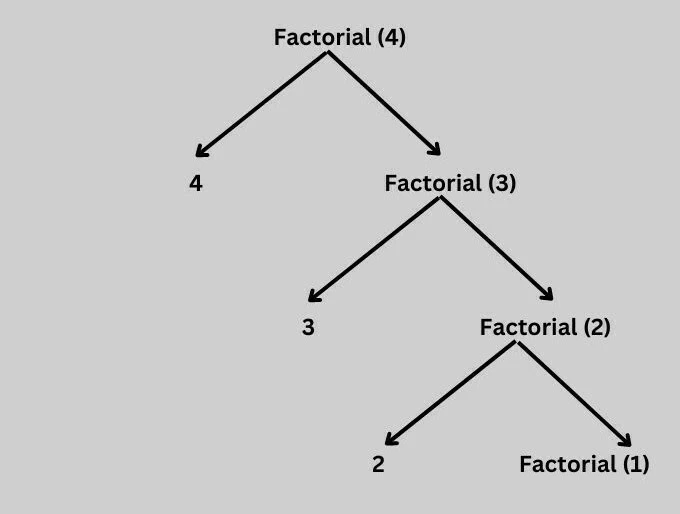
Below is the representation of memory management in recursion in javascript.
Factorial of (3)
When calculating a factorial of 3 these many call stack is called and memory is called.
When F(3) is called: the stack frame for F(3) takes memory space and is added to the call stack.
When F(2) is called from F(3): the stack frame for F(2) takes memory space and is added to the call stack.
When F(1) is called from F(2): the stack frame for F(1) takes memory space and is added to the call stack.
When the F(0) base condition is reached, and the return value is received, it then returns to the previous call stack and starts collecting the return values. When each call stack is reached and the function is completed, the deletion of memory space happens.
Examples of Recursive Function
Below we have discussed a few examples of recursive techniques.
1. Fibonacci Series
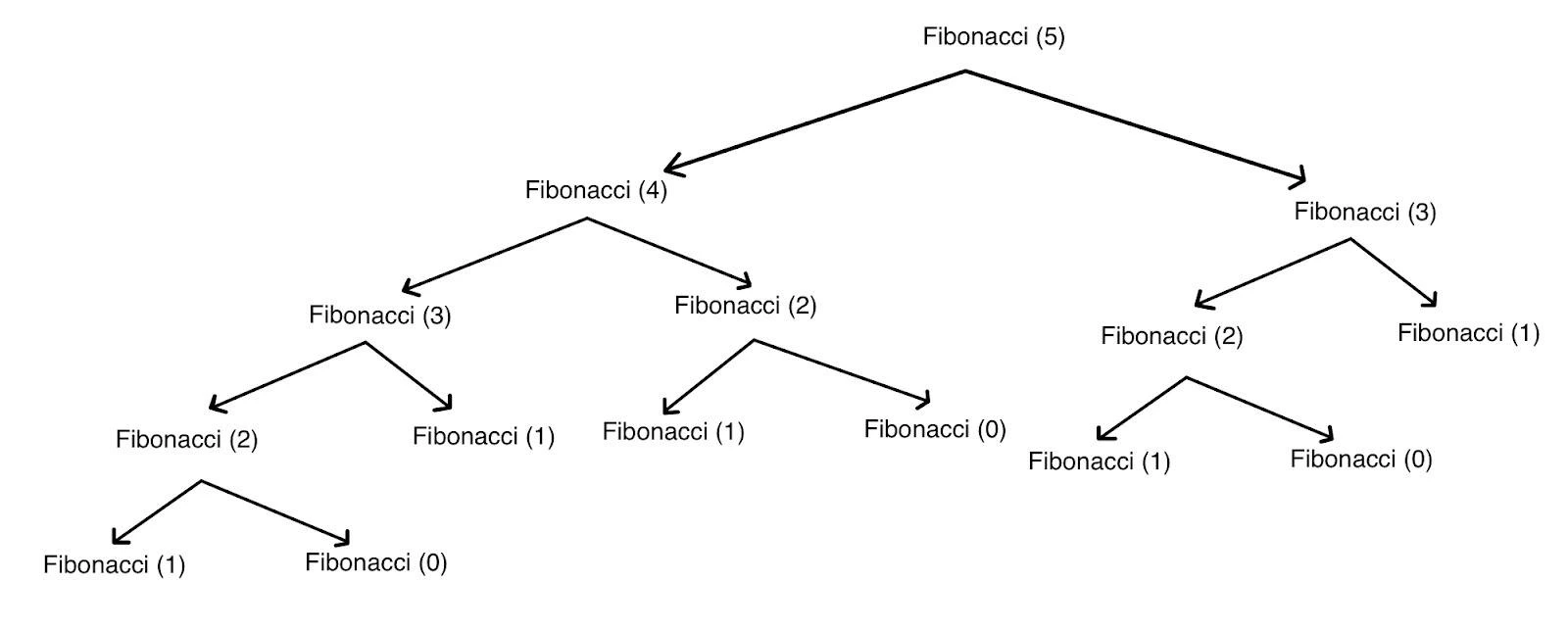
In the below example, we will print the 5th element in the Fibonacci series using the recursion in the Javascript technique.
JavaScript
JavaScript
function fibonacci(n) {

    if (n === 0) {

        return 0;

    }

    if (n === 1 || n === 2) {

        return 1;

    } else {

        return fibonacci(n - 1) + fibonacci(n - 2);

    }

}

console.log("5th term in Fibonacci series is: " + fibonacci(5));
You can also try this code with Online Javascript Compiler
Every recursive function has an alternative way to be written in the loop. They both work similarly. The recursive function code often leads to more concise and accurate code compared to iterative solutions. Recursive code iterates till the base condition is reached while loop iterates till the condition is met.
Recursive functions can optimize memory usage by removing the need for an explicit data structure, such as a stack or a loop counter. Therefore, in some cases, recursion leads to more efficient solutions than iterative approaches. Loops, on the other hand, has no maintenance of stacks and occupy less memory space.
Implementation for the Fibonacci Series Using a Loop
Below is the code implementation for the Fibonacci series using a loop.
JavaScript
JavaScript
function fibonacci(n) {
    if (n === 0) {
        return 0;
    }
    if (n === 1 || n === 2) {
        return 1;
    }

    let prev = 1, current = 1;

    for (let i = 3; i <= n; i++) {
        let next = prev + current;
        prev = current;
        current = next;
    }
    return current;
}

console.log("5th term in Fibonacci series is: " + fibonacci(5));
You can also try this code with Online Javascript Compiler
What are the advantages of recursion in Javascript?
Some advantages of Recursion are:
Simplified Code: Recursive algorithms are known to be more simplified than any other algorithm. It can often lead to more concise and accurate code compared to iterative solutions.
Code Reusability: While developing a recursive function, it can be reused for solving related problems with various input values. Recursive functions break a complex problem into smaller sub-problems and solve them. It reduces the repetition of code as well as supports reusability of code.
Time and Space Efficiency: In some cases, recursive functions might be more memory efficient than imperative functions because they do not need an explicit data structure like a stack or a loop counter. Hence, in certain cases, recursion makes the solution more efficient compared to an iterative approach.
Readability and maintainability: Recursive code, as known, is much easier to understand than iterative code. It can capture the essence of a problem more intuitively, that makes the code easier to understand and maintain over time.
When not to use Recursion
You should not use recursion when:
The problem deals with large data sets, because recursion causes stack overflow owing to too many functions calls.
Iterative solutions are possible, since they tend to consume less memory.
For execution performance, recursion may sometimes lead to unnecessary overhead.
Tail-call optimization isn’t supported, which can lead to inefficiency in languages without TCO.
Frequently Asked Questions
What are the advantages of recursion?
Recursion helps in multiple ways in programming. It provides code reusability, simplified code, and is easier to maintain. Recursion is particularly useful in scenarios where backtracking is required to find a solution. Another advantage of using recursion is it is time and space-efficient.
What is the limit of recursion in JavaScript?
The limit of recursion in javascript depends upon the engine but mainly it is 10,000 calls to 65,000 calls. Once this range gets exceeded it results in "RangeError: Maximum call stack size exceeded.".
What is the error of recursion in JavaScript?
The error of recursion in javascript is "RangeError: Maximum call stack size exceeded.". This error is received when the base condition is not properly defined or it lacks the base condition. This can also happen when recursion handles some deeply recursive calls.
Which is faster, loop or recursion?
In general terms, loops tend to be more efficient and easy to operate. Loops are easy to write and understand while debugging of recursive functions can be difficult. Loops are more convenient to use as they use less memory and have fewer chances of memory issues.
Conclusion
Recursion in JavaScript is a powerful technique that helps developers solve problems with smaller sub-problems, which are part of it. Knowing the principles, applications, and limitations of recursion helps developers make better use of their time when working on tasks such as tree traversal, mathematical computations, and algorithm design.







 1+ registered

