Do you think IIT Guwahati certified course can help you in your career?
Introduction
As a python developer, you must have come across the term web2py as it allows the python developers to program dynamically for development. So it reduces the need for making the project from scratch. But in some cases where we need to use many objects together and data from both, it becomes a very hectic task, so is there any easier way to perform these operations?
The answer is yes, and we can use joins to operate on different tables and another object together. It will save us time as we are not searching and addressing them individually. We are using addressing them combined. We will learn all about joins while moving further in this blog along with types of relations, so without wasting any time further, let’s get on with our topic.
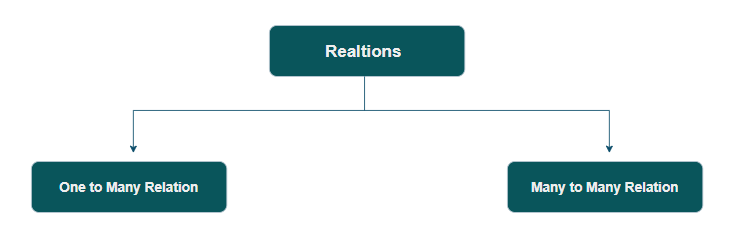
One to Many Relation
One to many relations can be understood as the relationship when one entity is related to more than one entity. We will have a better understanding of this with an example:
Example
This example shows how to implement one-to-many relations with Data Abstraction Layer or DAL. We will define two tables, one with the name “person” and the other with the name ”things”.
The things table will have two fields: one referring to the person who owns it, and the other is the owner id. Now we insert three things into the things table.
You can select by providing the object id. A record of a table person now contains a new attribute thing, which is a Set, which defines the things of that person. This is because a person might have numerous things. After all, a thing has a reference to a person. This makes it simple to loop over every person and conveniently gather their belongings:
>>> for person in db().select(db.person.ALL):
...    print person.name
...    for thing in person.thing.select():
...        print '    ', thing.name
Output
Joey
     Boat
     Chair
Chandler
     Shoes
Ross
Joins
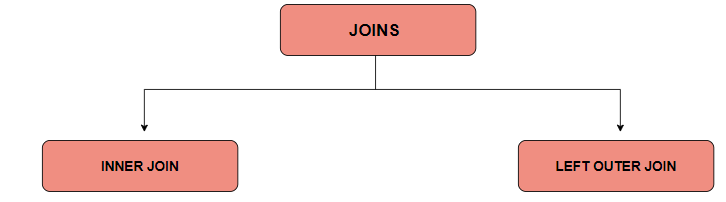
Based on a shared column between two or more tables, a JOIN clause is used to merge rows from those tables. Here we will learn about the two most commonly used joins in web2py, the inner join and left outer join.
Inner Join
Using a join, more especially an INNER JOIN is another technique to accomplish the same goal. When a query connects two or more tables, like in the example below, web2py performs automatically and transparently.
>>> rows = db(db.person.id == db.thing.owner_id).select()
>>> for row in rows:
...    print row.person.name, 'has', row.thing.name
Output
Joey has Boat
Joey has Chair
Chandler has Shoes
The rows now contain two results as web2py did a join. But the two fields can have a similar name, so you must specify which field you want to access at the extraction time.
For example,
row.person.name
Or
Row.thing.name
You can also use an alternate syntax for INNER JOINS.
>>> rows = db(db.person).select(join=db.thing.on(db.person.id == db.thing.owner_id))
>>> for row in rows:
...    print row.person.name, 'has', row.thing.name
Output
Joey has Boat
Joey has Chair
Chandler has Shoes
Left Outer Join
Due to his lack of possessions, Carl is not included in the list above. You must do a LEFT OUTER JOIN if you want to pick on people (whether they have or not) and their things (if they do). The select's argument "left" is used to do this. Here's an illustration:
>>> rows = db().select(db.person.ALL, db.thing.ALL,
...                   left=db.thing.on(db.person.id == db.thing.owner_id))
>>> for row in rows:
...    print row.person.name, 'has', row.thing.name
Output
Joey has Boat
Joey has Chair
Chandler has Shoes
Ross has None
Where:
left = db.thing.on(...)
Does a left join query. Here, the condition needed for the join is the argument of db.thing.on (the same used above for the inner join). It is essential to be clear about the fields to choose in a left join scenario.
Several left joins can be concatenated by giving a list or tuple of db.mytable on(...) to the left parameter.
Group and Counting
Sometimes, you want to group rows based on specific criteria and count them while performing joins. Consider counting the quantity of possessions each person has. Web2py also supports this. You must first have a counting operator. The second step is to owner-join the person table to the item table. Third, group the rows by person, count them as you group them, and then select all rows (person + thing):
>>> count = db.person.id.count()
>>> for row in db(db.person.id == db.thing.owner_id
...              ).select(db.person.name, count, groupby=db.person.name):
...    print row.person.name, row[count]
...
Output
Joey 2
Chandler 1
The count operator is used as a field. One of the significant issues is the way to retrieve the information. The count in every row is not visible on the field, so where does it go? It does not go anywhere. It just goes into the storage object.
Many to Many Relations
This is somehow similar to one-to-many relations but also different in its own way. Like in one to many, we have a thing to have one owner, but one person can own many things, but here, the thing can have many owners along with the owner containing many things.
We can understand this with the help of an intermediate table that connects the person and things table. You can do this as shown below:
Now you can search for a person or the owner of a particular thing like this:
>>> for row in persons_and_things(db.person.name == 'Joey').select():
...    print row.thing.name
>>> for row in persons_and_things(db.thing.name == 'Boat').select():
...    print row.person.name
Output
Boat
Chair
Joey
Ross
Frequently Asked Questions
What is web2py?
Web2py is a web application framework that is free and open-source, written in the Python programming language.
Why web2py?
Users can learn easily server-side web development, and it is lightweight and speedy.
What is meant by Web application framework?
A software framework known as a web application framework (WAF) is made to facilitate the creation of web applications, which include web resources, web services, and web APIs.
What is Database Abstraction Layer?
A database abstraction layer is an API (Application Programming Interface) that unifies the communication between a computer application and databases such as Oracle, SQL Server, MySQL, IBM Db2, and PostgreSQL.
Is web2py an MVC model?
The Ruby on Rails and Django frameworks inspired the creation of web2py. Web2py is similar to these frameworks in that it emphasizes rapid development, prefers convention over configuration, and adheres to the model-view-controller (MVC) architectural pattern.
Conclusion
In this blog, we have learned about different types of relations in web2py, like one to many and many to many. We have also discussed various types of joins like inner join and left outer join, followed by suitable examples with proper explanations.







 1+ registered

