Do you think IIT Guwahati certified course can help you in your career?
Introduction
Hey Readers!!
Have you ever heard the term puppet?
It's not the Puppet we played with in our childhood.
Puppet is a software configuration management and deployment tool that is open source. It is most commonly used on Linux and Windows to manage multiple application servers simultaneously.
So in this article, you will learn about Running Plans Puppet in Enterprise.
So let's begin!!
Puppet Enterprise
A puppet is a tool for managing and automating server configuration. Puppet Enterprise (PE) is a commercial version of Puppet built on the Puppet platform.
Plans in PE
Plans enable you to connect tasks, scripts, commands, and other plans to build complex workflows with fine-grained access control. Install modules containing plans or create your own, then run them from the console or command line.
Running plans in PE
The orchestrator can execute plans across your infrastructure's systems. Plan jobs can be configured using the Puppet Enterprise (PE) console or the command line. Plan jobs can be run once or regularly.
Plans cannot modify your Puppet configuration, which defines the desired state of your infrastructure if you run a plan that modifies the state of a Puppet-managed resource.
If you've configured compilers and want to use plans, you must point your agents'
primary_uris or server_list to your compilers.
Running plans from the console
The orchestrator establishes an ID to monitor the plan run when you set up a plan run from the console, displays the nodes included in the plan, and executes the plan on those nodes properly. For every node a part of the plan run, Puppet creates a new catalogue.
Select Plans in the Console's Orchestration section, then click Run a plan.
Choose the environment where you installed the module containing the plan you wish to run under the Code environment. Consider production.
Optional: Include a description under "Job description." On the Plans page, this text is displayed.
Choose the plan you want to run under.
Add optional parameters to the list under "Plan parameters" and input values for both the mandatory and optional parameters. For each optional parameter-value pair you include in the plan, click Add parameter.
Select view plan metadata under the Plan field to see details about the view plan's mandatory and optional parameters.
Use texts, arrays, objects, numbers, or booleans to express values (true or false). Empty strings must be expressed using two double quotes without a space (""). Structured values, such as an array, need to be JSON-compliant.
Unless you specify a different value, plans with default values execute using the default.
Select Later under Schedule, then specify the job's start date, time, time zone, and frequency.
Choose a Run job.
Running plans from the command line
Use the puppet plan run command to execute a plan.
Run the command puppet plan run on the command line with the following parameters:
The complete plan's name is formatted as <MODULE>::PLAN>.
credentials prepared with the --user and --password flags, if necessary.
Run the following code, assuming a plan specified in mymodule/plans/myplan.pp supports the load_balancer parameter:
Puppet plan run mymodule::myplan load_balancer=lb.myorg.com
Plan command options
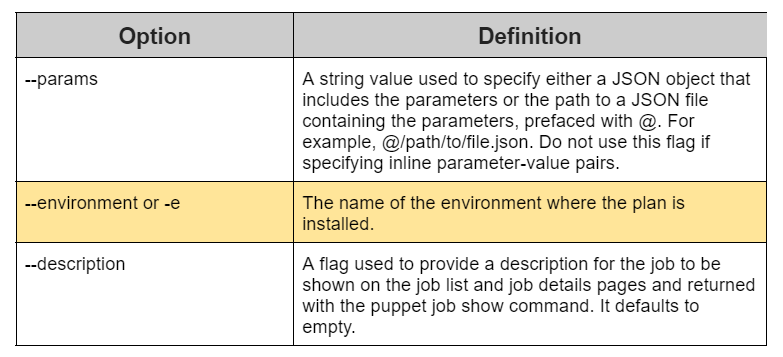
You can utilize the following typical choices in conjunction with the plan of action. Run puppet plan --help to get a comprehensive set of global options.
There are two ways you can input parameters into the plan:
Using the syntax <PARAMETER>=VALUE> inline.
As a JSON object or a reference to a JSON file, with the --params option.
Review this strategy, for instance:
plan example::test_params(Targetspec $nodes, String $command){
  run_command($command, $nodes)
}
These two methods of handing in parameters cannot be combined. Choose between --params and inline.
Inspecting plans
Run one of the commands listed below to view details about your plan inventory after logging into your primary server or client tools workstation:
For instance, this plan permits the parameters $nodes and $version, which can be given as data types TargetSpec and Integer, respectively.
plan infra::upgrade_apache (
  TargetSpec $nodes,
  Integer $version,
){
run_task(‘package’, $nodes, name => ‘apache’, action => ‘upgrade’, version
 => $version)
}
Running plans alongside code deployments
Navigate to Node groups > PE Infrastructure > PE Orchestrator in the PE console.
Locate (or add) the puppet_enterprise::profile::plan_executor class on the Classes tab, and change versioned deploys to true. The complete statement is:
After adjusting this parameter, the orchestrator server doesn’t restart automatically. Thus you must restart the pe-orchestration-services service to complete the modification. Run the following command on the primary server to accomplish this:
Service pe-orchestration-services reload
Results
Code deployments can begin without waiting for plans to finish, and the orchestrator can run plans without blocking them.
Frequently Asked Questions
What is the most basic unit for modeling in Puppet?
Resources serve as the fundamental building block for modeling system setups.
What user does Puppet run as?
The puppet agent is run as root, allowing it to control the system's settings.
Which of the following commands is used in the standalone architecture of Puppet?
A solo execution command for applying to a specific manifest is Puppet apply.
What do you mean by Orchestrator?
The automated configuration, management, and coordination of computer applications, systems, and services is known as orchestration. IT can more easily manage difficult activities and workflows with the aid of orchestration.
How do I restart the Puppet agent?
As of version 2.30, you can restart the Puppet Server by giving the active Puppet Server process a hangup signal, often known as a HUP signal or SIGHUP.
Conclusion
In this article, we have extensively discussed Running Plans in Puppet Enterprise. Running Plans from the console. We also discussed the Running Plans from the command line. In the end, we saw the Plan command options and Inspecting plans.










 1+ registered

