Table of contents
1.
Introduction
2.
Security Architecture
3.
Application State
4.
Data Validation
5.
Web Services
6.
SSL and HTTPS
7.
Frequently Asked Questions
7.1.
What are the types of security architecture?
7.2.
What is security architecture design?
7.3.
What is the purpose of security architecture?
7.4.
What is a good security architecture?
7.5.
What is an example of security architecture?
8.
Conclusion
Last Updated: Mar 27, 2024
Easy

Security Architecture

Career growth poll
Do you think IIT Guwahati certified course can help you in your career?

Introduction

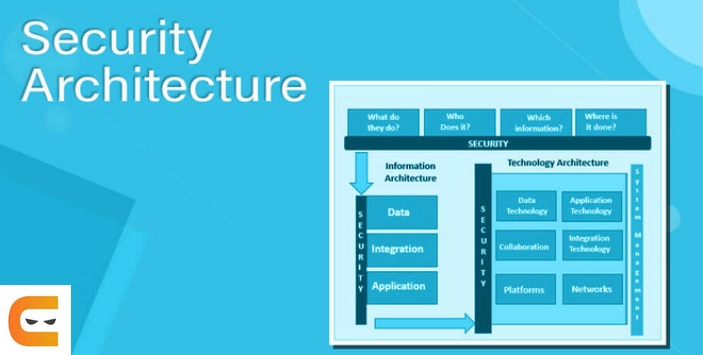
Security architecture is a comprehensive security design that considers the requirements and potential risks in a specific situation or environment. Additionally, it details where and when to implement security controls. In general, the design process is repeatable.

Clear design principles are reported in security architecture, and detailed security control specifications are typically recorded in separate documents. The system architecture is a design that includes a structure and addresses the connection between its parts.
 

Security architecture

Security Architecture

shows the working of security architecture

In Vaadin, All your application state, business logic, and UI logic reside on the server when using the server-side framework flow. A Flow application never exposes its internals to the browser, unlike client-driven frameworks, where a hacker could take advantage of security holes.

Through a single, secure endpoint, flow automates server and client communication. This endpoint has numerous built-in security features, which we go over in the following chapters.

The following example shows how to retrieve private user information from the database. However, we never reveal any client information that is not necessary:

  • A user clicks a button in the user interface (UI) to edit their data, like their name.
     
  • These two entities are translated from this click by the framework JavaScript and sent to the server:
    1. The distinct ID of the Button instance, which the framework had previously assigned sequentially; 
    2. The mouse information is related to the action taken with the button, in this case, a click (what type of click it was, and the associated cursor position).
       
  • Using the single server endpoint, the data is transmitted to the server. The correct user session is located by the application server using Servlet Session standard methods, and it is then provided to Vaadin along with the request payload.
     
  • Vaadin verifies the session data a second time and ensures a Button with the specified ID is present. If it does, the button's server-side click handler is called and given the event information.
     
  • The user information is retrieved from storage by the server-side code. Although it is not necessary to filter this data at this time, the developer may decide to do so if it is.
     
  • By designating it as the content for any components, the developer decides which portions of the data to display to the user.As an illustration, use nameTextField.setValue(user.getName()).
     
  • Vaadin does not retain references to the fetched data after the handler code has finished running. User IDs hashed passwords, and salts are just a few examples of data discarded because it is not explicitly set to be displayed.
     
  • The entire user object is not sent to the client for display; only the user name string is. Even the existence of a user object on the server side is unknown to the client.
     
  • After the user changes the name, the new value is sent back to the server. The user object may be reloaded by the developer, given a new name, and kept on the server.

The example demonstrates that, even when working with UI code, the developer can safely handle sensitive data in their code. The framework only keeps information that the developer explicitly provides. Only information that belongs to the client is transmitted there.

Application State

Vaadin Application Staate

The server is always informed of the state of your Vaadin Flow application. This implies that the server is aware of what is currently visible on the end user's screen, just like client-side applications. Vaadin thus refuses to act on components that are either not visible at the moment on the net or that have been turned off on the server.

For instance, if the developer disables a component, both the server and the client receive this effect. On the client, an attacker can get around this because they have complete control over everything that happens in the browser. Any attempt to interact with the component will be blocked by the server, and a warning will be noted in the server logs.

Java

Button button = new Button("Click me for effect!");
button.setEnabled(false);
button.addClickListener(e -> {
   // This listener won't activate if the button is disabled, //even if an attacker changes the button's client-side state.
});
You can also try this code with Online Java Compiler
Run Code

Data Validation

Data Validation

The data binding API in a Vaadin application supports data validation on the server, impervious to client-side attacks. Vaadin components support client-side validation to improve the application's responsiveness. Still, the developer should be aware that these features should only be used conveniently because they can be easily bypassed in the browser.

Like with other web applications, all client-side data must always be verified once it reaches the server. 

Relying solely on client-side validation is risky. For this purpose, Vaadin offers a collection of pre-made server-side validators. Additionally, the developer is free to connect to external services or use any other Java API for validating the data. A built-in integration between Vaadin and the Java Bean Validation (JSR 303) standard is also available.

Additionally, data from a data source (like a database) should be escaped when it is inserted into DOM elements using HTML mode in component captions or when setting an element's innerHTML.

Web Services

Web services

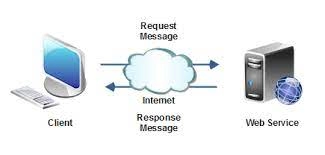
Applications written in Vaadin don't require any public Web Services. In Vaadin, all communication occurs through a single HTTP request handler that processes RPC requests by the Servlet Java API. There are fewer attack entry points for your Vaadin application because you never expose your business logic as Web Services.

SSL and HTTPS

SSL and HTTPS

Vaadin consistently advises developers to configure secure server endpoints and only to use HTTPS for communication. With Vaadin, HTTPS functionality is built-in right out of the box; developers don't need to change their application code.

Frequently Asked Questions

What are the types of security architecture?

Five main classes of security services are taken into account by the Security Architecture of the OSI Reference Model (ISO 7498-2): authentication, access control, confidentiality, integrity, and non-repudiation.

What is security architecture design?

In order to protect the confidentiality, integrity, and availability of the data used, processed, and stored in IT systems, security architecture and design look at how information security controls and safeguards are implemented in those systems.

What is the purpose of security architecture?

A cyber security architecture ensures that all elements of an organization's IT infrastructure are secure and serves as the cornerstone of that defense against cyber threats. Cloud is one of the environments that is protected by a cyber security architecture. Networks.

What is a good security architecture?

After the architecture is implemented, a solid framework will help you quickly identify and fix security flaws and potential threats, protecting sensitive data like employee social security numbers and intellectual property with little work.

What is an example of security architecture?

These explain technical security measures like access restrictions, system hardening, security checks, etc. A taxonomy of software integrity protection techniques for protecting software and data integrity.

Conclusion

So that's the end of the article. Security Architecture

After reading about the Security Architecture, Are you interested in reading/exploring more themes on Architecture?

Don't worry; Coding Ninjas has you covered.

However, if you want to give your work an edge over the competition, you might choose to enroll in one of our premium courses.

With our Coding Ninjas Studio Guided Path, you may learn about Data Structures & Algorithms, Competitive Programming, JavaScript, System Design, and more! If you want to put your coding skills to the test, check out the mock test series on Coding Ninjas Studio and participate in the contests! But if you've only recently started your schooling and are looking for answers to issues presented by digital titans like Amazon, Microsoft, Uber, and others. In this situation, you must consider the obstaclesinterview experiences, and interview package as part of your placement preparations. If you find our blogs valuable and fascinating, please vote them up!

Good luck with your studies!

Live masterclass