Do you think IIT Guwahati certified course can help you in your career?
Introduction
In an era when the transfer of data is happening every second as we speak, computer networking becomes an important subject of study. It is a subject that every good programmer must be thoroughly familiar with. One important topic under this is socket programming. In this article, we will discuss the topic of socket programming and study various ways of its implementation in C++.
Socket programming in C++ is the way of combining or connecting two nodes with eaceachh other over a network so that they can communicate easily without losing any data. One socket (node) listens on a particular port at an IP, while the other socket reaches out to the other to form a connection. The server forms the listener socket while the client reaches out to the server. Before we jump to what socket programming is, let’s understand the various components involved in it. starting with, what a socket is.
What is a Socket?
A socket in C++ is an endpoint for communication between two machines over a network. It allows programs to send and receive data across a network using protocols like TCP or UDP. Sockets are used for client-server communication in networked applications.
Types of Sockets
There are two main types of sockets :
Stream Sockets - Stream sockets, also known as connection-oriented sockets, operate using the Transmission Control Protocol (TCP). They provide reliable, ordered, and error-checked delivery of data between devices over a network. Stream sockets establish a connection between a client and a server before data transmission begins.
Datagram Sockets - Datagram sockets, also known as connectionless sockets, operate using the User Datagram Protocol (UDP). They provide a connectionless communication model where individual packets, called datagrams, are sent between devices without establishing a persistent connection.
Procedure in Client-Server Communication
Socket: Create a new communication
Bind: Attach a local address to a socket
Listen: Announce willingness to accept connections
Accept: Block caller until a connection request arrives
Connect: Actively attempt to establish a connection
Send: Send some data over a connection
Receive: Receive some data over a connection
Close: Release the connection
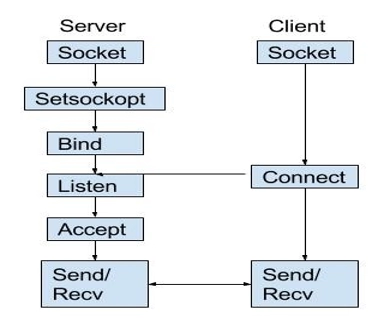
State diagram for server and client model:
Stages for Server Socket Creation :
int socketcr = socket(domain, type, protocol)
Socketcr = integer type, It is like a descriptor (file handle)
Domain = integer type, communication domain, example = AF_INET6 (IPv6 protocol)
Type = communication type
SOCK_DGRAM: UDP(unreliable, connectionless)
Protocol = Protocol value for Internet Protocol(IP), which is 0. This is the same number which appears on the protocol field in the IP header of a packet. (man protocols for more details)
Example of Socket Programming in C++
Here's an example of socket programming in C++ with a simple server and client implementation:
server.cpp:
#include <iostream>
#include <sys/socket.h>
#include <netinet/in.h>
#include <cstring>
int main() {
   int server_fd, new_socket, valread;
   struct sockaddr_in address;
   int opt = 1;
   int addrlen = sizeof(address);
   char buffer[1024] = {0};
   const char* hello = "Hello from server";
   // Creating socket file descriptor
   if ((server_fd = socket(AF_INET, SOCK_STREAM, 0)) == 0) {
       perror("socket failed");
       exit(EXIT_FAILURE);
   }
   // Forcefully attaching socket to the port 8080
   if (setsockopt(server_fd, SOL_SOCKET, SO_REUSEADDR | SO_REUSEPORT, &opt, sizeof(opt))) {
       perror("setsockopt");
       exit(EXIT_FAILURE);
   }
   address.sin_family = AF_INET;
   address.sin_addr.s_addr = INADDR_ANY;
   address.sin_port = htons(8080);
   // Forcefully attaching socket to the port 8080
   if (bind(server_fd, (struct sockaddr *)&address, sizeof(address))<0) {
       perror("bind failed");
       exit(EXIT_FAILURE);
   }
   if (listen(server_fd, 3) < 0) {
       perror("listen");
       exit(EXIT_FAILURE);
   }
   if ((new_socket = accept(server_fd, (struct sockaddr *)&address, (socklen_t*)&addrlen))<0) {
       perror("accept");
       exit(EXIT_FAILURE);
   }
   valread = read(new_socket, buffer, 1024);
   printf("%s\n",buffer );
   send(new_socket, hello, strlen(hello), 0);
   printf("Hello message sent\n");
   return 0;
}
client.cpp:
#include <iostream>
#include <sys/socket.h>
#include <arpa/inet.h>
#include <cstring>
int main() {
   int sock = 0, valread;
   struct sockaddr_in serv_addr;
   char *hello = "Hello from client";
   char buffer[1024] = {0};
   if ((sock = socket(AF_INET, SOCK_STREAM, 0)) < 0) {
       printf("\n Socket creation error \n");
       return -1;
   }
   serv_addr.sin_family = AF_INET;
   serv_addr.sin_port = htons(8080);
   // Convert IPv4 and IPv6 addresses from text to binary form
   if(inet_pton(AF_INET, "127.0.0.1", &serv_addr.sin_addr)<=0) {
       printf("\nInvalid address/ Address not supported \n");
       return -1;
   }
   if (connect(sock, (struct sockaddr *)&serv_addr, sizeof(serv_addr)) < 0) {
       printf("\nConnection Failed \n");
       return -1;
   }
   send(sock, hello, strlen(hello), 0);
   printf("Hello message sent\n");
   valread = read(sock, buffer, 1024);
   printf("%s\n",buffer );
   return 0;
}
Explanation:
The server.cpp file creates a socket, binds it to a port, listens for incoming connections, accepts connections from clients, and sends and receives data. The client.cpp file creates a socket, connects to the server's IP address and port, sends a message, and receives a response from the server.
To compile and run the code, you can use the following commands:
This will start the server in the background and then run the client, which will connect to the server, send a message, and receive a response.
What is a connection?
A relationship between two machines, where two pieces of software know about each other. Those two pieces of software know how to communicate with each other. In other words, they know how to send bits to each other. A socket connection means the two machines have information about each other, including network location (IP address) and TCP port. (If we can use an analogy, IP address is the phone number and the TCP port is the extension).
A socket is an object similar to a file that allows a program to accept incoming connections, make outgoing connections, and send and receive data. Before two machines can communicate, both must create a socket object. A socket is a resource assigned to the server process. The server creates it using the system call socket(), and it can’t be shared with other processes.
Setsockopt: This helps in manipulating options for the socket referred by the file descriptor socket. This is completely optional, but it helps in the reuse of address and port. Prevents errors such as: “address already in use”.
Bind: After the creation of the socket, the bind function binds the socket to the address and port number specified in addr(custom data structure). In the example code, we bind the server to the localhost, hence we use INADDR_ANY to specify the IP address.
Listen: The listen() function marks a connection-mode socket (for example, those of type SOCK_STREAM), specified by the socket argument s, as accepting connections, and limits the number of outstanding connections in the socket listen to queue to the value specified by the backlog argument. The socket s is put into ‘passive’ mode where incoming connection requests are acknowledged and queued pending acceptance by the process.
The backlog parameter of this function is typically used by servers that could have more than one connection request at a time: if a connection request arrives with the queue full, the client receives an error with an indication of ECONNREFUSED.
listen() attempts to continue to function rationally when there are no available descriptors. It accepts connections until the queue is emptied. If descriptors become available, a later call to listen() or accept() re-fills the queue to the current or most recent backlog’, if possible, and resume listening for incoming connections.
Accept: The accept() system call is used with connection-based socket types(SOCK_STREAM, SOCK_SEQPACKET). It extracts the first connection request on the queue of pending connections for the listening socke sockfd, creates a new connected socket, and returns a new file descriptor referring to that socket. The newly created socket is not in the listening state. The original socket sockfd is unaffected by this call. The argument sockfd is a socket that has been created with socket(2), bound to a local address with bind(2), and is listening for connections after a listen(2).
Stages For Client:
1. Socket connection: Exactly same as that of server’s socket creation
2. Connect: The connect() system call initiates a connection on a socket. If the parameter s (a socket) is of type SOCK_DGRAM, then connect() permanently specifies the peer to which data grams are to be sent. If s is of type SOCK_STREAM, then connect() attempts to make a connection to another socket. The name parameter specifies the other socket. The connect() function is used to create a connection to the specified foreign association. The parameter s specifies an unconnected datagram or stream socket. If the socket is unbound, the system assigns unique values to the local association, and the socket is marked as bound. For stream sockets (type SOCK_STREAM), an active connection is initiated to the foreign host using the name (an address in the namespace of the socket). When the socket call completes successfully, the socket is ready to send/receive data.
3. Send/Receive :- The send() and recv() calls specify:
The sockets on which to communicate
The address in the storage of the buffer that contains, or will contain, the data (addr_of_data, addr_of_buffer)
The size of this buffer (len_of_data, len_of_buffer)
A flag that tells how the data is to be sent
Steps to establish connection in socket:
The system calls for establishing a connection are somewhat different for the client and the server, but both involve the basic construct of a socket. A socket is one end of an interprocess communication channel. The two processes each establish their own socket.
The steps involved in establishing a socket on the client side are as follows:
Create a socket with the socket() system call
Connect the socket to the address of the server using the connect() system call
Send and receive data. There are a number of ways to do this, but the simplest is to use the read() and write() system calls
The steps involved in establishing a socket on the server side are as follows:
Create a socket with the socket() system call
Bind the socket to an address using the bind() system call. For a server socket on the Internet, an address consists of a port number on the host machine
Listen for connections with the listen() system call
Accept a connection with the accept() system call. This call typically blocks until a client connects with the server
Send and receive data
Connecting Multiple Clients Without Multithreading
In numerous examples, what we see is how a single client is connected to a socket in a server. However, this is not the case in day to day life. We have multiple clients connected to a server and each has a different socket.
One way to achieve this feat is by using multithreading. But only someone who has done multithread programming knows it can lead to madness. They are very difficult to code and debug. Even if you end up programming them neatly, the results can be unpredictable. Not to mention the fact that they are not scalable for a large number of clients and there is also a chance of deadlocks occurring.
To tackle these issues, we try to support multiple clients on a network without using multithreading. To help us with this, we have a special function known as select().
What is the select() function?
It is a Linux command which uses fd_set data structure and allows us to monitor multiple file descriptors. It gets activated as soon as any file descriptor sends data. Hence it works like an interrupt handler. If some data is there that is to be read on one of the sockets then it is select() that provides that information. It then returns the total number of socket handles that are ready and contained in the fd_set structures.
There are four macros that are associated with the select function, used for manipulating and checking the descriptor sets.
*FD_ZERO(set) - Initializes the set to an empty set. A set should always be cleared before using.
*FD_CLR(s, set) - Removes socket s from set.
*FD_ISSET(s, set) - Check to see if s is a member of set and returns TRUE if so.
*FD_SET(s, set) - Adds a socket s to set.
Using these four macros and the select function, one can handle multiple clients using a single thread.
Implementation
Here is an example server side code which echos back the received message. Jump here for the explanation of the code.
for (i = 0; i < maximum_clients; i++) //initialise all client_sock to 0 { client_sock[i] = 0; } if( (master_sock = socket(AF_INET , SOCK_STREAM , 0)) == 0) //creating a master socket { perror("Failed_Socket"); exit(EXIT_FAILURE); }
//These are the types of sockets that we have created adr.sin_family = AF_INET; adr.sin_addr.s_addr = INADDR_ANY; adr.sin_port = htons( PORT );
if (bind(master_sock, (struct sockaddr *)&adr, sizeof(adr))<0) //bind the socket to localhost port 5500 { perror("Failed_Bind"); exit(EXIT_FAILURE); } printf("Port having listener: %d \\n", PORT);
if (listen(master_sock, 3) < 0) //Specify 3 as maximum pending connections for master socket { perror("listen"); exit(EXIT_FAILURE); }
addrlen = sizeof(adr); //Accepting the Incoming Connection puts("Looking For Connections");
//*******************************// // Here we start using select functions and the macros for multiple client handling
while(TRUE) { FD_ZERO(&readfds); //Clearing the socket set FD_SET(master_sock, &readfds); //Adding the master socket to the set maximum_socket_descriptor = master_sock;
for ( i = 0 ; i < maximum_clients ; i++) //Adding child sockets to set { sock_descriptor = client_sock[i]; //Descriptor for Socket
if(sock_descriptor > 0) //if the socket descriptor is valid then adding it to the read list FD_SET( sock_descriptor , &readfds);
if(sock_descriptor > maximum_socket_descriptor) //Highest File Descriptor Number which is needed for the select function maximum_socket_descriptor = sock_descriptor; }
//Waiting for something to happen on the master socket. As the wait time is NULL the wait is indefinite act = select( maximum_socket_descriptor + 1 , &readfds , nullptr , nullptr , nullptr);
if ((act < 0) && (errno!=EINTR)) { printf("Failed_Select"); } if (FD_ISSET(master_sock, &readfds)) //Any activity on the master socket is treated as an incoming connection { if ((new_sock = accept(master_sock, (struct sockaddr *)&adr, (socklen_t*)&addrlen))<0) { perror("Accept!"); exit(EXIT_FAILURE); }
//Informing the user of the socket number which will be sued to send and receive messages printf("This is a New Connection,The socket file descriptor is %d and the IP is : %s on Port : %d\\n" , new_sock , inet_ntoa(adr.sin_addr) , ntohs (adr.sin_port));
if( send(new_sock, message, strlen(message), 0) != strlen(message)) // Sending Greeting Message on New Connection { perror("Send!!"); } puts("Welcome Text Sent Affirmative.");
for (i = 0; i < maximum_clients; i++) // Adding new socket to the array of sockets { if( client_sock[i] == 0 ) // Checking if the position is empty { client_sock[i] = new_sock; printf("Adding new socket to the list of sockets as %d\\n" , i);
break; } } } for (i = 0; i < maximum_clients; i++) //If not the master socket then it is some i/o activity on some other socket { sock_descriptor = client_sock[i]; if (FD_ISSET( sock_descriptor , &readfds)) { //Checking if the activity was for closing and reading the incoming message if ((value_read = read( sock_descriptor , buff, 1024)) == 0) { //If someone disconnected, getting their details and printing a message getpeername(sock_descriptor , (struct sockaddr*)&adr , \\ (socklen_t*)&addrlen); printf("Disconnected Host. Their , IP %s and PORT %d \\n" , inet_ntoa(adr.sin_addr) , ntohs(adr.sin_port)); close( sock_descriptor ); //Closing the socket and marking it as 0 in the list to be reused client_sock[i] = 0; } else //Echoing back the message that came in the socket { buff[value_read] = '\\0'; //Setting the string terminating NULL byte on the end of the data that is read send(sock_descriptor , buff , strlen(buff) , 0 ); } } } } return 0; }
You can also try this code with Online C++ Compiler
Try and compile by yourself with the help of online C++ Compiler for better understanding.
Explanation of the code:
In the above code we first create an fd_set variable readfds, which monitors all the clients' active file descriptors as well as the active file descriptors on the main servers listening socket. For an old client sending data, readfds would already be activated and thus we'll check in the existing list to see which client has sent the data. When a new client connects to the server, master-sock will be activated and a new file descriptor will be open for that particular client. We store this file descriptor in a client_list and add it to the readfds variable in the next iteration to monitor the activity from the client.
Compiling and running the above code would create a server. telnet command can then be used on port 5500 to connect to the server. using multiple devices we can see that we can connect multiple devices to the server without using multithreading at all.
Uses of socket programming in C++:
Socket programs are used to communicate between various processes usually running on different systems. It is mostly used to create a client-server environment. This post provides the various functions used to create the server and client program and an example program. In the example, the client program sends a file name to the server and the server sends the contents of the file back to the client. Socket programming usually pertains to the basic communication protocols like TCP/UDP and raw sockets like ICMP. These protocols have a small communication overhead when compared to underlying protocols such as HTTP/DHCP/SMTP etc.
Some of the basic data communications between client and server are:
File Transfer: Sends name and gets a file.
Web Page: Sends URL and gets a page.
Echo: Sends a message and gets it back.
Advantages of Socket Programming in C++:
Socket programming in C++ allows developers to create network applications that can run on various operating systems without significant modifications, enhancing portability and interoperability.
C++ offers high performance and low-level control, making it well-suited for developing network applications with minimal overhead, reduced memory footprint, and optimized resource utilization.
Socket programming in C++ allows developers to design scalable network applications capable of handling large volumes of data and accommodating increasing user demands with ease.
C++ provides a wide range of networking libraries and frameworks, enabling developers to implement custom protocols, optimize network communication, and integrate advanced features seamlessly into their applications.
C++ boasts a vast community of developers, libraries, and resources dedicated to networking and socket programming, facilitating collaboration, knowledge sharing, and troubleshooting.
Disadvantages of Socket Programming in C++ :
The C++ can establish communication only with the machine requested and not with any other machine on the network.
Sockets allow only raw data to be sent. This means that both the client and server need to have mechanisms to interpret the data.
Yes, C++ supports socket programming, offering APIs and libraries for network communication and creating various types of sockets.
How do you create a TCP socket in C++?
To create a TCP socket in C++, you typically use the socket() function to create a socket, then bind() to associate it with an address and port, and finally listen() to start listening for incoming connections.
Which language is best for socket programming?
C++ is a popular choice for socket programming due to its performance, low-level control, and extensive libraries like Boost.Asio, making it well-suited for developing scalable and efficient network applications.
What is TCP socket programming?
Socket Programming is used to establish communication between two network nodes.
What is the best language for socket programming?
Java and C#/C++ are the best languages for socket Programming.
What is a socket HTTP? Why is socket programming used?
Socket programming is used to create endpoints to establish communication between network nodes.
Can socket programming be done in Windows?
Yes, socket programming can be done in Windows using Winsock.
To read more about C++, click here.
Conclusion
Computer Networking is an important subject of study for every programmer. Mastery in understanding transfer of data between two or more machines requires thorough knowledge in a number of topics. One such important topic is socket programming. Socket programming in C++ is the way of combining or connecting two nodes with each other over a network so that they can communicate easily without losing any data. This article discusses the topic with its implementation in C++ in detail.
To read more about Networking, check out this article.







 9+ registered

