Do you think IIT Guwahati certified course can help you in your career?
Introduction
Have you ever tried automating your organization's servers and network equipment management using any software or tool?
This article is focused on the Command Line tool of one of the automation software, which is known as Chef. This command-line tool is known as the knife in detail. We will study the different knife subcommands in detail. We will learn about syntax and properties as well. Let's learn all these things in more detail.
About Knife
The knife is an integral part of the Chef's Workstation. It is a command-line tool. It acts as an interface between the Chef Infra Server and a local chef-repo.
The knife has many functionalities. It allows the user to manage the following things:-
The Nodes,
Roles, Environments, and Data Bags,
Cookbooks, and recipes,
Resources within different cloud environments,
Finding indexed data on the Chef Infra Server,
The installation of Chef Infra Client on Nodes.
Let’s briefly discuss the different subcommands of Knife.
knife xargs
The knife xargs subcommand is used to take patterns from standard input, download it as JSON files, allow run commands against the downloaded JSON, and finally upload those changes.
Syntax:
knife xargs [PATTERN...] (options)
The different options and arguments are mentioned in the below table:
knife tag
Tag: A tag is a unique description that is assigned to a node. Once applied, a tag can help manipulate nodes with the knife or while creating recipes by providing alternative methods of combining similar types of information.
The knife tag subcommand is used to apply tags to nodes on a Chef Infra Server.
Syntax:
knife tag create NODE_NAME [TAG...]
This subcommand doesn’t have any specific option argument.
knife serve
The knife serve subcommand is used to run a persistent chef-zero against the local chef-repo.
Chef-Zero: Achef-zero is a lightweight Chef Infra Server that runs in-memory on the local machine.
Syntax:
knife serve (options)
The different options and arguments are mentioned in the below table:
knife show
The knife show subcommand is used to view the details of one or more objects on the Chef Infra Server.
Syntax:
knife show [PATTERN...] (options)
The different options and arguments are mentioned in the below table:
knife ssh
The knife ssh subcommand is used to invoke SSH commands on a subset of nodes within an organization, on the basis of a search query made to the Chef Infra Server.
Syntax:
knife ssh SEARCH_QUERY SSH_COMMAND (options)
The different options and arguments are mentioned in the below table:
knife ssl check
The knife ssl check subcommand is used to verify the SSL configuration for the Chef Infra Server or a location specified by a URL or URI.
Syntax:
knife ssl check (options)
This command has only one options argument.
URL_or_URI: This will provide the URL or URI for the location of the SSL certificate.
knife ssl_fetch
The knife ssl fetch subcommand is used to copy SSL certificates from an HTTPS server to the trusted_certs_dir directory used by knife and Chef Infra Client to store trusted SSL certificates.
Syntax:
knife ssl fetch (options)
This command has only one options argument.
URL_or_URI: This will provide the URL or URI for the location of the SSL certificate.
knife status
The knife status subcommand is used to display a brief summary of the nodes on a Chef Infra Server, including the time of the most recent successful Chef Infra Client run.
Syntax:
knife status (options)
The different options and arguments are mentioned in the below table.
knife recipe list
The knife recipe list subcommand is used to view all recipes on a Chef Infra Server.
Syntax:
knife recipe list REGEX
This subcommand doesn’t have any specific option argument.
knife raw
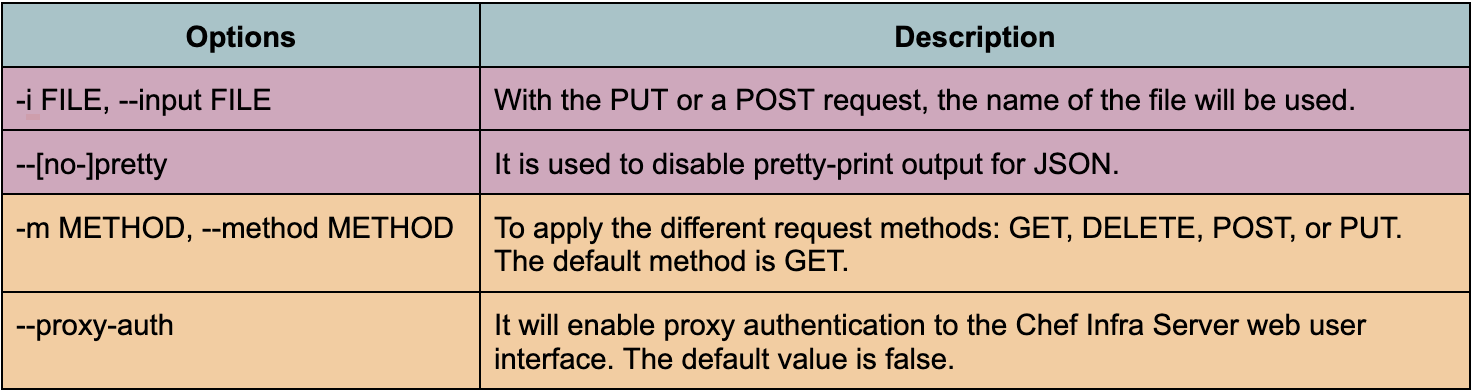
The knife raw subcommand is used to send a REST request to an endpoint in the Chef Infra Server API.
Syntax:
knife raw REQUEST_PATH (options)
The different options and arguments are mentioned in the below table:
knife exec
The knife exec subcommand is used to execute Ruby scripts in the context of a fully configured Chef Infra Client.
Syntax:
knife exec SCRIPT (options)
The different options and arguments are mentioned in the below table:
knife list
The knife list subcommand to view a list of objects on the Chef Infra Server.
Syntax:
knife list [PATTERN...] (options)
The different options and arguments are mentioned in the below table:
Frequently Asked Questions
Is Chef a programming language?
Chef is an esoteric programming language. Programs in Chef look like recipes. The main principle of language design is: that program recipes should not only generate valid output but be easy to prepare and delicious.
What is Knife in chef?
A knife is a command-line tool that connects a local chef-repo and the Chef Infra Server.
What do you understand about a node in Chef?
A node is a machine or system managed by the Chef server. It can be attached to any network that can send and receive information.
What are the three main components of a Chef?
Workstations, servers, and nodes are the three main components of Chef.
What do you mean by a client in Chef?
On each node that Chef is responsible for managing, an agent called a chef-client runs locally.
Conclusion
In this article, we have extensively discussed different subcommands of Knife like knife xargs, knife tag, knife serve, knife show, knife ssh, knife ssl check, knife ssl_fetch, etc. I hope you enjoyed this blog on Some Subcommands of Knife.







 1+ registered

