




Introduction
The forms in web2py are used to take inputs from users and perform actions on them by storing the data. The data submitted by the user must be validated to perform accurate operations and prevent the users from providing irrelevant data. But how do we perform validation on the form’s data? We have validators to handle this validation in web2py. Validators are the classes that are used to validate input fields. Let’s learn about special validators in web2py in this article.
Special type validators
The special type validators in web2py are used to validate the media, files, emails, and lists given by users as input and their lengths. Let’s discuss different types of validators now.
IS_LIST_OF
Ths IS_LIST_OF validator is used to put limits on the length of the lists obtained from the forms. If we have multiple fields in a form with the same name or any selection boxes, these inputs are considered as a list by the web2py forms. This validator automatically converts the non-list type values into a single list. We have three different arguments to ensure the limit is set using this validator. They are
Minimum - This argument provides the minimum length or limit of the list or inputs a user can give when used with the validator.
requiredLength = IS_LIST_OF(minimum=2, error_message=”minimum required length is two”)

Maximum - This argument provides the maximum length or limit of the list inputs a user can give when used with the validator.
maxLength = IS_LIST_OF(maximum=2, error_message=”maximum required length is two”)
Error_message - This argument displays the error message when the maximum length exceeds, or the minimum required length is not satisfied.
maxLength = IS_LIST_OF(maximum=1, error_message='Limit exceeded')
IS_LIST_OF_EMAILS
This validator works similar to the IS_LIST_OF validator, but the only difference is that this validator is used to validate the emails instead of regular lists. We can add and edit a list of emails in the fields.
Field('emails', 'list:string',
      widget=SQLFORM.widgets.text.widget,
      requires=IS_LIST_OF_EMAILS(),
      filter_in=lambda l: \
          IS_LIST_OF_EMAILS.split_emails.findall(l[0]) if l else l,
      represent=lambda v, r: \
          XML(', '.join([A(x, _href='mailto:'+x).xml() for x in (v or [])]))
     )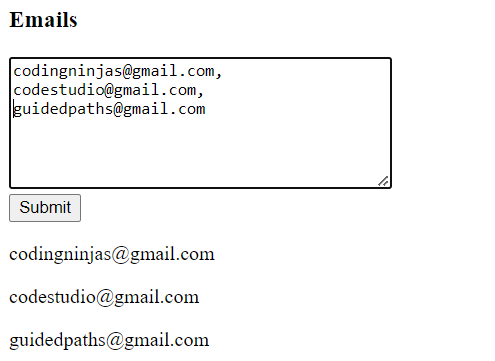
The widget in the above code will display the input field as a text area and allow the user to give a list of emails as input. This validator splits the emails according to the separator between mails like comma(,), newline, space, etc. This considers all the emails as a single list as discussed in the above validator and separates them to form a proper list of emails.
ANY_OF
This validator acts like a logical OR. It takes all the validators as arguments and successfully accepts a value if any of them accepts the value. When none of the values are accepted by any of the validators, the error message is displayed for the last value of the input list.
ANY_OF([IS_ALPHANUMERIC(), IS_EMAIL()],
           error_message='Enter an alphanumeric string’)
In the above case, if the given input is not an email and doesn’t contain alphanumeric characters, the error message Enter a valid email will be displayed.
IS_IMAGE
This validator is used to validate whether the input file uploaded by the user is an image and has the required or specified dimensions. The formats supported by this validator for images are BMP, GIF, JPEG, and PNG. This validator doesn't check the maximum file size. We have to use the IS_LENGTH validator to validate the maximum size of the image uploaded by the user. This validator takes three arguments; they are
Extensions - This argument contains the supported extensions by web2py and validates the image uploaded
maxsize - This validator checks the dimensions of the image(maximum height and width)
minsize -This validator checks the dimensions of the image(minimum height and width)
requires = IS_IMAGE(extensions=('png'), maxsize=(1920, 1080), minsize=(300, 300), error_message=”Enter a valid file type”))
According to the above code, the user can only upload a PNG format image with maximum dimensions 1920*1080 and a minimum size of 300*300.
IS_FILE
This validator works similarly to the IS_IMAGE validator but generally performs validation for all uploaded files. The extensions supported are case insensitive. It takes four arguments; they are
filename - validate the name of the file uploaded by the user.
extension - validates the extension of the file uploaded by the user.
lastdot - indicates which dot should be used as a filename/extension separator. It is a boolean value where True indicates the value after the last dot is considered an extension. In contrast, False indicates the value after the first dot is considered an extension.
Example:
When true => "file.tar.gz" will be broken in "file.tar" + "gz"
When false => "file.tar.gz" will be broken into "file" + "tar.gz"
case - validates the case of the filename. 0 indicates to ignore the case and let it be as it is, 1 indicates a transformation of the string into lowercase, and 2 indicates a transformation of the string into uppercase.
INPUT(_type='file', _name='name',
        requires=IS_FILE(filename=re.compile('backup.*'),
        extension='pdf', error_message=”file type is not supported”))
The above code validates the filename and checks if it is “backup”, the extension is tar.gz.
IS_IPV4
This validator checks if the value in the input field is in IPV4(IP version 4 address in decimal form) format. It takes three arguments; they are
minip - defined the lowest allowed address
maxip - defines the highest allowed address
invert - a flag to invert the allowed address range, i.e., if set to True, allows addresses only from outside of the given range, otherwise allows the addresses from inside the range.
IS_IPV4(minip='0.0.0.0', maxip='255.255.255.255', invert=False,
        is_localhost=None, is_private=None, is_automatic=None,
        error_message='Enter valid IPv4 address')
The above code checks the allowed addresses and considers the addresses from only a given range. In case of validation failure, it displays the error message in the code.
The IS_IPV6 validator also works similarly and validates the address for the IP version 6 address format. Similarly, the IS_IPADDRESS validates the IP address for both the 4 and 6 versions of the address.



 1+ registered

