




Introduction
Hello, Readers!!
Have you guys heard about Katalon Studio?
No? Don't worry. We got you covered. Katalon Studio is a robust automation tool with a Selenium-based engine. It is designed in order to create and reuse automated test scripts for UI without needing to code.
In this blog, we will discuss about Test Fixtures and Test Listeners in Katalon Studio.
So let us begin!!
Test Fixtures and Test Listeners
In Katalon Studio, Test Listeners are a code block that runs before or after each Test Case or Test Suite. They help the user to manage the code’s workflow better and also help in reducing the code’s redundancy. Whereas a Test Fixture is an environment that the user uses to test any piece of code/software consistently.
In order to extend the user's current testing flow, the test fixtures, as well as the test listeners, can be useful for prerequisite and clean-up configurations for all the tests. The test engine needs to take some specific actions before starting the test execution with the prerequisite configuration. While for clean-up configuration, the test engine should carry out some actions once the test execution finishes.
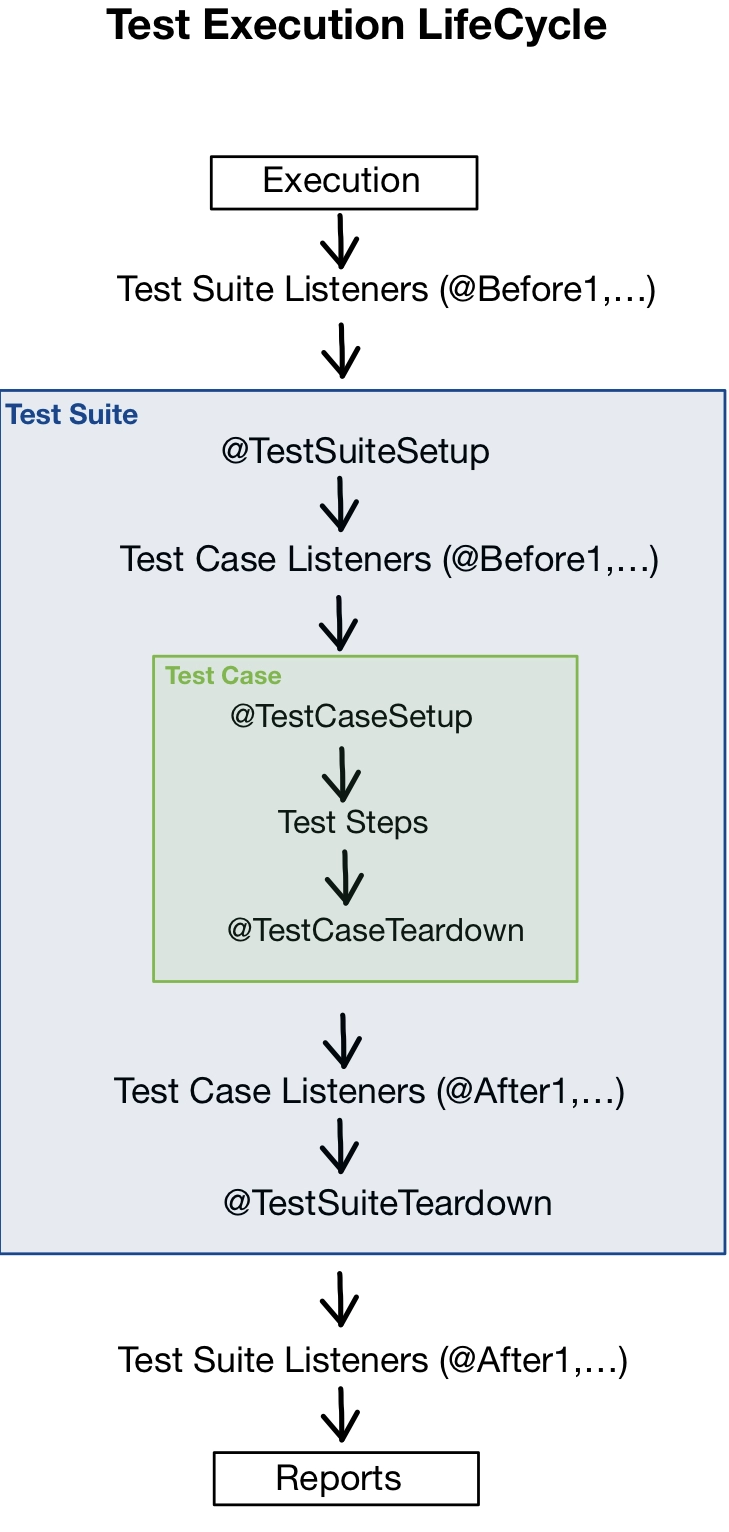
The above-given image represents how the Katalon Studio executes the user's automated test projects with test fixtures and test listeners methods.
setUp() and tearDown() for Test Suite and Test Case
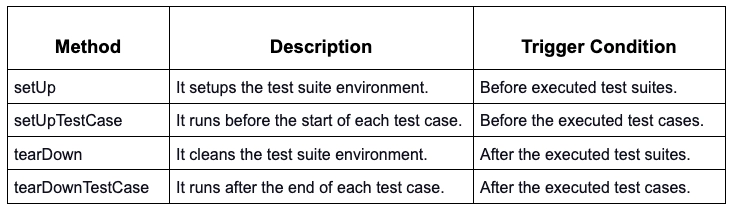
The setUp() and tearDown() are a group of users' own defined test steps that are executed before and after, respectively, executing a Test Suite.
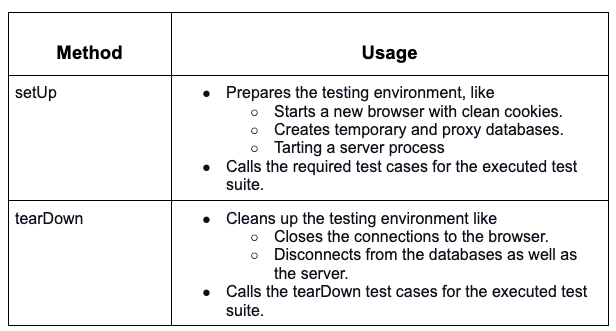
Users have the ability to specify the prerequisites as well as the clean-up configurations for their test cases by using the setUp() and tearDown() methods when working in Katalon Studio.
Some of the ways in which the setUp and tearDown methods are used are mentioned below:
The table shown below describes the trigger conditions for these methods:
Activate setUp and tearDown in a Test Suite
The user needs to switch to the Script tab in the test suite editor in order to view the setUp and tearDown methods template.
The setUp and tearDown methods do not get triggered by default, even if they match the given target conditions. A code representing this is mentioned below:
/**
*
Setup the test suite environment.
*/
@SetUp(skipped = true) // the user needs to change skipped to false in order to activate this method.
def setUp() {
// code goes here.
}
In order to activate the setUp and tearDown methods, we need to set the skipped value to false, an example of the same is shown below:
@SetUp(skipped = false)
Note:
- The execution logs are created as usual, even when executing with the setUp and tearDown methods.
- A user cannot view the executed reports from the setUp and tearDown methods from the generated Test Suite report.
Adding setUp and tearDown methods in Manual view of Test case
A user can add the setUp and tearDown methods while using the manual view of a test case by following the below-mentioned steps:
- Click on the Add icon, and a drop-down menu will appear. Choose Method.
- The Method builder dialog box will open.
- The user needs to enter their method's name and its return value and then choose any one of the below-mentioned options:

- In order to add a test step under a method, the user needs to choose the line of that method and then click Add. A new keyword will be added under that method.
Adding setUp and tearDown methods in the script view of the test case
Users can declare a method as a setUp or tearDown method using the matching annotation above them in the script view of a test case. For example
@com.kms.katalon.core.annotation.SetUp
def setup(def parameter_1, def parameter_2, def parameter_3) {
}
@com.kms.katalon.core.annotation.TearDownIfPassed
def teardownIfPassed(def parameter_1, def parameter_2, def parameter_3) {
}
@com.kms.katalon.core.annotation.TearDownIfFailed
def teardownIfFailed(def parameter_1, def parameter_2, def parameter_3) {
}
@com.kms.katalon.core.annotation.TearDownIfError
def teardownIfError(def parameter_1, def parameter_2, def parameter_3) {
}
@com.kms.katalon.core.annotation.TearDown
def teardown(def parameter_1, def parameter_2, def parameter_3) {
}
Test Listeners
Test listeners are the test steps that are created in order to listen to the event which is defined in the script. They then behave accordingly.
Create a new Test Listener
Test listeners are test artifacts that can be used to perform all of the basic operations like create, cut/copy, rename or delete. Follow the below-mentioned steps in order to create a new test listener:
- Right-click on the Test Listener from the Tests Explorer panel. Then select New > New Test Listener.
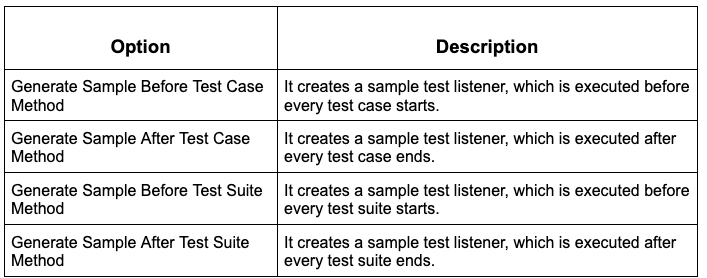
- The New Test Listener dialog box will open up with the below-mentioned four options:
-
The user can select multiple options. Once selected, click OK.
After the user completes the above steps, the Katalon Studio then generates a sample template accordingly, which includes all the necessary annotations, libraries, and supported functions.
Note:
- Users can create multiple test listeners.
- If a user has multiple test listener classes, then the classes are instantiated in alphabetic order in Katalon Storage.



 1+ registered

