




Introduction
A developer spends a significant portion of the effort while designing hardware systems and applications on testing and verification. Behavior Driven Development(BDD), which is an extension of Test-Driven Development(TDD), is a development technique where acceptance tests are written in natural language to drive the implementation. You can learn more about TDD and BDD here.
We will learn to add and verify behavior using the when() and verify() methods available in the Mockito mocking framework in Java through this article with the help of concept explanations and examples.
Verifying Behavior
Mockito can ensure if a mock method is being called with required arguments or not using the verify() method. You can use the verify methods in Mockito at the end of a method code to make sure that specified methods are called. That essentially means that the verify methods check whether a particular behavior happened.
To try out a straightforward implementation of the verify method, we will create an interface(CalculatorService) with arithmetic operations.
Program
//src/main/java/com.codingninjas.testrunner/CalculatorService.java
package com.codingninjas.testrunner;


public interface CalculatorService {
  public double add(double input1, double input2);
  public double subtract(double input1, double input2);
  public double multiply(double input1, double input2);
  public double divide(double input1, double input2);
}

We will now create a java class that implements the service from our interface(MathApplication).
Program
//src/main/java/com.codingninjas.testrunner/MathApplication.java
package com.codingninjas.testrunner;


public class MathApplication {
  private CalculatorService calcService;


  public void setCalculatorService(CalculatorService calcService){
      this.calcService = calcService;
  }

  public double add(double input1, double input2){
      //returns calcService.add(input1, input2);
      return input1 + input2;
  }

  public double subtract(double input1, double input2){
 //returns calcService.subtract(input1, input2);
      return calcService.subtract(input1, input2);
  }

  public double multiply(double input1, double input2){
 //returns calcService.multiply(input1, input2);
      return calcService.multiply(input1, input2);
  }

  public double divide(double input1, double input2){
 //returns calcService.divide(input1, input2);
      return calcService.divide(input1, input2);
  }
}Finally, we will test the above class by injecting a mock of our service interface using Mockito. We will use the verify method to verify the behavior of our interface.
Program
//src/test/java/com.codingninjas.testrunner/MathApplicationTest.java
package com.codingninjas.testrunner;


import static org.mockito.Mockito.verify;
import static org.mockito.Mockito.when;


import org.junit.Assert;
import org.junit.Test;
import org.junit.runner.RunWith;
import org.mockito.InjectMocks;
import org.mockito.Mock;
import org.mockito.runners.MockitoJUnitRunner;


// @RunWith attaches a runner with the test class to initialize the test data
@SuppressWarnings("deprecation")
@RunWith(MockitoJUnitRunner.class)
public class MathApplicationTester {

   //We use @InjectMocks annotation to create and inject the mock object
   @InjectMocks
   MathApplication mathApplication = new MathApplication();


   //We use @Mock annotation to create the mock object to be injected
   @Mock
   CalculatorService calcService;


   @Test
   public void testAdd(){
      //adds the behavior of CalcService for addition of two numbers
      when(calcService.add(10.0,20.0)).thenReturn(30.00);

      //tests the add functionality
      Assert.assertEquals(calcService.add(10.0, 20.0),30.0,0);

      //verifies the behavior
      verify(calcService).add(10.0, 20.0);
   }
}Output

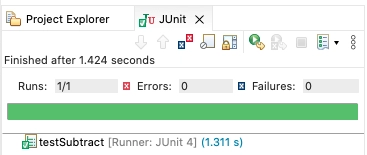


 7+ registered

