




Introduction💁
Before we dive into Text Validators Functions, we need to understand web2py. So what is web2py? Web2py is an open-source web application framework that is written in the Python programming language. It is used to create dynamic web pages using Python. It cuts down a lot of tedious hard work of creating a webpage, such as creating a form from scratch.
Text Format Validators ✔️
Now that we know a little bit about web2py, we can talk about Text Format Validators. So Text Format Validators are certain functions in the web2py package that are used to validate a text field against some given condition. Let us look at a few different types of Text Format Validators present in web2py.
IS_ALPHANUMERIC
This Text Format Validator is used to validate that the text in the text field does not contain any special symbols.
validate = IS_ALPHANUMERIC(error_message='Please Enter an alphanumeric value!!')
The above line of code is used to validate the text using the IS_ALPHANUMERIC function.
Lets us look at an example,
Controller File
def user():
    form=FORM('Your name:',
              INPUT(_name='name', requires=IS_ALPHANUMERIC(error_message="Please Enter an alphanumeric value!!")),
              INPUT(_type='submit'))
    if form.accepts(request, session):
        response.flash = 'form accepted'
    elif form.errors:
        response.flash = 'form has errors'
    else:
        response.flash = 'please fill the form'
    return dict(form=form)
View File
{{extend 'layout.html'}}
<h2>Input form</h2>
{{=form}}
<h2>Submitted variables</h2>
{{=BEAUTIFY(request.vars)}}
<br><br>
<h2>Errors in form</h2>
{{=BEAUTIFY(form.errors)}}
Output


IS_LOWER, IS_UPPER
These Text Format Validators do not return an error. Rather they convert the text to lower or upper case, respectively. We can use the following code snippets to implement these functions,
requires = IS_LOWER()
requires = IS_UPPER()
IS_EMAIL
This Text Format Validator is used to validate that the text in the text field is a valid email id.
validate = IS_ALPHANUMERIC(error_message='Please Enter a valid Email!!')
The above line of code is used to validate the text using the IS_LOWER function.
Lets us look at an example,
Controller File
def user():
    form=FORM('Your name:',
              INPUT(_name='name', requires=IS_ALPHANUMERIC(error_message="Please Enter an alphanumeric value!!")),
              INPUT(_type='submit'))
    if form.accepts(request, session):
        response.flash = 'form accepted'
    elif form.errors:
        response.flash = 'form has errors'
    else:
        response.flash = 'please fill the form'
    return dict(form=form)
View File
{{extend 'layout.html'}}
<h2>Input form</h2>
{{=form}}
<h2>Submitted variables</h2>
{{=BEAUTIFY(request.vars)}}
<br><br>
<h2>Errors in form</h2>
{{=BEAUTIFY(form.errors)}}
Output


IS_MATCH
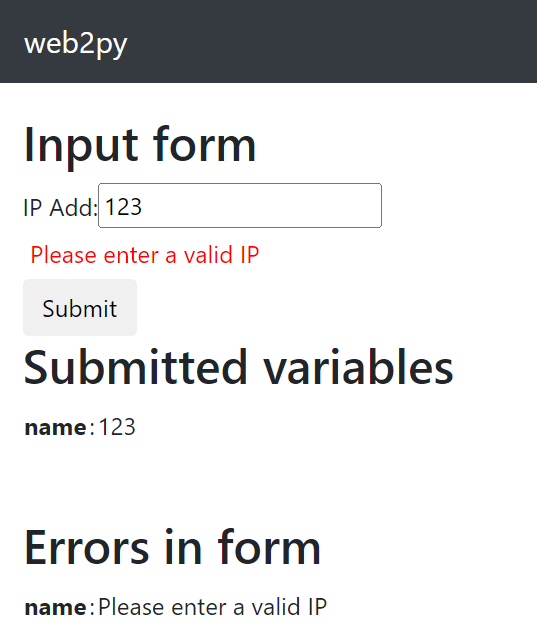
This Text Format Validator is used to match against a given regular expression, and if the text does not match, it returns an error message.
require = IS_MATCH(error_message='Please Enter a valid IP!!')
The above line of code is used to validate the text using the IS_MATCH function.
Lets us look at an example,
Controller File
def user():
form=FORM('IP Add:',
              INPUT(_name='name', requires=IS_MATCH('^\d{1,3}(.\d{1,3}){3}$',
         error_message='Please enter a valid IP')),
              INPUT(_type='submit'))
    if form.accepts(request, session):
        response.flash = 'form accepted'
    elif form.errors:
        response.flash = 'form has errors'
    else:
        response.flash = 'please fill the form'
    return dict(form=form)
View File
{{extend 'layout.html'}}
<h2>Input form</h2>
{{=form}}
<h2>Submitted variables</h2>
{{=BEAUTIFY(request.vars)}}
<br><br>
<h2>Errors in form</h2>
{{=BEAUTIFY(form.errors)}}
Output

IS_LENGTH
This Text Format Validator is used to check whether the length of the given text fits within the set boundaries.
require = IS_LENGTH(minsize=8, error_message='Password should be atleast 8 characters long!!')
The above line of code is used to validate the text using the IS_LENGTH function.
Lets us look at an example,
Controller File
def user():
form=FORM('Pass:',
              INPUT(_name='name', require = IS_LENGTH(minsize=8, error_message='Password should be atleast 8 characters long!!')
),
              INPUT(_type='submit'))
    if form.accepts(request, session):
        response.flash = 'form accepted'
    elif form.errors:
        response.flash = 'form has errors'
    else:
        response.flash = 'please fill the form'
    return dict(form=form)
View File
{{extend 'layout.html'}}
<h2>Input form</h2>
{{=form}}
<h2>Submitted variables</h2>
{{=BEAUTIFY(request.vars)}}
<br><br>
<h2>Errors in form</h2>
{{=BEAUTIFY(form.errors)}}
Output


IS_URL
This Text Format Validator is used to check whether the given text is a URL or not.
require = IS_URL(error_message='Please enter a valid URL!!')
The above line of code is used to validate the text using the IS_URL function.
Lets us look at an example,
Controller File
def user():
form=FORM('URL:',
              INPUT(_name='name', requires = IS_URL(mode='generic',
                  allowed_schemes=['ftps', 'https'],
                  prepend_scheme='https', error_message='Please enter a valid URL!!')),
              INPUT(_type='submit'))
    if form.accepts(request, session):
        response.flash = 'form accepted'
    elif form.errors:
        response.flash = 'form has errors'
    else:
        response.flash = 'please fill the form'
    return dict(form=form)
View File
{{extend 'layout.html'}}
<h2>Input form</h2>
{{=form}}
<h2>Submitted variables</h2>
{{=BEAUTIFY(request.vars)}}
<br><br>
<h2>Errors in form</h2>
{{=BEAUTIFY(form.errors)}}
Output


Frequently Asked Questions
What is web2py?
Web2py is an open-source web application framework that is written in the Python programming language. It is used to create dynamic web pages using Python. It cuts down a lot of tedious hard work of creating a webpage, such as creating a form from scratch.
What is Text Format Validator?
Text Format Validators are certain functions in the web2py package that are used to validate a text field against some given condition. It could either be validating a String, a phone number, a URL, etc.
What is Python?
Python is a general-purpose, high-level, interpreted programming language. Python emphasizes easy code readability by using a significant amount of indentation. It was released in the year 1991.
How to install web2py?
We can install web2py from the official web2py website.
We can also use the following commands to install web2py
- UNIX and Linux: web2py.py
- OS X open: web2py.app
- Windows: web2py.exe
What is the default port in web2py?
The default port in web2py is set to 8000, but developers can change it at any time. Developers can also change the admin password according to their own convenience.


 1+ registered

