Do you think IIT Guwahati certified course can help you in your career?
Introduction
When Rails 7 was released in December 2021, it included a new default component named Turbo. Turbolinks is the library that came before Turbo. Rails apps, unlike JavaScript-driven applications, have traditionally been rendered on the server. While we can have more real-time engagement, it frequently necessitates a jumble of strategies to make it work. To compensate, many developers were obliged to use React or Vue.js. Turbo and Stimulus in Ruby on Rails is the solution to this problem. Turbo and Stimulus in Ruby on Rails enhance projects with new technology, making them more reactive and stateful. We may still have a server-side application that reacts to requests in real-time while reducing the requirement for a significant amount of JavaScript usage. It is the main appeal for many Rails/Ruby developers. This is accomplished by processing specified types of requests and dynamically producing content on a page. Turbo and Stimulus in Ruby on Rails combine the historical advantages of Turbolinks with the benefits of new features such as Turboframes and Turbostreams.
Turbo
Turbo is an umbrella name for various strategies for developing fast and modern web apps. Turbo's purpose is to use four different strategies to produce the experience of a fast Single Page Application (SPA) without having to write any Javascript. It is a framework for implementing single-page application behaviour in our Rails application.
Uses
It is used to speed up overall page navigation.
It aids in speedier navigation, but only for specific page sections. Rather than requesting a complete page, they can define an HTML section as a Turbo Frame and replace only the content within that region.
Instantly inserts, updates, or removes a webpage region via delivering web page modifications. For example, suppose a user creates a new post, and the post appears at the top of the post index feed without any refresh or redirection.
It enables developers to create the same Turbo-style transitions in an iOS or Android mobile app.
Advantages
Turbo provides the performance of a single-page web application without the need for any JavaScript.
Turbo speeds up links and forms submissions without changing our server-side generated HTML.
It allows us to divide a page into different frames that can be lazy-loaded and used as standalone components.
It enables us to do partial page modifications using HTML and a set of CRUD-like container elements.
Stimulus
Stimulus allows us to create and use reusable controllers that provide a bit extra interaction. We sometimes want more interactivity in the browser, such as hiding/revealing a website section. It is impractical to make a round journey to the server. Stimulus is helpful in this situation. This gem is automatically configured for Rails 7+ apps. Stimulus is a JavaScript framework that has modest goals. It is not attempting to take over the entire front end. It has nothing to do with HTML rendering. Instead, it is intended to add just enough behaviour to the HTML to make it sparkle.
Uses
Stimulus allows us to make the HTML more interactive by displaying where the Javascript will interact with the HTML using data attributes.
It can be used to improve static or server-rendered HTML by utilising simple annotations to bind JavaScript objects to page elements.
Advantages
Stimulus works well with Turbo. This delivers a total solution for quick, appealing apps without effort.
They constitute the foundation of Hotwire. The Rails Stimulus makes it simple to use this framework with import-mapped and JavaScript-bundled programmes.
The usage of data attributes by Stimulus aids in separating content from behaviour, just as CSS aids in separating content from display. Furthermore, the rules of Stimulus naturally lead us to arrange related codes by name.
Stimulus assists us in creating compact, reusable controllers by providing just enough structure to prevent the code from devolving into "JavaScript soup."
Example
In this example, we will explore how to create a real-time search form for a resource in a Ruby on Rails 7 application. To achieve our objectives, we will use some components of the hotwire.dev ecosystem.
Step 1 Create New App
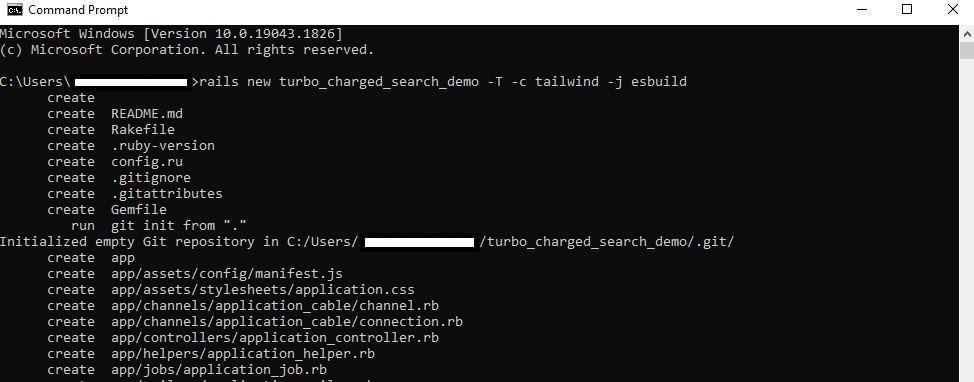
To begin, enter the following command into the prompt to build a new app.
rails new turbo_charged_search_demo -T -c tailwind -j esbuild
Step 2 Generating Country Model
We need something to look for now. We chose countries based on our interest in them. We perform all the commands in the following order to create the Country model and launch the Rails 7 app.
cd turbo_charged_search_demo
rails g scaffold country name:string
rails db:migrate
Step 3 Update Routes File
The default rails landing page should be displayed once the rails application has been created. We will make our root route out of the country#index route. We will now change config/routes.rb file to reflect the same.
# config/routes.rb
Rails.application.routes.draw do
  resources :country

  root "country#index"
end
You can also try this code with Online Ruby Compiler
We will need a search form next. We are adding a customised form that isn't often featured on index pages. A URL property is available on this form. Because we require the form to reply to a GET request, keep the method:get options in mind. Finally, we will employ turbo frames as a data attribute.
In the index action of the country controller.rb file, we add a conditional around whether or not the query returns specific arguments. If this is the case, we can create a new query utilising a SQL LIKE comparison. This will provide results with characters similar to what was entered in the form.
By default, if the not:query argument is present, we will display all of the countries currently in the database.
def index
  if params[:query].present?
    @country = Country.where("name LIKE ?", "%#{params[:query]}%")
  else
    @Country = Country.all
  end
end
You can also try this code with Online Ruby Compiler
The form should work at this point, but it requires page loads and actual country names to be present. Let us begin with that now.
Step 6 Create Countries
We will utilise the rails console to enter a few countries to search through quickly. We are free to substitute them with our favourite country here. These are just random country names that came to us.
rails c

["India", "USA", "Nepal", "Bhutan", "France"].each do |country_name|
  Country.create(name: country_name)
end
You can also try this code with Online Ruby Compiler
Through this application, we want to re-render results in real-time. So, we must include all of the listed countries in a new partial template called _country.html.erb. To make this work, we must include a turbo_frame_tag called "country."
Add new country partial template in app/views/country
<!-- app/views/country/_country.html.erb-->
<%= turbo_frame_tag "country" do %>
  <%= render country %>
<% end >
We can now render the partial as a one-liner in app/views/country/index.html and pass through the instance of @country. Rails is intelligent enough to recognise this as a collection of records based on our specified naming conventions and file locations.
The partial in app/views/country/ country.html.erb need some attention now. We formatted it slightly and included a link to each country that will appear in search results.
We need to use a "turbo frame request?" function from the turbo-rails gem inside the country_controller.rb file. In Rails, this examines the request.variant attribute to determine why the "type" of request is being returned. This will be a turbo frame request in our case. It will be based on the data: turbo frame: "country" properties we added to the search form. We can react conditionally within the index action as we know the request type. The "_country.html.erb" partial is rendered below by supplying the @country instance variable as a local variable Following these procedures enables the real-time user experience. This only happens when we hit the submit button. We will attempt to improve this even further.
def index
  if params[:query].present?
    @country = Country.where("name LIKE ?", "%#{params[:query]}%")
  else
    @country = Country.all
  end
  if turbo_frame_request?
    render partial: "country", locals: { country: @country }
  else
    render :index
  end
end
You can also try this code with Online Ruby Compiler
If we search right now, we will observe that the URL does not change with each new search. To correct this, we can add another data attribute relating to turbo to the form.
It is old to have to click to search. With a little JavaScript, we can make this more real-time. Rails 7 and above includes JavaScript.Stimulus.js by default. By running the command below, we will create a new controller called search_form_controller_demo.js.
rails g stimulus search-form
      create  app/javascript/controllers/search_form_controller_demo.js
       rails  stimulus:manifest:update
Replace the connect() method with a new one called search (). This will be called when a user initiates the input event on the text field. Then, if the user triggers the previously described input event, we will utilise JavaScript's setTimeout method to submit the form every 500 milliseconds. The clearTimeout function is another native JavaScript function that performs what it says. Every time an input event is triggered, we call it. This functions as a looping mechanism for the duration of the input event.
We must adhere to specific Stimulus.js framework rules to get the JavaScript to work. All code used to manipulate the UI must be surrounded by a data-controller element. The data element was added to the form. The text field was then given a data element. This action frequently indicates an event on a DOM element. Here, we listen for input events and use the stimulus controller search approach to find them.The method is (data: {action: "input->search-form#search"})
With those changes, we now have a beautiful real-time search form in Ruby on Rails that uses a mix of Turbo and Stimulus in Ruby on Rails.
Frequently Asked Questions
What are the four Turbo components?
Turbo Drive, Turbo Frames, Turbo Streams, and Turbo Native are the four Turbo components.
What is Hotwire in rails?
From Rail 7, Hotwire is included by default in all new applications. Hotwire is an umbrella term for three distinct frameworks. These frameworks are:1. Turbo 2.Stimulus 3. Strada
How to make the Stimulus controllers reusable?
They can be reused by utilising abstract controllers, such as toggle, rather than view-specific controllers, such as reveal-comments, by allowing them to be configured with values and classes.
Conclusion
The article taught us about Turbo and Stimulus in Ruby on rails. We also discussed their uses, what they offer, and where best to use them. The article also discussed the advantages they hold. After this, we implemented Turbo and Stimulus in Ruby on rails with an example to get a proper understanding. There are certain ways in which how Ruby differs from Ruby on rails. You can get many career opportunities after mastering ruby on rails. Refer to our courses on web development and read some articles on Ruby on rails to find out why you should consider Ruby on rails for your web projects. You can also check out some other blogs on ruby on rails to know everything you wish to know about Ruby on Rails.








 7+ registered

