Do you think IIT Guwahati certified course can help you in your career?
Introduction
In this article, we will learn the method to incorporate a data model into a data table to achieve the desired web application with the help of an example. However, before understanding the complexities involved in using a data model in a data table, let us first understand each individually.
Data Model
A data model, is an abstraction around arbitrary data binding technologies that may be used to modify various data sources for usage by JSF components that offer per-row processing for their child components, as in UIData.
Data Table
Data is displayed on JSF view pages using the dataTable tag. The relational data is displayed in tabular form by the data-bound table components. The data components are displayed using the <h:dataTable> element. The <h:column> tag loops through each row-displayed record in the data source.
Example Application
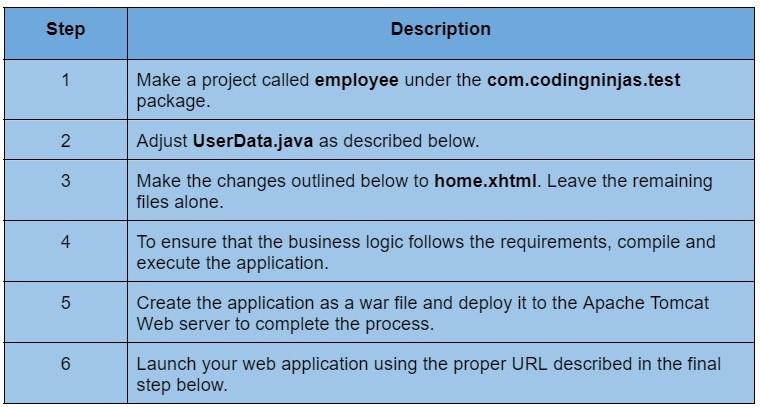
Let's build a sample JSF application and check the features described above.
UserData.java
package com.codingninjas.test;
import java.io.Serializable;
import javax.faces.bean.ManagedBean;
import javax.faces.bean.SessionScoped;
import javax.faces.model.ArrayDataModel;
import javax.faces.model.DataModel;
@ManagedBean(name = "userData", eager = true)
@SessionScoped
public class UserData implements Serializable {
   private static final long serialVersionUID = 1L;
   private static final Employee[] employees =  new Employee[] {
      new Employee("Rohan", "Public Relations", 21,25000.00),
      new Employee("Shubham", "Sales", 25,45000.00),
      new Employee("Maharsh", "Marketing", 26,25000.00),
      new Employee("Sarthak", "Customer services", 23,27000.00),
      new Employee("Anurag", "Sales", 20,10500.00)
   };
   private DataModel<Employee> employeeDataModel
      = new ArrayDataModel<Employee>(employees);
   public DataModel<Employee> getEmployees() {
      return employeeDataModel;
   }
}
You can also try this code with Online Java Compiler
<?xml version = "1.0" encoding = "UTF-8"?>
<!DOCTYPE html PUBLIC "-//W3C//DTD XHTML 1.0 Transitional//EN"
"http://www.w3.org/TR/xhtml1/DTD/xhtml1-transitional.dtd">
<html xmlns = "http://www.w3.org/1999/xhtml"
xmlns:h = "http://java.sun.com/jsf/html"
xmlns:f = "http://java.sun.com/jsf/core">
   <h:head>
      <title>JSF Data Type Example</title>
      <h:outputStylesheet library = "css" name = "styles.css"  />
   </h:head>
   <h:body>
      <h2>DataTable Type and example</h2>
      <h:form>
         <h:dataTable value = "#{userData.employees}" var = "employee"
            styleClass = "employeeTable"
            headerClass = "employeeTableHeader"
            rowClasses = "employeeTableOddRow,employeeTableEvenRow">
            <h:column>
               <f:facet name = "header">Sr. No</f:facet>
               #{userData.employees.rowIndex + 1}
            </h:column>
            <h:column>
               <f:facet name = "header">Name</f:facet>
               #{employee.name}
            </h:column>
            <h:column>
               <f:facet name = "header">Department</f:facet>
               #{employee.department}
            </h:column>
             <h:column>
               <f:facet name = "header">Salary</f:facet>
               #{employee.salary}
            </h:column>
            <h:column>
               <f:facet name = "header">Age</f:facet>
               #{employee.age}
            </h:column>
                    </h:dataTable>
      </h:form>
   </h:body>
</html>
Output
Frequently Asked Questions
Describe JSF?
The front-end framework JSF technology facilitates the building of user interface components by reusing the UI components. The Model View Controller pattern (MVC), which separates the presentation, controller, and business logic, is the foundation upon which JSF is built.
What is the data table in JSF?
To render and format Html tables, JSF offers a robust control called DataTable. A DataTable can cycle through an array or collection of values to show data. DataTable offers attributes to edit its data easily.
Define the JSF Tag library.
JSF offers a standard HTML tag library. These tags are translated into the appropriate HTML output. The following URI namespaces in an HTML node must be used for these tags.
What do you mean by Managed Bean?
An interaction between the user interface and the business logic is made possible via managed beans, which are Java classes registered to JSF. The @ManagedBean annotation can be used to construct Managed Beans.
What does JSF's resource bundling mean?
Resource bundling in JSF is the practice of hardcoding User Interface labels, dates, status messages, and other textual User Interface elements in a separate properties file as opposed to a page.
Conclusion
The use of a data model in a data table has been covered in-depth in this article. We hope this article has given you a better understanding of the topic.
Refer to our Guided PathonCoding Ninjas Studio to upskill yourself in Data Structures and Algorithms, Competitive Programming, JavaScript, System Design, and many more! If you want to test your competency in coding, you may check out the mock testseries and participate in thecontestshosted on Coding Ninjas Studio! But suppose you have just started your learning process and are looking for questions from tech giants like Amazon, Microsoft, Uber, etc. In that case, you must look at the problems, interview experiences, and interview bundle for placement preparations.
Nevertheless, you may consider our paidcourses to give your career an edge over others!
Do upvote our blogs if you find them helpful and engaging!










 7+ registered

