AtMost
In contrast with the atLeast method, the atMost method expects the maximum amount of times a method can be called. It allows us to verify the maximum method calls from a mock.
public static VerificationMode atMost(int maxNumberOfInvocations)
The atMost method takes the maximum number of invocations in integer type and returns the verification mode.
Example
verify(mock, atMost(3)).someMethod("some arg");

You can also try this code with Online Java Compiler
AtLeastOnce
As the name suggests, the atLeastOnce method allows verification of at least one method. It has the exact implementation as using atLeast(1).
public static VerificationMode atLeastOnce()
The atLeastOnce method does not take any parameters and returns the verification mode. AtMostOnce is a similar alias to atMost(1) and has the exact opposite implementation to AtLeastOnce.
Example
verify(mock, atLeastOnce()).someMethod("some arg");
You can also try this code with Online Java Compiler
Test Case
To understand the implementation of these three methods, we will create an example test case. We will test a Calculator Service interface for varying calls using mocks in JUnit.
We will start by creating an interface(CalculatorService) with arithmetic operations.
Program
//src/main/java/com.codingninjas.testrunner/CalculatorService.java
package com.codingninjas.testrunner;


public interface CalculatorService {
  public double add(double input1, double input2);
  public double subtract(double input1, double input2);
  public double multiply(double input1, double input2);
  public double divide(double input1, double input2);
}
You can also try this code with Online Java Compiler
Next, we will create a Java class that implements our Calculator Service interface from above(MathApplication).
Program
//src/main/java/com.codingninjas.testrunner/MathApplication.java
package com.codingninjas.testrunner;


public class MathApplication {
  private CalculatorService calcService;


  public void setCalculatorService(CalculatorService calcService){
      this.calcService = calcService;
  }

  public double add(double input1, double input2){
      //returns calcService.add(input1, input2);
      return input1 + input2;
  }

  public double subtract(double input1, double input2){
 //returns calcService.subtract(input1, input2);
      return calcService.subtract(input1, input2);
  }

  public double multiply(double input1, double input2){
 //returns calcService.multiply(input1, input2);
      return calcService.multiply(input1, input2);
  }

  public double divide(double input1, double input2){
 //returns calcService.divide(input1, input2);
      return calcService.divide(input1, input2);
  }
}
You can also try this code with Online Java Compiler
Finally, we will test varying calls from our mock service with a test using atLeast(), atMost(), and atLeastOnce() in JUnit.
Program
package com.codingninjas.testrunner;


import static org.mockito.Mockito.verify;
import static org.mockito.Mockito.when;
import static org.mockito.Mockito.atLeastOnce;
import static org.mockito.Mockito.atLeast;
import static org.mockito.Mockito.atMost;


import org.junit.Assert;
import org.junit.Test;
import org.junit.runner.RunWith;
import org.mockito.InjectMocks;
import org.mockito.Mock;
import org.mockito.runners.MockitoJUnitRunner;


// @RunWith attaches a runner with the test class to initialize the test data
@SuppressWarnings("deprecation")
@RunWith(MockitoJUnitRunner.class)
public class MathApplicationTester {

   //We use @InjectMocks annotation to create and inject the mock object
   @InjectMocks
   MathApplication mathApplication = new MathApplication();


   //We use @Mock annotation to create the mock object to be injected
   @Mock
   CalculatorService calcService;


   @Test
   public void testAdd(){
      //add the behavior of calc service to add two numbers
      when(calcService.add(10.0,20.0)).thenReturn(30.00);

      //add the behavior of calc service to subtract two numbers
      when(calcService.subtract(20.0,10.0)).thenReturn(10.00);

      //test the add functionality
      Assert.assertEquals(mathApplication.add(10.0, 20.0),30.0,0);
      Assert.assertEquals(mathApplication.add(10.0, 20.0),30.0,0);
      Assert.assertEquals(mathApplication.add(10.0, 20.0),30.0,0);

      //test the subtract functionality
      Assert.assertEquals(mathApplication.subtract(20.0, 10.0),10.0,0.0);

      //check a minimum 1 call count
      verify(calcService, atLeastOnce()).subtract(20.0, 10.0);

      //check if add function is called minimum 2 times
      verify(calcService, atLeast(2)).add(10.0, 20.0);

      //check if add function is called maximum 3 times
      verify(calcService, atMost(3)).add(10.0,20.0);
   }
}
You can also try this code with Online Java Compiler
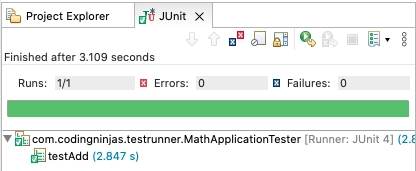
Output
Frequently Asked Questions
1. How do you call a method in Mockito?
Ans: Mockito allows you to call the real method of a mocked object using the thenCallRealMethod(). If you are mocking an object using Mockito, we can stub some of its methods and call the real method on others.
// Stubbinb mockservice methods
when( mockservice.getFirstName() ).thenReturn( "Coder" );
// Call a real method of a Mocked object
when( mockservice.getFullName() ).thenCallRealMethod();
You can also try this code with Online Java Compiler
2. How do you check if a method is called in Mockito?
Ans: We use the verify() method to check if a method is called or not. You can also use Mockito verify() method to test the number of method invocations as we did in the test case example in this article. You can also use verifyNoMoreInteractions() after all the verify() method calls to check if everything is verified.
3. What is stubbing in Mockito?
Ans: Mockito provides a when and then stubbing pattern to stub a method invocation of a mock object. The mock API invocation goes into when(), a static Mockito API method and the value we want the mock to return goes into the then() API.
4. Why do we need Mockito?
Ans: The main objective of using the Mockito framework is to simplify the development of a test by mocking external dependencies and using them in the test code. As a result, Mockito provides a simpler test code that is easier to read, interpret, and modify.
Conclusion
In this article, we have extensively discussed varying calls in Mockito framework and its implementation in unit testing using JUnit and Java programming with the help methods like atLeast(), atMost(), atLeastOnce(), and atMostOnce().
We hope this blog has helped you expand your knowledge regarding mocking and unit testing in Java. There are many more features and usage of Mockito JUnit in the scope of unit testing that you are yet to explore. If you would like to learn more, check out our articles on JUnit Introduction and Features, JUnit Environment Setup and Framework, and Basics of Java. Do upvote our blog to help other ninjas grow. Happy Coding!





 1+ registered

