Do you think IIT Guwahati certified course can help you in your career?
Introduction
Hello Ninja, welcome back. In this article, we will try to understand What are Selection Methods for Web Tests in Katalon?
As we all know that testing is an essential part of development. Thus, It's important to keep our concepts clear about testing.
That's where Katalon comes into the picture. Let's start with an understanding of Katalon before going to the actual topic, i.e. What are Selection Methods for Web Tests in Katalon?
Katalon
Katalon Studio is a software tool for automated testing. It can be used for web, API, mobile, and desktop application testing. It offers test data and execution results displayed through charts, graphs, and reports.
Test management, test planning, and test execution are some of its primary aspects. Katalon Jira and other CI/CD(Continuous Integration and Continuous Deployment) technologies can be connected with TestOps. In this blog, we will understand What are Selection Methods for Web Tests in Katalon? Let’s understand the TestOps first.
TestOps
Using AI techniques to scale up testing resources as necessary as part of test operations. By combining the efforts of development, operations, testing, and QA, TestOps makes sure that there is a framework in place to support quicker testing when consumers want yet another feature to add to the program.
Before moving to Selection Methods for Web Tests let's look into Web testing.
Selection Methods for Web Tests in Katalon
Web testing, often known as online application testing, is a software activity that ensures quality by examining if a given web application's feature operates as planned or by the specifications.
You can detect defects in web applications at any moment, before a release, or daily with the help of testing.
Every time you modify your software, no matter how tiny, defects could arise elsewhere in the system. The testing phase of software development is very important.
Now move with the topic What are Selection Methods for Web Tests in Katalon?
Set Up Test Design
The following steps should be taken to set the default selection technique used in the project's Spy/Recorder:
After starting Katalon Studio with version 8.4.1.
Go to Project then -> Settingsthen -> Test Design then -> Web Locators (from 7.6.0 or prev).
Go to Project then -> Settings then -> Test Design then -> Web UI (from 7.6.0. onward).
Source: www.katalon.com
Choose one of the offered options under the line Default element locator values of test objects produced by Recorder or Spy:
XPath: After using Spy/Recorder to capture a test object, a collection of XPath locators is produced. The default value for the Selection Method is XPath. You may see this in the below image.
Source: www.katalon.com
When using XPath: You have the following feature while using XPath, you can:
Set the XPath locators' priority.
Choose the attributes that are used to identify objects.
A given object's settings can be overridden globally. To do this, open an object view and set the selection criteria that will be applied to this object.
Source: www.katalon.com
CSS By opening an object view and using the CSS option, you can manually enter the CSS location of a test object. Enter a CSS locator value in the Selected Locator.
Source: www.katalon.com
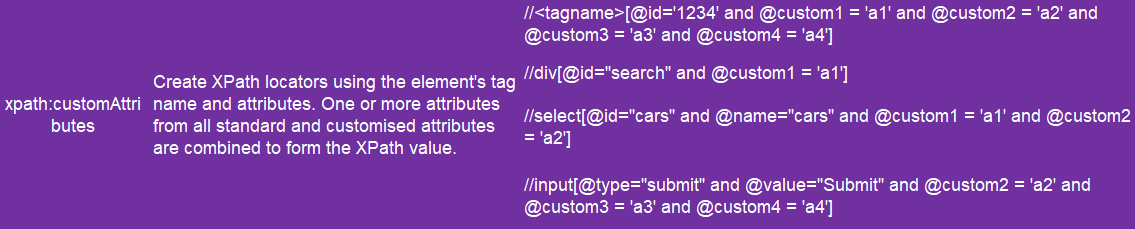
Attributes When spying and recording, Katalon Studio generates XPath locators that use the targeted object's properties to locate it if Attributes is specified as the default selection method. You can select or deselect preferred properties in the Detect object by a column of the Object's Attributes table.
Source: www.katalon.com
Setup the XPath
You can arrange the locators by simply dragging and dropping the XPath locators list. Katalon Studio default uses the first XPath to find the elements. The list's remaining XPaths are used to locate the element if the default XPath is unsuccessful.
Click Reset Default to restore the default order.
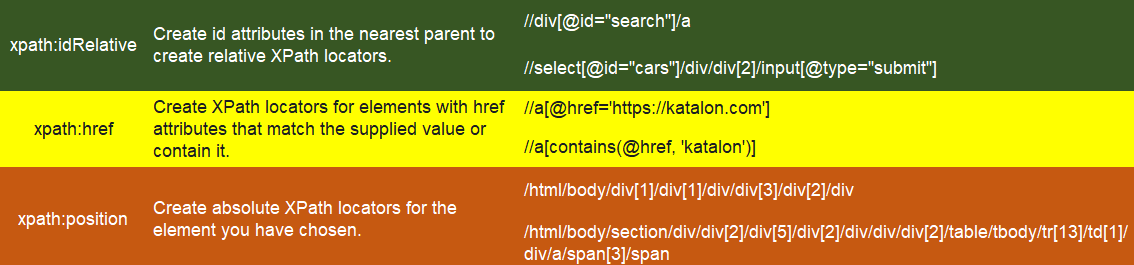
A list of XPath capturing techniques is provided below:
Set Up Attributes
The characteristics that are used to identify an object can be chosen.
Click Reset Default to go back to the default configuration.
Click Add to add additional qualities.
Select the traits and click Delete to remove them.
Click Clear to remove all attributes.
Source: www.katalon.com
Frequently Asked Questions
What is spy web in Katalon studio?
This feature allows you to spy on a mobile device and save things in an object repository after capturing them with Properties. A test case should be made by manually dragging and dropping the captured objects.
Can Katalon be used to automate Captcha?
Captcha is a technique to stop registration automation and is randomly generated each time. Therefore, it cannot be automated in addition to passing captcha image text into the textbox.
What language does Katalon use?
Groovy, a Java-based language used by Katalon Studio, requires loading numerous libraries to parse test data, test objects, and logging.
Is Katalon studio free?
Katalon Studio has a free version with limited features. You can also try a 30-day free trial for the premium plan. If you want to download the Katalon studio, visit the official website of Katalon.
What is automated testing?
It is a process of double-checking software to ensure they meet strict requirements. Before software is put into production, automated testing is the process that verifies that it is working correctly and that the criteria are being met.
Conclusion
In this article, we learned about What are Selection Methods for Web Tests in Katalon? Also, we have covered setup XPath and Attributes.










 1+ registered

