Do you think IIT Guwahati certified course can help you in your career?
Introduction
Python is used to create the open-source Web2py framework for web applications. Python dynamic web content programming is made possible via Web2py. While developing web applications using Web2py, the form is used. The form in Web2py has different kinds of uses which are discussed in the article.
What is Form in Web2py?
It is regarded as a low-level implementation of HTML aids. The contents of a field are known to a FORM object.
Using the form in Web2py, users can enter data into forms that are then transmitted to servers for processing. Since web users fill out the forms using checkboxes, radio buttons, or text fields, they can resemble paper forms or database forms.
Example of Form in Web2py
Consider a program that permits username and password and includes a "submit" button for submitting the result.
Let us create a web application ‘Web2pyForms_CodingNinjas’.
Controller
The following related function will be included in the "default.py" controller.
def index():
    return locals()
You can also try this code with Online Python Compiler
The username and password are requested in the standard HTML form shown above.
Output
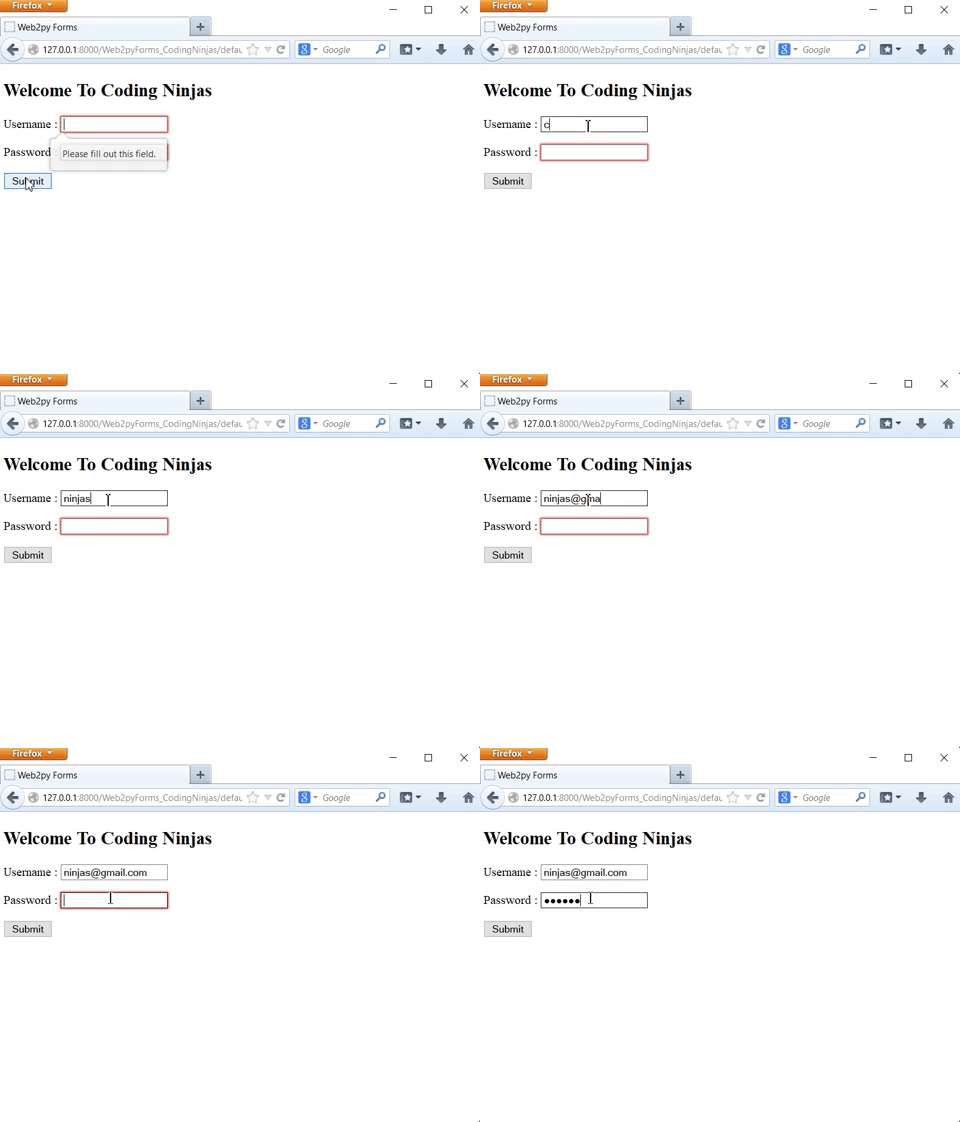
In the above example, we have used the required input tag in index.html. That's why when we click on the submit button, this will show us a warning “Please fill out this field”. We have used the required in the input tag for both the fields that’s why this warning message is coming. If we remove the required from the input field, and then we try to submit, then this warning will not be going to come.
Process and Validate Methods
If we want to write
form.accepts(request.post_vars, session, ...)
You can also try this code with Online Python Compiler
The request and session parameters are not required for the latter (although you can specify them optionally). It differs from accepted further in that it gives the form back. Process calls accept and transmit their arguments to one another internally. Accepts returns a value that is saved in form.accepted.
The process function accepts an additional parameter that it does not take, but it does take:
onsuccess: If this value is equal to "flash" (the default) and the form is accepted, the message onsuccess will flash.
onfailure: If the value of onfailure is equal to "flash" (the default), when the form's validation fails, the message onfailure will flash.
next: Specifies where to direct the user after the form has been submitted.
Functions like lambda form: do_something((form)) can be used for onsuccess and onfailure.
You can write
form.process(..., dbio = False).accepted
You can also try this code with Online Python Compiler
It facilitates the development of a form in Web2py for the current database. The procedures for putting it into practice are outlined below.
DAL( Database Abstraction Layer) object, also known as the DAL constructor, is used to build the connection with the database. The user can build the appropriate table once the connection has been made.
db = DAL('sqlite://storage.sqlite')
db.define_table('ninjas',
Field('name', 'email','course','numberofcourse')
You can also try this code with Online Python Compiler
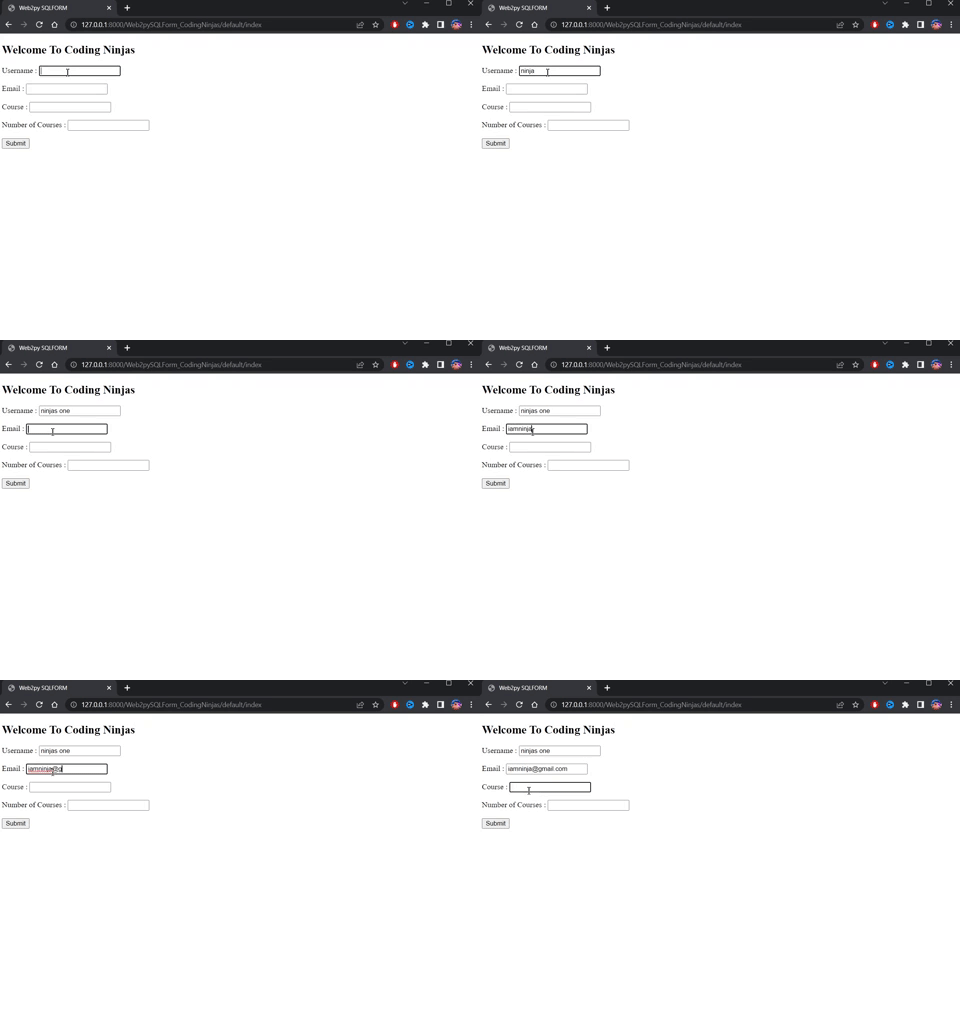
The view has not changed at all. Since the SQLFORM constructor created one from the table db.ninjas defined in the model, creating a FORM in the new controller is required. When serialized, the new form looks like this:
The names of each tag in the form are generated from the table and field names.
Output
By storing uploaded files in the "uploads" folder, an SQLFORM object also handles "upload" fields. The process is automatic. Checkboxes and text values with the aid of "textareas" are used by SQLFORM to show "Boolean" values.
Also utilizing the process approach is SQLFORM.
This is required if the user wants to save values with an accompanying SQLFORM.
It is acceptable if form.process(keepvalues = True).
SQLFORM.factory
There are instances where you wish to create forms as though you have a database table, but you do not. Simply use the SQLFORM feature to create a form that looks good and is compatible with CSS, as well as to upload files and possibly rename them.
A form factory can be used to achieve this. As an illustration, consider the following scenario where you produce the form, carry out validation, upload a file, and store everything in the session:
def index():
  form = SQLFORM.factory(
   Field('name', requires = IS_NOT_EMPTY()),
   Field('image', 'upload'))

  if form.process().accepted:
    response.flash = 'form is accepted'
    session.name = form.vars.name
    session.image = form.vars.image

  elif form.errors:
    response.flash = 'form has some errors'

  return dict(form = form)
You can also try this code with Online Python Compiler
An API(Application programming interface) called CRUD is utilized on top of SQLFORM. It is used to create, retrieve, update, and delete the relevant form, as the name would imply.
Compared to other APIs in web2py, CRUD is not available; as a result, it must be imported.
from gluon.tools import Crud
crud = Crud(db)
You can also try this code with Online Python Compiler
There are two ways to alter the way CRUD behaves: by changing the characteristics of the CRUD object or by adding extra parameters to each method.
We have covered all the information regarding the form in Web2py. Let's dive into the FAQs section.
Frequently Asked Questions
Which is superior, Django or web2py?
Due to its smaller size, short learning curve, and lack of project-level configuration files, web2py differs from Django. That’s why web2py is superior to Django.
What purpose does web2py serve?
Python dynamic web content programming is made possible via Web2py.
How can one launch web2py?
Web2py doesn't need to be installed. Start running the corresponding web2py file after unzipping your operating system's provided zip file.
What is Web2py's default port?
The default port in Web2py is 8000.
What function does Web2py request.vars serve?
During a single HTTP request, request.vars merely stores the values sent in the URL(Uniform Resource Locator) query string or the body of a POST request.
Conclusion
In this article, we have discussed form in web2py. We have also discussed its implementation and usage. Web2py is mainly used for making rapid web applications with the help of Python.








 1+ registered

