Table of contents
1.
Introduction 😇
2.
Playbook 📖
2.1.
Role Precedence Fix during Role Loading
2.2.
include_role and import_role variable exposure
2.3.
include_tasks/import_tasks inline variables
2.4.
vars_prompt 
3.
Command Line in Ansible 😃
4.
Python Compatibility 🐍
5.
Deprecated 😮
5.1.
Expedited Deprecation
5.2.
Using a loop on a package module via squash_actions
6.
Modules 🦾
6.1.
Deprecation Notice 📄
6.2.
Noteworthy Module Changes
7.
Plugins 🔌
8.
Frequently Asked Questions 🤔
8.1.
Is Ansible compatible with Python 3?
8.2.
What is CMD in Ansible?
8.3.
What are Adhoc commands?
9.
Conclusion🎉
Last Updated: Mar 27, 2024
Easy

Ansible 2.7 Porting Guide

Author Sagar Mishra
1 upvote
Career growth poll
Do you think IIT Guwahati certified course can help you in your career?

Introduction 😇

Ansible is an Open source IT automation engine that automates orchestration, app deployment, provisioning, config management, and numerous other IT activities.

Ansible runs by connecting with your nodes and sending short scripts, known as modules, to these nodes. In Ansible, operations that require automation are carried out via modules. These programs were created as resource models for the ideal system state. After their action, Ansible removes these modules.

ansible

In this blog, we will learn the Ansible 2.7 Porting Guide in detail.

Playbook 📖

The first topic of the "Ansible 2.7 Porting Guide" series is Playbook. This will help you to learn how to use a Playbook. 

Ansible Playbooks are a method for using scripts to transmit commands to remote systems. By running a script on one or more systems, Ansible playbooks are used to configure complex system environments. It is used to increase flexibility. Playbooks written in Ansible often resemble config languages more than programming languages.

There are some changes in the new version of Ansible 2.7. Let's discuss this in our Ansible 2.7 Porting Guide article.

Role Precedence Fix during Role Loading

Roles make it simpler to split the tasks when working with lengthy playbooks. Also, it makes it easier to reuse the roles later. A role is a group of tasks that may be transferred from one Playbook to another. It is operated freely, but only by using a playbook file.

There is a small change in the updated version, which is Ansible 2.7. The changes say that the role vars and defaults are parsed before tasks/main.yml. Before Ansible 2.7, when loading a role, the vars/main.yml and defaults/main.yml variables were not accessible when parsing the tasks/main.yml file for the role.

include_role and import_role variable exposure

There is an addition in the module named public in the include_role section. It controls whether or not the role's defaults and vars will be made available outside of the role, enabling later actions to utilize those variables.

There is a notable change between how import_role (static) and include_role (dynamic) reveal the role's variables. The variables are available to tasks and roles listed at any point in the play via the import_role pre-processor, which is used to assess defaults and vars at playbook parsing. 

Since it is a conditional task, the variables are made available to tasks and roles mentioned after the include_role task, and the defaults and vars are evaluated at execution time.

include_tasks/import_tasks inline variables

The inline variables can no longer be used with include_tasks and import_tasks in the updated Ansible 2.7 version. The vars keyword should be used by tasks to supply variables rather than inline variables.

Let's learn this using an example:

In the earlier versions of Ansible, like 2.6 or below, it follows the syntax shown below:

- include_tasks: include_me.yml variable=value


But now, In the updated version of Ansible (version 2.7), we have to use the vars keyword. Follow the below syntax:

- include_tasks: include_me.yml
  vars:
    variable: value

vars_prompt 

A prompt that defines one or more variables can be made using the vars_prompt function. If the controller does not support the hash algorithm given in encrypt, the vars_prompt now throws an exception. Vars_prompt is now more secure because it no longer returns None when the algorithm is unknown.

Command Line in Ansible 😃

The second topic of the "Ansible 2.7 Porting Guide" series is Command Line in Ansible. This will help you to learn how to use a Command line. The Ansible Command system uses to run commands on a remote node.

The Command module is mostly used to run simple Linux commands on a remote node or server. A host group member or a standalone server is listed in the host group.

This Ansible command module can be used to run a few basic shell commands on a remote server.

Ansible will combine the given tags if you use the command line option --tags or --skip-tags multiple times. When using earlier versions of Ansible, you could maintain only the most recent --tags by setting merge_multiple_cli_tags to False. For backward compatibility, this config option was present. 

In version 2.3, the overwriting behavior was considered obsolete, and version 2.4 modified the default behavior. Multiple "--tags" are now always merged; Ansible-2.7 removes the config option.

Python Compatibility 🐍

Any machine having Python 2 (version 2.7) or Python 3 (version 3.5 and higher) installed can run Ansible. This includes any BSD, Red Hat, Debian, CentOS, macOS, etc. The control node doesn't support Windows.

Ansible has dropped compatibility with Python 2.6. The ability to control a server that has Python-2.6 using /usr/bin/ansible-pull is one thing that is impacted by this. "ansible-pull" is a controller script, not a module. Hence it needs an updated Python version to run on the managed host.

Also see, How to Check Python Version in CMD

Deprecated 😮

ninja talks

In this section of the "Ansible 2.7 Porting Guide" series, we will discuss some Deprecated modules in Ansible.

Expedited Deprecation

The __file__ variable is deprecated in Ansible 2.7 and will also be removed in Ansible 2.8. In the upcoming modules, Ansible 2.8 will read the file from a zip file rather than creating a temporary file for AnsibleModule. This shift should speed up module performance, but it also means that, as of Ansible 2.8, referencing __file__ in AnsibleModule will never succeed.

Finding a directory to write a temporary file is the most common use of the function __file__. Instead, you can use the tmpdir attribute on an AnsibleModule instance with Ansible 2.5 and above, as shown in the code from the apt module:

-    tempdir = os.path.dirname(__file__)
-    package = os.path.join(tempdir, to_native(deb.rsplit('/', 1)[1]))
+    package = os.path.join(module.tmpdir, to_native(deb.rsplit('/', 1)[1]))

Using a loop on a package module via squash_actions

The use of squash_action is now deprecated. Users can use other methods to invoke the package module, like the module's name, pkg, or package parameter.

Check out the below example:

OLD The following task would only use the "yum" module once in Ansible 2.6 (and older) to install many packages.

- name: Install packages
  yum:
    name: "{{ item }}"
    state: present
  with_items: "{{ packages }}"


The syntax is changed in the NEW version of Ansible 2.7.

- name: Install packages
  yum:
    name: "{{ packages }}"
    state: present

Modules 🦾

There was a bug in the older Ansible versions, and due to this, the DEFAULT_SYSLOG_FACILITY config option was not affecting the system using journald with the system Python bindings installed. 

This flaw is fixed in Ansible 2.7, which routes all Ansible log messages by the value set for DEFAULT_SYSLOG_FACILITY. On systems that use journald, the location of remote logs may vary if DEFAULT_SYSLOG_FACILITY is specified.

Deprecation Notice 📄

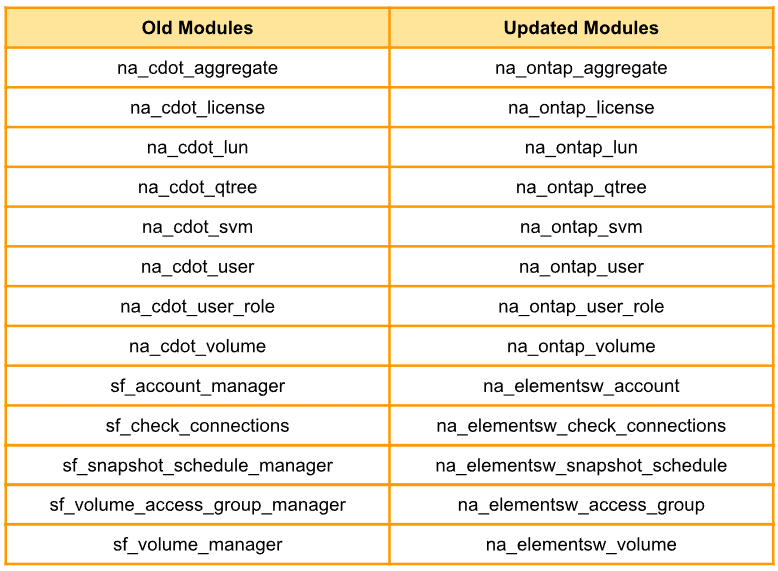
Follow the table below to learn about the deprecated modules.

old vs updated modules

Noteworthy Module Changes

💥 Since Ansible 2.5, the deprecated option use_basic_parsing has been removed from the win uri_module because it was ineffective.


💥 You should no longer use the interface_name module option for na_ontap_net_vlan in your playbooks.


💥 Use mount_paths[0] in place of mount_path, which the win_disk_image module has deprecated. In Ansible 2.11, this will be removed.


💥 Ansible (adhoc) and ansible-console now natively support the use of include role and include tasks:

#> ansible -m include_role -a 'name=myrole' all

Plugins 🔌

⚡ If the controller does not support the specified hash algorithm, the hash password filter now throws an exception. As the filter returned None if the algorithm was unknown, this improved the filter's safety.


⚡ The user module took a password of None as a request to not set a password. If this causes errors in your Playbook, you should modify this filter's hashing algorithm.

Frequently Asked Questions 🤔

faqs

Is Ansible compatible with Python 3?

Python 3 will be widely read by Ansible and used on many platforms that support it. Set the ansible python interpreter inventory variable at a group or host level to the location of a Python 3 interpreter. For instance: /usr/bin/python3, to directly configure a Python 3 interpreter.

What is CMD in Ansible?

To run any commands or scripts on the remote target machine, use the Ansible command module. Simple Linux commands can be run on a remote node or server. It is a member of the host group or a solo server mentioned in the host group using the command module.

What are Adhoc commands?

Ad hoc commands can be run separately to carry out short tasks. It is not required to run these commands later. You might need to restart all of your company's servers, for instance. You will run the Adhoc commands for this from '/usr/bin/ansible.'

Conclusion🎉

We have discussed the topic of the Ansible 2.7 Porting Guide. In detail, we have seen topics like Command Line, Python Compatibility, and many more.

We hope this blog has helped you enhance your knowledge of the "Ansible 2.7 Porting Guide." If you want to learn more, check out our articles Ansible - VariablesAnsible - DocAnsible - Playbooks, and many more on our platform Coding Ninjas Studio.

But suppose you have just started your learning process and are looking for questions from tech giants like Amazon, Microsoft, Uber, etc. In that case, you must look at the problemsinterview experiences, and interview bundles for placement trials.

However, you may consider our paid courses to give your career an edge over others!

Happy Learning!

thankyou

Live masterclass