




Introduction🧑🏫
So, are you wondering what Ansible is? And how can it help in the deployment of various IT tools? Let's explore and discuss Ansible Playbooks and some more topics related to it.

Before discussing Ansible playbooks, let us know about Ansible. Ansible is an open-source IT engine that automates the deployment of many IT tools, including intra-service orchestration, cloud provisioning, and application deployment. It has no agents or custom security infrastructures, making deployment simple
Ansible uses playbooks to describe automation jobs, and playbooks use YAML, a straightforward language that is simple for humans to understand, read, and write. YAML is a human-readable data serialization language frequently used for configuration files, but it can be used in various applications where data is stored. The advantage is that even IT infrastructure support guys can read, understand, and debug the playbook as necessary (YAML – It is in human-readable form).

To deploy complex applications, Ansible Playbooks provide a repeatable, reusable, easy configuration management and multi-machine deployment mechanism. If you need to use Ansible multiple times to accomplish the task, write a playbook and place it under source control. The playbook can then push out new configurations or verify remote systems' configurations.
Before discussing Ansible Playbooks we need to understand Ansible YAML Basics.
Ansible - Playbooks
Here, we'll learn about Ansible Playbooks
Ansible code is written in files called playbooks. The format used to write playbooks is YAML. Yet Another Markup Language is referred to as YAML. One of Ansible's major features, playbooks, tells the software what to execute. They are similar to an Ansible to-do list that has a list of tasks.
The steps that a user wants to carry out on a specific machine are contained in playbooks. Playbooks are executed in order. The foundation of every Ansible use case is a playbook.
Playbook Structure
Every playbook has one or more plays. Plays are used to structure playbooks. Inside a playbook, there may be multiple plays.
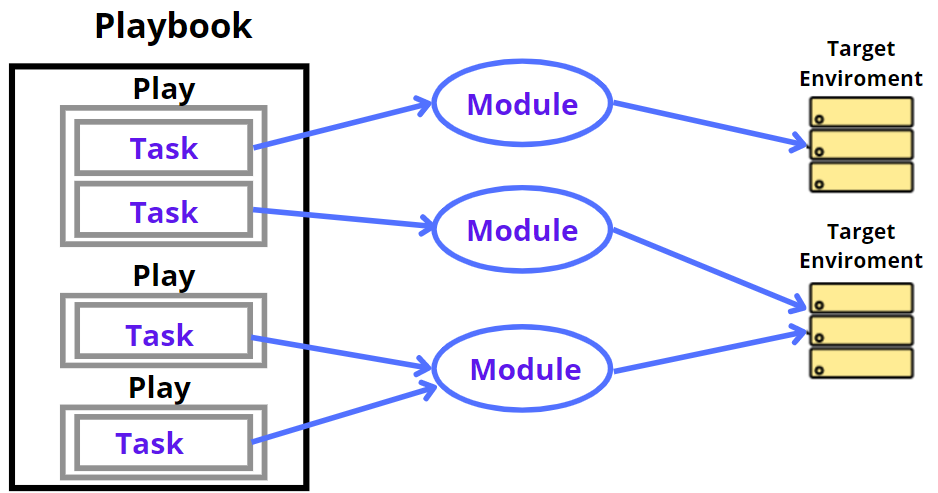
The play's function is to map a defined set of instructions against a particular host.
Although there are other YAML editors, notepad++ or another simple editor is preferred. First, open the notepad++ and copy-paste the below YAML, and change the language to YAML (Language → YAML)
A YAML always starts with — (3 hyphens) and ends with …(3 dots).
The Different YAML Tags
Let's now go over the various YAML tags. The various tags are explained below −
name
This tag provides the Ansible playbook's name such as the actions outlined in this playbook. The playbook can have any sensible name.
vars
You can declare the variables that can be used in your playbook using the vars tag. Here the usage is similar to variables that we use in any other programming language.
hosts
This tag identifies the lists of hosts or host groups that the job should be run against. It must contain the host's field or tag. It instructs Ansible to run the listed tasks on the specified hosts. Both the local machine and a distant machine may be used to do the tasks. A collection of hosts can also be listed in the host's tag because tasks might be run on several computers.
tasks
A list of actions to be carried out should be included in every playbook. Tasks are a list of things that need to be done. The name of the task is contained in a task field. This functions as the user's help text. Although not required, it helps to debug the playbook. Every task has an internal link to a module of code. a module that needs to be executed and the arguments needed for the module you want to run.
To know more about YAML tags and their syntax click here.
You can also visit these links for a deeper knowledge of Ansible YAML Basic and Ansible - Ad hoc Commands. Let's now understand the process of creating an Ansible Playbook.
Create a Playbook
Start by writing an example YAML file. We must define a task first. These serve as the interface to the roles and playbook modules for Ansible.
The example below shows one playbook with one play with multiple tasks.
---
   name: install and configure DB
   hosts: testServer
   become: yes

   vars:
      oracle_db_port_value : 1521

   tasks:
   -name: Install the Oracle DB
      yum: <code to install the DB>

   -name: Ensure the installed service is enabled and running
   service:
      name: <your service name>
The playbook's basic syntax is seen above. Save it as test.yml in a file. A YAML syntax must adhere to the correct indentation.

Let’s learn more about Ansible Playbook Execution.
Playbook Execution
In a playbook, everything happens in the order of top to bottom. The tasks in each play are also performed from top to bottom. Multiple "plays" in a playbook can manage multi-machine deployments by executing one play on your web servers, another play on your database servers, a third play on your network infrastructure, and so on. Each play defines at least two concepts:
-
target the controlled nodes using a pattern
-
a minimum of one task to execute
The first play in this example targets the web servers, and the second play is directed at the database servers.
---
- name: Update web servers
  hosts: webservers
  remote_user: root


  tasks:
  - name: Ensure apache is at the latest version
    ansible.builtin.yum:
      name: httpd
      state: latest
  - name: Write the apache config file
    ansible.builtin.template:
      src: /srv/httpd.j2
      dest: /etc/httpd.conf


- name: Update db servers
  hosts: databases
  remote_user: root


  tasks:
  - name: Ensure postgresql is at the latest version
    ansible.builtin.yum:
      name: postgresql
      state: latest
  - name: Ensure that postgresql is started
    ansible.builtin.service:
      name: postgresql
      state: started
There are more things in your playbook besides just a host's line and tasks. For instance, each play in the playbook mentioned above sets a remote_user which is the SSH connection's user account. To change how Ansible responds, you can add additional Playbook Keywords at the playbook, play, or task level. The connection plugin, whether to use privilege escalation, how to handle problems and several other things are all controlled by playbook keywords. Many of these parameters can be set by Ansible as command-line flags, in your Ansible configuration, or in your inventory to support a range of environments. You'll benefit from learning the precedence rules for these data sources as you expand your Ansible ecosystem.
Running Playbooks
Use the ansible-playbook command to run your playbook
ansible-playbook playbook.yml -f 10To see detailed output from successful modules or unsuccessful ones you can use the --verbose flag when running your playbook.
Verifying Playbooks
Before running your playbooks, you might want to verify them for problems like syntax errors. Verification options provided by the ansible-playbook command include —check, —diff, —list-hosts, —list-tasks, and —syntax-check. Other tools for validating and testing playbooks are described in the Tools for Validating Playbooks.
Now it's time for the questions. Let us now move to FAQs.



 5+ registered

