Commands and codes
Installing a package using Yum
Let’s install the epel repository using Yum. We’ll set the ‘name’ parameter to ‘epel release’ and the ‘state’ to ‘present’. Adding a parameter, ‘update_cache: true’, makes yum check if the package is out of date and updates it if needed.
name: install ruby
yum:
 name: ruby
 state: present
 update_cache: true
become: true
when: ansible_os_family == 'RedHat'
Installing multiple packages using Yum
For quick and simultaneous installation of packages, simply list the various packages under the ‘name’ parameter as shown below:
- name: Install multiple packages using Yum
         yum:
      		name:
				- epel-release
				- ruby
				- firefox
      		state: present
      		update_cache: true
    	 become: true
Installing a specific package version using Yum
If the version name of the package is mentioned alongside the package name, yum will explicitly install the required version for you. To check the available versions of a specific package, run
$ yum list *package-name* - -showduplicates
on your linux terminal to get the list of versions
- name: Install a specific version of ruby
         yum:
      		name: ruby-2.0.0.648-33.el7_4
      		state: present
      		update_cache: true
   become: true
Removing a package using Yum
Assigning the ‘state’ parameter as ‘absent’ will help you delete the chosen package. We can add a parameter, autoremove: true , which will take care of any dependencies that might have been installed initially.
- name: removing ruby from the local machine
         yum:
      		name: ruby
      		 state: absent
      		 autoremove: true
    	 become: true
Updating a package using Yum
Assigning the ‘state’ parameter as ‘latest’ will help you install the latest version of the required package. In case the package is already installed, Yum will update the package on your local host.
- name: Install the latest version of ruby/update existing
         yum:
      		name: ruby
      		state: latest
      		update_cache: true
         become: true
Updating multiple packages using Yum
For updation of multiple packages, simply list the various packages under the ‘name’ parameter as shown below:
- name: update multiple packages
         yum:
      		name:
        		- ruby
        		- firefox
      		state: latest
      		update_cache: true
         become: true
Capturing the output of the Yum module commands
The register keyword is used to capture and store the result of the yum commands. This captured result can be used further where and when required
- name: to check is rugby is present
  	yum:
    	name: ruby
    	state: present
    become: true
    register: yum_output
Listing available packages using Yum
To view the available and installed versions of a package on your host, the list parameter is assigned the name of the package as shown. The register command is used to capture the output and use it elsewhere, as described in the code-box above.
- name: available versions of ruby on system
  	yum:
    	list: ruby
  		become: true
    	when: ansible_os_family == 'RedHat'
    register: yum_output
When to Choose Yum
Choosing between yum and apt module
The yum package manager can be used only on Red Hat Enterprise Linux and CentOS. For Linux distros based on Debian Linux Distributions like Debian and Ubuntu use the apt packet manager. So, choose your packet manager in accordance with your linux distro.
Choosing between yum and package module
The package module is a flexible manager that chooses the manager present on your local machine, be it dnf, apt etc. Even though this seems convenient, yum package manager should be used for Red Hat Enterprise Linux as ‘package’ may lead to errors due to the package naming ambiguity across various package managers, i.e. the same package may have different names across different managers.
Frequently Asked Questions
What is Ansible?
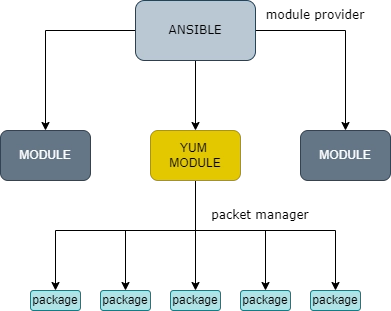
Ansible is a python-programmed open source software tool, used to manage your applications easily. Yum is a module of Ansible which helps to deal with installation and management of packages under the same.
Which Linux distros is Yum used for?
Yum is primarily used for Red Hat Enterprise Linux versions 5 and later. Yum can also be used for distros like Fedora, CentOS, Oracle Enterprise Linux, Terbolinux, and other distros derived from Red Hat Enterprise Linux.
How can I view my Ansible hosts?
The —list-hosts command will display the host IPs from your inventory file.
Conclusion
In this blog, we have successfully learned the basic working of the Yum module using commands to perform operations on sample packages- their installation, updating, and removal. For an insight into the topics related to the blog above, you can refer to our articles on Ansible, Linux, and Operating Systems. Join our platform Coding Ninjas Studio to practice and learn essential computer fundamentals like DBMS, DSA, Competitive Programming, Python, Java, etc. Share and upvote this blog if you find it helpful to help fellow ninjas get acquainted with it and help them grow. Happy Coding!!









 5+ registered

