Do you think IIT Guwahati certified course can help you in your career?
Introduction
There are programming languages that are intended for specific purposes. Python, for example, is a language helpful in data science. Cinder is a C++ library that is used for creative coding. C++, by itself, has almost no media facilities. This drawback can be overcome using Cinder.
In this article, we are going to discuss an overview of the audio functionalities offered by Cinder or Audio in Cinder.
What is Cinder
C++ has minimal functionalities when we consider its ability to handle media. To overcome this limitation, the Cinder library was developed. Cinder is an open-source C++ library. This library is used for creative coding. C++ is a very powerful language, and Cinder helps to provide it with advanced visualization capabilities.
It is the tool kit under the BSD license and provides an interface for multimedia. It was released in the spring of 2010 as a public tool. It is generally used in a non-browser environment.
Now let us take a look at audio in cinder.
Audio in Cinder
As discussed above, Cinder provides a wide range of creative coding methods. Depending on the requirement, it can be used for playing audio, writing to a continuous audio stream, or utilizing Digital Signal Processing Tools, etc.
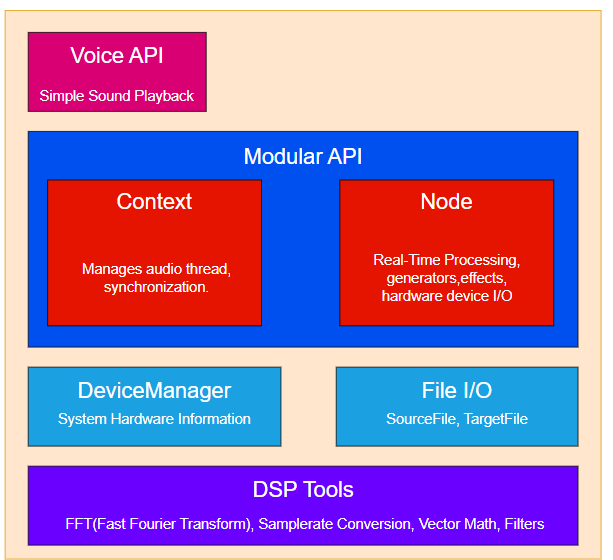
Audio in Cinder can be divided into the following main components:
Voice API (Application Programming Interface)
Modular API
DeviceManager
File I/O
DSP Tools
We will be discussing each of these components briefly.
Voice API
If your application requires only a simple functionality to playback a sound file, then Voice API could be the most helpful component offered by audio in cinder. Voices (high-level objects above the modular system) manage a small chain of audio::Nodes. These perform the necessary preprocessing of the data.
This API keeps the data required from the user’s end to a minimum. Thus the user does not have to think about the sample rate of the audio being played or the hardware it is being sent to.
Now, let us look at how we can play a sound using audio::Voice.
audio::VoiceRef myVoice;

void MyApp::setup()
{
    // Source file address
    audio::SourceFileRef sourceFile = audio::load( app::loadAsset( "audiofile.wav" ) );
    // add the source file to voice
    myVoice = audio::Voice::create( sourceFile );

    // Play audio from the voice
    myVoice->start();
}
You can also try this code with Online C++ Compiler
The architecture of audio in Cinder is modular. The Node-based system of ci::audio allows the interconnection of audio building blocks.
The Modular API consists of the following modules:
Context
Node
Context
The audio::Context class manages audio processing specific to platforms. It also takes care of the thread synchronization between audio and user threads.
A ‘master’ object is only a single hardware-facing context. All the Nodes that are created are done so using this context. This is necessary for thread synchronization.
A new node can be created using the following:
auto master_context = audio::Context::master();
new_Node = master_context->makeNode( new NodeType );
You can also try this code with Online C++ Compiler
There are two important parameters that depend on the current context. These parameters are used by Nodes to configure their internal buffer layout. They are
samplerate: number of samples processed per second (44100-48000)
frames per block: To facilitate real-time operations, the processing is sectioned into blocks.
These parameters are configured by the context’s OutputNode, which is always of type OutputNodeDevice.This also means that these parameters are governed by the system’s hardware capabilities.
Node
The audio::Node is called the fundamental building block for processing graphs. These help in flexible combinations of synthesis, effects, analysis, file reading/writing, etc. These are meant to be easily subclassed. There are two important Node types:
OutputNode: endpoint at the end of the output graph.
InputNode: endpoint at the beginning of the audio graph.
An audio graph is created from the Nodes which are connected. For the audio to be played through speakers, the last node is connected to the OutputNode of the context.
auto master_context = audio::Context::master();
mSine = master_context->makeNode( new audio::GenSineNode );
mGain = master_context->makeNode( new audio::GainNode );
mSine->connect( mGain );
mGain->connect( master_context->getOutput() );
You can also try this code with Online C++ Compiler
It can be disabled/enabled/disconnected/connected while audio is playing.
Nodes support multiple inputs.
Nodes support multiple outputs.
Feedback is supported by connecting nodes in a cycle.
If Node, a Node will process audion in place.
Node::ChannelMode allows channels to be decided based on the inputs and outputs of Nodes.
DeviceManager
Device Managers in audio in cinder manage the system hardware information. The Platform Specific hardware is managed using cinder::audio::DeviceManager.
File I/O
The File I/O in audio in cinder is used to read and write audio streams from source and target files.
Audio Files in Cinder are represented by the audio::SourceFile class.This class acts as a handle for an audio file that can be used to decode samples from a wide range of formats.
If the file can not be opened for decoding, the AudioFileExec error is thrown along with a reason for failure
DSP Tools
Digital Signal Processing (DSP) Tools in audio in cinder, such as Fast Fourier Transforms(FFTs), Samplerate Conversions, Vector Mathematics, etc., are some of the functions offered by the Cinder Library.
Raw DSP functionalities are available in the namespace ci::audio::dsp. It contains various high-performance tools required for various audio processing tasks.
We can access the Direct Fourier Transform Functionalities vis the audio::dsp::Fft class.
Frequently Asked Questions
What is a library?
A library is a collection of classes and methods.
What is OpenGL?
Open Graphics Library (OpenGL) is a cross-platform and cross-language API for rendering 2D and 3D vector graphics.
Why use Cinder?
A combination of Cinder with the speedy C++ makes the library appropriate for heavily abstracted projects, including art installations, commercial campaigns, and other advanced animation work.
What is creative coding?
Creative coding is where the programmers focus on creating something expressive rather than just something functional.
What other features does the Cinder Library provide us with?
Cinder Library helps in various fields, such as audio, video, and graphics handling in C++.
Conclusion
In this article, we discussed what Cinder is. We talked at length about audio handling in Cinder.







 1+ registered

