Do you think IIT Guwahati certified course can help you in your career?
Introduction
As the name suggests, computer graphics are the art of creating graphics on a computer. Graphics can be defined as images, graphs, sketches, or any visual representation of an object which represents something meaningful. In this article, you will learn about Cinder and graphics in Cinder.
If you know C++ programming language, you’ll be aware that in C++, the media facility is non-existent. The standard libraries don’t have windowing libraries, graphics drawings, 2D (two-dimensional), vector, or 3D (three-dimensional). To serve this purpose, you need to use third-party stuff. Therefore, Cinder is one of the best options to accomplish these media needs.
About Cinder
Cinder is a free, peer-reviewed, open-source C++ library for creative coding. It is designed to give advanced visualization abilities to C++ language. It is the tool kit under the BSD license and provides an interface for multimedia. It was released in the spring of 2010 as a public tool. It is generally used in a non-browser environment.
It helps create complicated interactive real-time audio-visual pieces because it uses one of the most powerful programming languages - C++. It relies on minimum third-party code libraries.
Graphics in Cinder
As discussed above, graphics is the visual representation of objects. Cinder exposes many different graphics APIs, each with other purposes. Graphics in Cinder can be 2D or 3D.
2D Graphics
2D graphics are created in a two-dimensional space. These graphics come in two flavors — raster and vector.
Raster Graphics:In this, pixels are used for drawing an image. It is also referred to as bitmap image (in this, a sequence of images is into smaller pixels). A bitmap implies a large number of pixels together. These graphics are the most common for digital photos, Web graphics, icons, and other images. They are formed of a simple grid of pixels, which can each be a diverse color.
Vector Graphics: In vector graphics, mathematical formulae are used for drawing. These graphics include paths like lines, shapes, letters, or other scalable objects.
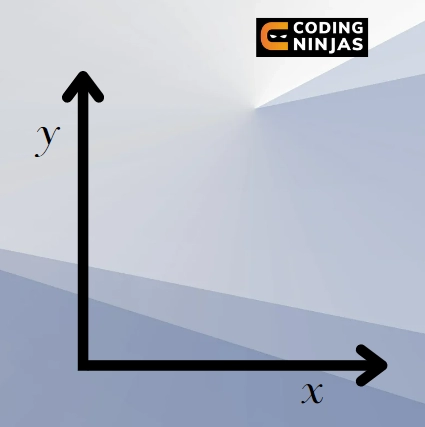
The coordinate system of 2D in Cinder starts from the top-left corner of the screen. Any object placed there have the coordinates (0, 0) (these are values of x and y, respectively). The x-axis extends to the right and y to the top, as shown in the following figure:
3D Graphics
3D graphics are created in a three-dimensional space that exists somewhere in the computer and is transformed into a two-dimensional image.
OpenGL (Open Graphics Library) relies on the so-called rendering pipeline to map the 3D coordinates of the objects to the 2D screen coordinates. Three kinds of matrices are used for this process:
Model matrix - Maps the 3D object’s local coordinates to the global space
View matrix - Maps the 3D object’s local coordinates to the camera space
Projection matrix - Cares of the mapping to the 2D screen space
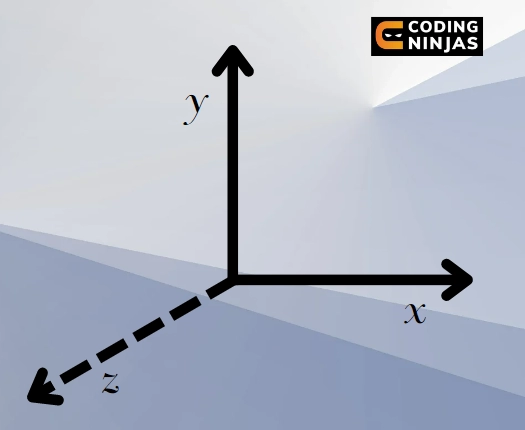
The coordinate system of 3D in Cinder starts from the top-left corner of the screen. Any object placed there has the coordinates 0, 0, 0 (these are values of x, y, and z, respectively). The x-axis extends to the right, y to the bottom, but z extends towards the viewer (us), as shown in the following figure:
OpenGL is a hardware-independent interface on multiple hardware platforms which provides about 150 distinct commands and functions for rendering 2D/3D computer graphics. There are no commands for getting user inputs and describing 3D models. But it allows the user to create their models using a set of points, lines, and polygons. Following are some of the functions provided by OpenGL:
Various Functions Used in Graphics
The table shows some of the functions there for graphics in Cinder.
Class
Function
Function Type
What it does
cinder::gl::Batch
draw(GLint x =0, GLsizei count = -1)
Public
Draws the Batch and returns void (nothing)
getNumIndices()
Public
Returns the number of element indices in the associated geometry
getVao()
Public
Returns the VAO (Vertex Array Object) mapping the Batch’s geometry to its shader.
cinder::gl::Fbo
getWidth()
Public
Returns the width of the FBO (Frame Buffer Object) in pixels.
getAspectRatio()
Public
Returns the aspect ratio of the FBO.
getColorTexture()
Public
Returns a reference to the color Texture2d of the FBO
create(int width, int height, const Format &format=Format())
Static Public
Creates an FBO with the specified height and width using Fbo::Format format.
cinder::gl::Texture2d
getDepth()
Public
Returns the depth of the texture in pixels.
cinder::gl::ImageSourceTexture
getRowBytes()
Public
Returns the number of bytes necessary to represent a row of the ImageSource.
getCount()
Public
Returns the number of images.
getPixelAspectRatio()
Public
Returns the aspect ratio of individual pixels to accommodate non-square pixels.
There are many functions provided by OpenGL for graphics in Cinder.
Key Technologies
Graphics in Cinder are provided with the following key technologies:
OpenGL
It is the most commonly used API (Application Programming Interface) provided for graphics in Cinder. It is used for high-performance, GPU (Graphics Processing Unit) -accelerated graphics.
It is performed on the particular hardware of the GPU rather than the CPU (Central Processing Unit). It is based on rendering triangles, applying a shader to each triangle pixel. Rasterization of triangles is not ideal for curved shapes, as it requires many triangles to create the illusion of curvature. An example of the Letter R is shown below:
As can be seen in the above image, it is completely based on rendering triangles. A shader is applied to each triangle pixel.
Raster Images
These are used for CPU-based image processing and I/O (Input/Output). These pixel-based graphics (raster) excel in manipulating pixels, either individually or through broad-strokes operations like blurs. Additionally, rendering 2D or 3D shapes with these APIs can be prohibitively complex. For graphics in Cinder, this API is expressed primarily through the Surface and Channel classes and the image processing operations in the ci::ip namespace. Example:
Cairo
It is CPU-based and most suitable for vector graphics (like SVG rendering). Vector graphics express 2D shapes primarily as combinations of lines and Bézier curves. These curves are the parametric curves used in computer graphics for 2D and 3D applications. These curves are formed using the control points.Cairo is an industry-standard graphics library designed for vector graphics in Cinder. The mathematical descriptions of shapes need to be converted to pixels, which Cairo is designed to do. Cinder provides an SVG (Scalable Vector Graphics) parser and classes relevant for manipulating vector shapes, namely ci::Shape2d, ci::Path2d, and ci::PolyLineT. Example:
Frequently Asked Questions
What is the difference between C++ based openFrameworks and Cinder?
Cinder uses system-specific libraries for better performance, while openFrameworks affords better control over its underlying libraries.
What is OpenGL?
Open Graphics Library (OpenGL) is a cross-platform and cross-language API for rendering 2D and 3D vector graphics.
Why use Cinder?
A combination of Cinder with the speedy C++ makes the library appropriate for heavily abstracted projects, including art installations, commercial campaigns, and other advanced animation work.
What if Cinder is not running on my system?
Cinder depends on a few submodules. It supports macOS, Windows, Linux, and iOS. It requires Xcode 11.3.1 or later for development on the Mac and Visual C++ 2019 or later on Windows.
What is the difference between GPU and Raster in graphics in Cinder?
GPU is a specialized hardware responsible for handling OpenGL-related graphics. Whereas, Raster is the pixel-based graphics, slower than GPU equivalents.
Conclusion
In this article we discussed Cinder and the graphics in Cinder. It also discussed different types of graphics, why to use Cinder, and what all functions are provided for graphics in Cinder.










 1+ registered

