Do you think IIT Guwahati certified course can help you in your career?
Introduction
Microsoft Azure, previously called Windows Azure, is a public cloud computing platform provided by Microsoft. It delivers a variety of cloud services, including analytics, computing, storage, and networking. Users can pick from these services to scale and develop new applications or run existing applications in the public cloud. It offers tools that support almost every industry such as e-commerce, and finance, and is even compatible with many open-source technologies.
Overview
Azure Cloud Shell provides a browser-based shell experience to manage and develop Azure resources. It also helps in managing Azure resources without the hassle of installing, versioning, and maintaining a machine yourself.
Cloud Shell works on a per-request basis, so the machine state will not persist across sessions. Since Cloud Shell is built for interactive sessions, shells automatically terminate after 20 minutes of shell inactivity. Azure Cloud Shell runs on Common Base Linux Delridge.
Azure portal: Select the Cloud Shell icon on the Azure portal:
Code snippets: On docs.microsoft.com and Microsoft Learn, select the Try It button that appears with Azure PowerShell and Azure CLI code snippets:
Azure CLI: az account show
Azure PowerShell: Get-AzSubscription
The Try It button opens the Cloud Shell directly alongside the documentation using Bash (for Azure CLI snippets) or PowerShell (for Azure PowerShell snippets).
To run the command, use Copy in the code snippet, use Ctrl+Shift+V (Windows/Linux) or Cmd+Shift+V (macOS) to paste the command, and then press Enter.
Bash in Azure Cloud Shell
Let us see the working of how to use Bash in Azure Cloud Shell in the Azure portal:
Start Cloud Shell
Firstly, we will launch the cloud shell from the top navigation of the Azure portal and then select a subscription for creating a storage account and Microsoft Azure Files share.
Select "Create storage"
Select the Bash environment
We will verify that the environment drop-down from the left-hand side of the shell window says Bash.
Set your subscription
For listing the subscriptions you have access to, we will type the following command in Azure CLI: az account list
To set your preferred subscription we will type
Azure CLI: az account set --subscription 'my-subscription-name'
Create a resource group
To Create a new resource group in WestUS named "MyRG", type the following,
Azure CLI: az group create --location westus --name MyRG
Create a Linux VM
Create an Ubuntu VM in your new resource group. The Azure CLI will establish SSH keys and set up the VM with them.
Azure CLI: az vm create -n myVM -g MyRG --image UbuntuLTS --generate-ssh-keys
SSH into your Linux VM
Firstly let us Search for our VM name in the Azure portal search bar.
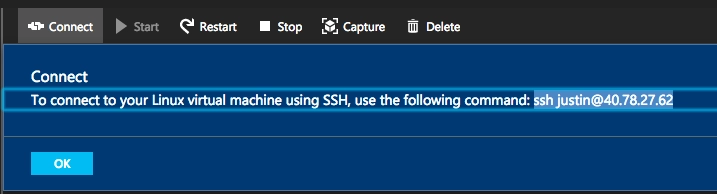
Click "Connect" to get your VM name and public IP address.
SSH into your VM with the ssh cmd: ssh username@ipaddress
Cleaning up
Exit your ssh session by typing: exit
To delete your resource group and any resources within it we can use: Azure CLI: az group delete -n MyRG
PowerShell in Azure Cloud Shell
Let us now see the working of how to use Powershell in Azure Cloud Shell in the Azure portal:
Start Cloud Shell
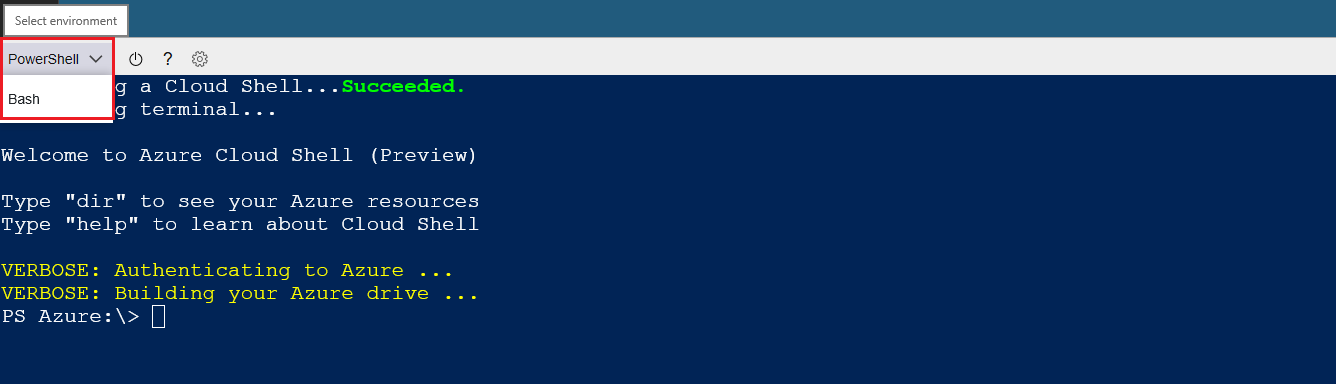
From the top navigation bar of the Azure portal, click on the Cloud Shell button
From the drop-down, select the PowerShell environment and you will be in Azure drive
Run PowerShell commands
Run regular PowerShell commands in the Cloud Shell, as:
PS Azure:\> Get-Date
Output:
Friday, June 26, 2022 7:08:48 AM
Interact with virtual machines
You can then locate all your virtual machines under the current subscription via the VirtualMachines directory.
Invoke PowerShell script across remote VMs
Considering you have a VM, MyVM1, we can use Invoke-AzVMCommand to invoke a PowerShell script block on the remote machine.
You can easily navigate your web app resources, by entering into the WebApps directory.
SSH
To authenticate to servers or VMs using SSH, generate the public-private key pair in Cloud Shell and publish the public key to authorized_keys on the remote machine, such as /home/user/.ssh/authorized_keys.
Using SSH
Before calling into New-AzVM to kick off the deployment, add the SSH public key to the VM configuration. The newly created VM will contain the public key in the ~\.ssh\authorized_keys location, thereby enabling credential-free SSH session to the VM.
List available commands
Type Get-AzCommand to get context-specific Azure commands.
Alternatively, you can also type Get-Command *az* -Module Az.* to locate the Azure commands that are available.
Install custom modules
Run Install-Module for installing modules from the PowerShell Gallery.
Get-Help
You can type Get-Help to get additional information or help about PowerShell in Azure Cloud Shell.
Azure PowerShell: Get-Help
For a specific command, you can still do Get-Help followed by a cmdlet.
Azure PowerShell: Get-Help Get-AzVM
Use Azure Files to store your data
You can create a script, and save it to your clouddrive to use it across shell sessions.
Use custom profile
We can also customize our PowerShell environment, by creating PowerShell profile(s). Then save it, so that it can be loaded in every PowerShell in Cloud Shell session.
Use Git
Create a personal access token and utilize it as the username. Once you have the token, clone the repository as follows:
Cloud Shell automatically and securely authenticates account access for the Azure PowerShell and Azure CLI.
$HOME persistence across sessions
To persist files across sessions, Cloud Shell walks you through attaching an Azure file share on the first launch. Once completed, Cloud Shell will automatically attach your storage (mounted as $HOME\clouddrive) for all future sessions.
Azure drive (Azure:)
The Azure drive enables quick discovery and navigation of Azure resources such as Compute, Network, Storage, etc. similar to filesystem navigation. We can use the familiar Azure PowerShell cmdlets to manage these resources regardless of the drive you are currently in.
Manage Exchange Online
PowerShell in Cloud Shell contains a private build of the Exchange Online module. We can run Connect-EXOPSSession to get our Exchange cmdlets.
Deep integration with open-source tooling
Cloud Shell includes pre-configured authentication for open-source tools such as Ansible, Terraform, and Chef InSpec.
Tools in Azure Cloud Shell
The most commonly used tools are:
Linux tools
bash
zsh
sh
tmux
Dig
Azure tools
Azure CLI
Az Copy
Azure Functions CLI
Service Functions CLI
Service Fabric CLI
Batch Shipyard
Text editors
code (Cloud Shell editor)
vim
nano
Emacs
Build tools
make
maven
npm
Pip
Containers
Docker machines
Kubectl
Helm
DC/OS CLI
Databases
MySQL client
PostgreSql client
Sqlcmd Utility
Mssql-scripter
Frequently Asked Questions
What is Azure?
Microsoft Azure, also called Azure, is a cloud computing service operated by Microsoft for application management via Microsoft-managed data centers.
Where can we use Microsoft Azure?
Azure is commonly used as a platform for hosting databases in the cloud.
In addition, the platform is frequently used for backup and disaster recovery. Microsoft offers serverless relational databases such as Azure SQL and non-relational databases such as NoSQL.
What do you understand by cloud computing?
It is the delivery of computing services—including databases, servers, storage, networking, software, analytics, and intelligence—over the Internet (“the cloud”) to offer flexible resources, faster innovation, and economies of scale.
List some services of cloud computing.
There are three main service models of cloud computing – Platform as a Service (PaaS), Infrastructure as a Service (IaaS), and Software as a Service (SaaS).
Write some use cases of Azure Cloud Shell.
Some use cases are: Application development, AI, Data and analytics, Hybrid cloud and infrastructure, Internet of Things, Security and governance.
Conclusion
I hope this article provided you with insights about Microsoft Azure, the Azure Cloud Shell, and how to set up bash and PowerShell in azure along with its various tools and features.









 1+ registered

