Working of Azure Notification Hub
We will understand the working of Azure Notification Hub with the help of the following diagram.
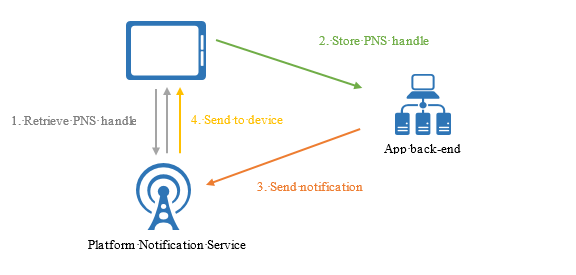
Image Source: docs.microsoft.com
To begin, we must get the PNS handle from the platform notification service so that our mobile client can retrieve it and send it to Azure Notification Hub via our Azure mobile app backend service. Anything is possible. Our mobile backend service may then interface with the Azure notification hub to issue notifications from that point forward.
Create a namespace and a notification hub
In this part, you will build a namespace and a namespace hub.
-
Sign in to the Azure portal.
-
Select Notification Hubs in the Mobile area after selecting All services on the left menu. To add a service to the FAVORITES area on the left menu, click the star symbol next to its name. Select Notification Hubs from the left menu after adding it to FAVORITES.

-
Select Create from the toolbar on the Notification Hubs page.


-
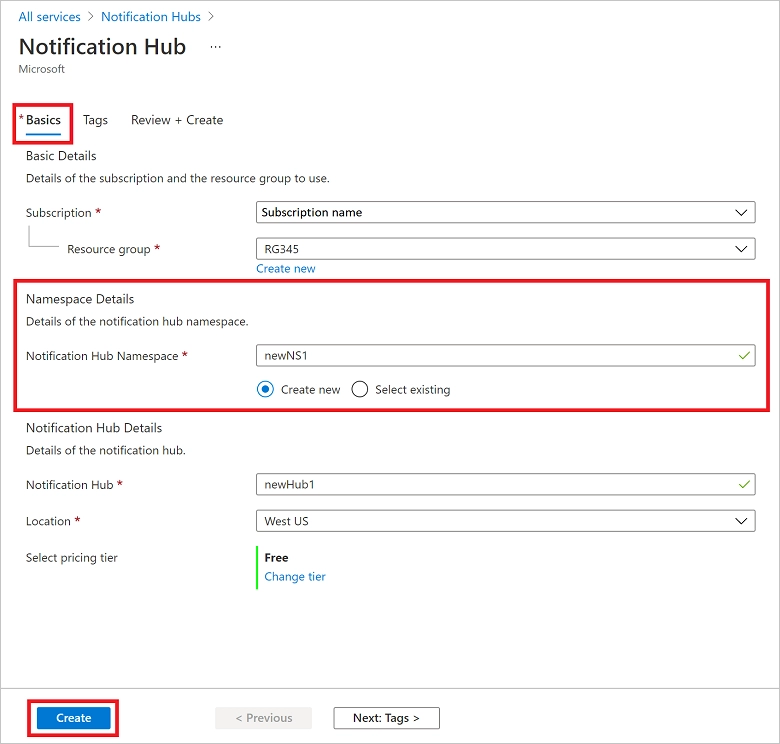
Perform the following steps on the Notification Hub page's Basics tab:
Select the name of the Azure subscription you wish to utilise under Subscription, and then choose an existing resource group or create a new one.
In Namespace Details, give the new namespace a distinct name.
A namespace contains one or more notification hubs, thus under Notification Hub Details, provide a name for the hub. Alternatively, choose an existing namespace from the drop-down menu.
Choose a value from the Location drop-down menu. This value defines the location where the hub should be created.
Choose to Create.
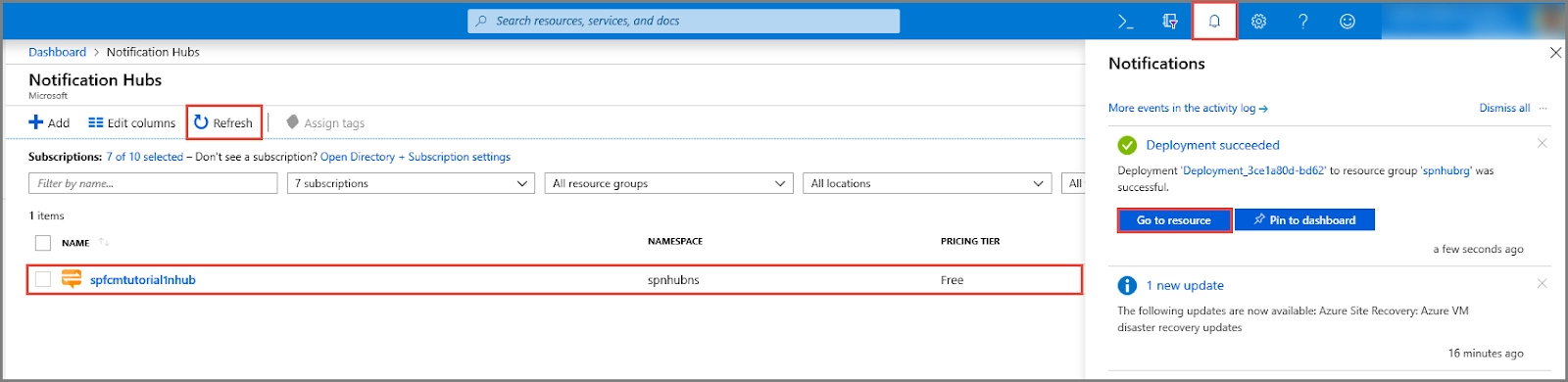
- Choose Notifications (the bell symbol), then Go to the resource. You may also pick your hub by refreshing the list on the Notification Hubs page.
- Choose Access Policies from the drop-down menu. Take note of the two connecting strings that are accessible to you. They'll come in handy later when dealing with push alerts.
Advantages Of Azure Notification Hub
- Multiplatform: We can deliver push alerts to iOS, Android, and Windows devices using Azure Notification Hub. It also works with any backend written in any language.
- Scalability: Azure notification hub will handle scalability for us. We can scale to millions of people without altering anything.
- Delivery Patterns: User segmentations might be broadcast, unicast, or multicast. So we can divide all of our users into these segments and utilise Azure Notification Hub to send messages to a specific group of users.
Mobile Engagement
Azure Mobile Engagement is a user engagement platform that gives data-driven insights into app usage and real-time user segmentation. The most important aspect is that it enables contextually intelligent push notifications and in-app communications.
For example, We operate an e-commerce business, and some of our customers express an increased interest in sporting goods. In such a situation, we may leverage mobile engagement to identify people who visit the sports product more frequently. And, if we wish to provide discounts or announce a new sports product, we may send a notification to only those people who have expressed an interest in sports items.
Data-driven insights into app usage are another thing we can accomplish with Azure Mobile Engagement. You may monitor which screens of your app receive the most user engagement, allowing us to develop our software. We can do real-time user segmentation based on user data such as the pages they visit, the type of data they search for, etc.
The Azure Mobile Engagement may be used with Azure mobile apps to provide a compelling platform for developing mobile apps.
Integration with App Service Mobile Apps
App Service Mobile Apps includes built-in support for alerts via Azure Notification Hubs to provide a consistent and unified experience across Azure services. App Service Mobile Apps is a highly scalable, globally available mobile application development platform for corporate developers and systems integrators that provides mobile developers with a wide range of features.
Notification Hubs may be used by mobile app developers in the following workflow:
- Get the device's PNS handle.
- Using the Mobile Apps client SDK registration APIs, register your device with Notification Hubs.
- Notification Hubs allow you to send notifications from your app's backend.
Advantages due to the App Integration
-
Mobile Apps Client SDKs: These cross-platform SDKs provide APIs for registration and communication with the mobile app's notification centre.
-
Installation model: Mobile Apps use the newest push model from Notification Hub to describe all push properties associated with a device in a JSON installation that is compliant with Push Notification Services and simple to use.
-
Flexibility: Even with the connection in place, developers can opt to work independently with Notification Hubs.
- Integrated experience in the Azure portal: Push as a capability is graphically represented in Mobile Apps, and developers may simply interact with the related notification centre via Mobile Apps.
Frequently Asked Questions
What type of web application can be deployed with Azure?
Microsoft provided SDKs for Java and Ruby, allowing applications developed in those languages to contact the Azure Service Platform API to access the AppFabric Service.
What is the storage key in Azure?
Based on our requirement, a storage key is an authentication technique that may be used to confirm access to the storage service account to manage data. We have the option of providing a primary and secondary access key. The principal rationale for employing a backup access key is to minimise application or website downtime.
Which service in Azure can be used to manage resources?
Azure Resource Manager is used to manage Microsoft Azure resources. Using a simple JSON script, it deploys, controls, and deletes all resources at once.
Conclusion
This article extensively discussed the working of Azure Notification Hub. We have also brushed up our knowledge regarding Azure services and their advantages. We hope this blog has helped you enhance your knowledge relating to Microsoft Azure.
To learn more, check out our Azure CDN, Azure Media Service, and Azure Storage Monitoring articles. Practice makes a man perfect. To practice and improve yourself for the interviews, you can check out Top 100 SQL problems, Interview experience, Coding interview questions, and the Ultimate guide path for interviews. Do upvote our blog to help other ninjas grow. Happy Coding!

Thank You Image





 1+ registered

