Do you think IIT Guwahati certified course can help you in your career?
Introduction
Routing Preference is a process in which you can traffic your route between Azure and the Internet. There are two routing options: the Microsoft network or the ISP network (public Internet). The terms "cold potato routing" and "hot potato routing" are also used to describe these alternatives. The internet egress data transfer pricing reflects the cost difference between the two choices. Data transfer costs for routing across the Microsoft worldwide network are similar to those for existing internet egress.
When generating a public IP address, the routing option will be decided by us. Resources like virtual machines, machine scale sets, internet-facing load balancers, etc., can be linked to the public IP address. All Azure services automatically route traffic through the Microsoft global network.
Microsoft Network vs.Public Internet(ISP Network)
Routing via Microsoft Network
When you route your traffic through the Microsoft global network, it is deliver over one of the world's largest networks, with more than 165 edge Points of Presence and over 160,000 miles of fiber (POP). Multiple redundant fiber routes are well-provisioned across the network to guarantee extraordinarily high availability and dependability. A software-defined WAN controller manages the traffic engineering and gives the best network performance and low latency path selection for your traffic.
Ingress Traffic: Ingress traffic entering the Microsoft network closest to the user is due to the worldwide BGP Anycast notification. For instance, when a user from Mumbai accessed Azure resources hosted in the United Kingdom, Now the USA, then traffic entered into the Microsoft global network in Mumbai Edge POP and traveled on the Microsoft network to the service located in the United Kingdom.
Egress Traffic: The same rule applies to exit traffic. Most traffic passes on the Microsoft worldwide network and departs at the nearest exits to the user. For instance, if traffic is sent from Azure Mumbai to a user in the United Kingdom, it travels on the Microsoft network from Mumbai to the United Kingdom before leaving it at the United Kingdom Edge POP.
Routing over ISP network(Public Internet)
The updated route is "Internet routing". It leverages the transit ISP network to redirect your traffic while minimizing travel on the Microsoft worldwide network. Network performance provided by this cost-effective routing solution is equivalent to that of other cloud service providers.
Ingress Traffic: Hot potato routing is used for the ingress path, so traffic enters the Microsoft network nearest to the service's area. For instance, traffic from a user in Mumbai accessing United States-hosted Azure resources enters the Microsoft global network in Chicago after traveling over the open Internet.
Egress Traffic: The same rule applies to egress traffic. The traffic leaves the Microsoft network in the same region where the service is hosted. As an illustration, if traffic is being sent from your service in the Azure United Kingdom to a user in Mumbai, it will leave the Microsoft network in the United Kingdom and proceed to the user's location via the open Internet.
Cost: The price difference between both options is reflected in the internet egress data transfer pricing. Data transfer costs for routing across the Microsoft worldwide network are the same to those for existing internet egress.
Routing Preference Unmetered
Routing Preference Unmetered is a way in which it is available for Content Delivery Network (CDN) providers with customers hosting their origin contents in Azure. With the use of the service, CDN providers can connect directly to various Microsoft global network edge routers.
The direct connectivity is advantageous for your network traffic, leaving Azure for a CDN provider as follows:
When traffic is routed over these direct links and leaves your Azure resources, there is no charge for data transmission.
The efficiency is provided by having a direct connection between the origin in Azure and the CDN provider since there are no intermediate hops. The burden of the CDN, which often fetches data from the origin, benefits from this.
Configuring Routing Preference Unmetered
Your CDN providers must participate in this program for you to benefit from Routing Preference unmetered. Contact your CDN provider if it is not a participant in the program.
Now, set the Routing Preference type to the Internet when configuring routing preferences. When generating a public IP address, you may choose the Routing Preference and then link the public IP to resources like virtual machines, and internet-facing load balancers. There are three types in which routing preferences can be configured:-
Configure routing preference for a public IP address using the Azure portal
The following Azure resources can be linked to the public IP address for both incoming and outgoing internet traffic:
For all Azure services, the Microsoft global network is the default setting for the public IP address routing preference. Any Azure service can be connected to this setting.
Create a public IP address with a routing preference
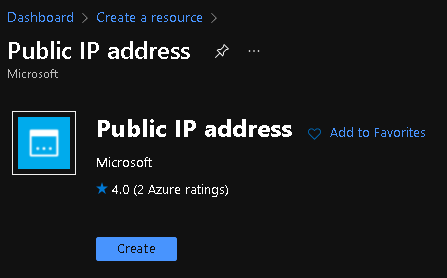
Select the Public IP address from the search results. Select Create in the Public IP address page.
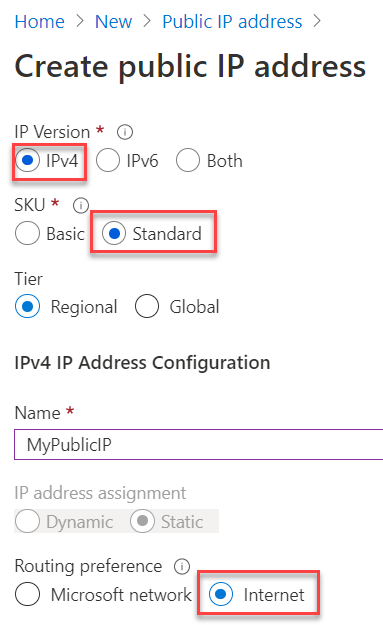
Choose Standard for SKU.
Choose Internet as your preferred routing method. Source: Azure
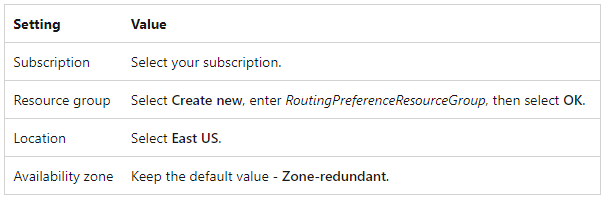
Enter the following information in the IPv4 IP Address Configuration section.
Select Create.
You may use the previously configured public IP address with either a Windows or Linux virtual machine. A virtual machine must be associated with a public IP address in order for the public IP to be associated with your VM, you may also link the public IP address you defined above with an Azure Load Balancer By designating it to the load balancer frontend settings.
Configure routing preference for a public IP address using Azure PowerShell
In this, we have a look at how we can Azure PowerShell to set the routing preference via ISP network for a public IP address. The following Azure resources can be linked to the public IP address for both incoming and outgoing internet traffic:
Virtual machine.
Virtual machine scale set.
Azure Kubernetes Service (AKS).
Internet-facing load balancer.
Azure Firewall.
Application Gateway
The default setting for the public IP address routing preference for all Azure services is the Microsoft global network, and any Azure service can be connected to this setting.
Use Azure Cloud Shell
Azure hosts a browser-based interactive shell environment called Azure Cloud Shell. To start Azure Cloud Shell:
Options Example
Select Try It in the upper-right corner of a code block. Selecting
Try It doesn't automatically copy the code to Cloud Shell.
You can eliminate the resource group, the VM, and all associated resources so that they are no longer required by using the Remove-AzResourceGroup command.
Remove-AzResourceGroup -Name myResourceGroup.
Frequently Asked Questions
What do you understand by routing?
Routing is the process of finding a path for traffic inside a network or between or across many networks. Routing occurs in many different types of networks, including circuit-switched networks like the public switched telephone network (PSTN) and computer networks like the Internet.
What is the difference between Hot potato Routing and Cold Potato Routing?
In hot-potato routing, an ISP sends traffic to a downstream ISP as soon as possible. Cold-potato routing is the inverse of hot-potato routing, in which an ISP transports traffic as far as feasible on its own network before passing it on to a downstream ISP. These two policies reflect the ISP's varied goals.
What are Egress traffic and Ingress Traffic?
whentraffic passes on the Microsoft worldwide network and departs at the nearest exits to the user. It is called Egress Traffic. But when the traffic entering the Microsoft network closest to the user is due to the worldwide BGP Anycast notification. It is called Ingress traffic.
Conclusion
In this blog, we first talked about the Introduction of Routing Preferences, Routing via Microsoft and Public Internet, and cost, Routing Preferences unmetered. At last, we see how to configure Routing preferences.











 1+ registered

