Do you think IIT Guwahati certified course can help you in your career?
Introduction
Microsoft Azure is a cloud computing platform and an online portal that allows users to manage and access cloud services and resources provided by Microsoft. These services and resources include storing users' data and transforming it, depending on users’ requirements.
Azure Service Bus is one such messaging service. In this article, we will discuss Azure Service Bus.
What is Azure Service Bus?
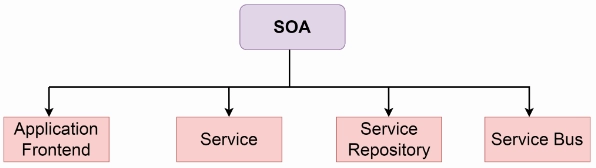
All the software applications have several components like front-end applications, backend web services, schedulers, etc. Software-Oriented Architecture (SOA) proposes a design for software implementations where these components are able to communicate with one another by application components via communication protocols over a network. These application components are said as Service Bus.
Azure Service Bus is a completely managed multi-tenant cloud messaging service, in short MAAS. It is brokered messaging system. Applications and services can communicate with each other using messages via Service Bus. The message contains two parts - message payloads and message properties. Message properties is a dictionary of values and property keys. The message payload is in binary format, that can have JSON, XML, or text data.
Service Bus decouples applications and services from each other, providing the below benefits:
Safe routing and transferring data and control over service and application boundaries
Load-balancing work across competing workers
Coordinating transactional work that requires a high degree of reliability
Some common messaging scenarios are:
Messaging Transfer business data, like sales or purchase orders, inventory movements, or journals.
Decouple applications: Improve scalability and reliability of applications and services. Consumers and producers do not have to be readily available or online at the same time.
Load Balancing: Enabling multiple competing consumers to read from a queue simultaneously, each safely obtaining exclusive ownership of specific messages.
Topics and Subscriptions: Allow 1:n relationships between subscribers and publishers, enabling subscribers to select particular messages from a published message stream.
Transactions: Allows users to do several operations, all in the scope of an atomic transaction. For instance, the following operations can be done in the scope of a transaction. → Retrieve a message from one queue. → Post results of the processing to different queues. → Moving the input message from the original queue.
The results are reflected downstream consumers only on success, involving the successful settlement of input message, allowing only-once processing semantics. This transaction model is a robust base for the compensating transactions pattern in the larger solution context.
Message Sessions: Implement high-scale coordination of multiplexed transfers and workflows that need message deferral or strict message ordering.
Service Bus Tiers
Service Bus features are available in two tiers - Premium and Standard.
Premium Tier It can be used for Production deployments. It offers auto-scaling and high throughput for variable workloads. The maximum size of the message can be up to 1MB. Premium name spaces offer memory level isolation for resources and CPU. Performance of Premium tier resources at the peak load is quite faster than standard ones.
Standard Tier It is used for initial development and QA environment deployments. Latency and throughput in the Standard tier are variable, hence performance is not predictable. In-built scaling is also not available and the maximum message size is up to 256 KB.
Azure Service Bus concepts
A few basic concepts used by Azure Service Bus are as follows:
Queues
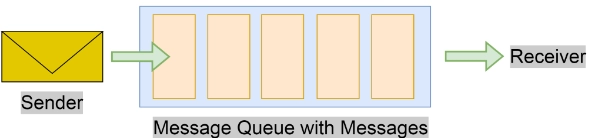
Messages are received and sent from queues. Queues store messages until the receiving application is available to receive and process them
Messages are received from and sent to queues. Queues keep messages until the receiving application is available to receive and process them
Messages are ordered and timestamped on arrival in queues. After being accepted by the broker, the message is stored durably in triple-redundant storage, spread across availability zones if the namespace is zone-enabled. Service Bus does not leave messages in memory or volatile storage after they've been reported to the client as accepted.
Messages are delivered in pull mode which means delivering messages when requested only. Contrary to the busy-polling model of some other cloud queues, the pull operations is long-lived and only complete once a message is available.
Topics
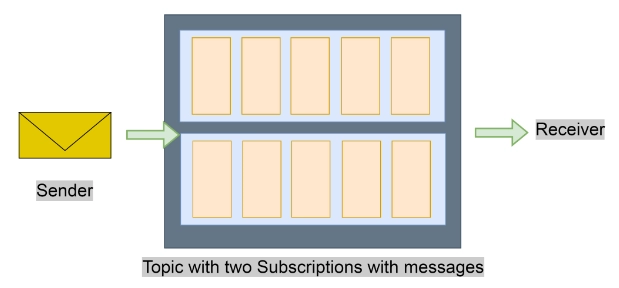
Topics are used to receive and send messages. While a queue is usually used for point-to-point communication, topics are useful in publishing and subscribing scenarios.
Topics can have multiple, independent subscriptions, that attach to the topic and otherwise work exactly similar to queues from the receiver side. A subscriber to a topic can take a copy of each message sent to that topic. Subscriptions are named entities.
By default, subscriptions are durable but can be configured to expire and then be automatically deleted. Through the JMS(Java Message Service) API, Service Bus Premium also allows users to make volatile subscriptions that are there for the duration of the connection.
Namespaces
A namespace is a container for all the messaging components like queues and topics. Multiple topics and queues can be in a single namespace, and namespaces often serve as application containers.
A namespace is similar to a server in the terminology of other brokers, but the concepts are not directly equivalent. A Service Bus namespace is the user’s own capacity slice of a large cluster made up of dozens of all-active virtual machines. It may optionally span 3 Azure availability zones. So, users get all the availability and robustness benefits of running the message broker at an enormous scale. Service Bus is basically serverless messaging.
Advanced features of Azure Service Bus
Service Bus also has advanced features that allow users to solve very complex messaging problems. These key features are as follows:
Message Sessions To enable a (FIFO) First In First Out guarantee in Service Bus, sessions are used. Message sessions allow joint and ordered handling of unbounded sequences of related messages.
Auto Forwarding The auto-forwarding feature enables users to chain a queue or subscription to another queue or topic that is part of the same namespace. Whenever auto-forwarding is enabled, Service Bus removes messages that are placed in the source (the first queue or subscription) and puts them in the destination (second queue or topic) automatically.
Dead Lettering Service Bus supports a DLQ (dead-letter queue) to store messages that cannot be delivered to any receiver, or messages that cannot be processed. Users can then remove messages from the DLQ and inspect them.
Scheduled Delivery Users can submit messages to a queue or topic for a certain kind of delayed processing. For instance, to schedule a job to become available for processing by a system at a specific time.
Message Deferral When a subscription or queue client receives a message that it wants to process, but that processing is not currently possible due to special circumstances in the application, the entity can defer retrieval of the message at a later point. The message stays in the queue or subscription, but it is set aside for time being.
Transactions A transaction groups multiple operations together into an execution scope. Service Bus supports grouping operations on a single messaging entity like a queue, topic, or subscription within the scope of a transaction.
Filtering and Actions Subscribers can define what messages they want to receive from a topic. These messages are mentioned in the form of one or more named subscription rules. For every matching rule condition, the subscription produces a copy of the message, which may be differently annotated for each matching rule.
Auto-delete on idle Auto-delete on idle enables users to specify an idle interval after which the queue is deleted automatically. The interval is reset whenever there is traffic in the queue. The minimum duration is usually five minutes.
Duplicate detection If an error occurs that triggers the client to doubt the result of a send operation, duplicate detection takes the doubt of these situations by allowing the sender to resend the same message, and the queue or topic removes any duplicate copies.
SAS and RBAC Service Bus supports security protocols like Shared Access Signatures (SAS), Role-Based Access Control (RBAC), and Managed identities for Azure resources.
Geo-disaster recovery When Azure regions or data centers experience downtime, Geo-disaster recovery enables data processing to continue operating in a different region or data center.
Security Service Bus offers standard Advanced Message Queuing Protocol (AMQP) 1.0 and HTTP/REST protocols.
Choosing between Azure Messaging Services
Azure provides three services that help with delivering events or messages throughout a solution. These services are as follows:
Azure Event Grid
Azure Event Hubs
Azure Service Bus
Although they have some common characteristics, each service is designed for specific scenarios. In several cases, the messaging services are complementary and can be used together. Let us look at each one of them to decide in what scenarios can be used.
Azure Event Grid
Event Grid is an eventing backplane that allows reactive and event-driven, programming. It is based on the publish-subscribe model. Subscribers make decisions on which events they want to handle. Publishers emit events but have no idea about how the events are handled.
Event Grid is intensively integrated with Azure services and can be integrated along with third-party services. It lowers costs by discarding the need for continuous polling and simplifies event consumption. It efficiently and reliably routes events from Azure and non-Azure resources. It distributes the events among registered subscriber endpoints. The event message has the information users require to react to changes in applications and services.
It has the following characteristics:
Low cost
Dynamically scalable
Serverless
At least one event delivery
Azure Event Hubs
Azure Event Hubs is an event ingestion service and a big data streaming platform. It can receive and process millions of events per second. It assists in the capture, retention, and replay of event stream data and telemetry. The data can come from any concurrent sources. Event Hubs allow the data to be made available to various stream-processing infrastructures and analytics services. It is available either as bundled event batches or data streams. This service offers a single solution that allows rapid data retrieval for real-time processing and repeated replay of stored raw data. It has the ability to capture the streaming data into a file for processing and analysis.
It has the following characteristics:
Low latency
Is able to receive and process millions of events per second
At least one delivery of an event
Azure Service Bus
It has the following characteristics:
Reliable asynchronous message delivery that requires polling. In other words, enterprise messaging as a service.
Advanced messaging features such as First In and First Out (FIFO), batching/sessions, transactions, dead-lettering, temporal control, routing and filtering, and duplicate detection
At least one delivery of a message
Optional ordered delivery of messages
Frequently Asked Questions
Why Azure Service Bus should be used?
As Azure Service Bus is a completely managed service, scaling and availability will be taken care of by the Azure team. It is integrated with other Azure services such as Event Grid, Logic Apps, Stream Analytics, etc. Azure Service Bus provides a reliable and secure asynchronous message communication platform along with the facility for delayed processing of events or data. Shared Access Signatures (SAS), Role-Based Access Control (RBAC), and Managed Service Identity (MSI) protocols are supported by it. Service Bus also supports client libraries for .NET, Java, and JMS.
What are a few similarities between Service Bus Queues and Storage Queues?
A few similarities are:
Both guarantee at least one delivery of the message.
Messages can be received in batches from both services.
Both support in-place updates of messages.
What are a few similarities between Service Bus Queues and Topics?
A few similarities between the two are:
Both support unidirectional communication.
Both support First In First Out(FIFO) message delivery.
Conclusion
This article extensively discusses the concept of Azure Service Bus in detail, with its features and other related services.
We hope that this blog has helped you enhance your knowledge regardingAzure Service Bus, and if you would like to learn more, check out our articles on Coding Ninjas Blogs.







 1+ registered

