Do you think IIT Guwahati certified course can help you in your career?
Introduction
Let's ensure we understand the foundational concepts before delving further into the subjects. Here is a brief introduction if you are unfamiliar with APIs.
An API is a server's interface to access data or perform actions. Consider any home power outlet to understand an interface; it makes no difference if you want to power your laptop, a washing machine, or a television with it. Any plug that complies with a predetermined specification can fit into a wall outlet.
Before diving deep into the Testing API in Ready API, Let's have a basic introduction to API.
Ready API
API quality for Agile and DevOps software teams is accelerated by Ready API, which enables teams to create, manage, and carry out automated functional, security, and performance tests through a single centralised interface.
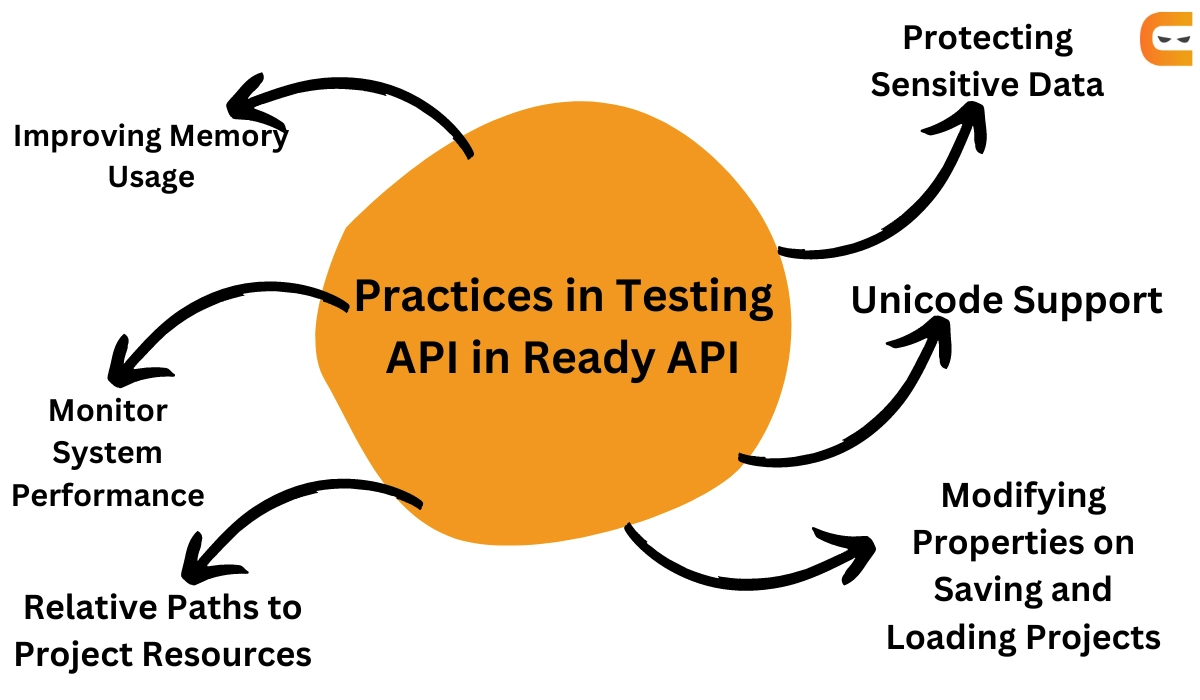
Practices in Testing API in Ready API.
Ready API is an easy-to-use no-code API Testing platform intended to make your testing processes more efficient. Automate and expand the end-to-end testing process for various API types. Comparable load tests should be run against your functional tests.
The best practices for using the Ready API are described in this section.
Optimising Memory Usage
It's possible that Ready API uses a lot of memory. It depends on how you use it and how the settings are configured. Running extensive functional or load tests may cause you to run out of memory.
To avoid memory problems, here is some solution.
🍁 Test case memory usage
The likelihood is that you run complicated test cases with thousands of requests if your memory is low. Requests and responses are automatically saved by the Ready API by default, allowing you to double-click either to view the corresponding entry in the test case log. No matter how much memory you have allocated, this will eventually fill it up.
🍁Adjust memory settings
Your test should probably be optimised if it uses a lot of memory. However, you will need to increase the maximum memory size that Ready API can allocate if your test contains large requests, attachments, etc.
🍁Disable test history
When your tests are prepared, and the test history is no longer required, you can disable it to free up memory. Select the Test History disabled option in the Test History Preferences dialogue. You must then restart the Ready API after doing this.
Monitor System Performance
It may be difficult to understand why a test unexpectedly fails. Using Ready API while working on extensive functional and load tests may occasionally result in hardware performance drops.
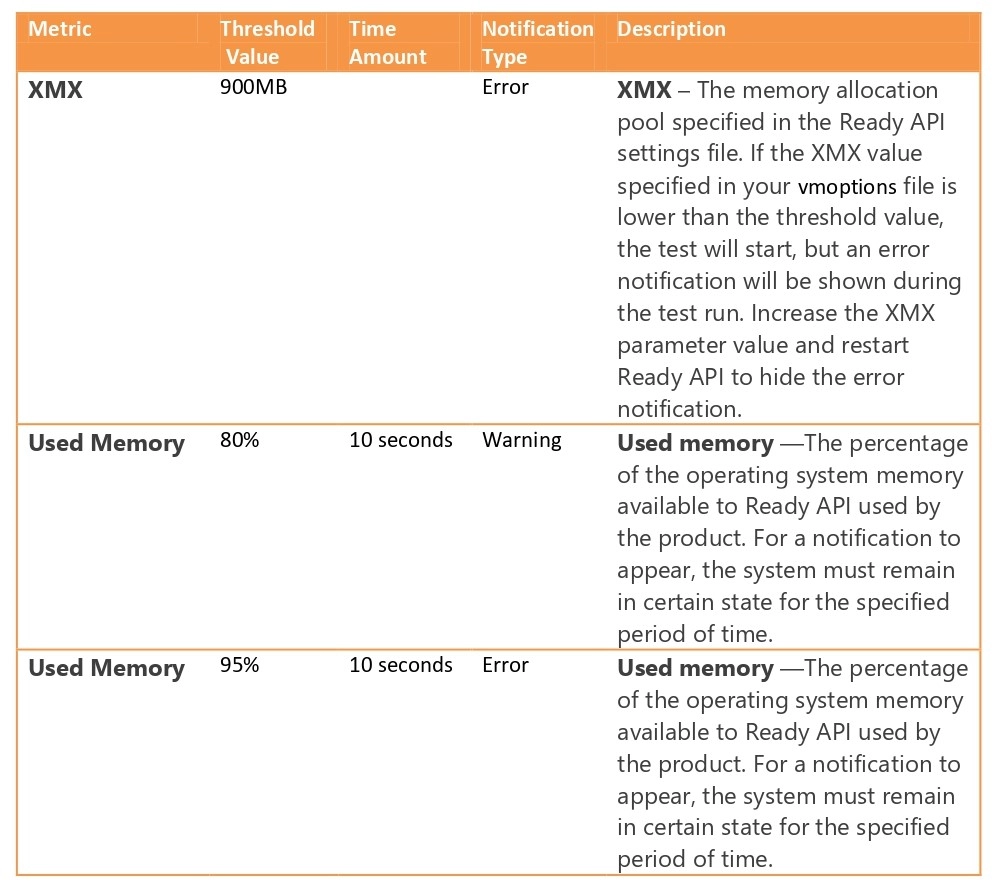
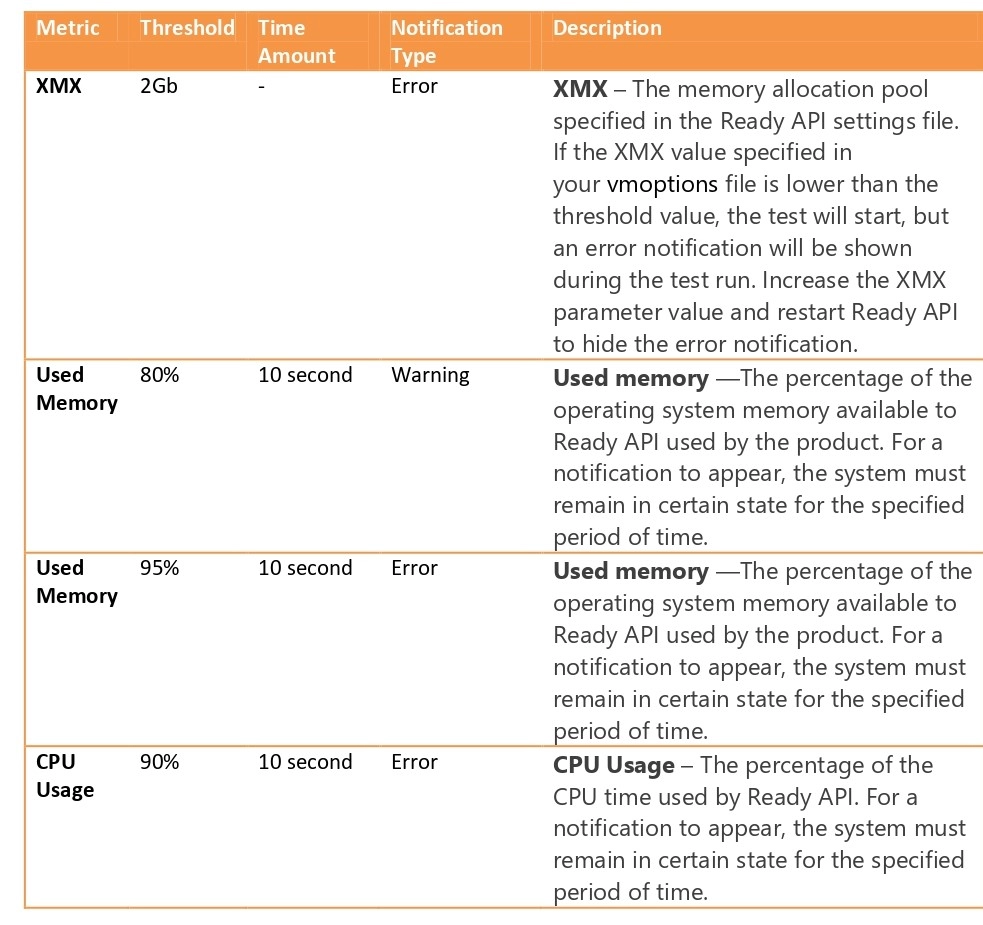
Monitor rules
For a notification to appear, Ready API has a different set of rules depending on the application you are using.
📑 Functional tests
📑 Performance tests
Relative Paths to Project Resources
Ready API uses absolute paths to files by default. This strategy might be flawed if you run the same test on different computers or distribute it to other users because not all of them will have the necessary files available. Use the Resource Root project property to resolve this problem.
Selecting the Root Folder
Within the Resource Root project property, you can specify the root folder. You have the ways of using one of the following options or selecting the folder's absolute path:
${projectDir} – The path to the project's folder is stored.
${workspaceDir} – The path to the folder containing the workspace file. The default Ready API workspace is store in the C:\Users\<username>\ folder.
Default value
The resource root property's value is empty by default. In this situation, Ready API will automatically search for the associated files in the project folder if you import a project on another computer and the folders specified in the project cannot be found.
Sample Usage
Relative paths are most frequently used when sharing projects and related files through source control systems. The project, workspace, and related files are all kept in the same folder in this instance.
Protecting Sensitive Data
In your test projects, you might need to keep private information like usernames, passwords, connecting strings, or other values. For this, you typically use project properties. You can password-protect specific project properties or the entire project to prevent unauthorised access to project data. Because of this, it is impossible to open and view the project in the Ready API, check the source code in external editors, or view encrypted data in logs, reports, or test results.
Supported Entities
In Ready API, you can encrypt –
Ready API preferences.
Entire test project.
Individual custom properties of your test projects.
The following entities, among others, do not support encryption:
Individual custom properties of test cases, test suites, and test steps.
Unique custom properties of load tests, security tests, and virtual services.
Modifying Properties on Saving and Loading Projects
When using Ready API, you might need to preprocess the project you open for it to function as you require. The loaded script for a project is triggered when you load it, and the save script is triggered when you save it. By changing the workspace to the one designated for the test, for instance, you can adjust the project to the computer it is running on.
Create Load and Save Scripts
In the Project Settings dialogue, load and save scripts can be created.
Select Project Settings by performing a right-click on your project.
Go to the Save Script or Load Script tab.
Available Objects
The following items are available for use:
💡 Log - This object is used to work with Ready API logs.
💡 Project - The object that provides access to the project you load or save.
Unicode Support
Unicode is a character encoding standard designed to support characters of the world's languages.
Recommendations
⭐ Set system locale (for Windows users)
⭐ Set the encoding system property
⭐ Set fonts that support Unicode
⭐ Do not name test items by using Unicode characters
⭐ Set Unicode charset for requests
⭐ Turn off normalizing line breaks
Frequently Asked Questions
What is ready API testing?
Ready API is an easy-to-use no-code API Testing platform that is intended to make your testing processes more efficient. Automate and expand the end-to-end testing process for various API types. Comparable load tests should be run against your functional tests.
Can we do performance testing using Ready API?
To ensure your APIs can handle a high volume of visitors, you can use Ready API to create and execute load or performance tests. You can distribute load generation across some computers, including cloud machines, or run load tests locally.
What is the difference between ready API and postman?
Postman is designed to work with each API endpoint; tracking and monitoring end-to-end testing over time is nearly impossible. Since each test case is customised for Ready API, tests may include a variety of endpoints, resources, or data sets.
Conclusion
Congratulations on finishing the blog! We have discussed the Best practices in testing API in Ready API. We further look at the Optimizing Memory Usage, Monitor System Performance, Relative Paths to Project Resources, Protecting Sensitive Data, Modifying Properties on Saving and Loading Projects, and Unicode Support.
If you liked this post, you should read more about the Ready API. Some of them are:-
Please refer to our guided pathways on Code studio to learn more about DSA, Competitive Programming, JavaScript, System Design, etc. Enrol in our courses, and use the accessible sample exams and questions as a guide. For placement preparations, look at the interview experiences and interview package.
Please upvote 🏆 our blogs if you find them helpful and informative!








 1+ registered

