Do you think IIT Guwahati certified course can help you in your career?
Introduction
Ready API is used to create and execute load or performance tests. This is done to make sure that our APIs can manage a lot of traffic. Load tests can be run on a single computer or many computers, including cloud-based ones.
In this blog, we will intensely discuss Miscellaneous in Ready API. Let's start going!
Virtual API to send HTML Response
In this part of "Miscellaneous in Ready API," we will see the Groovy script to send an HTML response from Virtual API.
The virtual service resembles your actual API by defining the operations that clients will call, taking client requests, and simulating responses. It is also called as virtual APIs or web service mocks.
Below is an example of sending an HTML response using the groovy script:
// Creating a request
def get = new org.apache.http.client.methods.HttpGet( "https://smartbear.com" )


// Sending the request
def response = org.apache.http.impl.client.HttpClients.createDefault().execute( get )


// Obtaining the response's body
def content = response.entity.content.text


// Saving the body to a context
context.content = content
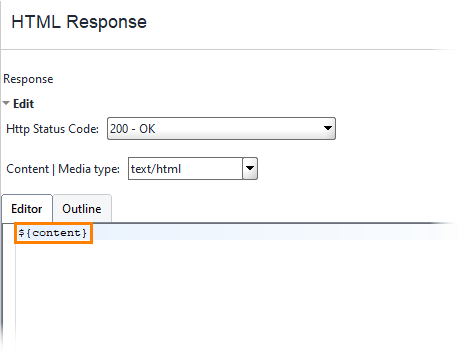
To add the HTML response's body to the virtual API response, use the ${content} property expansion:
Virtual Service Execution
In this part of "Miscellaneous in Ready API," we will see the Groovy script to manage simulated web services.
In order to start or stop virtual services in your functional tests, ReadyAPI offers the Virtual Service Runner test step. To manage your virtual services, you might prefer to use Setup and Teardown scripts if your test is complex and executes several test cases concurrently.
Below is an example to start the specified virtual service:
virtRunner.run('VirtName')
Below is an example to stop the specified virtual service:
virtRunner.stop('VirtName')
Simulating a Delay in SOAP Virtual Responses
Add the "MockRunListener.onMockResult" event with the following code at the project level to simulate a delay in the SOAP service response between 0 and 10 seconds:-
sleep(new Random().nextInt(10) * 1000)
We can use this method only for the SOAP Virtual Services. We can use the virtual service scripts to simulate a delay in the REST virtual services.
Parsing XML Nodes
ReadyAPI offers unique ways to obtain and interact with XML nodes. The groovyUtils and XmlHolder objects are used to obtain XML node values.
Below given an example to get XML node values. using groovy scripts:
// To hold the response XML, create the groovyUtils and XmlHolder objects.

def groovyUtils = new com.eviware.soapui.support.GroovyUtils( context )
def holder = groovyUtils.getXmlHolder( 'Test Request - login#Response' )

//Nodes in the response message's loop
for( item in holder.getNodeValues( "//faultcode" ))
    log.info "Item : [$item]"


// Defining the namespace

holder.namespaces['ns'] = 'http://www.soapui.org/sample/'

for( item in holder.getNodeValues( "//ns:loginFault" ))
    log.info "Item : [$item]"
Below is an example of counting the number of item elements in the XML using groovy scripts:
// Create the groovyUtils and XmlHolder objects to hold the response XML

def groovyUtils = new com.eviware.soapui.support.GroovyUtils( context )
def holder = groovyUtils.getXmlHolder( "Test Request - search#Response" )


// Count the number of item elements in the XML

def numberOfItemsInResponse = holder["count(//Body/searchResponse/searchResponseContent/item)"]
log.info numberOfItemsInResponse
XSD Validation of Responses
In this part of "Miscellaneous in Ready API," we will see validating a response against an XSD schema using groovy scripts.
import javax.xml.XMLConstants
import javax.xml.transform.stream.StreamSource
import javax.xml.validation.SchemaFactory

// Specify an XSD Schema
def xsdFilePath = "C:\\temp\\Schema.xsd"

// Getting the response as XML
def response = messageExchange.getResponse().contentAsXml

// Creating validation objects
def factory = SchemaFactory.newInstance(XMLConstants.W3C_XML_SCHEMA_NS_URI)
def schema = factory.newSchema(new StreamSource(xsdFilePath))
def validator = schema.newValidator()

// Validating the response against the schema
assert validator.validate(new StreamSource(new StringReader(response))) == null
virtRunner Scripting Object
In this part of "Miscellaneous in Ready API," we will see virtRunner Object to run and stop virtual services.
Various types of Object and their properties are:
🚀 run(virtName): It performs the specified virtual service's execution in ReadyAPI.
🚀 run(virtName, virtServerURL): It runs the desired virtual service that has been installed on the designated VirtServer.
🚀 stop(virtName): It stops a ReadyAPI virtual service that has been specified.
🚀 stop(virtName,virtServerURL): It stops the desired virtual service that is running on the designated VirtServer.
🚀 getExitCode: It returns the exitCode property.
Event Handler in ReadyAPI
In this part of "Miscellaneous in Ready API," we will see Event Handler in ReadyAPI. When particular events take place, event handlers run scripts, enabling you to carry out different operations or make changes.
Event Handler is used for:
Filtering Requests
Utilizing Test
Working with Virtual APIs
Working with Load Test and Security
With the help of ReadyAPI, you can include event handlers in your projects' custom scripts or attach them to relevant test run events.
Managing Event Handlers
In this part of "Miscellaneous in Ready API," we will see managing event handling in ReadyAPI.
Click on the ReadyAPI toolbar to access events for managing. You can also click Events on the Project menu. There will be a window called Events. You can add and remove event handlers as well as enter your scripts to use them in the Events window.
Method to add Event Handler
Steps to add event handlers are:
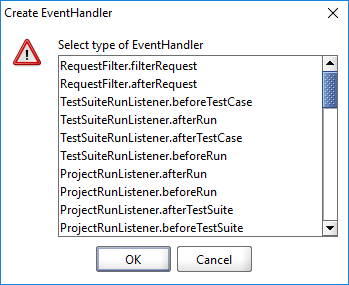
🚀 On the toolbar, select Add. The Create EventHandler dialogue will be invoked.
🚀 Click OK after selecting an event handler.
🚀 To activate the event handler, write a script.
🚀 Select OK.
Method to delete Event Handler
In order to delete the event handler in ReadyAPI, select the event handler in the table and click Delete to remove it.
Method to enable an Event Handler
You need to create a script in order to enable the added event handler. To access the available objects, methods, and properties, use the Code Completion list. Choose Edit > Code Completion or press CTRL+SPACE to display the list.
For instance, all 666 in all response messages must be changed to 555. Use the RequestFilter.afterRequest event handler and include a script to accomplish this:-
if( request.response == null )
 	 return

// Get the response content
def content = context.httpResponse.responseContent

// Change the content
content = content.replaceAll( "666", "555" )

// Return the content
context.httpResponse.responseContent = content
Teamwork
A number of QA engineers need to be involved when working on a complicated API. Each team member is in charge of a different area of the project, such as a specific test case, test suite, load test, virtual service, etc. In this situation, each member of the team should be able to work on the project concurrently and independently.
Method to achieve Teamwork in ReadyAPI:
Use Composite Project
Store your project in git
Using Composite Project
A project is typically saved by ReadyAPI in a single file. When working alone makes managing projects simple; however, if multiple people begin working on the same project at the same time, problems may arise.
Steps to create a composite project are:
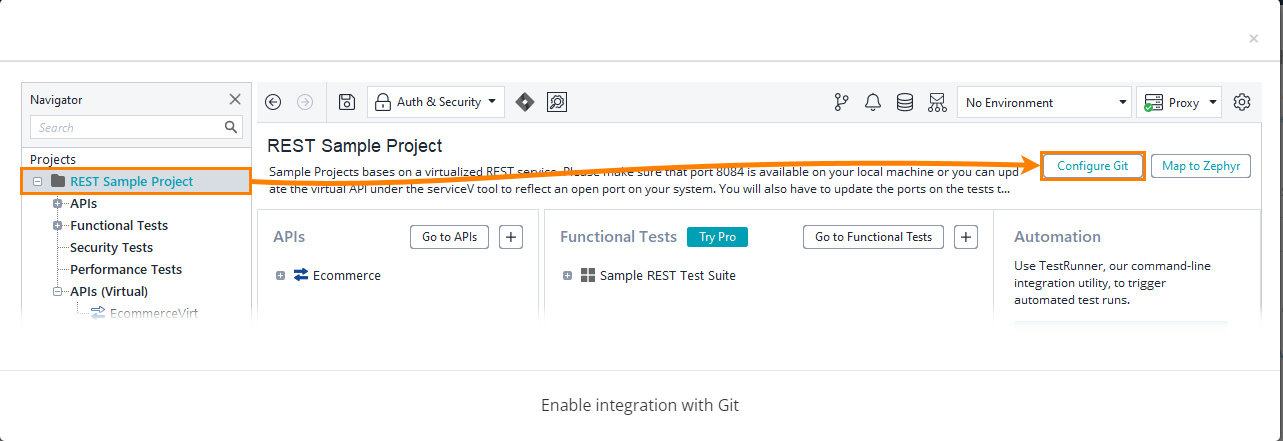
1️⃣ Click the Configure Git button in the project editor.
2️⃣ Change the composite project version as necessary.
3️⃣ Save the project.
You can work with your Git repositories directly in ReadyAPI because it supports git. Working with Git repositories located on GitHub or a machine in your network is an option. You must use external clients if you use another VCS.
Frequently Asked Questions
What purpose does Ready API serve?
API quality for Agile and DevOps software teams is accelerated by Ready API, which enables teams to build, organize, and run automated functional, security, and performance tests through a single centralized interface.
What types of reports is ReadyAPI able to provide?
ReadyAPI provides a range of pre-built reports and reporting templates in order to assist you in delivering the information that is most important to you. ReadyAPI offers a variety of export formats in addition to visual representations so that you can save or transfer your continuous integration findings into another system for analysis in the future.
How technical a user needs to be to use ReadyAPI?
By condensing previously complex tasks into a few clicks, ReadyAPI unifies the way development and QA teams collaborate on API quality. With features made to simplify time-consuming procedures and authentication, improve coverage, and maximize test reusability throughout the project lifecycle, ReadyAPI helps teams of all skill levels standardize their approach to API testing.
Conclusion
Congratulations on finishing the blog! We have studied Miscellaneous in Ready API. We further looked at the sending virtual response from Virtual API, XML nodes, XSD Validation, Teamwork, Handling Events, etc.
We sincerely hope that this blog has improved your understanding of Ready API, and if you want to learn more, then you can check articles on:-
Please refer to our guided pathways on Code studio to learn more about DSA, Competitive Programming, JavaScript, System Design, etc. Enroll in our courses, and use the accessible sample exams and questions as a guide. For placement preparations, look at the interview experiences and interview package.
Please do upvote our blogs if you find them helpful and informative!








 7+ registered

