Do you think IIT Guwahati certified course can help you in your career?
Introduction
This article discusses various aspects of Puppet's Certificate Authority and SSL.
Puppet validates node identities using certificates. The certificate authority (CA) service on a Puppet primary server issues these certificates. When a node connects to Puppet v for the first time, it requests a certificate. If the request appears safe, the Puppet primary server generates a certificate for the node. After receiving this certificate, the agent node knows it can trust the Puppet primary server and can now identify itself when requesting a catalog in the future.
Use the puppet server ca setup command to create a default intermediate CA before starting the Puppet Server for the first time after installation. More complex use cases can be found in the Intermediate and External CA documentation.
What's changed in Puppet 6?
Puppet 6 removes the puppet cert command and its associated certificate-related faces.
Puppet 6 now includes full support for intermediate CAs, which is the preferred architecture. Because this requires changes to both the server and the agent, using it necessitates updating both the server and the agent to Puppet 6.
👤Puppet Server CA Commands
The puppet server ca command in Puppet Server performs certificate authority (CA) tasks such as signing and revoking certificates. The majority of its operations are carried out by sending HTTP requests to the Puppet Server's CA API, specifically the certificate status endpoint. To sign or revoke certificates, you must have Puppet Server running.
👤Autosigning Certificate Requests
Before they can retrieve their configuration catalogs, Puppet agent nodes require a signed certificate from the local Puppet certificate authority (CA). Agents submit a certificate signing request (CSR) to the CA to obtain a signed certificate once it is available when using Puppet's built-in CA rather than an external CA.
👤Intermediate CA
A CA that is signed by a superior CA (e.g., a Root CA or another Intermediate CA) and signs CAs (e.g., another Intermediate or Subordinate CA).
👤CSR Attributes and Certificate Extensions
When Puppet agent nodes request certificates, the certificate signing request (CSR) typically includes only their certname and the required cryptographic information. Agents can also include extra data in their CSR, which is useful for policy-based auto-signing and adding new trusted facts.
👤Regenerating Certificates in a Puppet Deployment
In some cases, the certificates and security credentials (private and public keys) generated by Puppet's built-in PKI systems may need to be regenerated.
👤External CA
This section describes the external CA configurations that are supported and tested in this version of Puppet. Contact Puppet if you have an external CA use case that isn't listed here so we can learn more about it.
👤External SSL Termination
In some cases, the certificates and security credentials (private and public keys) generated by Puppet's built-in PKI systems may need to be regenerated.
Puppet Server CA Commands
The puppet server ca command in Puppet Server performs certificate authority (CA) tasks such as signing and revoking certificates. The majority of its operations are carried out by sending HTTP requests to the Puppet Server's CA API, specifically the certificate status endpoint. To sign or revoke certificates, you must have Puppet Server running.
👤CA Subcommands
Puppet Server includes the puppet server-ca CLI tool as a gem. Between releases, you can update the gem for bug fixes and improvements. To update the gem, execute:
Because the certificate status API endpoint allows you to sign or revoke certificates, access to it is strictly limited for security reasons. You must add a special extension to each endpoint's allow list in the auth.conf entries to access the certificate status and certificate status endpoints. Puppet Server refuses to sign other CSRs that request this extension because it is reserved.
If you require a certificate with this extension, you can generate it offline by following the steps below:
The puppet Server should be stopped.
Start puppet server ca generate --ca-client --certname <name>.
👤Upgrading
To use the Puppet CA commands, modify the auth.conf file in Puppet Server to include a rule that allows the primary server's certname to access the certificate status and certificate status endpoints.
The following example demonstrates how to grant CA commands access to the certificate status endpoint:
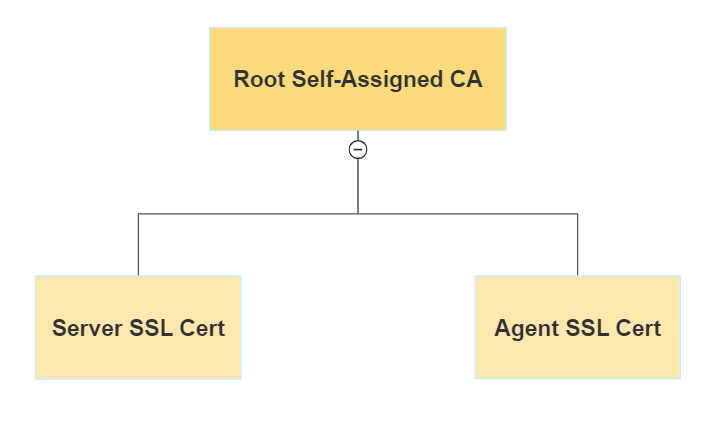
Puppet Server supports both a simple CA architecture, which includes a self-signed root cert that also serves as the CA signing cert, and an intermediate CA design, which includes a self-signed root cert that provides an intermediate CA cert that is used to sign incoming certificate requests. Because it is more secure and facilitates certificate revocation, the intermediate CA design is chosen. Run the puppet server ca setup command before starting your server for the first time to build a default intermediate CA for Puppet Server.
If you have an external certificate authority, you may use the puppet server ca import subcommand to produce a cert chain from it and install it on your server. Puppet agents can support an intermediate CA setup out of the box starting with Puppet 6. There is no need to copy files manually or configure CRL checking. Import, like setup, must be run before your server is started for the first time.
👤Setting up Puppet as an Intermediate CA with an External Root
Puppet Server must present the entire certificate chain to clients in order for them to authenticate the server. The certificate chain is built by concatenating the CA certificates, beginning with the new intermediate CA certificate and working your way down to the root CA certificate.
To configure Puppet as an intermediate CA with an external root:
Gather all of your organization's PEM-encoded certificates and CRLs, including the root certificate, any intermediate certificates, and the signing certificate. (The root or intermediate certificate could be used as the signing certificate.)
For the Puppet CA, generate a private RSA key with no passphrase.
Create a Puppet CA certificate in PEM format.
Create a CSR for Puppet CA.
Sign the CSR with your external CA to generate the Puppet CA certificate.
Check that the CA constraint is set to true and that the keyIdentifier is a 160-bit SHA-1 hash of the value of the bit string subjectPublicKeyfield. RFC 5280 section 4.2.1.2 contains more information.
Concatenate all of the certificates, beginning with the Puppet CA cert and ending with your root certificate, into a PEM-encoded certificate bundle.
-----BEGIN CERTIFICATE-----
<Puppet’s CA cert>
-----END CERTIFICATE-----
-----BEGIN CERTIFICATE-----
<Org’s intermediate CA signing cert>
-----END CERTIFICATE-----
-----BEGIN CERTIFICATE-----
<Org’s root CA cert>
-----END CERTIFICATE-----
Concatenate all of the CRLs into a PEM-encoded CRL chain, beginning with any optional intermediate CA CRLs and ending with the CRL for your root certificate.
            -----BEGIN X509 CRL-----
<Puppet’s CA CRL>
-----END X509 CRL-----
-----BEGIN X509 CRL-----
<Org’s intermediate CA CRL>
-----END X509 CRL-----
-----BEGIN X509 CRL-----
<Org’s root CA CRL>
-----END X509 CRL-----
To complete the CA setup, use the puppetserver ca import command:
puppetserver ca import --cert-bundle ca-bundle.pem --crl-chain crls.pem --private-key puppet_ca_key.pem
Autosigning Certificate Requests
Before they can get their configuration catalogs, Puppet agent nodes require a valid certificate from the local Puppet certificate authority (CA). Agents submit a certificate signing request (CSR) to the CA to get a signed certificate once it is available when utilizing Puppet's built-in CA rather than an external CA.
By default, these CSRs must be signed manually by an admin user using the puppetserver ca command or the Node requests page in the Puppet Enterprise dashboard.
You may also set up the CA to automatically sign specific CSRs to speed up the process of adding new agent nodes to the deployment.
👤Disabling Auto Signing
Depending on your installation strategy, there may or may not be an allowlist at that place after the Puppet Server is running:
Autosign.conf is not included in open-source Puppet by default.
Monolithic Puppet Enterprise (PE) installations: All essential services are executed on a single server and autosign.conf exists on the primary server by default, but it is empty because the primary server does not need to add other servers to an allowlist.
Installation of PE split systems: PuppetDB and other services can operate on other servers, and the CA server has an autosign.conf file that contains an allowlist of other needed hosts.
If the autosign.conf file is empty or does not exist, the allowlist is functionally empty. Until the auto-sign path is defined or the default autosign.conf file is a non-executable allowlist file, the CA Puppet primary server does not auto-sign any certificates. This file must include properly structured text or a custom policy executable that the Puppet user can utilize.
👤Naive Auto Signing
With naive autosigning, the CA automatically signs all CSRs.
Set autosign = true in the [server] section of the CA Puppet primary server's puppet.conf to enable naive auto-signing.
👤Basic Auto Signing (autosign.conf)
In simple auto-signing, the CA employs a config file containing an allowlist of certificate names and domain name globs. The requested certificate name is compared against the allowlist file when a CSR is received. If the name is existent or is covered by one of the domain name globs, the certificate is auto-signed. Otherwise, it will be reviewed manually.
👤Enabling Basic Auto Signing
The autosign.conf allowlist file's location and contents are detailed in its documentation.
Puppet searches puppet.conf for autosign.conf at the path supplied in the [autosign setting] section. The default location is $confdir/autosign.conf, which may differ depending on your operating system. More information can be found in the confdir documentation.
Even if the autosign.conf file provided by the auto sign setting contains a valid autosign.conf allowlist, Puppet will attempt to run it as a custom policy executable if it is one that the Puppet user can execute.
CSR Attributes and Certificate Extensions
When Puppet agent nodes seek certificates, the certificate signing request (CSR) usually simply provides their certname and the necessary cryptographic information. Extra data can also be included in the CSR by agents, which is important for policy-based auto-signing and providing new trusted facts.
It is beneficial to incorporate additional data into CSRs. When:
As part of an elastic scaling system, a significant number of nodes are produced and destroyed on a regular basis. Incorporating additional data into CSRs is useful.
You are open to developing custom tools to increase the security and utility of certificate auto-signing.
It could also be useful in deployments where Puppet is used to deploy private keys or other sensitive data, and you want more control over the nodes that receive this data.
If your deployment does not fit into one of these categories, you may not require this feature.
👤Timing: When Data can be Added to CSRs and Certificates
When the Puppet agent begins the catalog request process, it checks to see if it has a valid signed certificate. If it does not, it generates a key pair, creates a CSR, and sends it to the Puppet Server's certificate authority (CA). See agent/server HTTPS traffic for more information.
In practice, once a certificate is signed, it is locked and unchangeable. Data must be added to the CSR before the CA signs the certificate for it to remain in the certificate.
This means that any desired additional data must be present before the Puppet agent requests its catalog for the first time.
👤Data Location and Format
The csr attributes.yaml file in Puppet's confdir is read for extra data for the CSR. The csr attributes configuration setting allows you to change the location of this file.
The YAML hash with one or both of the following keys must be present in the csr attributes.yaml file:
custom attributes
extension requests
Each key's value must also be a hash, where:
Each key is a valid object identifier (OID) — - - Puppet-specific OIDs can optionally be referenced by short name rather than numeric ID.
Each value is an object that can be converted to a string; numbers are permitted, but arrays are not.
👤Custom Attributes (Transient CSR Data)
Custom attributes are data elements that are only found in the CSR. They can be used by the CA to decide whether to sign the certificate, but they are then discarded and are not transferred to the final certificate.
👤Default Behavior
Custom attributes for pending CSRs are not displayed by the puppetserver ca list command, and basic auto-signing (autosign.conf) does not check them before signing.
👤Configurable Behavior
When you utilize policy-based auto-signing, your policy executable receives the entire CSR in PEM format. Before determining whether or not to sign the certificate, the executable can extract and inspect the custom attributes.
The most basic technique is to add some kind of pre-shared key in the custom characteristics. A policy that is executable can compare it to a list of known keys and auto-sign certificates for any pre-authorized nodes.
👤Manually Checking for Custom Attributes in CSRs
You can check for custom attributes by using OpenSSL to convert a CSR in pem format to text format, as shown below:
openssl req -noout -text -in <name>.pem
Look for the Attributes section, which appears below the Subject Public Key Info block, in the output:
Attributes:
challengePassword :<Public Key Here>
Regenerating Certificates in a Puppet Deployment
You may need to regenerate the certificates and security credentials (private and public keys) generated by Puppet's built-in PKI systems in some cases.
For example, you may need to relocate a Puppet primary server to a different network in your infrastructure, or you may have discovered a security flaw that renders existing credentials untrustworthy.
Regenerate your Puppet primary server's agent certificate and add DNS alt-names or other certificate extensions.
This option maintains the primary server/agent relationship while allowing you to add DNS alternative names or certificate extensions to your existing primary server.
Revoke the certificate for the Puppet primary server and destroy any associated CA files. It is vital to remember that until the following procedures are done, the agents will be unable to connect to the primary server.
Puppet ssl clean will remove the agent-specific copy of the certificate's public key, private key, and certificate-signing request.
puppetserver ca clean —certname <YOUR SERVER CERTNAME>
Stop the primary server service of Puppet:
puppet resource service puppetserver ensure=stopped
After stopping the primary server and the CA service, generate a certificate signed by the CA and add the following DNS alternate names (comma separated):
puppetserver ca generate --certname <CERTNAME> --subject-alt-names <DNS ALT NAMES> --ca-client
Start the Puppet primary server service once more:
puppet resource service puppetserver ensure=running
External CA
This section describes the external CA configurations that are supported and tested in this version of Puppet. Contact Puppet if you have an external CA use case that isn't listed here so we can learn more about it.
👤Supported External CA Configurations
This version of Puppet supports some external CA configurations, but not all possible configurations.
Puppet fully supports the following configuration options:
A single CA issues SSL certificates directly.
Puppet Server acts as an intermediary CA.
Puppet's full support means:
If issues that are considered bugs arise, we will address them as soon as possible.
If problems arise in any other external CA setup that are deemed feature requests, we will consider expanding our support.
👤Option 1: Puppet Server Functioning as an Intermediate CA
Puppet Server can act as a bridge to an external root CA.
👤Option 2: Single CA
When Puppet uses its internal CA, it uses a single CA configuration by default. A single CA issued externally can also be used in this manner.
This is a one-size-fits-all configuration rather than a mix-and-match. The built-in Puppet CA service must be disabled when using an external CA and cannot be used to issue SSL certificates.
👤Puppet Server
The Puppet Server should be configured in three steps:
Turn off the internal CA service.
Make certain that the certname does not change.
Place certificates and keys on the disc.
👤Puppet Agent
There are no settings to change. Place the external credentials in their proper filesystem locations. To find the appropriate locations, use the following commands.
Credential
File location
Agent SSL certificate
puppet config print hostcert --section agent
Agent SSL certificate private key
puppet config print hostprivkey --section agent
Root CA certificate
puppet config print localcacert --section agent
Root certificate revocation list
puppet config print hostcrl --section agent
The above-mentioned table connects the credentials and their file location.
External SSL Termination
Configure external SSL termination using the steps below.
👤Turn off HTTPS for Puppet Server.
To force Puppet Server to use the HTTP protocol instead of SSL, remove the ssl-port and ssl-host settings from the conf.d/webserver.conf file and replace them with port and host settings. For more information on configuring the web server service, see Configuring the Webserver Service.
👤Allow Client Certificate Data in HTTP Headers
Puppet Server expects to receive client certificate information via HTTP headers when using external SSL termination.
Reading this data from headers is disabled by default. You must configure Puppet Server to recognise it.
allow-header-cert-info: true in the authorization config section of the /etc/puppetlabs/puppetserver/conf.d/auth.conf file.
👤Reload Puppet Server
For the configuration changes to take effect, you must reload Puppet Server.
Frequently Asked Questions
Does puppet use SSL?
For all secure socket layer (SSL) communications, Puppet can use its built-in certificate authority (CA) and public key infrastructure (PKI) tools or an existing external CA.
What is a puppet command to list all signed certificates?
The following command will generate a list of signed certificates beginning with + (sign), indicating that the request has been authorised. $ sudo puppet cert list —all /opt/puppetlabs/bin.
What is a puppet agent?
The Puppet agent is the application responsible for managing the configurations on your nodes. To retrieve configuration catalogs, a Puppet primary server is required. You can administer systems using Puppet agent as a service, as a cron job, or on demand, depending on your infrastructure and needs.
What are the commands to check requests for certificates?
To see all signed and unsigned certificate requests, use the —all flag as follows: sudo puppet certificate list —all.
Conclusion
In this article, we discussed different aspects of Certificate Authority and SSL in Puppet in detail.
Want To Learn More About brand-new technologies? We Have A Whole Category, visit Coding Ninjas or explore yourself in the following links:








 1+ registered

