Do you think IIT Guwahati certified course can help you in your career?
Introduction
Have you ever tried to automate the management of the servers and network equipment in your organization using any software or tool?
This article is focused on one of the automation software, which is known as Chef. We will also study the system requirements for Chef Desktop. We will also learn about the infrastructure of the chef desktop. Let’s see all these things in more detail.
About Chef Desktop
Chef Desktop can be understood as a deployment strategy that uses programming to automate the management of desktop and laptop computers. Chef curated Desktop content with YAML support may be used to construct device profiles, which can then be audited using Chef curated Desktop CIS profiles before being deployed with Chef Infra. Chef Automate can also be used to provide continuous insight into the fleet’s configuration state.
The desktop services are focused on the following fundamental tasks:
Encryption of the Hard drive,
Screensaver with a password,
Password policy so that complexity and other elements can be set,
Creation of a rescue account with additional user accounts as well,
Application Management for the deployment and management of applications that you care about,
Update the management to control when, where, and how Operating System and related patches are actually installed,
Desktop control for limiting access to features or services.
Now, let’s see what the System Requirements for the Chef Desktop are.
System Requirements for Chef Desktop
Chef Desktop makes use of the following system architecture:
A Chef Automate Server,
A Chef Infra Server,
Chef Workstation running on a developer environment,
One or more “nodes,” which are the computers that are running on Windows or macOS that you will control.
Chef Automate
System requirements for Chef Automate are:
Minimum of 16 GigaByte of RAM,
Minimum of 80 GigaByte of Disk Space (available to /hab),
Minimum of 4 vCPUs.
Operating System requirements for Chef Automate are:
a Linux kernel that is of version 3.2 or greater,
systemd as the init system,
cURL or GNU Wget,
useradd,
The shell that will start Chef Automate should have a max open file setting of at least 65535.
Chef Infra Server
The recommendation by Chef is a single virtual machine instance that has:
Minimum of 2 CPU cores and 8 GigaByte of RAM, which is equivalent to an Amazon EC2 m3.large instance
Minimum of 2 MegaByte of disk space on the data partition per managed node.
Chef Workstation
System requirements for Chef Workstation are:
Minimum of 4 GigaByte of RAM,
Minimum of 8 GigaByte of disk space.
Developer Environment
The development environment can be understood as a workspace with a set of processes and coding tools used to create the source code for a software application or product. It is a crucial component in software, web, and mobile application development. Developers can create and innovate in development environments without risking causing a disruption in a live environment.
Visual Studio Code or VS Code
The Chef does not specify a particular editor. However, we strongly advise utilizing Visual Studio Code (VSCode) and the Chef Infra extension for VSCode, both of which come equipped with code generators and useful features like the ability to conduct Cookstyle linting each time you save a recipe.
The following extensions from the Visual Studio Code Marketplace are required for this guide in addition to VSCode:
Chef Infra Extension,
PowerShell, and
Python.
Virtualization
Test Kitchen is the environment that you are going to use for the testing of your Chef Desktop cookbooks right before you deploy them to your devices. The important thing is that Test Kitchen is dependent on virtualization.
You will need to download Vagrant and VirtualBox so that you can use them with Test Kitchen.
VirtualBox
Oracle VM VirtualBox is actually a cross-platform software that is intended for virtualization. It enables users to add additional operating systems to their current machine so that it can run numerous ones simultaneously, including Microsoft Windows, Mac OS X, Linux, and Oracle Solaris.
VirtualBox Extensions
VirtualBox Extension Pack is actually a binary package that is intended for the extension of the functionality of the VirtualBox software.
Vagrant
Vagrant is a tool which is used for creating and managing virtual machine environments in a single process. Vagrant reduces the setup time for development environments, improves production parity, and eliminates the “works on my machine” defense with an intuitive process and an emphasis on automation.
Windows Developer Tools
The Windows SDK is used for the purpose of building Windows-compatible applications. Developers can utilize the Windows SDK because it offers tools, compilers, headers, libraries, code examples, and a new help system.
WinSCP
You can use WinSCP to transfer files to and from your Windows workstation to the Linux-based Chef Infra Server. You are going to use it for managing your keys and machine configurations between the machine.
Microsoft Azure
Azure is a sizable collection of servers and networking equipment that powers a broad range of distributed applications. On those servers, these applications coordinate the configuration and use the virtualized hardware and software.
Microsoft Intune
Microsoft Intune is a cloud-based platform that is used to push configuration to devices and captures it as well.
Windows Autopilot
Windows Autopilot is used for the simplification of the IT side of the management of Windows devices.
Gorilla
Gorilla is an open-source project. It is a collection of different tools that are used for the management of applications on the computer with Windows OS.
Storage Explorer
Microsoft offers a free application called Storage Explorer that you may use to manage your Azure cloud storage resources.
macOS Developer Tools
The Apple Developer Tools are a group of software tools created by Apple to help developers create dynamic software for the macOS and iOS platforms. The developer tools were once part of the macOS installation disc but are now only available online.
Apple Enterprise Developer Account
The Apple Developer Enterprise Program is a program that helps big businesses create and distribute exclusive, internal-use applications to their staff members.
AutoPkg
AutoPkg is a framework for automating the packaging and distribution of macOS software. It is focused on automating the tedious activities involved in setting up third-party software for widespread deployment to managed customers.
Munki
The Walt Disney Animation Studios’ open-source project is called Munki. It is a collection of tools that are used for the management of applications on a computer running on macOS.
MunkiAdmin
MunkiAdmin is a GUI or Graphical User Interface that is used for the management of munki repositories.
Storage Explorer
Microsoft offers a free application called Storage Explorer that you may use to manage your Azure cloud storage resources.
After this, let’s move on to the infrastructure of the Chef Desktop.
Infrastructure of Chef Desktop
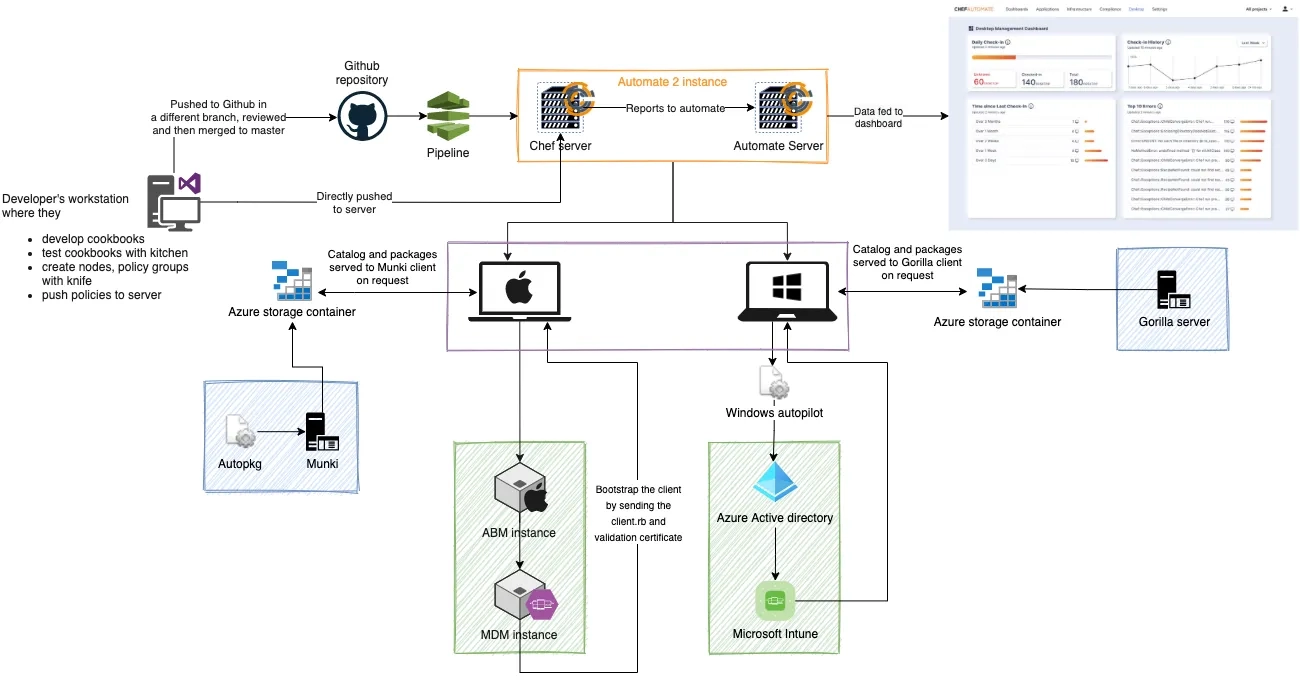
For managing device setups and apps for your company, the Chef Desktop pattern would be fully configured, as shown in the graphic below.
Ideally, you would have a chef repository that contained all of your custom cookbooks or those that contained our premium Chef Desktop cookbook content. These recipes would be kept in a remote repository and pushed to the Automate 2 server via a CI/CD pipeline. If it is working better for your workflow, you can also push it directly from your local workstation system.
We can see many components in the above diagram. Let’s see what these components are:
Windows and/or macOS nodes:
The devices that the Chef Desktop product will handle are called Windows and/or macOS nodes.
Automate 2 server:
An automate, and an infra server is used in this configuration. Additionally, when you implement Automate, you would also enable the desktop product, which would provide you access to a dashboard to get information about the managed fleet.
Repository for AutoPkg and Munki:
This repository would be set up and kept in a cloud storage container for automating application management for Apple devices. It contains all the data for the updates and installations of applications that you are in charge of managing for macOS devices.
Apple Business Manager and MDM Server:
Your device can be registered automatically using Apple Business Manager and an MDM server as part of a zero touch deployment strategy. This can be skipped if you want to manually enroll devices each time you add them to the fleet.
Microsoft Active Directory and Intune:
This makes it possible for your device to be registered automatically as part of the zero touch deployment pattern. If you want to manually enroll devices each time they are added to the fleet, you can ignore this step.
CI/CD Pipelines:
When the remote repository for your chef repo is updated, you may utilize a pipeline to automatically push the new policies to the server if you want to fully automate the rollouts. The revised configurations will be analyzed and applied by the Chef client while maintaining the other configurations as-is whenever the next scheduled chef-client run occurs. The new policy will be pulled by the nodes at that time.
Gorilla Repository:
This repository would be set up and kept in a cloud storage container for automating application management for Windows. It contains all the data for the software updates and installations that you are in charge of managing for your fleet of Windows devices.
Once everything is set up, and Chef client runs have been scheduled, either manually by you or using the Chef desktop cookbook already provided to you, you can log into the Chef Desktop dashboard and check details about your fleet, including the progress of Chef client runs.
Frequently Asked Questions
Does Chef have a Graphical User Interface?
Chef is actually written in Ruby and Erlang, and it uses a pure-Ruby DSL in the Knife CLI. It also includes a nice GUI for easy management.
What do you mean by a node in Chef?
A node can be understood as any machine that is currently being managed by the Chef server. It can be attached to any network that can send and receive information.
What is an attribute in Chef?
An attribute is a piece of basic information about a specific node. It basically shows the state of the node.
Is Chef open-source?
Chef is actually an open-source configuration management tool which is developed by Opscode. Chef is actually available for free, but there are also paid versions, such as Chef Enterprise.
Which language is Chef based on?
Chef uses a Ruby-based domain-specific language, which is usually abbreviated as “DSL.”
Conclusion
In this article, we have studied getting started with Chef Desktop in detail.
We hope that this article has provided you with the help to enhance your knowledge regarding Chef Workstation and if you would like to learn more, check out our articles on Chef migration and Chef Desktop.












 1+ registered

