Do you think IIT Guwahati certified course can help you in your career?
Introduction
Sinatra is a simple web framework. You might be aware that Sinatra-inspired express.js. It is advantageous and simple to use. It is recognized for being incredibly simple and user-friendly. Some of the duties this post covers are ones I routinely do.
As always, go to the official publications here for further details and to learn more.
Sinatra Initialization
Sinatra.rb is where it all begins. This file only requires main.rb; not precisely fascinating, is it? It becomes more fascinating now! You can find a need for base.rb and the option parsing code within main.rb (port, environment, quiet mode, etc.). Optparse from Ruby's standard library is used by Sinatra. What more is there to see here? Check out the exit block:
at_exit { Application.run! if $!.nil? && Application.run? }
This line of code will be executed at program completion.
Since there are no loops, sleep, or similar constructs in your code, Ruby will read it all, and your program will terminate automatically.
However, the exit block will activate immediately before it concludes!
Then Sinatra assumes control and launches a web server to handle requests.
That code is provided here:
begin
 start_server(handler, server_settings, handler_name, &block)
rescue Errno::EADDRINUSE
 $stderr.puts "== On the port, performance has already begun. #{port}!"
 raise
end
# Included in base.rb's "run!" method
Oh, and this is where another important event occurs:
extend Sinatra::Delegator
Sinatra:: Delegator is a module that defines get, post, and set methods in the Sinatra DSL.
You can do this because of this:
get '/' do
 puts "Hello World!"
end
With this module, Sinatra broadens the main global object.
Request & Response Processing
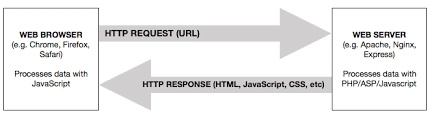
Now that the server is running, we can accept new connections.
But what takes place when a new connection is made?
Well, Rack is used by Sinatra, Rails, and other Ruby web frameworks to handle all the lower-level tasks.
Your application must have a call method if you want Rack to use it. When you initialize Rack, you give it that object.
This object, in the case of Sinatra, is the Sinatra::Base class.
To demonstrate how a request is handled, it appears that we should look into the dispatch! Method next.
This is how it works:
def dispatch!
 invoke do
   static! if settings.static? && (request.get? || request.head?)
   filter! : before
   route!
 end
rescue ::Exception => boom
 invoke { handle_exception!(boom) }
ensure
 filter! :after unless env['sinatra.static_file']
end
# trimmed down to the essentials
There are four steps to the request:
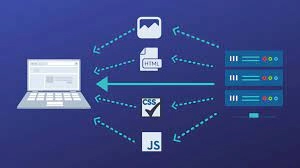
First, static files are examined. These are image, CSS, and js files. This setting is automatically enabled if a directory called "public" exists.
Run before the filter.
Route comparison
Run after the filter.
Now that we have more information, we can examine each step in greater detail.
Serving Static Files
The static! the Method is quite straightforward:
def static!(options = {})
 return if (public_dir = settings.public_folder).nil?
 path = File.expand_path("#{public_dir}#{URI_INSTANCE.unescape(request.path_info)}" )
 return unless File.file?(path)
 cache_control(*settings.static_cache_control) if settings.static_cache_control?
 send_file(path, options)
end
The "Cache-Control" HTTP header is set after this code determines whether the requested file is present.
The last line calls to send the file and do what it says on the tin.
Before Filter
Using a before filter, you can execute code before looking for a matching route.
How to add a filter is as follows:
# Establish the before the filter.
#Runs prior to all requests in the same context as route handlers, and #has access to and the ability to modify both the request and response.


@filters = {:before => [], :after => []}
def before(path = /.*/, **options, &block)
 add_filter(:before, path, options, &block)
end
def after(path = /.*/, **options, &block)
 add_filter(:after, path, options, &block)
end
def add_filter(type, path = /.*/, **options, &block)
 filters[type] << compile!(type, path, block, options)
end
As you can see, filters are just a hash with two keys—one for each type of filter.
What, however, is compiled?
A pattern, an array of conditions, and a wrapper are the three elements of the array that this method returns.
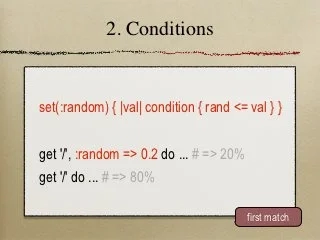
When using a get or post block, the following procedure is used to generate routes:
def get(path, opts = {}, &block)
 route('GET', path, opts, &block)
end
def route(verb, path, options = {}, &block)
 signature = compile!(verb, path, block, options)
 (@routes[verb] ||= []) << signature
 signature
end
# Methods have been clarified.
This teaches us that Sinatra filters behave and operate similarly to routes.
Route Matching
Route matching is the following stage in the request processing cycle:
def route!(base = settings, pass_block = nil)
 routes = base.routes[@request.request_method]
 routes. each do |pattern, conditions, block|
   process_route(pattern, conditions)
   route_eval
 end
 route_missing
end
# Edited method
This code examines every route corresponding to the request method (get, post, etc.).
The process route method performs route matching:
def process_route(pattern, keys, conditions, block = nil, values = [])
 route = @request.path_info
 route = '/' if route.empty? and not settings.empty_path_info?
 return unless match = pattern.match(route)
end
A regular expression is used where pattern.
The route matching process is complete once route eval, which evaluates the block (the body of your get/post route), is called if a course matches both the path and the conditions.
# Run a route block and throw: halt with the result.
def route_eval
 throw:halt, yield
end
For flow control, this makes use of an unusual catch/throw mechanism.
Although I would advise against it because it can be tough to follow the flow of the code, it's interesting to see a practical application of this feature.
Response Building
The preparation of the response is the last stage of the request cycle.
What follows then in the response?
The response is gathered by the invoke method as follows:
res = catch(:halt) { yield }
The body method is used to assign this result to the response body:
body(res)
We can find the following line of code in the call method, which is where we started:
@response.finish
This invokes the finish method on the Rack::Response object represented by @response.
In other words, this will cause the client to receive a response.
Frequently Asked Questions
Why should you always use Sinatra instead of rails?
What are the primary differences, then? First off, Sinatra is much more resource-efficient and lightweight than Rails, which makes it an excellent option for creating simple web applications. Rails, however, is brimming with features and requires a lot of code.
How does Sinatra work?
Sinatra makes use of a series of requests that are made to the web server and then answered. These inquiries are contained in a controller, a file inside your application that communicates with the internet. One-third of the MVC architectural pattern is a controller (Models-Views-Controllers).
What are Rails and Sinatra?
Sinatra is a server-side HTTP library, whereas Rails is a framework for developing model-driven web applications. Sinatra is the best tool if you think in terms of HTTP requests and responses. Rails are the way to go if you require complete integration and as little boilerplate as possible.
Is Sinatra a framework?
A Ruby-based framework called Sinatra was created. It is intended to be a quick, easy, and flexible way to build web-delivered applications without requiring much setup, configuration, or work. Sinatra makes it fast and simple to launch a web service.
What is a Sinatra application?
Sinatra is a Ruby-based web application library and domain-specific language. It is free and open-source software. It is an alternative to Ruby on Rails, Merb, Nitro, and Camping, as well as other Ruby web application frameworks. The Rack web server interface is required. Frank Sinatra, a musician, inspired its name.
Conclusion
So that's the end of the article. Conditions in Sinatra
After reading about the Static Files and templates in Conditions in Sinatraa, Are you interested in reading/exploring more themes on Sinatra? Don't worry; Coding Ninjas has you covered.
However, if you want to give your work an edge over the competition, you might choose to enroll in one of our premium courses.
With our Coding Ninjas StudioGuided Path, you may learn about Data Structures & Algorithms, Competitive Programming, JavaScript, System Design, and more! If you want to put your coding skills to the test, check out the mock test series on Coding Ninjas Studio and participate in the contests! But if you've only recently started your schooling and are looking for answers to issues presented by digital titans like Amazon, Microsoft, Uber, and others. In this situation, you must consider the obstacles, interview experiences, and interview package as part of your placement preparations. If you find our blogs valuable and fascinating, please vote them up!







 7+ registered

